Key Takeaways
- Understand what is a data structure and why choosing the right one matters.
- Learn the difference between built-in data structures in Python and custom data structures.
- Discover why custom data structures focus on abstraction rather than creating new storage mechanisms.
- Understand how wrapping built-in collections behind a clear API makes code easier to use and maintain.
- Build the foundation for designing stacks, queues, and other reusable data structures.
Introduction
"Good programmers don't just store data, they organize it so the right operation becomes easy."
Python already provides powerful built-in data structures such as lists, dictionaries, sets, and tuples. They solve most everyday programming problems efficiently. But as applications grow, raw collections often expose more functionality than necessary or require the same validation logic to be repeated throughout the codebase.
This is where custom data structures become useful. Instead of inventing new ways to store data, they wrap existing collections behind a meaningful interface that enforces rules, hides implementation details, and models real-world behavior. Understanding when to build a custom data structure, and when not to, is an important step toward writing cleaner, more maintainable Python programs.
What is a Data Structure?

A data structure is a way of organizing and storing data so it can be accessed, modified, and managed efficiently.
Different data structures are designed for different operations. Some provide fast lookups, others simplify inserting or removing elements, while some are optimized for representing relationships between data.
For example:
- A list stores an ordered sequence of elements.
- A dictionary stores data as key-value pairs.
- A set stores unique values.
- A queue processes elements in the order they arrive.
Selecting the right data structure often has a greater impact on code quality and performance than changing the algorithm itself. This is why data structures and algorithms are studied together; they complement each other when solving programming problems.
If you're new to Python collections, explore our guides on Python Lists, Python Dictionaries, Python Sets, and Specialized Collections before building custom data structures.
Built-in Data Structures in Python
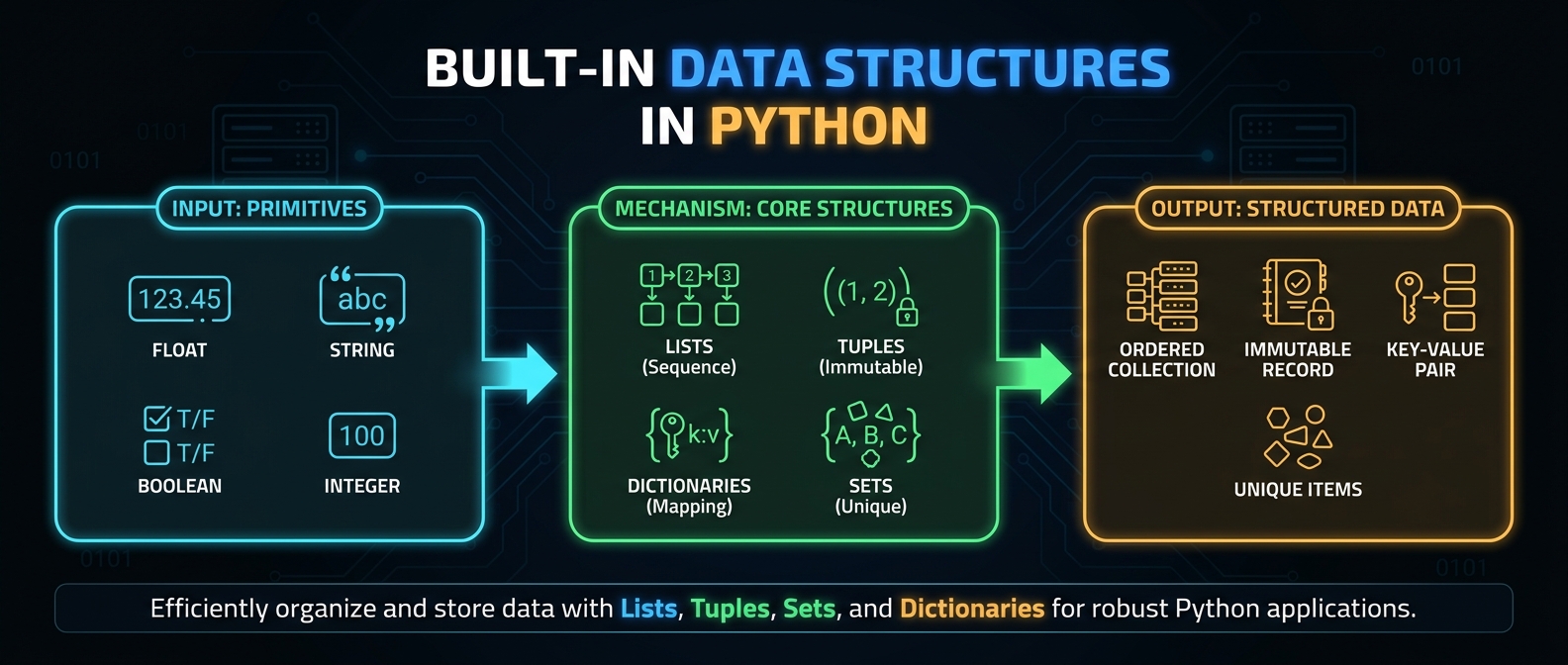
Python includes several built-in data structures that cover most programming needs.
| Data Structure | Primary Purpose |
|---|---|
| List | Ordered, mutable collection |
| Tuple | Ordered, immutable collection |
| Dictionary | Stores elements as key-value pairs |
| Set | Stores unique values |
These are examples of non primitive data types in Python because they can store multiple values and organize data in different ways.
By contrast, primitive data types in Python, such as int, float, bool, and str, represent individual values rather than collections.
In most applications, these built-in collections provide everything you need. A custom data structure should only be introduced when it simplifies the way your program models or manages data.
What is a Custom Data Structure?
A custom data structure is a user-defined abstraction that wraps one or more existing data structures behind a clear, purpose-specific interface.
Unlike built-in collections, a custom data structure focuses on behavior, not just storage. It exposes only the operations that make sense for a particular problem while hiding unnecessary implementation details.
For example, instead of allowing unrestricted access to a list, a custom stack might expose only:
- push()
- pop()
- peek()
Internally, it may still use a Python list, but users interact with the stack through its dedicated methods rather than the underlying collection.
Although people sometimes refer to these as user-defined data types, in Python they are more accurately described as custom data structures built by combining existing language features.
Custom Data Structures vs Built-in Containers
A custom data structure does not replace Python's built-in collections, it builds on top of them.
| Built-in Containers | Custom Data Structures |
|---|---|
| General-purpose collections | Designed for a specific problem |
| Expose many built-in methods | Expose only meaningful operations |
| Focus on storing data | Focus on behavior and rules |
| Used directly by developers | Hide implementation details behind a clean API |
For example, a browser history can be implemented using a list, but exposing the entire list allows operations that don't make sense, such as inserting pages in the middle. A custom history structure can instead provide methods like visit(), back(), and forward(), ensuring the history behaves correctly regardless of how it is implemented internally.
The key idea is simple:
Use built-in collections to store data. Build custom data structures to express intent, enforce rules, and simplify how other parts of your program interact with that data.
Wrapping Built-in Collections
One of the biggest advantages of Python is that you rarely need to build a data structure from scratch. Instead, you can wrap a built-in collection inside a custom class and expose only the operations that make sense for your application.
For example, a stack can internally use a list but provide only methods such as push() and pop().
class Stack:
    def __init__(self):
        self._items = []
    def push(self, item):
        self._items.append(item)
    def pop(self):
        return self._items.pop()
The list handles storage, while the custom structure defines how it should be used.
Wrapping built-in collections offers several benefits:
- Simplifies the public interface.
- Prevents invalid operations.
- Centralizes validation and business rules.
- Makes the code easier to understand and maintain.
Choosing Internal Storage
The internal collection should be selected based on the operations your data structure performs most frequently.
| Requirement | Recommended Storage | Reason |
|---|---|---|
| Ordered collection | list | Efficient indexing and appending. |
| Queue | deque | Fast insertion and removal at both ends. |
| Key-value lookup | dict | Fast access using keys. |
| Unique values | set | Automatically prevents duplicates. |
For example:
- A stack is naturally backed by a list.
- A queue is better implemented with a deque.
- A cache often uses a dictionary.
- A tag collection can use a set.
The goal is to choose the storage that naturally supports the required behavior instead of forcing every problem into a single collection type.
Invariants
An invariant is a rule that must always remain true while a data structure is being used.
These rules define the valid state of the structure and help prevent incorrect behavior.
Examples:
- A stack in data structure removes only the most recently added element.
- A queue always follows First In, First Out (FIFO).
- A bounded history never stores more than its maximum capacity.
- A collection of unique values never contains duplicates.
The methods of a custom data structure are responsible for preserving these invariants whenever data is added, removed, or updated.
Why Invariants Matter
Without invariants, a data structure can enter an invalid state, leading to incorrect results and difficult-to-find bugs.
For example, a stack should not allow pop() on an empty collection.
class Stack:
    def __init__(self):
        self._items = []
    def pop(self):
        if not self._items:
            raise IndexError("Stack is empty")
        return self._items.pop()
By enforcing the invariant, the structure guarantees consistent behavior regardless of how it is used.
A well-designed custom data structure protects its own state instead of relying on users to avoid mistakes.
Hiding Implementation Details
A custom data structure should expose what users need to do, not how the data is stored.
For example, users of a stack should interact with methods such as:
- push()
- pop()
- peek()
They should not need to know whether the stack uses a list, deque, or another internal collection.
class Stack:
    def __init__(self):
        self._items = []
    def push(self, item):
        self._items.append(item)
    def peek(self):
        return self._items[-1]
If the internal implementation changes in the future, for example, replacing a list with a deque, the public interface remains the same. Code that uses the stack continues to work without modification.
This separation between interface and implementation is one of the primary reasons for building custom data structures. It makes code easier to maintain, reuse, and extend while reducing the risk of accidental misuse.
Building a Stack Abstraction
A stack is a custom data structure that follows the Last In, First Out (LIFO) principle. The last element added is the first one removed.
Instead of exposing every method of a list, a stack provides only the operations that define stack behavior.
Common operations:
- push() – Add an element to the top.
- pop() – Remove and return the top element.
- peek() – View the top element without removing it.
- is_empty() – Check whether the stack contains any elements.
Example:
class Stack:
    def __init__(self):
        self._items = []
    def push(self, item):
        self._items.append(item)
    def pop(self):
        if not self._items:
            raise IndexError("Stack is empty")
        return self._items.pop()
    def peek(self):
        if not self._items:
            raise IndexError("Stack is empty")
        return self._items[-1]
    def is_empty(self):
        return len(self._items) == 0
Although the stack stores its data in a list, users interact only through the stack's methods. This keeps the implementation hidden and preserves the stack's LIFO behavior.
Building a Queue Abstraction
A queue follows the First In, First Out (FIFO) principle. The first element added is the first one removed.
Since queues frequently add elements at one end and remove them from the other, deque is a better internal storage choice than a list.
Common operations:
- enqueue() – Add an element to the rear.
- dequeue() – Remove and return the front element.
- front() – View the first element.
- is_empty() – Check whether the queue is empty.
Example:
from collections import deque
class Queue:
    def __init__(self):
        self._items = deque()
    def enqueue(self, item):
        self._items.append(item)
    def dequeue(self):
        if not self._items:
            raise IndexError("Queue is empty")
        return self._items.popleft()
    def front(self):
        if not self._items:
            raise IndexError("Queue is empty")
        return self._items[0]
Using deque keeps queue operations efficient while exposing a simple, purpose-specific API.
Building a Bounded History
A bounded history stores only the most recent entries up to a fixed capacity. When the limit is reached, the oldest entry is automatically removed.
This pattern is useful for:
- Browser history
- Recent searches
- Undo history
- Recently opened files
A deque with a maximum length (maxlen) naturally supports this behavior.
from collections import deque
class History:
    def __init__(self, limit=5):
        self._history = deque(maxlen=limit)
    def add(self, item):
        self._history.append(item)
    def recent(self):
        return list(self._history)
Example:
history = History(3)
history.add("Page A")
history.add("Page B")
history.add("Page C")
history.add("Page D")
print(history.recent())
Output
['Page B', 'Page C', 'Page D']The oldest entry ("Page A") is automatically discarded when the history exceeds its capacity, ensuring the structure always satisfies its size limit.
Designing Small Record-like Structures
Not every collection of related data should remain a dictionary. When a group of values represents a single entity with a fixed structure, a small record-like class often provides a clearer interface.
Instead of repeatedly accessing dictionary keys:
student = {
    "name": "Alice",
    "age": 20,
    "course": "Python"
}
you can represent the same concept with a custom structure.
class Student:
    def __init__(self, name, age, course):
        self.name = name
        self.age = age
        self.course = course
This approach offers several advantages:
- Gives the data a meaningful name.
- Groups related attributes together.
- Makes the code easier to read.
- Provides a place to add validation or behavior later if needed.
However, avoid overengineering. If a simple dictionary is sufficient and no additional behavior or rules are required, creating a custom structure adds unnecessary complexity.
Key idea: Build a custom data structure when it models a clear concept, enforces useful rules, or provides a cleaner API, not simply to replace Python's built-in collections.
When Not to Build a Custom Data Structure
A custom data structure should solve a specific problem, not add unnecessary complexity.
Avoid building one when:
- A built-in collection already provides the required functionality.
- The structure only stores data without enforcing rules or adding behavior.
- It exposes the same interface as a list or dictionary with no meaningful abstraction.
- It increases maintenance without improving readability or correctness.
For example, wrapping a list in a class that simply forwards every list method offers little benefit. Build a custom data structure only when it simplifies the API, protects invariants, or models a real-world concept more clearly.
How It Prepares You for Classes
Building custom data structures is a natural introduction to classes in Python.
When designing a custom structure, you learn how to:
- Store state using instance attributes.
- Define methods that operate on that state.
- Hide implementation details behind a clean interface.
- Protect invariants through controlled operations.
For example, a Stack class combines data (_items) with behavior (push(), pop(), peek()). This is the same design principle used in object-oriented programming, where objects encapsulate both state and functionality.
Understanding custom data structures makes it easier to design reusable, maintainable classes as your Python applications grow.
Best Practices
- Build a custom data structure only when it models a clear concept or behavior.
- Reuse Python's built-in collections instead of implementing storage from scratch.
- Choose the internal collection based on the required operations.
- Keep the public API small and intuitive.
- Protect invariants by validating operations inside methods.
- Hide implementation details and expose only meaningful behavior.
- Prefer simplicity over unnecessary abstraction.
Common Mistakes
Reimplementing Built-in Collections
Avoid recreating lists, dictionaries, or sets unless there is a specific learning or performance requirement.
Choosing the Wrong Internal Storage
Using a list for queue operations or a dictionary for ordered data can lead to inefficient or unclear implementations. Select the collection that naturally supports the required operations.
Exposing Internal Data Directly
Allowing users to modify the internal collection can break the structure's invariants. Interact with the data through well-defined methods instead.
Ignoring Invariants
Operations such as removing from an empty stack or exceeding a bounded history's capacity should be handled explicitly to keep the structure in a valid state.
Overengineering Simple Problems
Not every collection of related data needs a custom class. If a built-in collection solves the problem clearly, use it.
Wrapping Up
Python's built-in collections solve most programming problems, but some situations benefit from a custom data structure that exposes a simpler, purpose-specific interface. In this guide, you learned what custom data structures are, why they exist, how they differ from built-in containers, and how to design abstractions such as stacks, queues, and bounded histories by wrapping existing collections. You also explored invariants, implementation hiding, and choosing the right internal storage. The key takeaway is to build custom data structures only when they improve clarity, enforce meaningful rules, or model real-world behavior, otherwise, Python's built-in collections are usually the better choice.
Frequently Asked Questions
What is a custom data structure?▾
A custom data structure is a user-defined abstraction that wraps one or more built-in collections and exposes a simplified interface tailored to a specific problem.
Why build a custom data structure instead of using a list?▾
A list provides general-purpose storage, while a custom data structure can enforce rules, hide implementation details, and expose only meaningful operations.
What is the difference between built-in and custom data structures?▾
Built-in data structures are provided by Python and support a wide range of operations. Custom data structures reuse these collections while restricting or extending their behavior for a particular use case.
Do custom data structures replace Python's built-in collections?▾
No. Most custom data structures use built-in collections such as lists, dictionaries, or deque internally. They provide a cleaner interface rather than replacing the underlying storage.
When should I avoid building a custom data structure?▾
Avoid creating one if a built-in collection already solves the problem effectively or if the custom structure adds no meaningful behavior or abstraction.
How do custom data structures relate to classes?▾
A custom data structure is typically implemented as a class that combines data and methods, making it a practical introduction to object-oriented programming in Python.