
Python Conditionals: if / elif / else, match, and Cleaner Branching
Key Takeaways
- Python utilizes if, elif, and else statements to execute alternative code paths based on circumstances.
- Conditional statements in Python evaluate an expression's truth value, not just the Boolean objects True and False.
- Python checks conditional branches from top to bottom and executes only the first matching branch.
- Nested conditionals solve more complex decision-making but should be used carefully to maintain readability.
- Writing clear and predictable branching logic requires an understanding of how Python conditionals evaluate conditions.
Introduction
Consider creating a login system. The program must determine what occurs after the user inputs a password. Should it indicate that the account is locked, permit access, or ask the user to try again? The program doesn't "guess" the next step, it evaluates conditions and follows a specific path. A Python conditional allows the program to choose different execution paths based on whether a condition evaluates to True or False. That's why conditional statements are fundamental to Python programming. In this guide, you'll learn how conditional statements in Python including if, elif, else, and match help to choose the right branch of execution and keep decision-making clear and maintainable.
What is Statement in Python?
Every Python program is made up of statements. A statement is a complete instruction that tells Python to perform a specific action, such as assigning a value, calling a function, making a decision, or repeating a task.
Unless the control flow is altered by conditionals, loops, or function calls, Python executes each of these statements one at a time.
For example:
name = "Alice"
print(name)
This code contains two statements:
- name = "Alice" assigns a value to the variable name.
- print(name) calls the print() function to display the variable's value.
When executed, the output is:
AliceA single statement can be as simple as assigning a value or as complex as an if statement containing multiple nested statements. Regardless of its complexity, each statement represents a complete instruction that Python can execute.
Common Types of Statements in Python
Python provides different kinds of statements to perform different tasks:
| Statement Type | Purpose | Example |
|---|---|---|
| Assignment | Store values in variables | count = 10 |
| Expression | Evaluate an expression | total + 5 |
| Conditional | Execute code based on a condition | if age >= 18: |
| Loop | Repeat a block of code | for item in items: |
| Function Definition | Define reusable code | def greet(): |
| Return | Return a value from a function | return total |
| Import | Import modules or packages | import math |
Understanding statements is essential because every Python program is ultimately a sequence of executable instructions. As you learn control flow, functions, and object-oriented programming, you'll encounter different statement types that work together to define a program's behavior.
What is Conditional Statement in Python?
A Python program normally executes statements one after another. However, many problems require the program to make a decision before continuing.
Conditional statements provide this decision-making capability. Depending on whether a condition is true or false, they assess it and run various code blocks.
For example:
age = 20
if age >= 18:
    print("Eligible to vote")
Age >= 18 yields a Boolean value when compared. Python runs the indented block since the condition evaluates to True.
Control flow is based on conditional statements, which enable computers to handle many scenarios, validate data, and react dynamically to user input.
List of Conditional Statements in Python
To assist a program in making decisions based on the result of a condition, Python has four primary conditional statements. Depending on the branching logic you wish to use, each statement has a distinct function.
- if – Executes a block of code only when a condition evaluates to True.
- if...else – Chooses between two alternative code blocks based on a condition.
- if...elif...else – Evaluates multiple conditions in sequence and executes the first matching block.
- match...case (Python 3.10 and later) – Matches a value against multiple patterns and executes the corresponding case.
The following sections explain each conditional statement, when to use it, and how it controls the flow of a Python program.
How Python Chooses a Branch
What is an if statement in Python
The if statement is Python's simplest conditional statement. It executes a block of code only when its condition evaluates to a truthy value.
Basic Syntax for if statement in Python
The general syntax is:
if condition:
    # code to execute
Python uses a colon (:) to begin the block, and indentation determines which statements belong to that block.
Example:
score = 75
if score >= 50:
    print("Pass")
If the condition evaluates to False, Python skips the indented block and continues with the next statement.
How Python Evaluates Conditions
Every if statement begins by evaluating its condition.
- If the condition is truthy, the block executes.
- If it is falsy, the block is skipped.
For example:
temperature = 38
if temperature > 35:
    print("High temperature")
Here, Python first evaluates temperature > 35.
The comparison produces True, so the statement inside the block runs.
Conditions commonly come from:
- Comparison operators (==, !=, <, >, <=, >=)
- Membership tests (in)
- Identity checks (is)
- Boolean expressions using and, or, and not
Each of these produces a value that Python can evaluate in a conditional context.
Truthiness in if
A condition doesn't have to evaluate to the Boolean objects True or False.
Python evaluates an object's truth value.
For example:
items = ["Laptop", "Mouse"]
if items:
    print("Items available")
The list is not the Boolean object True, but it is truthy because it contains elements.
Similarly,
items = []
if items:
    print("Items available")
doesn't print anything because an empty list is falsy.
This behavior lets Python write concise conditions without explicitly checking the length of a collection.
Instead of:
if len(items) > 0:you can simply write:
if items:This style is considered more idiomatic because it relies on Python's built-in truthiness rules.
The else Statement
The block that is executed when the previous if condition evaluates to False is defined by the else statement.
Example:
marks = 42
if marks >= 50:
    print("Pass")
else:
    print("Fail")
Only one of the two blocks executes.
If the condition is True, Python skips the else block. Python skips the if block and runs else if the condition is False.
Running an Alternative Block
An else block provides a fallback path if none of the aforementioned requirements are satisfied.
For example:
is_logged_in = False
if is_logged_in:
    print("Welcome back!")
else:
    print("Please sign in.")
This guarantees that no matter how the condition turns out, the program always has a defined action.
When else Executes
The if condition is only evaluated once in Python.
If the condition evaluates to False, the corresponding else block executes immediately.
Because else doesn't have its own condition, it always serves as the final fallback branch.
The elif Statement
Programs in the real world frequently require more than two possible outputs.
The elif statement allows Python to test additional conditions when the previous condition evaluates to False.
Example:
score = 82
if score >= 90:
    print("Grade A")
elif score >= 75:
    print("Grade B")
else:
    print("Grade C")
Python determines which of the conditions is true by evaluating each one in turn. The remaining branches are omitted after a matching branch is located.
Checking Multiple Conditions
Each elif introduces another condition to evaluate.
For example:
day = "Saturday"
if day == "Monday":
    print("Start of the week")
elif day == "Saturday":
    print("Weekend")
else:
    print("Regular day")
Only the second branch executes because it is the first condition that evaluates to True.
Evaluation Order
Python evaluates conditional branches from top to bottom.
The moment a condition evaluates to True, Python executes that block and ignores every remaining elif and else branch.
Flow:
Reasoning about branching logic is made simpler by this predictable evaluation sequence.
Why Order Matters
The order of criteria directly influences the behavior of the program because Python terminates after the first matching branch.
Consider this example:
score = 95
if score >= 50:
    print("Pass")
elif score >= 90:
    print("Excellent")
The output is:
PassAlthough 95 is greater than 90, Python never reaches the second condition because the first condition already evaluated to True.
A better approach is to place the more specific condition first:
if score >= 90:
    print("Excellent")
elif score >= 50:
    print("Pass")
When multiple conditions can overlap, ordering them from the most specific to the most general helps produce the expected result.
How Python Chooses a Branch
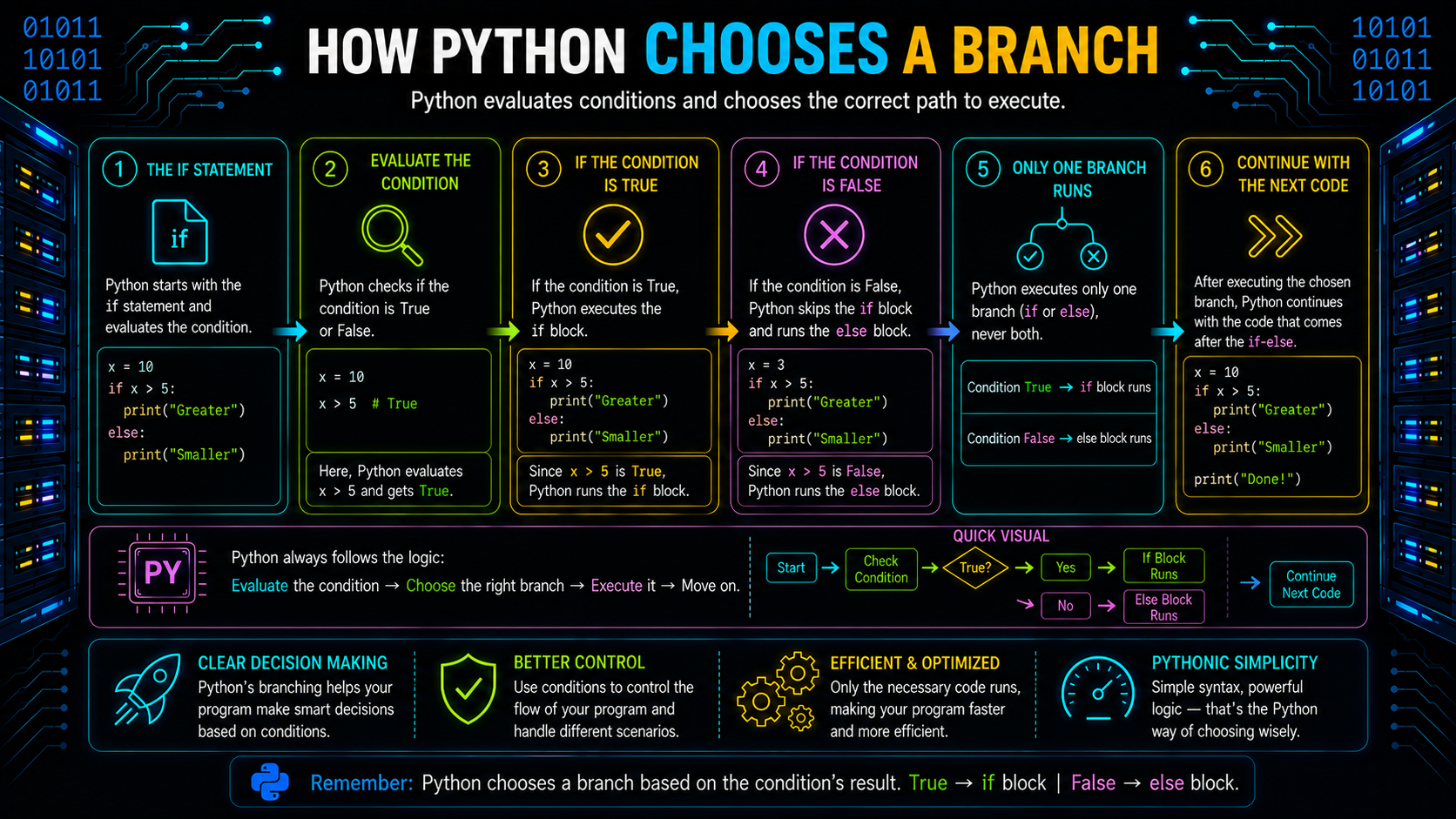
Whenever Python encounters an if statement, it follows the same evaluation process.
- Evaluate the if condition.
- If it is truthy, execute its block and skip every remaining branch.
- Otherwise, evaluate the next elif.
- Continue until a condition evaluates to True.
- If none of the conditions match, execute the else block (if present).
The process can be visualized as follows:
This sequential evaluation ensures that only one branch executes for a single conditional statement.
Nested Conditionals
A nested conditional places one conditional statement inside another. This allows a program to make a second decision only after the first condition has been satisfied.
Example:
age = 20
has_id = True
if age >= 18:
    if has_id:
        print("Entry allowed")
The second if executes only because the first condition evaluates to True.
Python's nested if statements are helpful when decisions made later depend on those made earlier, but too much nesting can make the code hard to comprehend and maintain. Whenever possible, consider simplifying complex branching with combined conditions or other cleaner control-flow techniques, which you'll explore in the next section.
Understanding Boolean Conditions
A condition that evaluates to a Boolean value is the foundation of every conditional statement. A comparison, a membership test, an identity check, or any expression that Python can assess using its truthiness principles can be the condition.
For example:
age = 20
if age >= 18:
    print("Eligible")
The expression age >= 18 evaluates to True, so Python executes the indented block.
Conditions can also come from Boolean variables.
is_logged_in = True
if is_logged_in:
    print("Welcome")
Since is_logged_in already stores a Boolean value, Python evaluates it directly.
Remember that conditions don't need to return the Boolean objects True or False explicitly. Python evaluates an object's truth value before deciding whether to execute a branch.
Combining Conditions with Boolean Operators
Many decisions depend on more than one condition. Python provides three Boolean operators to combine or invert conditions:
- and
- or
- not
These operators allow you to write more expressive branching logic without creating unnecessary nested if statements.
Using and
The and operator requires every condition to evaluate to a truthy value.
Example:
age = 22
has_id = True
if age >= 18 and has_id:
    print("Entry allowed")
Both conditions must be satisfied before the block executes.
Python evaluates the conditions from left to right. If the first condition is falsy, it doesn't evaluate the second one because the overall result is already determined. This behavior is known as short-circuit evaluation.
Using or
The or operator requires at least one condition to be truthy.
is_admin = False
is_owner = True
if is_admin or is_owner:
    print("Access granted")
The block executes because one condition evaluates to True.
Like and, the or operator evaluates expressions from left to right and stops as soon as the result is known.
Using not
The not operator reverses the truth value of a condition.
is_active = False
if not is_active:
    print("Account inactive")
Here, not False becomes True, allowing the block to execute.
Unlike and and or, the not operator always returns a Boolean value.
Writing Readable Conditions
A conditional should express a decision clearly without adding unnecessary comparisons.
Instead of comparing a Boolean variable with True, use the variable directly.
Avoid:
if is_active == True:
    print("Active")
Prefer:
if is_active:
    print("Active")
Similarly, instead of writing:
if is_active == False:
    print("Inactive")
write:
if not is_active:
    print("Inactive")
These forms are shorter, easier to read, and follow common Python coding practices.
Conditional Expressions (Ternary Operator)
When a condition selects between two simple values, Python provides a conditional expression.
The syntax is:
value_if_true if condition else value_if_falseExample:
age = 20
status = "Adult" if age >= 18 else "Minor"
print(status)
Output
AdultA conditional expression performs the same decision as an if-else statement but returns a value directly.
Equivalent code:
if age >= 18:
    status = "Adult"
else:
    status = "Minor"
Conditional expressions are useful when the result is simple and can be expressed clearly in one line. For longer or more complex branching logic, a regular if-elif-else statement is generally easier to read.
Common Conditional Mistakes
Even simple branching logic can produce unexpected results if conditions are written carelessly.
| Mistake | Why It Happens | Better Approach |
|---|---|---|
| if is_valid == True: | Unnecessary comparison | if is_valid: |
| if is_valid == False: | Less readable | if not is_valid: |
| Placing general conditions before specific ones | Earlier branch prevents later branches from executing | Check specific conditions first |
| Using deeply nested if statements unnecessarily | Makes logic harder to follow | Combine related conditions with and or or where appropriate |
| Assuming every condition must return True or False explicitly | Python evaluates truthiness automatically | Write conditions that rely on truthiness when appropriate |
Most conditional bugs come from the order of conditions or writing more logic than necessary. Keeping conditions focused and readable makes the program easier to understand and maintain.
What Is the match Statement?
As programs grow, an if-elif-else chain can become lengthy when you're comparing the same value against many fixed options. Starting with Python 3.10, Python introduced the match statement to simplify this kind of branching.
Instead of repeatedly comparing the same variable, match evaluates it once and checks it against a series of patterns.
Basic syntax:
match subject:
    case pattern_1:
        # code
    case pattern_2:
        # code
    case _:
        # default case
The wildcard (_) acts as the default branch, similar to the else block in an if-elif-else statement.
Basic Example of match
Consider a simple menu-driven program.
choice = "settings"
match choice:
    case "home":
        print("Home Page")
    case "profile":
        print("User Profile")
    case "settings":
        print("Settings Page")
    case _:
        print("Invalid option")
Python compares choice with each case from top to bottom. When it finds the first matching pattern, it executes that block and skips the remaining cases.
match vs if-elif-else
Although both constructs perform branching, they solve slightly different problems.
| if-elif-else | match |
|---|---|
| Evaluates Boolean expressions | Matches a value against patterns |
| Ideal for comparisons, ranges, and logical conditions | Ideal for fixed values and structured patterns |
| Can combine conditions using and, or, and not | Focuses on matching one subject against multiple cases |
| Works in every supported Python version | Available from Python 3.10 onwards |
For example, checking a score range is more suitable for if-elif-else:
if score >= 90:
    print("Grade A")
elif score >= 75:
    print("Grade B")
else:
    print("Grade C")
On the other hand, selecting an action based on a command is easier to express with match:
match command:
    case "start":
        start()
    case "stop":
        stop()
    case "restart":
        restart()
Choose the construct that makes the logic easiest to understand rather than trying to replace every if statement with match.
When Should You Use match?

The match statement is particularly useful when a computer has to compare a single integer against several known alternatives.
Common examples include:
- Processing menu selections
- Handling application commands
- Matching status codes
- Working with predefined constants or enums
For example:
status = 404
match status:
    case 200:
        print("Request successful")
    case 404:
        print("Page not found")
    case 500:
        print("Server error")
    case _:
        print("Unknown status")
However, match is not intended for every branching problem. If your logic depends on comparisons such as <, >, >=, or multiple Boolean conditions, if-elif-else usually provides a clearer solution.
Real-World Examples of Conditional Branching
The following conditional statement examples demonstrate how different conditional statements are used to solve common programming problems.
Login Validation
if username and password:
    print("Attempt login")
else:
    print("Missing credentials")
The program first verifies that the required input exists before attempting authentication.
Grade Classification
if score >= 90:
    grade = "A"
elif score >= 75:
    grade = "B"
elif score >= 50:
    grade = "C"
else:
    grade = "F"
Each range is checked in descending order so that the first matching condition determines the result.
Command Processing
match command:
    case "add":
        print("Adding item")
    case "delete":
        print("Deleting item")
    case "update":
        print("Updating item")
    case _:
        print("Unknown command")
Here, match improves readability because every branch compares the same variable.
Menu Selection
match option:
    case 1:
        print("View Profile")
    case 2:
        print("Edit Profile")
    case 3:
        print("Logout")
    case _:
        print("Invalid selection")
This method avoids lengthy chains of repeated equality checks, keeping menu-driven systems organized.
Best Practices for Writing Cleaner Branching Logic
Because each branch has a distinct goal, well-written Python conditionals are simple to understand.
Keep these practices in mind:
- Place more specific conditions before broader ones to avoid unreachable branches.
- Keep each branch concentrated on a single rational action.
- When a simpler structure conveys the same meaning, steer clear of tightly nested conditionals.
- Use names for your Boolean variables that are descriptive, like has_permission or is_authenticated.
- Choose match only when multiple branches compare the same subject against known patterns.
- Prefer readability over reducing the number of lines of code.
As programs get more complicated, these techniques make conditional logic simpler to test, maintain, and expand.
Final Thoughts
Conditional statements in Python control the flow of execution by allowing a program to choose different ways based on the outcome of a particular condition. This blog shows you how to make decisions using if, elif, and else, how Boolean expressions choose which branch to run, and when pattern-based branching can be replaced with a cleaner match statement. You can design Python code that is easier to read and maintain by carefully arranging conditions and selecting the right branching technique.
Frequently Asked Questions
What are Conditional Statements in Python?▾
Python conditional statements enable a computer to make decisions by running distinct code blocks according to whether a condition evaluates to True or False. Python allows conditional logic to be implemented using if, elif, else, and match statements.
What are the types of Conditional Statements in Python?▾
Python has four main conditional statements:
if – Executes code if a condition is true.
if...else – Chooses between two code blocks.
if...elif...else – Checks multiple conditions.
match...case (Python 3.10+) – Matches a value against multiple patterns.
What Is the Purpose of the with Statement?▾
In order to ensure that resources are appropriately cleaned up after use—for example, by automatically shutting a file—the with statement is utilized.
Can multiple branches execute in one conditional statement?▾
No. Python executes only the first matching branch and skips the remaining branches.
Can I nest conditional statements in Python?▾
Of course. One conditional statement can be nested inside another in Python, but too much nesting can complicate the code.
What are Statements in Python?▾
In Python, a statement is a comprehensive command that instructs the interpreter to carry out a certain task. Unless the control flow is altered by structures like if statements, loops, or function calls, statements—the fundamental units of every Python program—are carried out sequentially.
Statements include things like declaring a function, printing output, assigning a value to a variable, and making conditional decisions.
name = "Alice"
print(name)