Key Takeaways
- Understand what control flow is and how Python determines the order in which code is executed.
- Learn how conditional statements allow programs to make decisions based on different conditions.
- Explore the different forms of the if statement, including if, if...else, if...elif...else, nested conditions, and conditional expressions.
- Discover how control flow helps create dynamic, interactive, and efficient Python programs.
- Establish a solid basis for learning functions, loops, and more complex programming ideas.
Introduction
"A program isn't just a collection of statements, it's a sequence of decisions that determines what happens next."
Each Python program starts with a series of statements. Real-world programs, however, seldom take a straight line from beginning to end. Depending on user input or program state, they make choices, repeat tasks, omit pointless procedures, and run various code blocks. This movement through a program is known as control flow.
Because it controls when, whether, and how frequently various parts of your code execute, control flow is one of the fundamental programming notions in Python. When used in conjunction with functions, it allows programmers to create modular, effective, and complicated problem-solving programs. This tutorial will teach you how Python manages program execution, beginning with conditional expressions that let your programs make wise choices.
What Is Control Flow in Python?
Control flow refers to the order in which Python executes the statements in a program. By default, Python executes code from top to bottom, but this order can change based on conditions, loops, function calls, or exceptions.
Programs can use control flow to:
- Execute statements in sequence.
- Make decisions based on conditions.
- Repeat a block of code multiple times.
- Transfer execution to functions and return to the caller.
Without control flow, every Python program would execute every statement exactly once in the order it appears, making it impossible to build interactive or intelligent applications.
Sequential Execution
Python follows sequential execution by default. This means it starts with the first executable statement and continues downward until it reaches the end of the program.
For example:
print("Start")
print("Learning Python")
print("End")
Output
Start
Learning Python
End
Only once the preceding statement is finished does the subsequent one begin to run. Every Python program is built on this predictable order of execution.
How Control Flow Changes
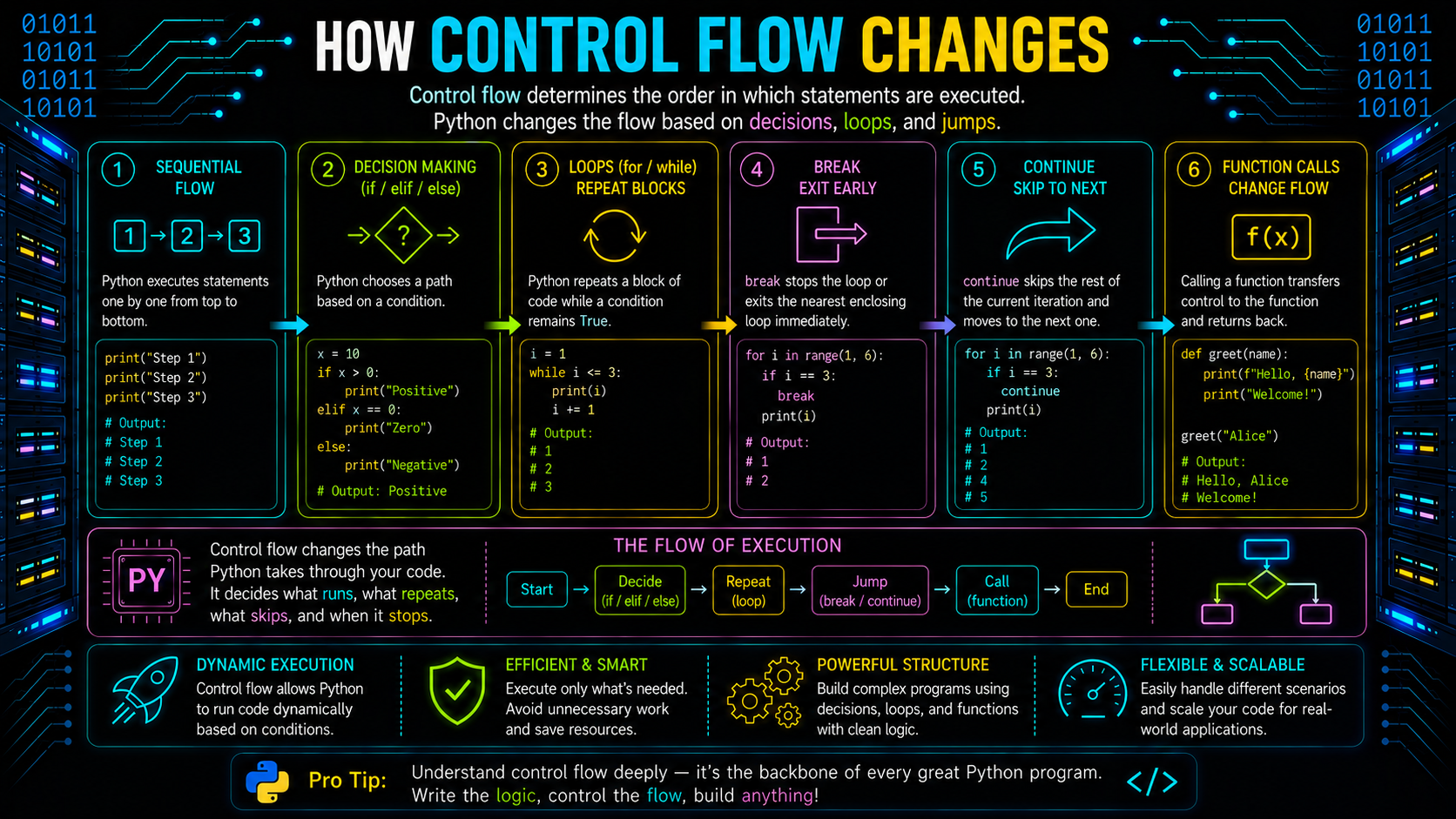
Although sequential execution is the default, Python provides several constructs that change the normal flow of execution.
Some of the most common ways control flow changes are:
- Conditional statements execute different code based on a condition.
- Loops repeat a block of code until a condition changes.
- Function calls temporarily transfer execution to another function before returning.
- Exceptions interrupt normal execution when an error occurs.
For example:
age = 20

if age >= 18:
    print("Eligible to vote")

print("Program finished")
Python runs the if block before moving on to the next statements if the condition evaluates to True. If it evaluates to False, Python skips the block and moves directly to the next statement.
This ability to alter execution flow allows Python programs to respond to different situations instead of following a fixed sequence.
Decision Making with Conditional Statements
Programs often need to choose between multiple possible actions. For example:
- Should a user be allowed to log in?
- Has a student passed the exam?
- Is an item in stock?
- Should a discount be applied?
Conditional statements, which assess a condition and run distinct code blocks based on whether the condition is True or False, are how Python responds to these queries.
Python's main conditional statement is the if statement, which can be expanded to handle several decision routes using else and elif.
The if Statement
Only when its condition evaluates to True does the if statement run a piece of code.
Syntax
if condition:
    # code block
Example:
marks = 85

if marks >= 40:
    print("Pass")
Output
PassIf the condition evaluates to False, Python skips the indented block and continues with the next statement.
The if statement is the simplest way to introduce decision-making into a Python program.
The if...else Statement
Sometimes a program needs to perform one action when a condition is True and another when it is False. The if...else statement handles this situation.
Syntax
if condition:
    # executed if True
else:
    # executed if False
Example:
marks = 35

if marks >= 40:
    print("Pass")
else:
    print("Fail")
Output
FailOnly one of the two code blocks executes, depending on the result of the condition.
The if...elif...else Statement
When there are more than two possible outcomes, Python uses the elif (short for else if) statement.
Python evaluates the conditions one by one from top to bottom. As soon as it finds a condition that evaluates to True, it executes the corresponding block and skips the remaining conditions.
Example:
score = 82

if score >= 90:
    print("Grade A")
elif score >= 75:
    print("Grade B")
elif score >= 60:
    print("Grade C")
else:
    print("Grade D")
Output
Grade BUsing if...elif...else keeps decision-making organized and avoids writing multiple independent if statements for related conditions.
Nested Conditions
A nested condition is an if statement placed inside another if or else block. It allows Python to evaluate a second condition only after the first condition has been satisfied.
Example:
age = 22
has_id = True

if age >= 18:
    if has_id:
        print("Entry allowed")
Output
Entry allowedNested conditions are useful when one decision depends on the outcome of another. However, deeply nested code can become difficult to read and maintain. When possible, simplify complex conditions or move related logic into functions.
Conditional Expressions
A ternary operator, sometimes referred to as a conditional expression, offers a succinct method of selecting between two values depending on a condition.
Syntax
value_if_true if condition else value_if_falseExample:
age = 20
status = "Adult" if age >= 18 else "Minor"

print(status)
Output
AdultA conditional expression evaluates to a single value, in contrast to an if statement. It works best for straightforward choices that make sense on a single line. A conventional if...else statement is typically easier to read for more complicated logic containing several assertions or conditions.
Looping in Python
Often it's not enough to run a block of code only once. You could have to repeatedly request user input, process each item in a list, or carry out an activity until a condition changes. This is made feasible by loops, which let Python run the same block of code repeatedly without repetition.
Python provides two primary looping constructs:
- for loop – iterates over an iterable or sequence.
- while loop – Repeats execution as long as a condition remains True.
Whether you need to repeat until a condition changes or know the number of iterations ahead of time will determine which loop is best.
The for Loop
An iterable, such as a list, tuple, string, dictionary, or range, can have its items iterated over using the for loop. It is the best option when the number of iterations is known because it automatically obtains each element one at a time.
Syntax
for variable in iterable:
    # code block
Example:
for number in range(1, 6):
    print(number)
Output
1
2
3
4
5
Since Python handles the iteration automatically, for loops are concise, readable, and less prone to errors.
The while Loop
As long as a particular condition evaluates to True, the while loop keeps running a block of code. When the number of iterations is unknown in advance, it is helpful.
Syntax
while condition:
    # code block
Example:
count = 1

while count <= 5:
    print(count)
    count += 1
Output
1
2
3
4
5
Because the condition is checked before every iteration, the loop stops as soon as the condition becomes False.
Infinite Loops
When the loop condition remains False, an infinite loop is created. Consequently, until it is stopped or halted, the loop keeps running indefinitely.
Example:
while True:
    print("Running...")
This loop never stops because the condition True always evaluates to True.
Infinite loops are sometimes used intentionally, such as in game loops, servers, or programs that continuously wait for user input. However, when created unintentionally, they can make a program unresponsive. Always ensure that a while loop has a condition or logic that eventually allows it to terminate.
break, continue, and pass
Python provides three statements to modify the normal behavior of loops.
break
The break statement immediately terminates the loop, regardless of whether the loop condition is still True.
Example:
for number in range(1, 6):
    if number == 4:
        break
    print(number)
Output
1
2
3
continue
The continue statement moves straight to the next iteration, bypassing the remaining statements in the current iteration.
Example:
for number in range(1, 6):
    if number == 3:
        continue
    print(number)
Output
1
2
4
5
pass
The pass statement is a placeholder that performs no action. It is commonly used when a statement is syntactically required but no implementation is needed yet.
Example:
for number in range(5):
    if number == 2:
        pass
Unlike break and continue, pass does not affect loop execution, it simply allows the program to continue.
for...else and while...else
Python supports an optional else clause with both for and while loops. The else block executes only if the loop completes normally without encountering a break statement.
Example using for...else:
for number in range(1, 4):
    print(number)
else:
    print("Loop completed")
Output
1
2
3
Loop completed
If a break statement exits the loop early, the else block is skipped.
Similarly, a while...else statement executes its else block only when the loop condition becomes False naturally rather than being terminated by break.
Although for...else and while...else are less commonly used, they can simplify logic where you need to perform an action only after a loop completes successfully.
What are Functions in Python?

As programs grow larger, writing the same code repeatedly becomes difficult to maintain. Functions solve this problem by grouping related statements into reusable blocks that perform a specific task.
A Python function is a named block of code that executes only when it is called. Instead of rewriting the same logic multiple times, you can define it once and reuse it throughout your program.
Python provides two main types of functions in Python:
- Built-in functions – Functions provided by Python, such as print(), len(), and max().
- User defined functions in Python – Functions created by programmers using the def keyword to perform custom tasks.
Functions improve readability, reduce duplication, and make programs easier to test and maintain.
Why Functions Matter
Functions are one of the fundamental building blocks of Python programming. They make programs modular by dividing large problems into smaller, manageable pieces.
Using functions provides several benefits:
- Promotes code reuse.
- Reduces duplicate code.
- Improves readability and organization.
- Simplifies debugging and testing.
- Makes programs easier to maintain and extend.
For example, instead of writing the same calculation multiple times, you can define a function once and call it whenever needed.
Defining Functions
A user defined function in Python is created using the def keyword, followed by the function name, parentheses, and an indented block of code.
The general syntax of a def function in Python is:
def function_name(parameters):
    # function body
Example:
def greet():
    print("Welcome to Python!")
Here:
def indicates the start of a function definition.
greet is the function name.
The indented statements form the function body.
Defining a function does not execute it. Python simply stores the function so it can be used later.
This is one of the simplest Python function examples, demonstrating how reusable code is created.
Calling Functions
After defining a function, you must call it to execute its code. A function call transfers control from the current location in the program to the function. Once the function finishes executing, control returns to the statement immediately following the call.
If you're wondering how to call a function in Python, simply write the function name followed by parentheses.
Example:
def greet():
    print("Welcome to Python!")

greet()
Output
Welcome to Python!Here, greet() is the Python call function statement that executes the function body.
Functions can also call other functions, creating a structured flow of execution. This ability to transfer control between functions is one of the key reasons functions play such an important role in Python programming.
Parameters and Arguments
Functions become more flexible when they can accept input values. Instead of writing separate functions for every situation, you can pass different values to the same function using parameters and arguments.
Although these terms are often used interchangeably, they have different meanings:
- Parameters are variables defined in the function declaration.
- Arguments are the actual values passed to the function when it is called.
Understanding this distinction helps you write reusable and dynamic Python functions.
For example:
def greet(name):
    print(f"Hello, {name}!")

greet("Alice")
In this example:
name is the parameter.
"Alice" is the argument.
The function can now greet any user simply by passing a different argument.
Types of Arguments in Python
Python supports multiple ways of passing arguments to a function.
Positional Arguments
Positional arguments are assigned to parameters based on their order.
def introduce(name, city):
    print(name, city)

introduce("John", "Delhi")
Here, "John" is assigned to name, and "Delhi" is assigned to city.
Keyword Arguments
Keyword arguments specify the parameter name while calling the function, making the code easier to read.
def introduce(name, city):
    print(name, city)

introduce(city="Delhi", name="John")
Because each argument is explicitly associated with a parameter, the order does not matter.
Default Arguments
A parameter can have a default value that Python uses if no argument is provided.
def greet(name="Guest"):
    print(f"Hello, {name}!")

greet()
greet("Alice")
Output
Hello, Guest!
Hello, Alice!
Default arguments make functions more flexible while reducing the number of required inputs.
Variable-Length Arguments
Sometimes the number of arguments is unknown in advance. Python supports this using *args and **kwargs.
def total(*numbers):
    print(sum(numbers))

total(10, 20, 30)
*args collects multiple positional arguments into a tuple, while **kwargs collects keyword arguments into a dictionary.
Return Values
Many functions don't just perform an action, they also produce a result. In Python, the return statement sends a value back to the code that called the function.
Returning values makes functions reusable because the result can be stored, displayed, or used in further calculations.
Example:
def square(number):
    return number * number

result = square(6)

print(result)
Output
36Here, the function calculates the square of a number and returns the result instead of printing it directly.
Returning Multiple Values
A function can return multiple values separated by commas. Python automatically packs them into a tuple.
def calculate(a, b):
    return a + b, a * b

addition, multiplication = calculate(4, 5)

print(addition)
print(multiplication)
Output
9
20
This feature is useful when a function needs to provide more than one related result.
Functions Without a return
If a function does not contain a return statement, Python automatically returns None.
Example:
def greet():
    print("Welcome!")

value = greet()

print(value)
Output
Welcome!
None
This behavior is important because every Python function returns a value, even if it is only None.
Variable Scope in Functions
A variable's scope determines where it can be accessed within a program. Understanding scope helps prevent unexpected errors and keeps functions independent.
Python primarily uses two scopes:
- Local scope
- Global scope
Local Scope
Variables created inside a function exist only within that function. They cannot be accessed outside it.
Example:
def display():
    message = "Hello"

    print(message)

display()
The variable message exists only while the function executes.
Local variables help functions remain self-contained and reduce unintended side effects.
Global Scope
Variables defined outside any function belong to the global scope.
Example:
language = "Python"

def show_language():
    print(language)

show_language()
Output
PythonGlobal variables are accessible inside functions unless a local variable with the same name exists.
Although global variables are convenient, excessive use can make programs difficult to debug and maintain. In most cases, passing values as function arguments is a better practice.
The LEGB Rule
When Python encounters a variable, it searches for its value in the following order:
- Local
- Enclosing
- Global
- Built-in
This search order is known as the LEGB rule.
For example, if a variable exists inside a function, Python uses the local variable before checking the global scope. If it cannot find the variable in any scope, it raises a NameError.
Understanding the LEGB rule makes it easier to predict how Python resolves variable names in larger programs.
How Control Flow Works with Functions
So far, you've seen how conditional statements and loops change the execution path of a program. Functions also influence control flow, but in a different way.
When a function is called, Python temporarily pauses the current execution, transfers control to the function, executes its statements, and then returns to the point where the function was called.
This transfer of execution allows programs to break complex tasks into smaller, reusable units while maintaining an organized flow.
Function Calls Change Control Flow
When Python encounters a function call, it performs the following steps:
- Saves the current execution state.
- Transfers control to the called function.
- Executes the function body.
- Returns to the statement immediately after the function call.
Example:
def greet():
    print("Inside function")

print("Before function")

greet()

print("After function")
Output
Before function
Inside function
After function
The output shows that execution temporarily moves into the function before returning to continue the remaining program.
This behavior is what makes Python call function operations possible. Every time you call a function, Python follows this execution sequence.
Functions Calling Functions
A function can call another function, allowing large problems to be divided into smaller, reusable tasks.
Example:
def greet():
    print("Hello!")

def welcome():
    greet()
    print("Welcome to Python")

welcome()
Output
Hello!
Welcome to Python
Here's what happens:
- welcome() is called.
- Control moves to welcome().
- welcome() calls greet().
- Control moves to greet().
- After greet() finishes, execution returns to welcome().
- Once welcome() completes, execution returns to the main program.
This layered execution makes programs modular and easier to understand.
High-Level Call Stack Overview
Every time Python calls a function, it keeps track of the execution using a call stack. Think of it as a stack of active function calls.
Each function call creates a stack frame containing information such as local variables, arguments, and the return location.
When a function finishes, its stack frame is removed.
Execution then resumes from the previous function or the main program.
For example, consider the following code:
def first():
    second()

def second():
    print("Inside second")

first()
The execution follows this sequence:
- The main program calls first().
- first() calls second().
- second() executes and finishes.
- Control returns to first().
- first() completes.
- Execution returns to the main program.
Although Python manages the call stack automatically, understanding this process helps explain how nested function calls work and why tracebacks display a sequence of function calls when an error occurs.
Note: The Python call stack is a broad topic on its own. In the next guide, we'll explore stack frames, function execution, recursion, and tracebacks in greater detail.
Combining Control Flow and Functions
In Python, control flow and functions work together to create organized, reusable, and maintainable programs. While control flow determines which code executes and when, functions group related logic into reusable units that can be called whenever needed.
Instead of writing all the program logic in a single block, you can use functions to separate tasks and use conditional statements or loops to decide when each function should run.
For example, consider a simple menu-driven program:
def display_menu():
    print("1. Add")
    print("2. Exit")
choice = 1
if choice == 1:
    display_menu()
Here:
The if statement controls whether the function is executed.
The function contains the code for displaying the menu.
The program becomes easier to read because the decision-making logic and implementation are separated.
Similarly, loops frequently work with functions.
def greet(name):
    print(f"Hello, {name}")
names = ["Alice", "Bob", "Charlie"]
for person in names:
    greet(person)
In this example, the for loop controls the repetition, while the function performs the same task for each item. This combination avoids duplicate code and makes programs easier to extend.
As your applications grow larger, you'll find that almost every Python program combines loops, conditional statements, and functions to solve problems efficiently.
Best Practices
Writing code that works is only part of programming. Writing code that is easy to understand, maintain, and reuse is equally important. Following these best practices will help you create clean and reliable Python programs.
Keep Functions Focused
Each function should perform one specific task. Small, focused functions are easier to understand, test, and reuse.
Good:
def calculate_total():
    ...
Avoid functions that perform multiple unrelated tasks.
Use Meaningful Function Names
Choose names that clearly describe what the function does.
Good examples:
- calculate_area()
- validate_email()
- find_maximum()
Avoid vague names such as:
- func()
- test()
- data()
Descriptive names improve readability and reduce confusion.
Avoid Deeply Nested Conditions
Excessive nesting makes code difficult to follow.
Instead of writing multiple nested if statements, simplify conditions where possible or split the logic into smaller functions.
Prefer Parameters Over Global Variables
Passing data through parameters makes functions more predictable and reusable.
Instead of this:
discount = 20Prefer:
def calculate_price(price, discount):
    ...
This reduces dependencies and makes testing easier.
Return Values Instead of Printing
Whenever possible, return results instead of printing them directly.
Better
def square(number):
    return number * number
instead of
def square(number):
    print(number * number)
Returning values allows other parts of the program to reuse the result.
Reuse Functions
If you find yourself copying the same block of code multiple times, consider turning it into a function.
Reusable code is easier to maintain and reduces the chance of introducing bugs.
Common Mistakes
Beginners often encounter similar issues when learning control flow and functions. Understanding these mistakes can help you avoid them.
Forgetting Indentation
Python uses indentation to define code blocks.
Incorrect:
if True:
print("Hello")
Correct:
if True:
    print("Hello")
Improper indentation results in an IndentationError.
Missing a return Statement
Many beginners expect a function to automatically return the computed value.
Incorrect:
def add(a, b):
    a + b
Correct:
def add(a, b):
    return a + b
Without return, the function returns None.
Creating Infinite Loops Accidentally
Forgetting to update the loop condition can cause a program to run forever.
Example:
count = 1

while count <= 5:
    print(count)
Since count never changes, the condition always remains True.
Confusing = with ==
A common mistake is using the assignment operator instead of the comparison operator.
Correct:
if age == 18:
    print("Eligible")
Remember:
- = assigns a value.
- == compares two values.
Overusing Global Variables
Global variables can make programs difficult to debug because any part of the program can modify them.
Passing values as function arguments usually leads to cleaner and more maintainable code.
Writing Functions That Are Too Large
A function with hundreds of lines of code is difficult to understand and maintain.
Instead, divide large functions into smaller, reusable functions that each perform a single responsibility.
Summary
Control flow determines how a Python program executes using conditional statements, loops, and functions. In this guide, you learned how if statements make decisions, for and while loops handle repetitive tasks, and functions improve code reusability through parameters, arguments, return values, and variable scope. Understanding these core concepts helps you write clean, efficient, and maintainable Python programs while preparing you for advanced topics like recursion, exception handling, and object-oriented programming.
Frequently Asked Questions
What is control flow in Python?▾
Control flow is the order in which Python executes statements in a program. It uses sequential execution, conditional statements, loops, function calls, and exceptions to determine how a program runs.
What is a Python function?▾
A Python function is a reusable block of code that performs a specific task. Functions help organize programs, reduce duplicate code, and improve readability.
What are the types of functions in Python?▾
The two primary types of functions in Python are:
- Built-in functions, such as print(), len(), and sum().
- User defined functions in Python, which are created using the def keyword.
What is the def function in Python?▾
The def keyword is used to define a user defined function in Python.
Example:
def greet():
    print("Hello!")
After defining the function, you can call it whenever needed.
How do you call a function in Python?▾
If you're wondering how to call a function in Python, simply write the function name followed by parentheses.
Example:
greet()This Python call function statement transfers execution to the function, runs its code, and then returns control to the caller.
What is the difference between parameters and arguments?▾
Parameters are variables defined in a function declaration, while arguments are the actual values passed when the function is called.
Can one function call another function?▾
Yes. A function can call another function, allowing programs to be divided into smaller, reusable tasks. Python manages these nested function calls using the call stack.