Key Highlights
- Every time you run a Python program, it goes through multiple stages before producing the final output.
- Python doesn't execute your source code directly. It first converts it into bytecode, an intermediate form that's easier to execute.
- Components like the tokenizer, parser, compiler, and Python Virtual Machine (PVM) each play a specific role in the execution process.
- Understanding Python's execution pipeline makes it easier to debug errors, optimise code, and understand what's happening behind the scenes.
- By the end of this guide, you'll know exactly how a Python program travels from a .py file to your computer's processor.
What Really Happens When You Click Run?
You write a few lines of Python code, click Run, and within seconds the output appears on your screen. Simple, right?
But have you ever wondered how your computer understands Python in the first place?
After all, computers don't understand keywords like if, for, print(), or while. They only understand machine instructions made up of binary digits (0s and 1s).
So how does a Python script become something your computer can execute?
The answer is that your program goes through a series of carefully coordinated stages. Python first analyzes your code, checks whether it's valid, converts it into an intermediate format called bytecode, and finally executes it using the Python Virtual Machine (PVM) before the operating system and CPU carry out the instructions.
This entire process happens in a fraction of a second, which is why most developers never notice it.
Understanding these stages not only satisfies your curiosity but also helps explain why syntax errors occur, why Python creates __pycache__ folders, and why people describe Python as both a compiled and an interpreted language.
Let's follow the complete journey of a Python program.
The Python Execution Pipeline
Whenever you run a Python script, it passes through several stages before producing the final output.
Here's a simplified view of the execution pipeline:
Source Code (.py)
        │
        ▼
   Tokenization
        │
        ▼
     Parsing
        │
        ▼
Abstract Syntax Tree (AST)
        │
        ▼
   Compilation
        │
        ▼
    Bytecode
        │
        ▼
Python Virtual Machine (PVM)
        │
        ▼
Operating System & CPU
        │
        ▼
  Program Output
This pipeline can be compared to an assembly line. After completing a single job, each stage transfers the outcome to the subsequent stage. Python evaluates your program step by step until it's ready to run, rather than attempting to comprehend it all at once.
Let's now examine each step, starting with your source code, which you are already familiar with.
Stage 1: Source Code — Where Every Python Program Begins
All Python programs begin as source code files, which are usually saved with the extension .py.
For example:
name = "Alex"
print(f"Hello, {name}!")
This file contains instructions written in Python syntax, making it easy for humans to read and write.
However, your computer can't execute this code directly.
To your computer, a .py file is simply a text document containing characters. It has no understanding of variables, loops, functions, or keywords like print().
Before the program can run, Python must first understand what each part of the code represents.
That's where the first stage of processing begins.
Stage 2: Tokenization — Breaking Code into Meaningful Pieces
Consider reading this sentence without any spaces:
PythonmakescodingeasierIt's hard to comprehend until you break it down into individual words:
Python | makes | coding | easierPython follows a similar approach when it reads your program.
The tokenizer (also called the lexical analyzer) scans your source code and breaks it into smaller pieces called tokens.
For example, consider this statement:
x = 10 + 5During tokenization, Python identifies each element separately:
| Source Code | Token Type |
| x | Identifier |
| = | Assignment Operator |
| 10 | Number |
| + | Arithmetic Operator |
| 5 | Number |
Instead of reading the statement as one long string of characters, Python now understands that it contains a variable, an assignment operator, two numeric values, and an arithmetic operator.
This step doesn't execute the code or check whether the logic is correct. Its only job is to identify the building blocks of your program so the next stage can understand how they're related.
Without tokenization, Python wouldn't know where one instruction ends and another begins.
In the next stage, the parser takes these tokens and checks whether they follow Python's grammar rules, creating a structured representation of your code that the compiler can understand.
Stage 3: Parsing — Checking Whether Your Code Makes Sense
Once the tokenizer has identified the individual tokens, Python still doesn't know whether those tokens form a valid program.
For example, consider these two statements:
x = 10 + 5
= x 10 +
Both contain similar tokens, but only the first follows Python's syntax rules.
This is where the parser comes in.
The parser analyzes the tokens and checks whether they follow Python's grammar. If the syntax is valid, Python moves to the next stage. Otherwise, execution stops immediately with a SyntaxError.
For example:
if True
    print("Hello")
Output:
SyntaxError: expected ':'This error is detected by the parser before your application starts running. Python is prevented from executing code that violates the language rules via this early inspection.
Once the parser confirms that the syntax is correct, it builds a structured representation of your program called the Abstract Syntax Tree (AST).
Stage 4: Abstract Syntax Tree (AST) — Organizing Your Code
An Abstract Syntax Tree (AST) is a tree-like structure that represents the logical organization of your program.
Instead of viewing your code as plain text, Python now understands the relationship between different parts of the program.
Consider this example:
result = (5 + 3) * 2As humans, we immediately recognize that:
- 5 + 3 should be evaluated first.
- The result is then multiplied by 2.
- The final value is assigned to result.
This similar structure is captured by the AST, which makes it simpler for Python to comprehend what has to be done and in what sequence.
This is how a simplified depiction appears:
     Assign
      /    \
 result     *
           / \
          +   2
         / \
        5   3
Notice that the AST focuses on the meaning of the code rather than its formatting. Whether you write extra spaces or place expressions on different lines, the logical structure remains the same.
The subsequent step, the compiler, is built upon this structured representation.
Stage 5: Compilation — Converting the AST into Bytecode
After creating the AST, Python compiles it into bytecode.
Bytecode is an intermediate set of instructions that sits between Python source code and machine code. It's designed to be executed efficiently by the Python Virtual Machine (PVM).
Unlike your original .py file, bytecode isn't meant for humans to read or edit.
This compilation step happens automatically every time you run a Python program. You don't need to compile your code manually, unlike languages such as C or C++.
An important point to remember is that Python compiles your code into bytecode, not machine code.
The bytecode still needs another component, the Python Virtual Machine, to execute it. We'll explore that in the next section.
What Is Bytecode?
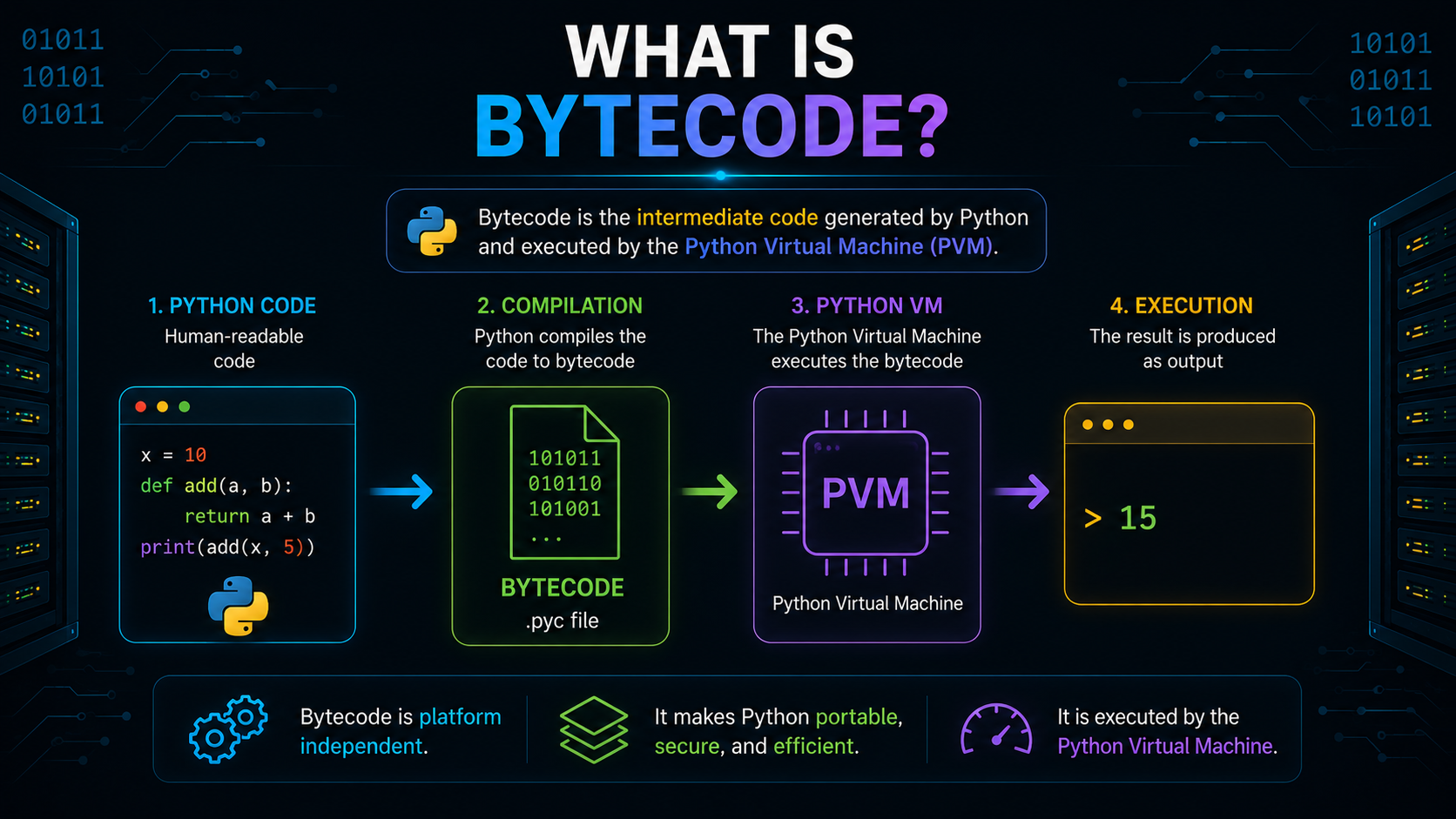
Bytecode is a platform-independent representation of your Python program.
Instead of generating machine instructions for Windows, Linux, or macOS separately, Python creates bytecode that can be executed by the Python Virtual Machine on any supported platform.
This design has a number of benefits:
- Faster execution compared to repeatedly analyzing source code.
- Platform independence across operating systems.
- Easier execution through the Python Virtual Machine.
Think of bytecode as a common language between your Python code and the computer's hardware.
What Are .pyc Files?
When Python compiles your program into bytecode, it may save that compiled version as a .pyc (Python Compiled) file.
For example:
calculator.pymay generate:
calculator.cpython-313.pycRather than your original source code, the produced bytecode is contained in the .pyc file.
The next time you run the same program, Python can reuse this bytecode when appropriate, avoiding unnecessary recompilation and improving startup performance.
What Is the __pycache__ Folder?
If you have explored a Python project, you've probably noticed a folder named __pycache__.
Many beginners assume it's something they created by mistake, but it's actually generated automatically by Python.
This folder stores compiled .pyc files.
For example:
project/
│
├── app.py
│
└── __pycache__/
      └── app.cpython-313.pyc
Instead of compiling the source file every time from scratch, Python can reuse the cached bytecode whenever it's still valid.
Nothing happens if you remove the __pycache__ folder. The next time the program runs, Python just recreates it.
In other words:
- .py — Your source code.
- .pyc — Compiled bytecode.
- __pycache__ — The folder where Python stores cached bytecode files.
Now that Python has successfully compiled your source code into bytecode, it's time for the Python Virtual Machine (PVM) to step in and execute those instructions.
Stage 6: Python Virtual Machine (PVM) — Executing the Bytecode
At this point, your Python program has been converted into bytecode. But bytecode still isn't something your computer's processor can understand directly.
This is where the Python Virtual Machine (PVM) comes in.
The PVM is the runtime component of CPython that reads bytecode instructions and executes them one by one. In simple terms, it acts as the engine that runs your Python program.
The execution flow looks like this:
Python Source Code
         │
         ▼
     Bytecode
         │
         ▼
Python Virtual Machine
         │
         ▼
Program Execution
Suppose your program contains:
x = 10
y = 20
print(x + y)
The PVM prepares the output, adds, and processes the bytecode that has been compiled. It runs the bytecode produced by the compiler rather than your original .py file.
This is why Python first compiles your code into bytecode before running it.
Stage 7: Operating System and CPU — Producing the Final Output
Although the Python Virtual Machine executes bytecode, it doesn't work in isolation. It relies on the operating system (OS) and the CPU to perform real-world operations.
For example, when your program contains:
print("Hello, World!")The following sequence takes place:
The operating system handles tasks such as:
- Managing memory
- Reading and writing files
- Displaying output on the screen
- Communicating with hardware devices
The CPU then executes the low-level machine instructions required to complete these operations.
In other words, Python provides the instructions, the PVM executes the bytecode, the operating system manages system resources, and the CPU performs the actual computations.
Is Python Compiled or Interpreted?
One of the most common questions beginners ask is:
"Is Python a compiled language or an interpreted language?"
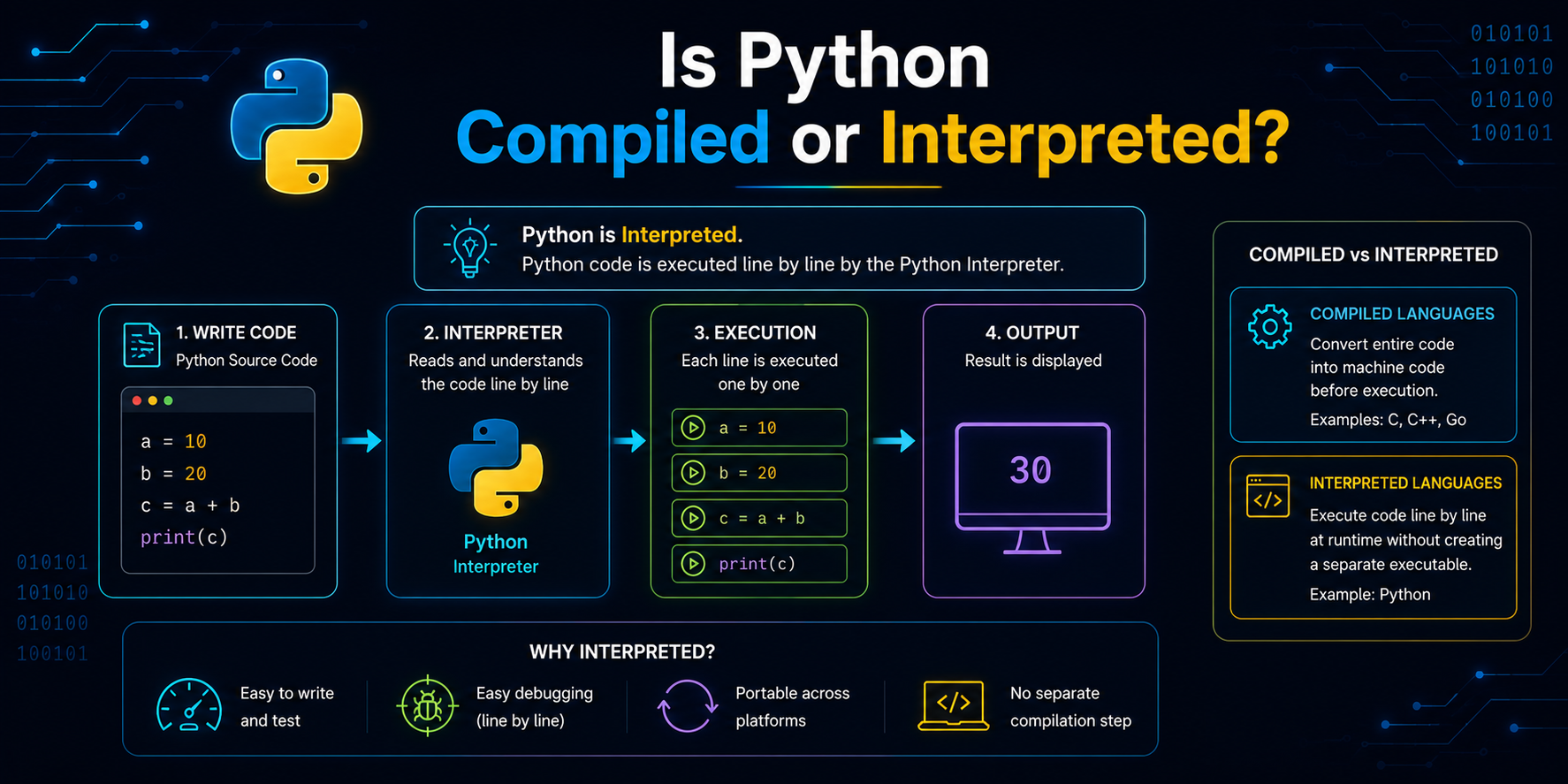
The answer is: Python uses both compilation and interpretation.
This is the reason:
- Compilation: Python initially converts your source code (.py) into bytecode (.pyc).
- Interpretation: The bytecode is subsequently interpreted and executed by the Python Virtual Machine.
Because Python uses both stages, describing it as only compiled or only interpreted is an oversimplification.
Common Misconceptions About Python Execution
Understanding the execution pipeline helps clear up several common misconceptions.
Misconception 1: Python Executes .py Files Directly
Reality: Python first compiles your source code into bytecode before executing it through the Python Virtual Machine.
Misconception 2: Bytecode Is Machine Code
Reality: Bytecode is an intermediate representation of your program. It still needs the Python Virtual Machine to execute it.
Misconception 3: The __pycache__ Folder Is Required
Reality: The __pycache__ folder simply stores cached bytecode files to improve performance. If you delete it, Python automatically recreates it the next time your program runs.
Misconception 4: The CPU Understands Python Code
Reality: CPUs execute machine instructions, not Python syntax. Several stages, including tokenization, parsing, compilation, and the Python Virtual Machine, bridge the gap between your source code and the processor.
The Complete Journey of a Python Program
Now you can see the complete execution process from start to finish.
Every stage has a specific responsibility, and together they transform your Python code into a running program.
Conclusion
It takes much more than just reading a .py file to run a Python script. Python tokenizes the source code, verifies its syntax, creates an Abstract Syntax Tree (AST), compiles it into bytecode, and runs it via the Python Virtual Machine before your application generates any output. The requested activities are then carried out by the CPU and operating system working together.
In addition to explaining what occurs when you click Run, comprehending this execution pipeline provides a solid basis for studying more complex ideas like memory management, garbage collection, and Python internals.
Frequently Asked Questions
1. Does Python run source code directly?
No, Python uses the Python Virtual Machine (PVM) to run the source code after first compiling it into bytecode.
2. What does Python bytecode mean?
Bytecode is an intermediate, platform-independent representation of your Python program. It's generated automatically by the Python compiler and executed by the PVM.
3. What is the role of the Python Virtual Machine (PVM)?
The PVM reads and executes Python bytecode, allowing your program to run on different operating systems without generating platform-specific machine code.
4. Why does Python create a __pycache__ folder?
Python may reuse compiled .pyc files by storing them in the __pycache__ subdirectory, which eliminates the need to rewrite unaltered source code.
5. Is Python compiled or interpreted?
Python uses both approaches. It first compiles source code into bytecode and then interprets that bytecode using the Python Virtual Machine.