Key Highlights
- Discover what an operating system is and why it is essential to every computer.
- Learn how the operating system controls the CPU, memory, files, devices, and processes.
- Recognize the reasons behind Python's reliance on the operating system rather than direct hardware communication.
- Explore how the operating system enables multiple applications to run safely and efficiently at the same time.
- Build a strong foundation for advanced Python topics such as system calls, multiprocessing, threading, and memory management.
Introduction
Consider creating a Python program that reads a file, produces a message, and saves the output to a different file. From your point of view, only a few lines of code are needed to do everything.
print("Hello, World!")
with open("notes.txt") as file:
    content = file.read()
It almost feels like Python knows how to display text on your monitor, find files on your SSD, and store data in memory.
But here's the interesting part: it doesn't.
Python doesn't know how to communicate with your keyboard, monitor, processor, storage drive, or even your computer's memory. It isn't designed to control hardware directly. Instead, every time Python needs to perform one of these tasks, it asks another piece of software to do it.
That software is the operating system (OS).
Think of Python as a customer placing an order in a restaurant. The customer knows what they want, but doesn't walk into the kitchen to cook the meal. Instead, they place the order, and the kitchen prepares it. In the same way, Python tells the operating system what it needs, and the operating system determines how to accomplish it using the computer's hardware.
One of the main factors making current software development simple is this division. What if all applications had to comprehend the functions of various CPUs, storage devices, keyboards, graphics cards, and printers? It would become extremely difficult to write even the most basic software.
Computer scientist Andrew S. Tanenbaum, author of Modern Operating Systems, describes this relationship perfectly:
"An operating system is a program that acts as a mediator among a user of a computer and the computer hardware."
Modern computing is made feasible by that middleman. It preserves system memory, organizes several programs, controls hardware resources, and offers a consistent interface that software may use.
In this blog, you are going to learn how operating systems work, what responsibilities they perform behind the scenes, and why every Python program depends on them from the moment it starts until it finishes execution.
What Is an Operating System?
System software that controls a computer's hardware resources and offers the services required for programs to function is called an operating system (OS). It ensures that hardware and software may collaborate effectively by serving as a bridge.
Unlike applications such as Python, Microsoft Word, or Google Chrome, the operating system isn't designed to perform a specific task for the user. Instead, it creates an environment where all applications can execute reliably without worrying about the underlying hardware.
Consider a large library to comprehend its function. Numerous books, reading tables, computers, and study spaces are requested by hundreds of guests. Confusion would soon result if everyone attempted to manage these resources on their own. A librarian keeps things in order, directing patrons, overseeing resources, and making sure everyone has what they require.
An operating system performs a similar role inside a computer. It coordinates every request made by applications and ensures hardware resources are used efficiently.
For example, when you run a Python program that reads a file, the operating system:
- Creates a process for the Python interpreter.
- Allocates memory for the program.
- Finds the requested file on the storage device.
- Reads the data into memory.
- Sends the file contents back to Python.
- Releases resources after the program finishes.
Even though these processes take place in milliseconds, precise coordination is necessary. Every application would have to interact directly with hardware in the absence of an operating system, which would make software development far more difficult and prone to mistakes.
No matter which platform you use, Windows, Linux, or macOS, the operating system performs the same fundamental responsibilities:
- Managing running programs
- Allocating memory
- Organizing files
- Communicating with hardware devices
- Scheduling processor time
- Protecting the computer and its users
The way these operating systems implement these responsibilities may differ, but their purpose remains the same: to make computing efficient, reliable, and secure.
Where Does the Operating System Fit?
Every task performed on a computer follows a layered architecture. Instead of applications communicating directly with hardware, they interact through the operating system.
The relationship looks like this:
This layered approach offers several important advantages.
It makes software development easier to start. Python programmers don't have to understand how each CPU carries out instructions or how each storage device stores data. These hardware-specific features are concealed by the operating system's uniform interface.
Second, it improves portability. The same Python program can often run on Windows, Linux, or macOS without changing its core logic. Although each operating system communicates with hardware differently, Python interacts with all of them using standard operating system services.
Lastly, it enhances stability and security. Applications cannot freely access the memory of another application or change hardware. Rather, each request is sent to the operating system, which determines whether or not it should be approved.
Consider this simple Python statement:
print("Hello, World!")Although Python appears to write straight to the screen, the sequence itself is more intriguing.
- Python interprets the print() function.
- It requests the operating system to display the output.
- The operating system communicates with the display subsystem.
- The graphics hardware renders the text on the monitor.
The same process occurs whenever Python reads a file, creates a process, allocates memory, or accesses the internet. Python focuses on expressing what should happen, while the operating system determines how those requests are carried out.
What Does an Operating System Actually Do?
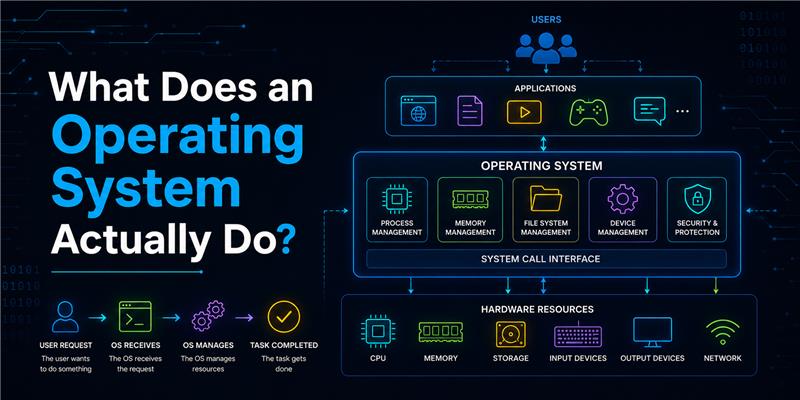
From the moment a computer starts until it shuts down, the operating system continuously manages resources and coordinates activities across the entire system. Instead of performing one large task, it handles many responsibilities simultaneously to ensure that applications run smoothly and efficiently.
Let's explore its major responsibilities.
Managing Processes
Every time you open an application or execute a Python script, the operating system creates a process, a program that is actively running.
Its responsibilities include:
- Creating new processes
- Allocating system resources
- Scheduling CPU time
- Monitoring execution
- Terminating completed processes
For instance, each application operates as a separate process if you are concurrently executing a Python program, writing a document, listening to music, and browsing the web. The operating system makes sure they run without interfering with each other.
Without process management, multitasking wouldn't be possible.
Managing Memory
Memory is one of the computer's most valuable resources. Every running application requires memory to store instructions, variables, and temporary data.
The operating system is responsible for:
- Allocating memory to each process
- Preventing processes from accessing one another's memory
- Reclaiming memory after programs finish
- Managing virtual memory when RAM becomes limited
Imagine multiple people trying to write in the same notebook at the same time. Their work would overlap and become unreadable. Similarly, without memory management, applications could overwrite each other's data, leading to crashes and unpredictable behavior.
The operating system avoids this by giving each process its own protected memory space.
Managing Files
Every document, image, video, program, and Python script stored on your computer is organized by the operating system.
It manages tasks such as:
- Creating files and folders
- Reading and writing data
- Moving or deleting files
- Managing file permissions
- Organizing storage efficiently
Consider the following code:
with open("report.txt") as file:
    data = file.read()
Python doesn't search your SSD for report.txt. Instead, it asks the operating system to locate the file, verify access permissions, read the data, and return it to the program.
This abstraction allows developers to work with files without worrying about how information is physically stored.
Managing Devices
Keyboards, mouse, displays, printers, speakers, cameras, storage drives, and network adapters are just a few of the hardware components that modern computers may connect to.
Since every hardware device operates differently, applications don't communicate with them directly. Instead, the operating system uses device drivers, specialized software that understands how each device works.
For example, when you press a key on your keyboard:
- The keyboard detects the input.
- Its device driver sends the signal to the operating system.
- The operating system identifies the active application.
- The character is delivered to that application.
The same principle applies when Python prints text, plays audio, or saves data to a storage device.
Managing CPU Time
Although modern computers appear to run many applications simultaneously, the CPU can execute only a limited number of instructions at any instant.
The operating system manages this by deciding:
- Which process should run next?
- How long can each process use the CPU?
- When to switch execution between processes.
This scheduling happens thousands of times every second, creating the illusion that multiple applications are running simultaneously.
Without efficient CPU scheduling, one application could monopolize the processor, making the entire system slow or unresponsive.
Security and Protection
The operating system also acts as the computer's security manager.
It protects users and applications by:
- Verifying user identities.
- Enforcing file permissions.
- Preventing unauthorized memory access.
- Isolating applications from one another.
- Controlling access to system resources.
For example, if a Python program attempts to access a protected system file without permission, the operating system blocks the request instead of allowing unauthorized access.
This protection not only improves security but also prevents accidental mistakes from affecting the entire system.
How Python Asks the Operating System to Do Work
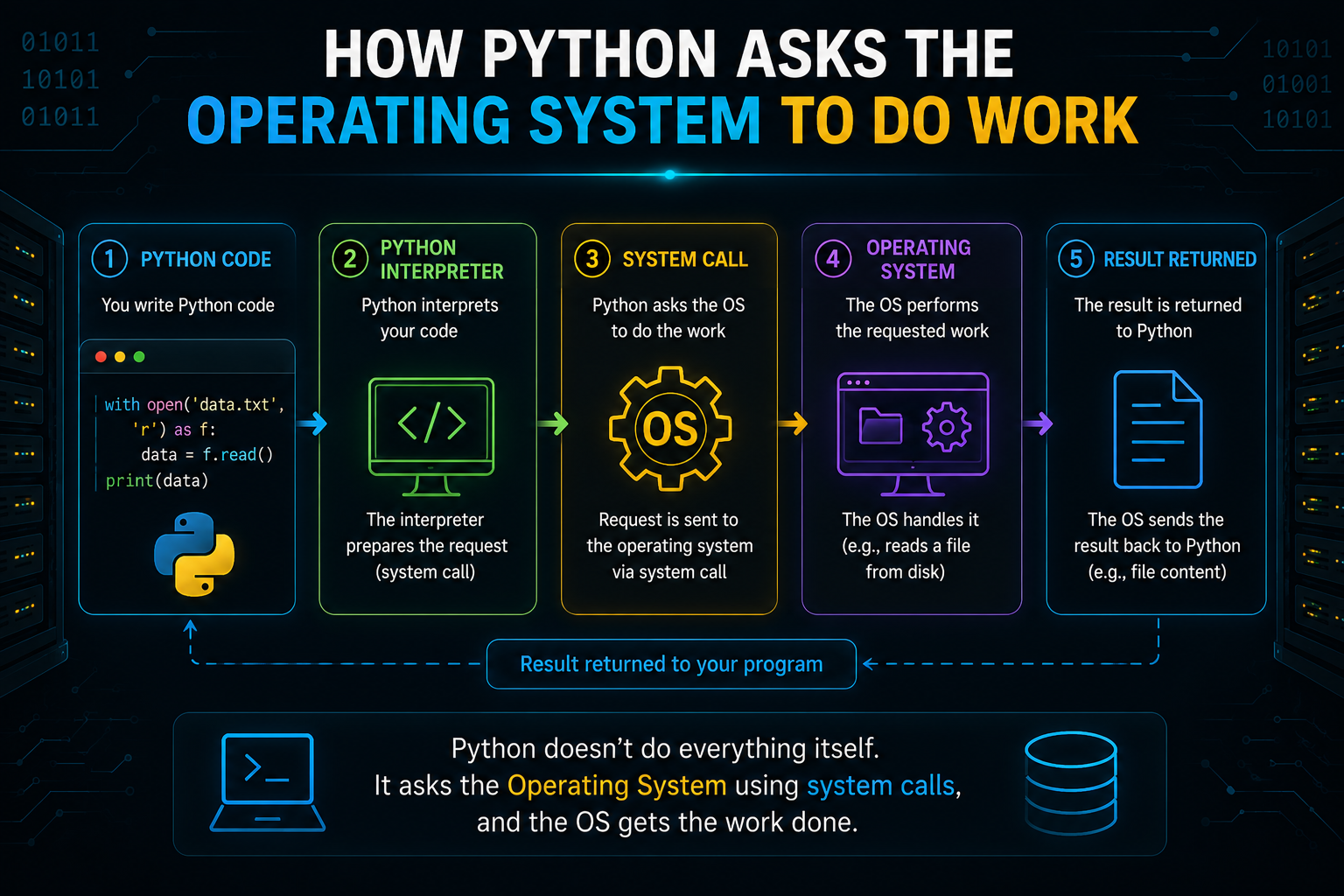
Python is known for its simple syntax, but behind every line of code is a series of interactions that make your program work. Whether you're reading a file, printing output, creating a process, or connecting to a website, Python doesn't perform these tasks on its own. Instead, it requests the operating system to perform them.
Think of Python as an architect designing a house. The architect creates the blueprint, but electricians, plumbers, and builders carry out the actual construction. Similarly, Python defines what should happen, while the operating system determines how it happens using the computer's hardware.
Let's see this relationship in action.
Reading a File
Consider the following Python program:
with open("notes.txt", "r") as file:
    content = file.read()
This looks like a simple file operation, but several steps happen behind the scenes.
- Python encounters the open() function.
- It requests the operating system to locate notes.txt.
- The operating system checks whether the file exists.
- It verifies that the program has permission to access the file.
- The operating system retrieves the data from the storage device.
- The file's contents are loaded into memory.
- Python receives the data and stores it in the content variable.
Python doesn't know where the file is physically stored or how data is retrieved from an SSD or HDD. Those responsibilities belong entirely to the operating system.
Displaying Output
Now consider one of the first programs every beginner writes:
print("Hello, World!")Although it appears to be a direct instruction, the process is more involved.
- Python prepares the text to be displayed.
- It asks the operating system to display the output.
- The operating system communicates with the graphics subsystem.
- The graphics hardware renders the text on the monitor.
Even the simplest Python program depends on the operating system to interact with the display hardware.
Allocating Memory
Whenever you create variables or objects, Python needs memory to store them.
numbers = [10, 20, 30, 40]When this list is created:
- Python requests memory from the operating system.
- The operating system allocates space in RAM.
- Python stores the list in the allocated memory.
As the program continues running, Python keeps requesting memory for new objects. When objects are no longer needed, Python's memory manager and the operating system work together to reclaim the memory.
Creating New Processes
Python also depends on the operating system when it creates additional processes.
from multiprocessing import Process

def greet():
    print("Hello")

p = Process(target=greet)
p.start()
When start() is executed, Python requests the operating system to:
- Create a new process.
- Allocate memory.
- Assign a unique Process ID (PID).
- Schedule the process for execution.
The operating system then manages this new process alongside every other application running on your computer.
System Calls — How Python Communicates with the Operating System
If Python cannot directly access hardware, how does it ask the operating system to perform tasks?
The answer is system calls.
A system call is a controlled mechanism that allows an application to request services from the operating system. It acts as the communication channel between user applications and the operating system's kernel.
Whenever Python needs to perform an operation that requires hardware access or privileged resources, it uses a system call.
Common operations that involve system calls include:
- Opening or closing files
- Reading and writing data
- Allocating memory
- Creating processes
- Accessing network resources
- Communicating with hardware devices
You can think of a system call as placing a service request.
Instead of directly interacting with the hardware, Python says:
"Please perform this operation for me."
The operating system validates the request, performs the necessary work, and returns the result to Python.
This architecture offers two major advantages.
Security: Applications cannot accidentally modify hardware or overwrite critical system memory.
Portability: The same Python program can run on Windows, Linux, and macOS because Python communicates with the operating system instead of depending on hardware-specific instructions.
User Mode vs Kernel Mode
Modern operating systems separate execution into two privilege levels: User Mode and Kernel Mode. This separation protects the system from accidental errors and unauthorized access while ensuring that applications can safely use system resources.
User Mode
Most applications, including Python programs, web browsers, media players, and text editors, run in User Mode.
In this mode, applications have limited permissions. They cannot directly:
- Access hardware devices.
- Modify operating system memory.
- Execute privileged instructions.
- Control other running processes.
If an application crashes in User Mode, it usually affects only that application rather than the entire operating system.
Kernel Mode
The operating system runs in Kernel Mode, which has unrestricted access to hardware and critical system resources.
In Kernel Mode, the operating system can:
- Manage memory.
- Schedule CPU time.
- Control storage devices.
- Handle input and output operations.
- Create and terminate processes.
- Communicate directly with hardware.
Whenever Python makes a system call, the operating system temporarily switches to Kernel Mode, performs the requested operation, and then returns control to the Python program in User Mode.
This controlled transition keeps the computer secure while allowing applications to use hardware safely.
Why This Separation Matters
Imagine if every application could directly access your computer's hardware and memory. A small programming mistake or a malicious application could corrupt important files, overwrite another program's memory, or crash the entire system.
By restricting applications to User Mode and reserving hardware access for Kernel Mode, operating systems ensure that software runs in a controlled and secure environment.
This design is one of the primary reasons modern computers remain stable even when many applications are running simultaneously.
How Everything Comes Together
Let's combine everything you've learned by following the journey of a simple Python program.
with open("data.txt", "r") as file:
    print(file.read())
Although this program contains only two lines, several components work together behind the scenes.
- You run the Python program.
- The operating system creates a process for the Python interpreter.
- Python reaches the open() function and requests the operating system to locate the file.
- The operating system verifies permissions and reads the file from storage.
- The data is returned to Python.
- Python executes the print() function.
- The operating system sends the output to the display subsystem.
- The monitor displays the text.
- When the program finishes, the operating system releases the allocated resources.
This sequence highlights an important principle:
Python focuses on solving problems, while the operating system manages the hardware needed to solve them.
Conclusion
Every program is built on top of the operating system, which controls memory, files, devices, processes, CPU scheduling, and security. Because operations like print(), open(), and process creation depend on the operating system, this is particularly crucial for Python coders. You may create Python programs that are more dependable, efficient, and platform-independent by comprehending this interplay.
Frequently Asked Questions
1. What is an operating system?
An operating system is a type of system software that controls the physical resources of a computer and offers the services needed for programs to function. It serves as a conduit between hardware and software.
2. Why does Python need an operating system?
Python relies on the operating system to perform tasks such as reading files, allocating memory, creating processes, communicating with hardware, and displaying output.
3. What is a system call?
A system call is a controlled request made by an application to the operating system to perform privileged operations, such as opening a file, allocating memory, or creating a process.
4. Can Python communicate directly with hardware?
No. Python communicates with hardware indirectly by requesting services from the operating system, which safely manages all hardware interactions.
5. What distinguishes Kernel Mode from User Mode?
Python and other programs operate in User Mode, which limits hardware access. The operating system operates in Kernel Mode, which has complete hardware access and carries out privileged actions on behalf of programs.