Key Highlights
- Before you see the output, your Python code is checked, translated, and run when you click Run.
- A Python program doesn't communicate with the CPU directly; it relies on the Python interpreter to understand and execute your instructions.
- Understanding the journey from a source file to the CPU helps you make sense of syntax errors, runtime errors, and how Python actually works.
- Knowing what happens behind the scenes builds stronger programming fundamentals and prepares you for advanced Python concepts.
- Once you understand Python's execution process, debugging code and learning new topics become much easier because you'll know what Python is doing at every stage.
You Press Run. What Happens Next?
You write a few lines of Python code, click Run, and within moments the output appears on your screen. It feels almost instant, making it easy to assume that the computer simply reads your code and executes it.
But that's not what actually happens.
Before your program prints a message, performs a calculation, or asks for user input, Python completes a series of well-defined steps. It first reads your source code, checks whether it follows Python's syntax rules, prepares it for execution, and then works with the operating system and processor to carry out your instructions.
This entire process happens so quickly that most beginners never notice it. Yet understanding it explains why syntax errors stop your program before it starts, why Python creates __pycache__ folders, and why the same Python code can run on Windows, macOS, and Linux with little or no modification.
In this blog, you will follow the complete journey of a Python program, from the moment you save a .py file until the CPU executes the operations that produce the final output.
A Bird's-Eye View of Python's Execution Process
Every Python program follows a sequence before it produces a result. While each stage has its own responsibility, together they ensure that your code is understood and executed correctly.
Source File (.py)
        │
        ▼
Python Interpreter
        │
        ▼
Syntax Validation & Compilation
        │
        ▼
Python Bytecode
        │
        ▼
Python Virtual Machine (PVM)
        │
        ▼
Operating System
        │
        ▼
CPU
        │
        ▼
Program Output
Don't worry if some of these terms are unfamiliar. By the end of this article, you'll understand what each stage does and why it's necessary.
Step 1: Writing Your Python Source Code
Each Python program starts out as a source file that ends in .py. The instructions in this file are simple for humans to create and comprehend since they are written in Python's understandable syntax.
For example:
print("Welcome to Python!")Despite the code's seeming simplicity, Python cannot be immediately understood by the CPU. Python needs to read and process these instructions before your program can execute. Because of this, the Python interpreter, which serves as a conduit between your source code and the computer, is required in the following step.
What Information Does a Source File Contain?
A source file can contain everything needed to define how a program should behave, including:
- Variables that store data
- Conditional statements for decision-making
- Task-repeating loops
- Reusable code organizing functions
- Objects and classes for more complex applications
- Comments that provide developers an explanation of the code
For example:
name = input("Enter your name: ")
print(f"Hello, {name}!")
Although this program looks simple, Python still needs to understand each statement before it can display the prompt or print the greeting.
That's exactly what happens in the next stage.
Step 2: The Python Interpreter Reads Your Code
Before executing a Python application, the Python interpreter examines your source code. It confirms that your code complies with Python's syntax rules, which include correct formatting, matching parentheses, and appropriate keyword usage.
For example:
print("Hello World"Since the closing parenthesis is missing, Python raises a SyntaxError and stops execution before the program begins.
Once the interpreter confirms that the code is syntactically correct, it prepares the program for the next stage, compiling it into Python bytecode, an intermediate format used during execution.
Why Doesn't Python Execute the Code Immediately?
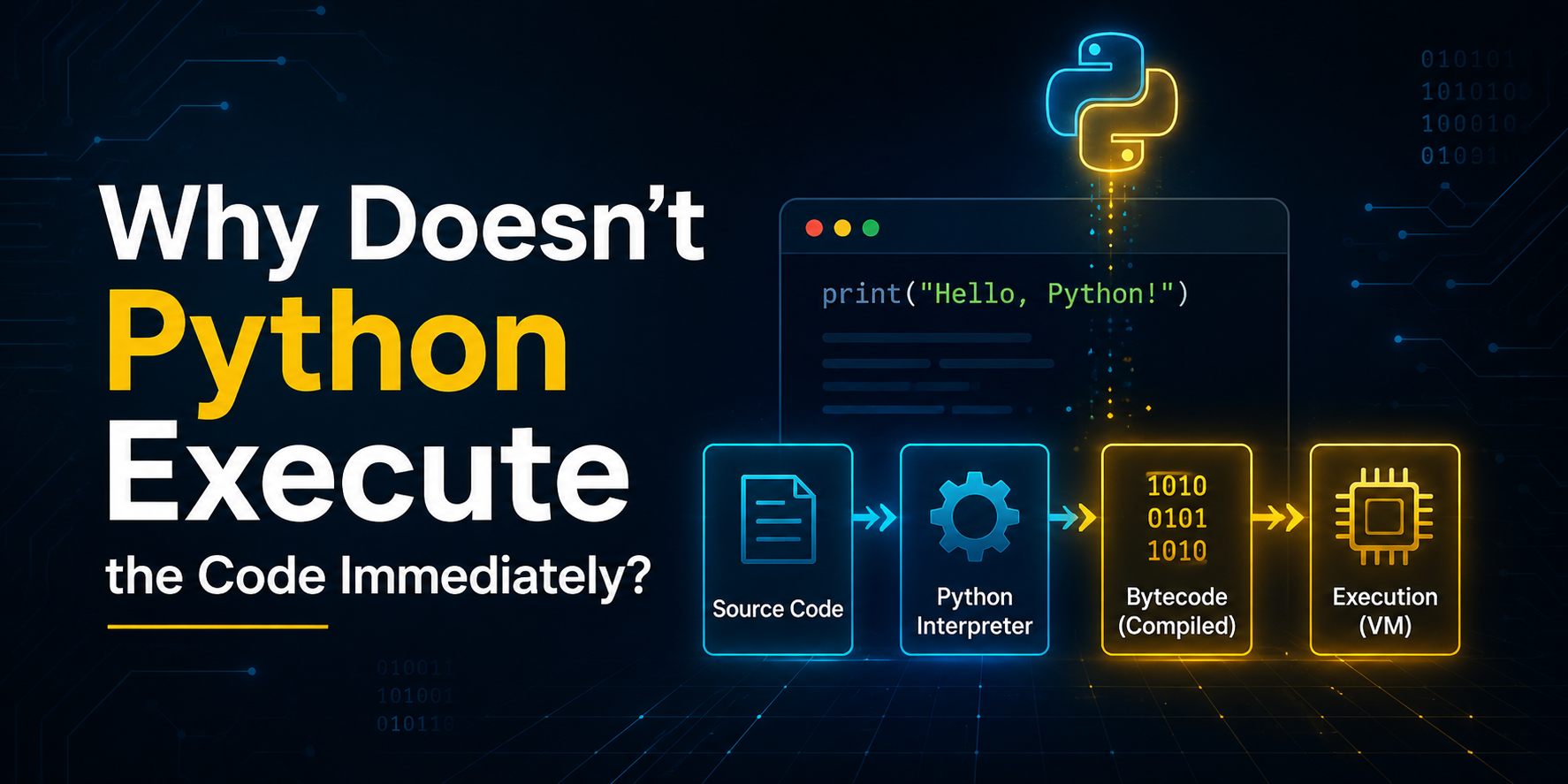
A common misconception is that Python reads one line and instantly executes it.
In reality, Python first needs to determine whether the entire program is structurally valid. Executing code that contains syntax mistakes could lead to unpredictable behaviour or incomplete execution.
By checking the program before running it, Python helps developers identify problems early and prevents invalid code from progressing further in the execution process.
Once the interpreter confirms that your source code is syntactically correct, it prepares the program for the next stage, compilation into Python bytecode.
This bytecode is neither the final form that the processor executes, nor is it machine code. Rather, it functions as an intermediary representation that the Python Virtual Machine can comprehend. In the next part, we'll go over what bytecode is and why Python utilizes it.
Step 3: Python Compiles Your Code into Bytecode
Once the Python interpreter confirms that your code is free of syntax errors, it moves to the next stage, compiling the source code into bytecode.
At first, this might sound surprising because Python is often described as an interpreted language. In reality, before your program is executed, Python first converts your source code into an intermediate format called bytecode.
Here's how the process looks so far:
Source Code (.py)
        │
        ▼
Python Interpreter
        │
        ▼
Python Bytecode
Bytecode is not the same as machine code. Instead, it's a platform-independent set of instructions designed specifically for Python's execution environment. Rather than being understood by the CPU, bytecode is created for the Python Virtual Machine (PVM), which executes it in the next stage.
This extra step allows Python to separate the code you write from the hardware running it, making Python programs portable across different operating systems.
Does Python Save Bytecode?
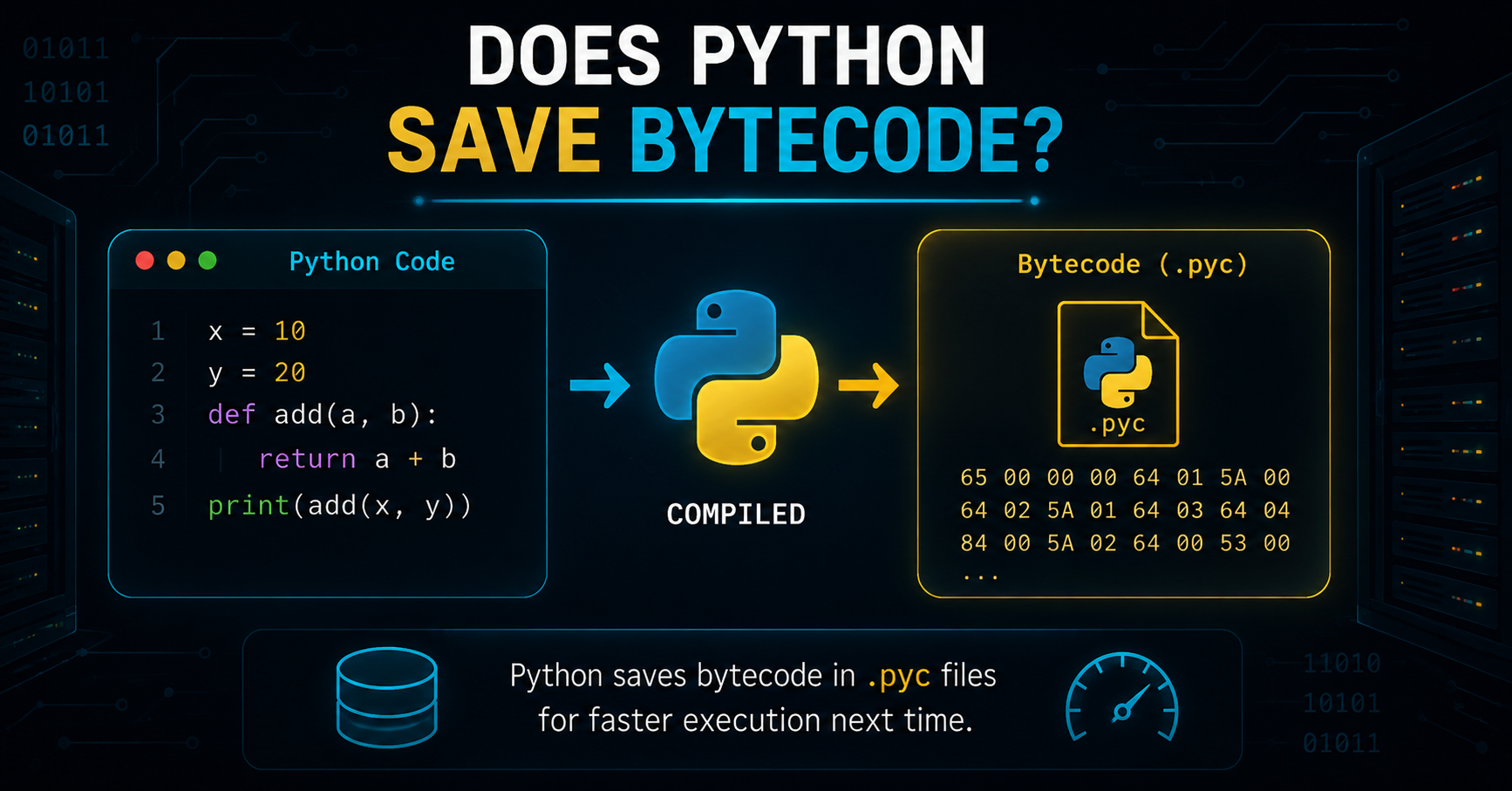
Sometimes, yes.
When you run a Python program, Python may store the compiled bytecode as a .pyc file inside a folder named __pycache__.
For example:
project/
│
├── app.py
└── __pycache__/
      └── app.cpython-313.pyc
These files are cached bytecode, created to help Python avoid recompiling unchanged modules every time they're imported.
However, they are not required for your program to run. If the __pycache__ folder is deleted, Python simply generates the cached bytecode again when needed.
So, think of __pycache__ as a performance optimization rather than a necessary part of Python execution.
Step 4: The Python Virtual Machine (PVM) Executes the Bytecode
After the bytecode is ready, Python hands it over to the Python Virtual Machine (PVM).
The PVM is the component responsible for executing Python bytecode instruction by instruction. It acts as the execution engine that understands bytecode and carries out the operations described in your program.
The execution flow now becomes:
Source Code
      │
      ▼
Python Interpreter
      │
      ▼
Bytecode
      │
      ▼
Python Virtual Machine (PVM)
Suppose your program contains:
x = 10
y = 20
print(x + y)
The PVM executes the bytecode that represents these operations in sequence. It creates variables, performs the addition, calls the print() function, and manages the execution of each instruction.
Although developers often imagine Python executing an entire program at once, the PVM actually processes the bytecode step by step until the program finishes.
Is the PVM the CPU?
No.
This is one of the most common misconceptions among beginners.
The PVM is software, while the CPU is hardware.
The PVM doesn't replace the processor or execute machine instructions directly. Instead, it interprets the bytecode and performs the required operations through the underlying Python implementation. Those operations ultimately rely on the operating system and processor to execute native instructions.
In simple terms:
The PVM understands Python bytecode.
The CPU understands machine instructions.
The PVM bridges the gap between the two during program execution.
Step 5: The Operating System and CPU Complete the Execution
At this stage, your Python program is almost finished.
As the PVM executes each bytecode instruction, it works with the operating system to perform tasks such as:
- Allocating memory
- Reading or writing files
- Displaying text on the screen
- Receiving keyboard input
- Accessing system resources
The CPU then connects with the operating system and carries out the low-level machine instructions required to carry out these tasks.
For example, when your program runs:
print("Hello, World!")Several things happen behind the scenes:
The print() function's bytecode is executed by the PVM.
The request to show text is sent to the operating system.
The CPU carries out the instructions required to send the output to your terminal or console.
Finally, you see:
Hello, World!Although this entire sequence takes only a fraction of a second, it involves multiple layers working together to produce the result.
Does Python Compile or Interpret?
This is one of the most frequently asked Python interview questions.
The accurate answer is:
Python does both.
First, Python compiles your source code into bytecode.
Then, the Python Virtual Machine interprets and executes that bytecode.
This is how the entire execution flow appears:
Source Code (.py)
        │
        ▼
Syntax Check
        │
        ▼
Compilation
        │
        ▼
Python Bytecode
        │
        ▼
Python Virtual Machine
        │
        ▼
Operating System
        │
        ▼
CPU
        │
        ▼
Program Output
Understanding this order debunks the fallacy that Python is "only interpreted." Although you do not directly create Python programs like you would in languages like C or C++, Python still completes a compilation stage before execution.
Why Does Python Use Bytecode?
You could question why Python utilizes bytecode at all if the CPU is unable to comprehend it directly.
Efficiency and adaptability hold the key to the solution.
The Python Virtual Machine can execute bytecode, a common intermediate format, reliably on several systems. This implies that you don't need to modify the Python source code for each operating system in order for it to function on Windows, macOS, and Linux.
Bytecode also improves performance in certain situations. When cached bytecode is available, Python can skip recompiling unchanged modules, reducing the work needed before execution begins.
In short, bytecode helps make Python portable, efficient, and easier to execute across different environments, which is one of the reasons Python has become such a widely used programming language.
Common Misconceptions About How Python Runs Code
After knowing Python's execution mechanism, it's clear why newcomers frequently have misconceptions. Many of these concepts are derived from simplistic justifications that omit crucial details.
Let's clear up some of the most common ones.
Myth 1: Python Executes Source Code Directly
Not exactly.
Although you write Python code in a .py file, Python doesn't send that file directly to the CPU. Before execution begins, the interpreter checks your code for syntax errors and compiles it into bytecode. The Python Virtual Machine (PVM) then executes that bytecode.
Myth 2: Bytecode Is Machine Code
No.
Machine code and bytecode are entirely different.
Python's intermediate form for the Python Virtual Machine is called bytecode.
Low-level instructions that the CPU can comprehend and carry out make up machine code.
This distinction is one of the reasons Python programs can run on multiple operating systems without changing the source code.
Myth 3: Python Is Only an Interpreted Language
Not entirely.
Python first compiles your source code into bytecode. Then, the Python Virtual Machine interprets and executes that bytecode.
That's why it's more accurate to say that Python uses both compilation and interpretation during program execution.
Myth 4: __pycache__ Is Required to Run Python Programs
False.
The __pycache__ folder stores cached bytecode files that can help improve performance when modules are imported again.
If you delete this folder, your program will still run normally. Python simply recreates the cached bytecode when needed.
Python Execution Flow: Complete Recap
Now that you have explored each stage individually, here's the complete journey of a Python program from start to finish.
Although this process happens in just a fraction of a second, every stage has a specific responsibility. Together, they ensure that your program is checked, prepared, and executed correctly.
Why Understanding Python's Execution Process Matters
At first, learning how Python runs code may seem like an advanced topic. In reality, it's one of the best ways to strengthen your programming fundamentals.
Understanding what goes on behind the scenes lets you to:
- Recognize the reasons why a program cannot run due to syntax problems.
- Know why Python creates the __pycache__ folder.
- Recognize the role of the Python interpreter and the PVM.
- Build a stronger foundation before learning advanced topics like memory management, modules, and performance optimization.
- Answer common Python interview questions with confidence.
Instead of treating Python as a "black box," you'll understand the sequence of events that turns your source code into a running program.
Conclusion
There is considerably more to running a Python program than just hitting the Run button. Your code starts out as a human-readable source file, goes through syntax validation, gets compiled into bytecode, is run by the Python Virtual Machine, and then collaborates with the CPU and operating system to generate the desired result.
You can see Python beyond its syntax by comprehending this path. It describes how Python carries out your commands, why errors happen, and why the language functions uniformly on many platforms.
As you continue learning Python, this knowledge will make advanced concepts easier to understand because you'll already know what happens behind the scenes every time your code runs.
Frequently Asked Questions
1. Does Python compile code before executing it?
Yes, before running your code, Python transforms it into bytecode. The Python Virtual Machine (PVM) then interprets and executes the bytecode.
2. What is Python bytecode?
Bytecode is an intermediate representation of your Python program. It's generated after compilation and is designed to be executed by the Python Virtual Machine rather than the CPU.
3. What is the Python Virtual Machine (PVM)?
The Python Virtual Machine is the execution engine that reads and executes Python bytecode. It acts as the bridge between your Python program and the underlying operating system.
4. Why does Python create the __pycache__ folder?
Python improves efficiency when modules are imported again by storing cached bytecode files in the __pycache__ subdirectory. These files are optional and can be automatically restored in the event that they are erased.
5. Is Python a compiled or interpreted language?
Python uses both approaches. It first compiles source code into bytecode and then interprets that bytecode during execution.