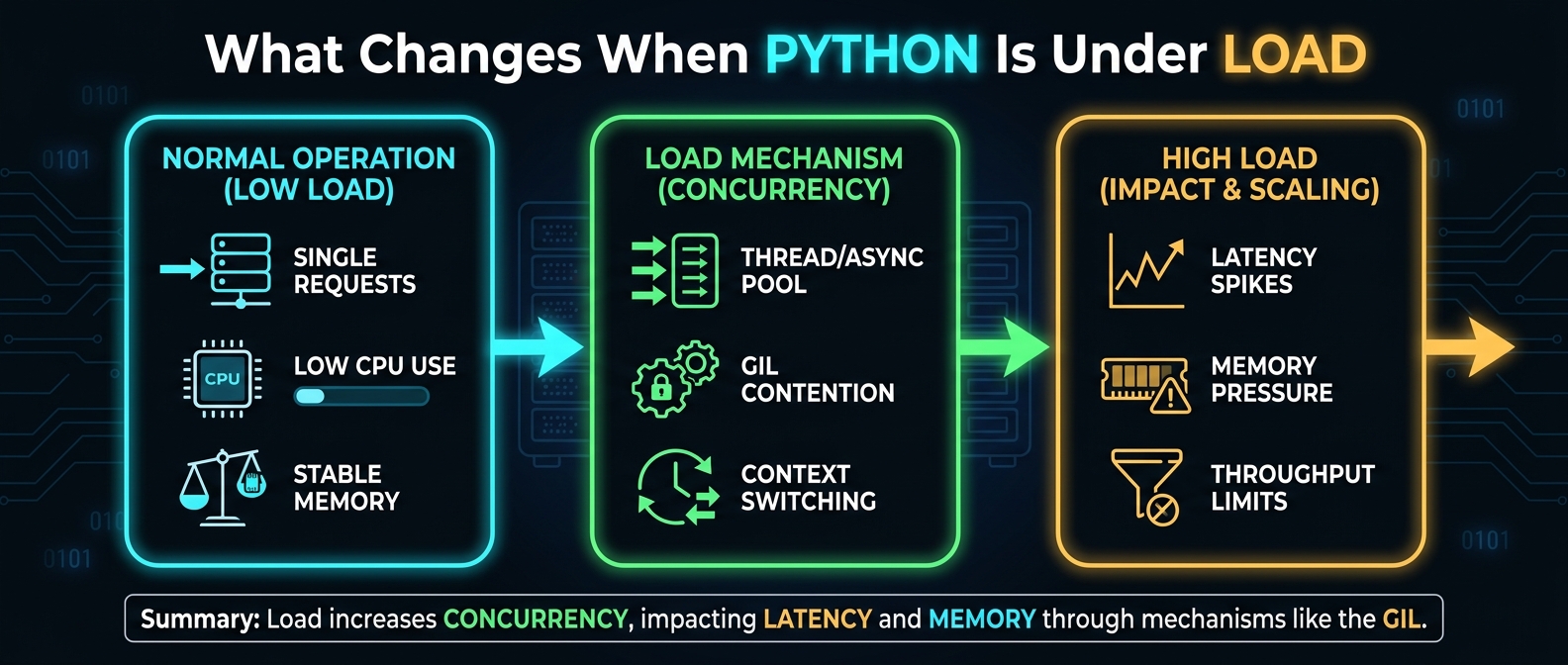
What Changes When Python Is Under Load
I/O Is Often About Waiting
I/O Is Often About Waiting
I/O-bound work spends significant time communicating with something outside the immediate Python computation.
Examples include:
- reading files
- writing files
- querying databases
- making HTTP requests
- communicating through sockets
- interacting with subprocesses
Consider:
with open("sales.txt", encoding="utf-8") as file:
    data = file.read()
The Python statement is simple, but several layers are involved:
Python code
    ↓
operating system
    ↓
filesystem / storage
    ↓
data returned
    ↓
Python object
The CPU isn't necessarily doing useful Python computation for the entire duration.
Network operations make this even clearer:
response = make_request()
data = response.json()
Your application may spend most of its time waiting for another system to respond. That distinction becomes important when deciding whether concurrency can help.
CPU-Bound vs I/O-Bound Work
A CPU-bound workload spends most of its time performing computation.
For example:
def calculate(values):
    total = 0

    for value in values:
        total += expensive_calculation(value)

    return total
An I/O-bound workload spends substantial time waiting:
def fetch_user(user_id):
    return database.get_user(user_id)
The difference matters because concurrency mechanisms don't provide the same benefit for both. For I/O-bound work, another task can often make progress while one task waits. For CPU-heavy Python code, the behavior depends on the CPython build and the nature of the computation.
Loading Data Is Also a Memory Decision
Suppose you need to load dataset in Python.
A straightforward approach is:
with open("users.txt", encoding="utf-8") as file:
    data = file.read()
That's reasonable when the file is small, and its size is known. But if the input is several gigabytes, the question becomes:
Do you really need the entire dataset in memory at once?
Often, you don't. You can process it incrementally:
with open("users.txt", encoding="utf-8") as file:
    for line in file:
        process(line)
Now the application processes the input progressively instead of constructing one enormous string. For very large workloads, this difference can determine whether a program stays within its memory limit.
load() and loads() Are Not the Same
When working with JSON, the distinction between load() and loads() is straightforward.
import json

with open("config.json", encoding="utf-8") as file:
    config = json.load(file)
json.load() reads JSON from a file-like object.
By contrast:
text = '{"name": "Asha"}'
config = json.loads(text)
json.loads() reads JSON from a string.
Likewise:
text = json.dumps({"name": "Asha"})
converts a Python object into JSON text.
So:
Python object
      ↓
   dumps()
      ↓
   JSON text
      ↓
   loads()
      ↓
Python object
These operations matter under load because serialization and deserialization consume CPU and memory.
Loading Text Incrementally
To load txt in Python, you can read the whole file:
with open("notes.txt", "r", encoding="utf-8") as file:
    text = file.read()
Or process it line by line:
with open("logs.txt", encoding="utf-8") as file:
    for line in file:
        process(line)
For chunk-based processing:
with open("large.txt", "r", encoding="utf-8") as file:
    while chunk := file.read(1024 * 1024):
        process(chunk)
The appropriate approach depends on what the application needs.
Streaming isn't automatically faster. Its major advantage is that it can prevent the entire input from becoming resident in memory simultaneously.
load_env Python and Configuration
You may also encounter load_env Python searches when working with environment configuration. For example, third-party packages such as python-dotenv provide functions that can read variables from a .env file and place them into the process environment.
Your application might then access a variable with:
import os
api_key = os.environ.get("API_KEY")
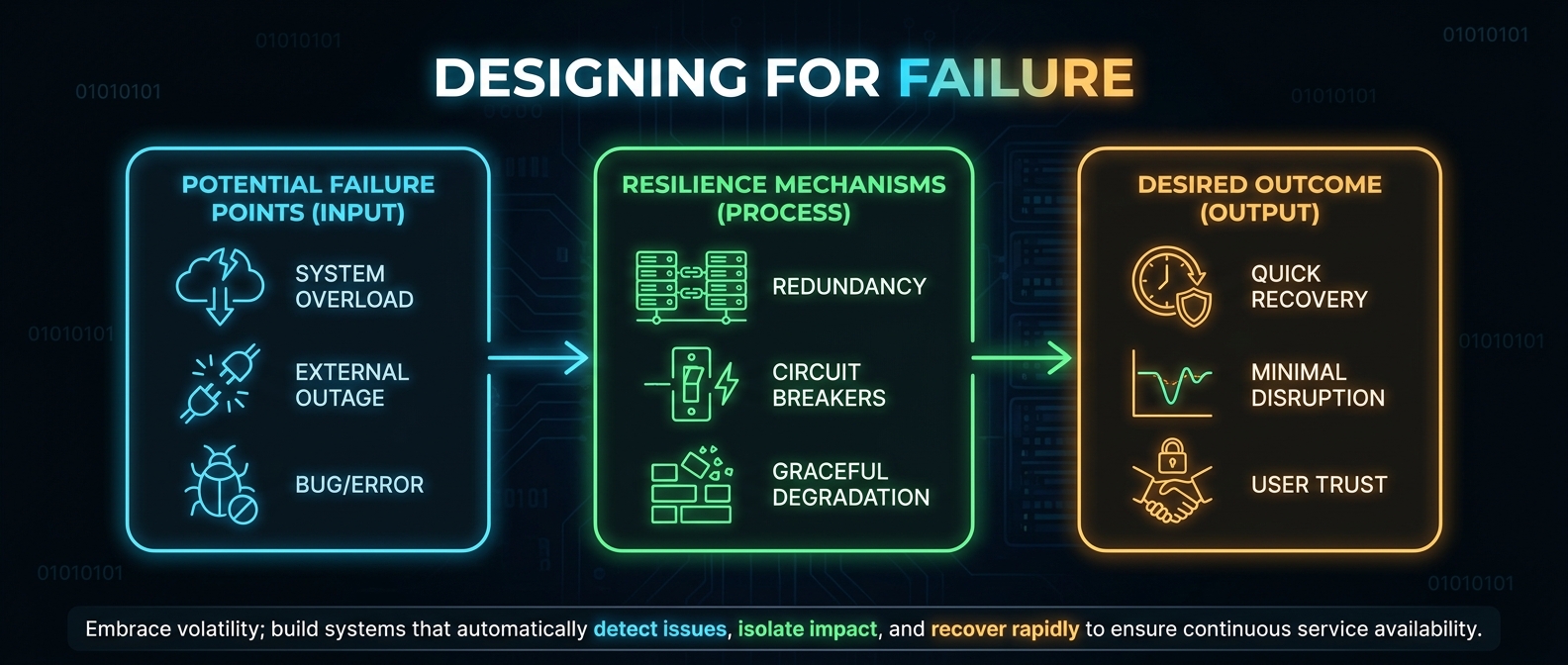
Designing for Failure
Exceptions Are Part of the Workload
Exceptions Are Part of the Workload
As workload increases, opportunities for failure increase too.
- A file can disappear.
- A network request can time out.
- A database can reject a connection.
- An input record can be malformed.
- An external API can return unexpected data.
Python's exception model allows an error to propagate through the call stack until a suitable handler deals with it.
For example:
try:
    data = load_data()
except ValueError:
    data = []
The important question isn't:
How do I prevent exceptions?
It's:
Which layer actually knows what to do when this operation fails?
That distinction leads to better error boundaries.
Keep try Blocks Narrow
Consider:
try:
    data = load_data()
    result = process(data)
    save(result)
except ValueError:
    recover()
Which operation produced the ValueError? It could be any of the three.
A narrower boundary gives you more precise control:
try:
    data = load_data()
except ValueError:
    recover()
else:
    result = process(data)
    save(result)
Now the exception handler is clearly associated with the loading operation. This becomes increasingly valuable when several operations have different failure and recovery strategies.
Preserve the Original Cause
Sometimes an application needs to translate a low-level exception into a domain-specific one.
try:
    data = json.loads(text)
except json.JSONDecodeError as error:
    raise ConfigurationError("Invalid configuration") from error
The application now exposes a meaningful error while retaining the original exception as its cause.
Cleanup Must Happen Even When Work Fails
Resource lifetime is another part of robust programs.
For files:
with open("data.txt", encoding="utf-8") as file:
    process(file)
The context manager handles cleanup when execution leaves the block.
Avoid Catching Everything
This:
try:
    process(data)
except Exception:
    return None
may appear resilient.
In reality, it can hide programming errors along with expected failures. Prefer specific exceptions when you know how to recover:
try:
    data = load_data()
except FileNotFoundError:
    data = []
Choosing the Right Concurrency Model
Threads for I/O-Bound Work
Threads for I/O-Bound Work
from concurrent.futures import ThreadPoolExecutor

def fetch(url):
    return make_request(url)

urls = [...]

with ThreadPoolExecutor(max_workers=8) as executor:
    results = list(executor.map(fetch, urls))
The workers can make progress on different operations while individual calls wait. But 8 isn't a magic number.
asyncio for Asynchronous I/O
import asyncio

async def fetch(url):
    return await async_request(url)

async def main(urls):
    tasks = [asyncio.create_task(fetch(url)) for url in urls]
    return await asyncio.gather(*tasks)

asyncio.run(main(urls))
When a coroutine reaches an await that actually suspends, another task can run. The important detail is that async def does not automatically make every operation asynchronous.
Processes for CPU-Heavy Work
from concurrent.futures import ProcessPoolExecutor

def calculate(value):
    return expensive_calculation(value)

values = range(100)

with ProcessPoolExecutor() as executor:
    results = list(executor.map(calculate, values))
ProcessPoolExecutor can bypass the GIL because each worker is a separate process. However, arguments and results generally need to be serializable, and the process boundary introduces overhead.
Interpreter Pools in Modern Python
Python 3.14 adds InterpreterPoolExecutor, which runs tasks in separate interpreters within worker threads. Each interpreter has its own runtime state and GIL, allowing genuine multi-core parallelism.
Concurrency Needs Limits
Imagine processing millions of records:
tasks = [
    executor.submit(process, item)
    for item in huge_dataset
]
Submitting everything immediately can create a large amount of pending work. A better architecture limits work in flight:
Producer
   ↓
bounded queue
   ↓
workers
   ↓
results
What CPython is Doing Under the Hood
The GIL Is About the Interpreter, Not "Python Can't Multithread"
The GIL Is About the Interpreter, Not "Python Can't Multithread"
The common statement "Python doesn't support multithreading" is too broad. Traditional GIL-enabled CPython allows multiple threads, and threads can be useful for I/O-bound work. The limitation is that the GIL prevents multiple threads from simultaneously executing Python bytecode in the same interpreter.
Free-Threaded CPython
Starting with Python 3.13, CPython supports free-threaded builds in which the GIL can be disabled. Such builds allow Python threads to execute Python code in parallel across CPU cores.
Python Objects and The Python Data Model
Python programs operate on objects:
numbers = [1, 2, 3, 4]
That list contains references to Python objects. Large collections can have significant memory overhead.
Reference Counting and Garbage Collection
CPython uses reference counting. Cyclic references are handled by the cyclic garbage collector.
The Operating System Is Part of the Performance Model
Python doesn't directly control every resource involved in execution.
Making Python Workloads More Predictable
Measure Before Optimizing
Measure Before Optimizing
from time import perf_counter
start = perf_counter()
run_work()
elapsed = perf_counter() - start
print(f"{elapsed:.3f}s")
Stream Large Inputs When Appropriate
Suppose a file contains millions of records.
with open("events.txt", encoding="utf-8") as file:
    for record in file:
        process(record)
Watch Serialization Boundaries
A process-based architecture may look like:
main process
    ↓
serialize
    ↓
worker process
    ↓
deserialize
    ↓
process
A Practical Load-Ready Architecture
A robust workload can often be thought about as a pipeline:
Input
  ↓
Validation
  ↓
Streaming / controlled loading
  ↓
Bounded work queue
  ↓
Workers
  ↓
Processing
  ↓
Error boundary
  ↓
Result
Common Mistakes When Python Is Under Load
- Loading Everything Into Memory
- Creating Unlimited Work
- Using Threads Without Identifying the Workload
- Blocking an Async Event Loop
- Ignoring Serialization Costs
- Catching Every Exception
- Assuming Every CPython Build Behaves the Same Way
- Optimizing Before Measuring
Final Takeaway
A Python application under load isn't simply "running more Python." It's moving through several systems:
Python code
    ↓
Python objects
    ↓
Memory
    ↓
I/O
    ↓
Operating system
    ↓
External services
    ↓
Concurrent workers
    ↓
Python runtime
Every boundary can introduce a different bottleneck.