
is vs == in Python: Identity, Equality, and Memory Diagrams Explained
Key Takeaways
- The is operator checks whether two variables refer to the same object in memory, while == compares whether their values are equal.
- Two different objects can contain identical data, so a == b can be True even when a is b is False.
- Every Python object has an identity, type, and value, and understanding these three properties makes comparisons easier to reason about.
- is None is the recommended way to check for None because None is a singleton object.
- Memory diagrams help visualize object references, aliasing, mutation, and rebinding, making debugging much easier.
Introduction
Imagine running the following code:
a = [1, 2]
b = [1, 2]
print(a is b)
print(a == b)
The output is:
False
True
At first glance, the result seems contradictory. If both lists contain the same values, why does one comparison return True while the other returns False?
The answer lies in how Python stores and compares objects. The is and == operators answer two completely different questions:
- is asks: Are these references pointing to the same object?
- == asks: Do these objects have the same value?
Understanding this distinction is one of the most important steps in learning Python's object model. It also explains why aliasing, mutable objects, shallow copies, and even some debugging scenarios behave the way they do.
In this guide, you'll learn the difference between identity and equality, understand when to use each operator, and use simple memory diagrams to visualize what's happening behind the scenes.
Understanding Python's Object Model Before Comparing Objects
Before learning the difference between is and ==, it's important to understand how Python treats data.
Every value in Python is an object, and every object has three fundamental properties:
- Identity – distinguishes one object from another.
- Type – defines what kind of object it is, such as a list, string, or integer.
- Value – represents the data stored in the object.
A simple mental model looks like this:
name
  │
 ▼
object
├── identity
├── type
└── value
Variables in Python don't store values directly. Instead, they refer to objects. When you compare two variables, Python can either compare the objects themselves or compare the values those objects contain. That's why Python provides two different comparison operators.
is vs == in Python: What's the Difference?
Although both operators compare objects, they answer different questions.
| Operator | What It Checks | Typical Use |
|---|---|---|
| is | Whether two variables refer to the same object | Identity comparison |
| == | Whether two objects have equal values | Value comparison |
Consider this example:
a = [1, 2]
b = [1, 2]
print(a is b)
print(a == b)
Output
False
True
Here's why:
- a is b returns False because each list literal creates a separate list object.
- a == b returns True because both lists contain the same elements.
Memory diagram:
a ─────▶ list object #1 [1, 2]
b ─────▶ list object #2 [1, 2]
The values are identical, but the objects are different.
This distinction forms the foundation for understanding object references, mutation, copying, and many other Python concepts.
Understanding Identity in Python (is Operator)
Identity answers one question:
Are these two references pointing to the exact same object?
Every object created in Python has an identity that remains constant for its lifetime.
The is operator compares that identity.
For example:
a = []
b = a
print(a is b)
Output
TrueBoth variables refer to the same list object.
Memory diagram:
a ─┐
   ├────▶ list object []
b ─┘
Now compare it with this example:
a = []
b = []
print(a is b)
Output
FalseAlthough both lists are empty, each [] creates a new object.
a ─────▶ list object #1 []

b ─────▶ list object #2 []
Using id() to Understand Identity
Python provides the built-in id() function to inspect an object's identity during its lifetime.
items = [1, 2, 3]
print(id(items))
print(id(items))
Both calls return the same value because items refers to the same object.
The exact number returned by id() is not important. What matters is that the identity remains the same while the object exists. It's mainly used for learning and debugging rather than application logic.
Understanding Equality in Python (== Operator)
While is compares identity, the == operator compares values.
It answers the question:
Should these two objects be considered equal?
For built-in Python types, equality is determined by the object's contents.
print([1, 2] == [1, 2])Output
TrueThe two lists are different objects, but their elements match.
Similarly,
print("python" == "python")
print((1, 2) == (1, 2))
print({"x": 1} == {"x": 1})
Output
True
True
True
Different data types define equality according to their own rules.
For example:
- Lists compare corresponding elements.
- Tuples compare items in order.
- Dictionaries compare key-value pairs.
- Strings compare their sequence of characters.
- Numbers compare their numeric values.
This is why == is the preferred operator for most comparisons in everyday Python programs.
Identity vs Equality Explained with Memory Diagrams
The easiest way to understand the difference between is and == is to visualize how variables refer to objects.
Case 1: Same Object
a = [1, 2]
b = a

print(a is b)
print(a == b)
Output
True
True
Memory diagram:
a ─┐
      ├────▶ list object [1, 2]
b ─┘
Both variables refer to the same object, so both comparisons return True.
Case 2: Different Objects, Same Value
a = [1, 2]
b = [1, 2]

print(a is b)
print(a == b)
Output
False
True
Memory diagram:
a ─────▶ list object #1 [1, 2]
b ─────▶ list object #2 [1, 2]
The lists have equal contents, but they are separate objects.
Case 3: Different Objects, Different Values
a = [1, 2]
b = [3, 4]
print(a is b)
print(a == b)
Output
False
False
Memory diagram:
a ─────▶ list object #1 [1, 2]
b ─────▶ list object #2 [3, 4]
Since both the objects and their values differ, both comparisons return False.
These three scenarios explain nearly every comparison involving is and ==. Once you understand them, concepts like aliasing, mutation, copying, and object references become much easier to follow.
I agree with the revised flow. Below is Part 2, written as a continuation of Part 1. It stays grounded in the reference, avoids fluff, and maintains a smooth learning progression.
Why Identity and Equality Become Confusing
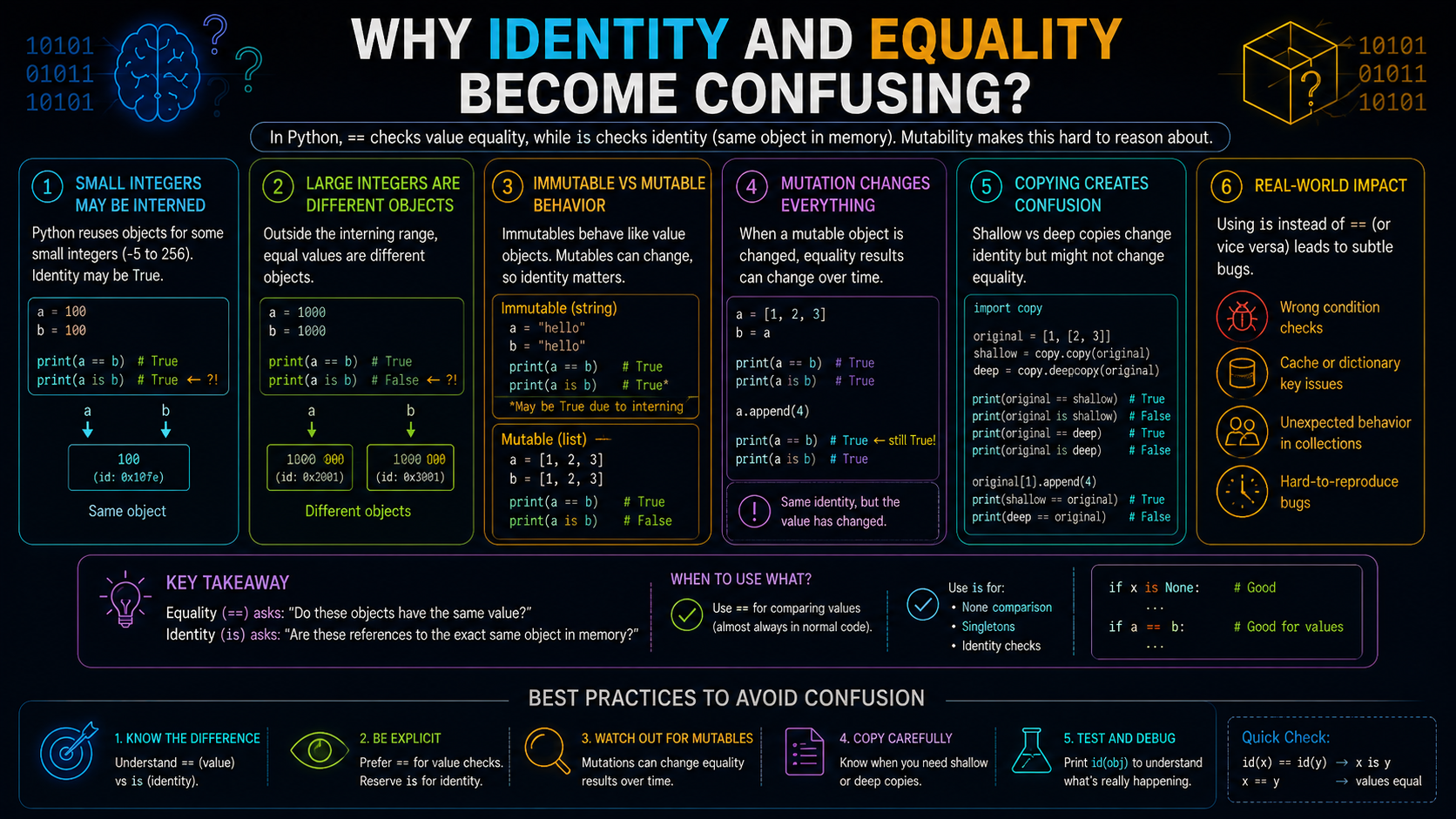
In Part 1, you learned that:
- is checks whether two variables refer to the same object.
- == checks whether two objects have the same value.
The distinction seems straightforward until you start working with mutable objects like lists and dictionaries.
The reason is that Python variables don't store objects directly—they store references to objects. This means multiple variables can refer to the same object, and changes made through one variable may be visible through another.
Understanding this behavior requires three closely related concepts:
- Aliasing
- Mutation
- Rebinding
Together, these concepts explain many situations where identity matters more than equality.
Aliasing: When Two Variables Refer to the Same Object
Aliasing occurs when multiple variables refer to the same object.
For example:
a = [1, 2]
b = a
print(a is b)
print(a == b)
Output
True
True
Memory diagram:
a ─┐
      ├────▶ list object [1, 2]
b ─┘
Only one list object exists.
Both a and b point to that object. Therefore:
- a is b returns True because both variables refer to the same object.
- a == b also returns True because an object is always equal to itself.
Aliasing doesn't create a copy of an object—it simply creates another reference to the existing object.
Mutation Changes the Object, Not Its Identity
Some Python objects, such as lists, dictionaries, and sets, are mutable, meaning their contents can change after they're created.
Let's continue with the previous example.
a = [1, 2]
b = a
b.append(3)
print(a)
print(b)
Output
[1, 2, 3]
[1, 2, 3]
Memory diagram:
a ─┐
      ├────▶ list object [1, 2, 3]
b ─┘
Notice what changed.
The list object was modified, but the references did not change.
Both variables still point to the same object, so both display the updated list.
This is why modifying a mutable object through one variable affects every other variable that refers to the same object.
Rebinding Changes the Reference
Mutation modifies an existing object.
Rebinding is different. It changes which object a variable refers to.
a = [1, 2]
b = a
b = [3, 4]
print(a)
print(b)
print(a is b)
Output
[1, 2]
[3, 4]
False
Memory diagram:
a ─────▶ list object #1 [1, 2]
b ─────▶ list object #2 [3, 4]
Here, the original list wasn't modified.
Instead, b was assigned a new list object.
After rebinding:
- a still refers to the original list.
- b refers to a different list.
The two variables no longer share the same identity.
Understanding the difference between mutation and rebinding is essential for reasoning about object references in Python.
Why Memory Diagrams Make These Concepts Easier
When reading code, it's often difficult to tell whether a variable is referring to an existing object or a new one.
Memory diagrams remove that ambiguity by showing:
- Variables (names)
- Objects
- References between them
For example, compare these two snippets.
Example 1: Mutation
a = [1, 2]
b = a
b.append(3)
Memory diagram:
a ─┐
      ├────▶ list object [1, 2, 3]
b ─┘
Only the object's contents changed.
Example 2: Rebinding
a = [1, 2]
b = a
b = [3, 4]
Memory diagram:
a ─────▶ list object #1 [1, 2]
b ─────▶ list object #2 [3, 4]
The object remained unchanged.
Only the reference stored in b changed.
Whenever you're unsure why two variables behave differently, drawing a simple memory diagram often makes the answer immediately clear.
When Should You Use is?
Use is only when you want to know whether two references point to the same object.
The most common use cases are:
- Comparing with None
- Comparing with a sentinel object
For most other comparisons—including strings, numbers, lists, tuples, and dictionaries—use == because you're interested in comparing values, not object identities.
Why is None the Recommended Way to Check for None
None represents the absence of a value in Python.
It is also a singleton, which means there is only one None object.
Because of this, checking identity is the most precise way to determine whether a variable refers to None.
value = None

if value is None:
    print("No value available")
Although this also works,
if value == None:
    ...
is None is preferred because it explicitly checks whether the variable refers to the singleton None object.
Truthiness Is Different from Identity and Equality
Python conditions don't always compare objects directly.
Instead, they evaluate an object's truthiness.
Truthiness, equality, and identity answer different questions.
| Concept | Question It Answers |
|---|---|
| Truthiness | Should this object evaluate to True or False in a condition? |
| Equality (==) | Do these objects have the same value? |
| Identity (is) | Do these variables refer to the same object? |
Consider this example:
values = []
print(values == [])
print(values is [])
print(bool(values))
Output
True
False
False
These results are different because each statement asks a different question.
values == [] compares values.
values is [] compares object identity.
bool(values) evaluates whether the object is truthy or falsy.
Although they involve the same variable, they represent three separate concepts.
Why is True and is False Are Rarely Used
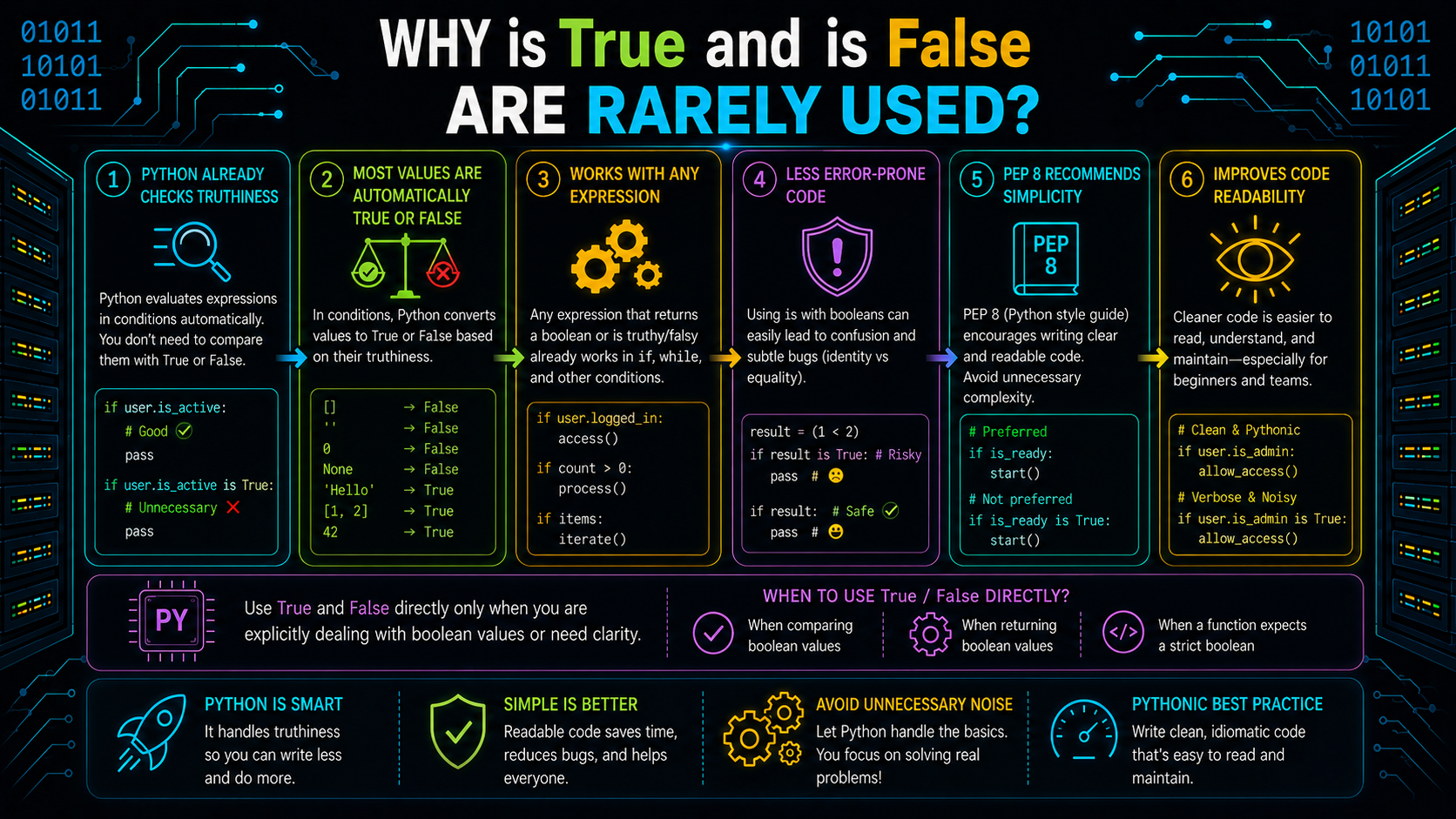
Since Python conditions already evaluate truthiness, comparing directly with True or False is usually unnecessary.
Instead of writing:
if is_active is True:
    ...
write:
if is_active:
    ...
Similarly,
if not is_active:
    ...
is generally preferred over:
if is_active is False:
    ...
This makes the code simpler and follows common Python style.
Why is Sometimes Works for Numbers and Strings
You may occasionally see examples like these:
a = 10
b = 10
print(a is b)
or
language1 = "python"
language2 = "python"
print(language1 is language2)
Depending on the Python implementation, these comparisons may return True.
This happens because implementations such as CPython may reuse certain integer and string objects as an optimization.
These optimizations should not influence how you write comparisons.
Instead of writing:
count is 10use:
count == 10Likewise, compare string values with ==, not is.
Your program should compare the values, not rely on whether Python happens to reuse an object internally.
Why [] is [] Returns False
This example brings together everything you've learned so far.
print([] is [])
print([] == [])
Output
False
True
Every time Python evaluates [], it creates a new list object.
Memory diagram:
list object #1 []
list object #2 []
The two lists contain the same values, so == returns True.
However, they are different objects, so is returns False.
This example reinforces the central idea of this guide:
- Identity asks whether two references point to the same object.
- Equality asks whether two objects have the same value.
With these concepts in place, you're ready to explore more advanced scenarios involving nested objects, copying, and shared references, where understanding identity becomes even more important.
Identity in Nested Objects
So far, we've seen how two variables can refer to the same object. The same idea applies when one object contains another.
Consider this example:
row = [1, 2]
matrix = [row, row]
matrix[0].append(3)
print(matrix)
Output
[[1, 2, 3], [1, 2, 3]]At first, this may seem surprising because only matrix[0] was modified.
The reason is that both positions in matrix refer to the same inner list.
Memory diagram:
There is only one inner list object. Since both elements of the outer list point to it, modifying one reference changes what both references see.
Independent Nested Objects
Now compare the previous example with this one.
matrix = [[1, 2], [1, 2]]
matrix[0].append(3)
print(matrix)
Output
[[1, 2, 3], [1, 2]]Memory diagram:
Although both rows started with the same values, each list literal created a separate list object.
Only the first list changed because the two rows have different identities.
Function Calls Also Use Object References
Function parameters work the same way as variables.
When you pass an object to a function, Python binds the parameter name to the same object—it doesn't automatically create a copy.
def add_item(values):
    values.append("Python")
items = []
add_item(items)
print(items)
Output
['Python']During the function call, both items and values refer to the same list object.
Memory diagram:
Global Namespace

items   ─┐
              ├────▶ list object ["Python"]
values ─┘
When the function ends, the parameter values disappears, but the list object remains because items still refers to it.
This is why changes made inside the function are visible outside the function.
Rebinding a Function Parameter Doesn't Affect the Original Object
Now consider another function.
def reset(values):
    values = []
items = [1, 2]
reset(items)
print(items)
Output
[1, 2]Why didn't the original list change?
Because the function didn't modify the existing list.
Instead, it rebound the local variable values to a new list object.
Memory diagram:
Before rebinding:
items ───┐
                 ├────▶ list object [1, 2]
values ──┘
After rebinding:
items ─────▶ list object [1, 2]
values ────▶ list object []
The caller's variable still points to the original list.
This example highlights an important distinction:
- Mutation changes an object.
- Rebinding changes a variable's reference.
Shallow Copy vs Deep Copy
Sometimes you want a copy of an object instead of another reference to it.
Python provides two common approaches:
- Shallow copy
- Deep copy
Although both create new objects, they behave differently for nested mutable objects.
Shallow Copy
A shallow copy creates a new outer container, but the nested objects inside it are still shared.
a = [[1], [2]]
b = a.copy()
Memory diagram:
a ─────▶ outer list #1
          ├──▶ inner list #1 [1]
          └──▶ inner list #2 [2]

b ─────▶ outer list #2
          ├──▶ inner list #1 [1]
          └──▶ inner list #2 [2]
The outer lists are different objects.
The inner lists are the same objects.
If one of the inner lists is modified, both outer lists observe the change.
Deep Copy
A deep copy duplicates the outer container and the nested mutable objects.
import copy

a = [[1], [2]]

b = copy.deepcopy(a)
Memory diagram:
a ─────▶ outer list #1
          ├──▶ inner list #1 [1]
          └──▶ inner list #2 [2]

b ─────▶ outer list #2
          ├──▶ inner list #3 [1]
          └──▶ inner list #4 [2]
Now every nested list has its own identity.
Changes to one structure won't affect the other.
A Common Pitfall: List Multiplication
One of the most common mistakes involving object identity is list multiplication.
matrix = [[0] * 3] * 3

matrix[0][0] = 1

print(matrix)
Output
[[1, 0, 0], [1, 0, 0], [1, 0, 0]]The output may suggest that Python copied the first row three times.
It didn't. Instead, the outer list contains three references to the same inner list object.
Memory diagram:
To create independent rows, use a list comprehension.
matrix = [[0] * 3 for _ in range(3)]Each iteration creates a new inner list, giving every row its own identity.
Equality Can Be Customized, Identity Cannot
The behaviour of == depends on the object type.
Built-in types such as lists and dictionaries compare their contents, while user-defined classes can define their own equality rules.
For example:
class User:
    def __init__(self, email):
        self.email = email

u1 = User("alice@example.com")
u2 = User("alice@example.com")

print(u1 == u2)
Without custom equality behavior, the comparison returns False because the two objects have different identities. Later, a class can define custom equality so that two users with the same email compare as equal.
The important idea is that == is type-defined behavior. The is operator is different. It always checks whether two variables refer to the same object, and this behavior cannot be customized.
When Should You Use is and ==?
Use the operator that matches the question you're asking.
| Situation | Recommended Operator |
|---|---|
| Compare numbers | == |
| Compare strings | == |
| Compare lists | == |
| Compare dictionaries | == |
| Check for None | is |
| Compare a sentinel object | is |
| Verify two variables refer to the same object | is |
As a general rule:
- Use == when comparing values.
- Use is only when object identity matters.
Common Mistakes Beginners Make
| Mistake | Why It's Incorrect | Correct Approach |
|---|---|---|
| Using is for numbers | Identity isn't guaranteed for numeric values | Use == |
| Using is for strings | Python may reuse string objects internally | Use == |
| Writing value == None | Checks equality instead of identity | Use value is None |
| Assuming equal objects are identical | Equal values don't imply the same object | Understand identity vs equality |
| Expecting a shallow copy to duplicate nested objects | Nested mutable objects remain shared | Use deepcopy() when independent copies are required |
Conclusion
Understanding the difference between identity and value is essential for reasoning about how Python handles objects.
Remember these key ideas:
- Every Python object has an identity, type, and value.
- Variables store references to objects, not the objects themselves.
- is checks whether two references point to the same object.
- == checks whether two objects have the same value.
- Mutation changes an object's contents, while rebinding changes what a variable refers to.
- Memory diagrams make aliasing, copying, and nested object relationships much easier to visualize.
- Use == for most comparisons and reserve is for cases where identity genuinely matters, such as checking for None.
The complete mental model can be summarized as:
name
  │
 ▼
object
├── identity
├── type
└── value
Once you understand this model, concepts like mutable objects, copying, function arguments, and object references become much easier to reason about.
Frequently Asked Questions
1. What is the difference between is and == in Python?▾
is checks whether two variables refer to the same object, while == checks whether two objects have equal values.
2. Why is is None preferred over == None?▾
None is a singleton object, so checking identity with is accurately determines whether a variable refers to that object.
3. Why does [] is [] return False?▾
Each list literal creates a new list object. Although the lists have equal values, they have different identities.
4. Can two different objects be equal?▾
Yes. Two objects can store the same values while having different identities.
5. When should I use id()?▾
id() is useful for learning and debugging object identity. It isn't intended to serve as a permanent identifier in application code.