
Mutable vs Immutable in Python: The Bugs It Causes and How to Avoid Them
Key Highlights
- The ability to change an item after it has been formed is known as its mutability.
- Mutable and immutable in Python are properties of objects, not variables or names.
- Lists, dictionaries, and sets are mutable, while strings, tuples, integers, and booleans are immutable.
- Understanding the difference between mutation and rebinding helps explain many unexpected Python behaviors.
- Knowing which objects are mutable helps you avoid common bugs caused by shared references and unintended changes.
Introduction
Consider the following code:
numbers = [10, 20]
backup = numbers
backup.append(30)
print(numbers)
Most beginners expect backup to change while numbers remains the same. Instead, the output is:
[10, 20, 30]This isn't a bug or a Python quirk. It happens because lists are mutable objects, and both variables refer to the same object.
Now compare it with a string:
language = "Python"
language += " 3"
Here, the original string isn't modified. Python creates a new string object instead.
These two examples highlight one of Python's most important concepts, mutability. Understanding how mutable and immutable objects behave makes it easier to reason about assignment, object references, and many bugs that occur when working with Python programs.
What Is Mutability in Python?
Mutability describes whether an object can be changed after it is created. Some objects allow their contents to be modified, while others remain unchanged throughout their lifetime.
This property belongs to the object itself, not the variable that refers to it.
Understanding mutability is essential because Python handles mutable and immutable objects differently during assignment and updates.
What Does Mutable Mean?
Once an object is formed, it can be changed. Instead of creating a new object, Python updates the existing object in memory.
For example, a list is mutable.
numbers = [10, 20]
numbers.append(30)
print(numbers)
Output
[10, 20, 30]The append() method modifies the original list by adding a new element.
Other common mutable data types in Python include:
- Lists (list)
- Dictionaries (dict)
- Sets (set)
Since these objects can change over time, they are useful when data needs to be updated, added, or removed.
What Does Immutable Mean?
An immutable object cannot be modified after it is created. If you appear to change its value, rather than changing an existing object, Python produces a new one.
For example, strings are immutable.
language = "Python"
language = language + " 3"
print(language)
Output
Python 3The original string object is still the same even though it appears that the string has changed. Python assigns the variable to a newly created string object that contains "Python 3".
Other common immutable objects in Python include:
- Integers (int)
- Floating-point numbers (float)
- Booleans (bool)
- Strings (str)
- Tuples (tuple)
- Bytes (bytes)
- Frozensets (frozenset)
Key Takeaway: Immutable objects never change after creation. Any apparent modification creates a new object.
Mutability Is a Property of Objects, Not Names
The idea that variables are either immutable or mutable is one of the most widespread misunderstandings. In actuality, mutability is limited to objects.
Consider this example:
message = "Hello"Here:
- message is simply a name.
- "Hello" is a string object.
- The string object is immutable.
Later, you can write:
message = "Welcome"The original string remains unchanged as a result. Rather, a new string object is now linked to the name message.
The variable itself hasn't changed, it simply refers to another object.
This distinction becomes even more important when working with mutable objects such as lists and dictionaries.
Remember: Variables don't become mutable or immutable. They simply refer to objects that may or may not be mutable.
Why Does Python Support Both Mutable and Immutable Objects?
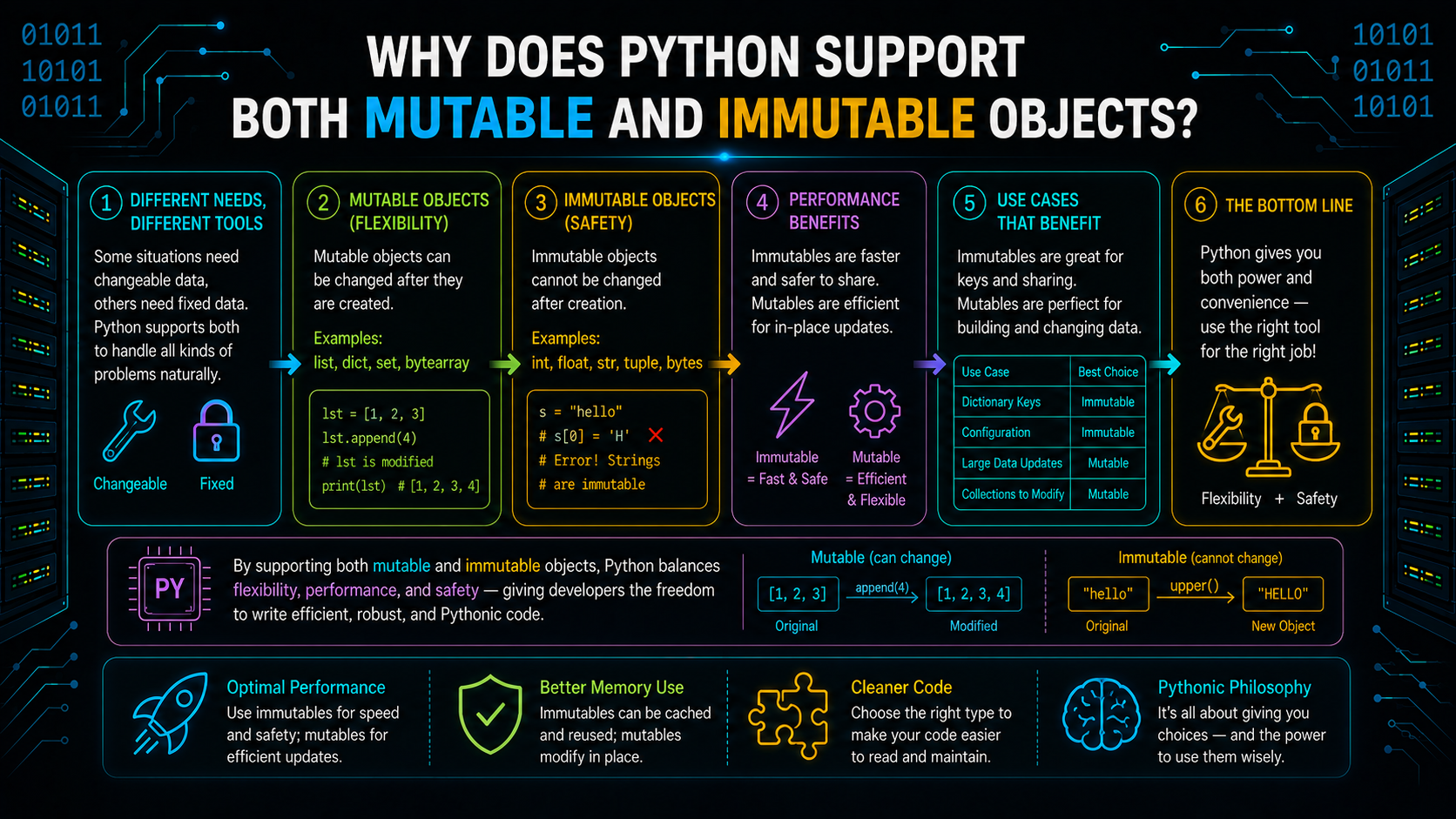
If immutable objects are safer, why doesn't Python make every object immutable?
The answer lies in flexibility and efficiency.
Mutable objects are useful when data needs to change over time. For example, adding elements to a list or updating values in a dictionary would be inefficient if Python had to create a new object after every change.
Immutable objects, on the other hand, provide predictable behavior because their values never change after creation. This makes them safer to share across different parts of a program.
Python uses both types because they solve different problems.
- Use mutable objects when data needs to be updated.
- Use immutable objects when values should remain unchanged.
Mutable vs Immutable in Python
Both mutable and immutable objects represent data, but they behave differently when you modify them.
The key difference is what happens after an update operation.
- A mutable object is updated in place.
- An immutable object cannot be updated. Python creates a new object instead.
Mutation and Rebinding Are Different Operations
A lot of beginners mistake rebinding for mutation, however the two are not the same.
Mutation
Mutation changes the existing object.
numbers = [1, 2]
numbers.append(3)
The same list object now contains three elements.
Rebinding
Rebinding doesn't modify an existing object. Instead, it makes a variable refer to another object.
numbers = [1, 2]
numbers = [1, 2, 3]
Here, Python creates a new list object and binds the name numbers to it.
The original list object isn't modified by this assignment.
Remember: Mutation changes an object. Rebinding changes the relationship between a name and an object.
Difference Between Mutable and Immutable in Python
| Feature | Mutable Objects | Immutable Objects |
|---|---|---|
| Modification after creation | Can be modified after they are created. | Cannot be modified after they are created. |
| What happens when the value changes? | The existing object is updated without creating a new object. | Python does not change an existing object; instead, it generates a new one. |
| Effect on shared references | Changes are visible through every variable that refers to the same object. | Since a new object is created, other variables referring to the original object remain unchanged. |
| Best suited for | Data that needs frequent updates, additions, or deletions. | Data that should remain constant after it is created. |
| Common examples | list, dict, set | str, tuple, int, float, bool, bytes, frozenset |
Understanding this difference helps explain why some operations update an object directly while others create a completely new one.
Mutable and Immutable Data Types in Python
Python's built-in data types fall into two categories based on whether their objects can be modified after creation.
Mutable Data Types in Python
The following built-in types are mutable:
| Data Type | Mutable | Example Modification |
|---|---|---|
| list | Yes | append(), remove() |
| dict | Yes | Add or update key-value pairs |
| set | Yes | add(), remove() |
List is Mutable or Immutable?
A list is mutable because you can add, remove, or update elements without creating a new list.
fruits = ["Apple", "Orange"]
fruits.append("Mango")
Dictionary Is Mutable or Immutable?
A dictionary is mutable because its key-value pairs can be added, updated, or deleted.
student = {"name": "Alex"}

student["age"] = 20
Is a Set Mutable in Python?
Yes. The ability to add or delete elements after the set is created makes it changeable.
languages = {"Python", "Java"}

languages.add("C++")
Immutable Data Types in Python
The following built-in types are immutable:
| Data Type | Immutable |
|---|---|
| int | Yes |
| float | Yes |
| bool | Yes |
| str | Yes |
| tuple | Yes |
| bytes | Yes |
| frozenset | Yes |
Is String Mutable in Python?
No. Strings are immutable. Any operation that appears to modify a string creates a new string object instead.
Is Tuple Mutable in Python?
No. Tuples are immutable. Once created, their elements cannot be added, removed, or replaced.
Note: A tuple itself is immutable, but it can contain mutable objects such as lists. In that case, the tuple's structure remains fixed, while the mutable object inside it can still change.
Why Mutability Causes Bugs

One of the biggest sources of confusion in Python is that multiple names can refer to the same mutable object. When the object changes, the change is visible through every name that points to it.
This behavior is often mistaken for a Python bug, but it's actually a direct result of how mutable objects and references work together.
Aliases and Shared References
Aliases are two variables that refer to the same item.
Take a look at this example:
numbers = [10, 20, 30]
backup = numbers
Here, Python doesn't create two separate lists. Instead, both numbers and backup refer to the same list object.
numbers ───┐
                      ▼
              [10, 20, 30]
                      ▲
backup ────┘
Now modify the list through one variable.
backup.append(40)
print(numbers)
print(backup)
Output
[10, 20, 30, 40]
[10, 20, 30, 40]
It is not because Python duplicated the list that the update shows in both variables, but rather because the object changed.
Note: Assignment doesn't create another mutable object. It creates another reference to the same object.
Why Immutable Objects Behave Differently
Now compare the previous example with an immutable object.
x = "Python"
y = x
y += " 3"
print(x)
print(y)
Output
Python
Python 3
Strings are immutable, so Python cannot modify the original string.
Instead, it creates a new string object and rebinds y to it.
Initially
x ───┐
          ▼
 "Python"
          ▲
y ───┘
After y += " 3"
x ─────────► "Python"
y ─────────► "Python 3"
This is why changing an immutable object never affects other variables that refer to the original object.
Why Function Arguments Can Change Your Data
Another common surprise is when a function changes data outside its own scope.
Consider this function.
def add_item(items):
    items.append("Python")
languages = ["Java"]
add_item(languages)
print(languages)
Output
['Java', 'Python']Since the changes take place inside the function, many novices assume that languages will not change. But rather than passing a copy of the object, Python passes the reference to it.
Inside the function:
languages ───┐
                         ▼
                     ["Java"]
                           ▲
items ───────┘
The same list object is referenced by both languages and items. The shared object is altered when append() is called, and the change is apparent once the method has returned.
Mutable vs Immutable Function Arguments
When an immutable object is provided, the behavior is altered.
def add_exclamation(text):
    text += "!"
    return text
message = "Hello"
new_message = add_exclamation(message)
print(message)
print(new_message)
Output
Hello
Hello!
Strings are immutable, therefore the original string doesn't change. Python generates a new string and returns it rather of changing the previous one.
This difference explains why functions can modify lists and dictionaries but cannot modify integers or strings in place.
Mutable Default Arguments, A Common Python Pitfall
Default argument values are evaluated only once, when the function is defined, not every time the function is called.
Consider this example.
def add_item(item, items=[]):
    items.append(item)
    return items
print(add_item("Python"))
print(add_item("Java"))
Output
['Python']
['Python', 'Java']
Many developers expect the second call to return:
['Java']Instead, the same default list is reused across function calls.
This happens because the default list is a mutable object, and Python doesn't create a new list every time the function runs.
The Recommended Approach
Make a new list inside the function and set None as the default value.
def add_item(item, items=None):
    if items is None:
        items = []
    items.append(item)
    return items
Unless one is specifically supplied, a new list is now sent to each function call. This method is the suggested Python practice and prevents unexpected behavior.
Takeaway: Avoid using mutable objects such as lists or dictionaries as default argument values.
Copying Mutable Objects
Sometimes you want two variables to contain the same data but remain independent.
Using normal assignment doesn't achieve this.
original = [10, 20, 30]
copy_list = original
Both variables still refer to the same list.
To create a separate object, make a copy.
original = [10, 20, 30]
copy_list = original.copy()
copy_list.append(40)
print(original)
print(copy_list)
Output
[10, 20, 30]
[10, 20, 30, 40]
Now the original list remains unchanged because copy() creates a new list object.
Shallow Copy vs Deep Copy
Not all copies behave the same way. The difference becomes important when working with nested mutable objects.
What Is a Shallow Copy?
A shallow copy creates a new outer object but doesn't copy nested objects inside it.
Example:
import copy
original = [[1, 2], [3, 4]]
shallow = copy.copy(original)
The two lists inside the new outer list are still shared.
Both structures reflect any modifications made to one of the nested lists.
What Is a Deep Copy?
A deep copy creates a completely independent copy of the object, including all nested objects.
import copy
original = [[1, 2], [3, 4]]
deep = copy.deepcopy(original)
Now every nested object is copied.
Changes made to one structure don't affect the other.
Shallow Copy vs Deep Copy
| Feature | Shallow Copy | Deep Copy |
|---|---|---|
| Creates a new outer object | Yes | Yes |
| Copies nested objects | No | Yes |
| Shares nested mutable objects | Yes | No |
| Suitable for simple (one-level) collections | Yes | Yes |
| Suitable for nested collections | No | Yes |
Key Takeaway: Use a shallow copy for one-level collections. Use a deep copy when nested mutable objects should be copied independently.
Why Python Uses Both Mutable and Immutable Objects
If immutable objects make programs easier to reason about, why doesn't Python make every object immutable?
The answer is that different problems require different kinds of objects. Immutable objects provide safety and predictability, while mutable objects make it efficient to update data without creating new objects repeatedly.
Python includes both because each serves a different purpose.
Why Immutable Objects Make Reasoning Easier
Since immutable objects cannot be modified after they are created, their value remains consistent throughout their lifetime.
For example, consider a string:
language = "Python"No part of your program can change the existing string object to "Python 3". Instead, a new object is created by any operation that seems to change the string.
This makes immutable objects:
- Easier to reason about because their values never change.
- Safer to share between different parts of a program.
- Suitable as dictionary keys and set elements because their hash value remains constant.
Common immutable objects include:
- int
- float
- bool
- str
- tuple
- bytes
- frozenset
Why Mutable Objects Are Still Important
Many real-world programs need to update existing data.
Imagine storing thousands of items in a shopping cart or processing a list of records. Creating a new object after every modification would be inefficient.
Mutable objects allow changes to happen in place.
For example:
cart = ["Laptop", "Mouse"]
cart.append("Keyboard")
Python modifies the current list rather than making a new one.
In particular, mutable objects are helpful for:
- Constructing collections gradually.
- Adding new data to dictionaries.
- Managing sets of unique elements.
- Performing repeated modifications efficiently.
Common mutable objects include:
- list
- dict
- set
Mutability, Identity, and Equality
Mutability becomes easier to understand when you connect it with object identity and equality.
Although these concepts are related, they answer different questions.
- Identity asks whether two names refer to the same object.
- Equality asks whether two objects contain the same value.
For example:
list1 = [1, 2]
list2 = list1
list3 = [1, 2]
Here:
- Lists 1 and 2 both make reference to the same thing.
- list3 is a different object with the same contents.
list1 ───┐
               ▼
              [1, 2]
                 ▲
list2 ────┘

list3 ───► [1, 2]
If you modify list1:
list1.append(3)The result becomes:
list1  # [1, 2, 3]
list2  # [1, 2, 3]
list3  # [1, 2]
This happens because only list1 and list2 share the same mutable object.
Conclusion
Writing dependable and error-free code requires an understanding of mutable and immutable in Python. Keep in mind that objects, not variables, are capable of mutability. Python's behavior becomes lot more predictable if you grasp how assignment, function calls, and object sharing operate. While immutable objects offer consistency and lessen unanticipated side effects, mutable objects enable effective in-place modifications. You may prevent many common programming errors and construct more dependable Python programs by understanding when objects are shared, when to make copies, and how mutation differs from rebinding.
Frequently Asked Questions
1. What is mutable and immutable in Python?▾
An immutable object cannot be changed after it is created, but a mutable object may. Sets, dictionaries, and lists can all be changed. Booleans, integers, tuples, and strings are immutable.
2. What are mutable and immutable data types in Python?▾
Mutable data types:
List
Dictionary
Set
Immutable data types:
Integer
Float
Boolean
String
Tuple
Bytes
Frozenset
3. What is the difference between mutable and immutable in Python?▾
The main difference is how objects behave after creation.
Mutable objects can be changed without creating a new object.
Immutable objects require a new object whenever their value changes.
4. Which data type is immutable in Python?▾
Common immutable data types include:
int
float
bool
str
tuple
bytes
frozenset
5. Is a list mutable or immutable?▾
A list is mutable. You can add, remove, update, and reorder its elements without creating a new list.
6. Is a dictionary mutable or immutable?▾
A dictionary is mutable. Keys and values can be added, updated, or removed after the dictionary is created.
7. Is a set mutable in Python?▾
Yes. A set is mutable because you can add or remove elements. However, the elements stored inside a set must themselves be immutable.
8. Is a tuple is mutable or immutable in Python?▾
No. A tuple is immutable, meaning its elements cannot be added, removed, or replaced after creation. However, a tuple can contain mutable objects such as lists.
9. Is a string mutable in Python?▾
No. Strings cannot be changed. Instead of changing the original string object, operations like concatenation and replace() return a new one.