
Variables Aren't Boxes: Names and References in Python
Key Highlights
- An object is referred to by a name in Python; the object itself is not stored in the variable.
- When you assign a variable in Python, the interpreter binds a name to an existing or newly created object.
- Understanding variables and assignment in Python helps explain why reassignment changes the name's reference rather than the object.
- Python creates variables through assignment, so there's no separate variable declaration syntax like in C, C++, or Java.
- Thinking of variables as references instead of containers provides a more accurate mental model of how Python works.
Introduction
What does this line of code actually do?
score = 95Most beginners answer:
"It stores 95 inside a variable named score."
It's a useful explanation when you're just starting, but it isn't how Python actually works.
Python doesn't place the value 95 inside a container called score. Instead, it creates (or reuses) an integer object and binds the name score to that object. In other words, score is simply a way to refer to the object, not a place where the object is stored.
Although this distinction may seem trivial, it explains a number of Python characteristics, such as rebinding, assignment, and the ability for two variables to refer to the same object.
In this blog, you'll learn what a Python variable really is, how variables and assignment in Python work, and why thinking in terms of names and references gives you a much clearer understanding of the language.
What Is Python Variable?
A Python variable is a name that refers to an object. Unlike some programming languages where variables are often described as memory locations that store values, Python treats a variable as an identifier associated with an object.
For example:
language = "Python"Here:
- "Python" is a string object.
- language is the name that refers to that object.
This is the most accurate variable definition in Python: a variable doesn't contain data, it provides a way to access an object.
Why Variables Are Often Compared to Boxes
Many programming tutorials describe variables as boxes because it's an easy way to introduce the concept of assignment.
For example:
age = 25It's common to say:
"The variable age stores the value 25."
Despite being clear, this explanation falls short of describing Python's execution paradigm. 25 is not put within a variable in Python. Rather, it links the numeric object that represents 25 to the name age.
This distinction becomes important as you learn more about assignment and object references.
Variables Are Names, Not Objects
A variable and an object are two different things.
Consider this example:
city = "Hyderabad"In this statement:
- city is the name.
- "Hyderabad" is the string object.
The assignment operator (=) binds the name city to that object.
The name simply allows your program to refer to the object later.
This explains why the blog is titled "Variables Aren't Boxes." A variable isn't the object itself, nor does it physically hold the object. It's simply a reference by name.
Did You Know? Python's language reference consistently uses the term name rather than variable when describing how assignment works. A variable is essentially a name that refers to an object.
Why This Difference Matters
Understanding the difference between a name and an object helps you build the right mental model from the beginning.
Instead of thinking:
Variable → Stores Value
Think:
Name ─────► ObjectThis simple change greatly facilitates later comprehension of ideas like assignment, references, and object sharing.
Variables Aren't Boxes, They Are Names
When people first learn programming, variables are often described as boxes that store values. While this analogy works in some languages, it doesn't accurately describe how Python works.
In Python, a variable cannot contain an object. Instead, it is the name of an item.
For example:
language = "Python"A typical interpretation is:
The string "Python" is stored in the variable language.
But Python's object model works differently. When this statement is executed:
- Python creates the string object "Python".
- It creates the name language.
- The name language is bound to that object.
Instead of storing the value, the name simply provides a way to access the object.
Why the "Box" Analogy Is Misleading
It can be more difficult to comprehend how Python manages assignment and object sharing if variables are thought of as boxes.
Consider this example:
city = "Hyderabad"It's easy to see the string "Hyderabad" inside a city-named box. City is merely the name given to the string object, which actually exists on its own.
This distinction becomes important when multiple names refer to the same object or when a name is reassigned to another object.
A Name and an Object Are Different
A name is simply an identifier used in your code, whereas an object is the actual value created and managed by Python.
For example:
price = 999Here,
- price is the name.
- 999 is an integer object.
The name lets you access the object, but it is not the object itself.
Understanding this difference is the foundation of Python's object model and explains why the language uses the term "names and references" instead of "variables and storage."
Variables and Assignment in Python
Assignment is one of the most common operations in Python. However, assignment doesn't place an object inside a variable. It simply binds a name to an object.
age = 25When Python executes this statement, it:
- Creates the integer object 25 (if it doesn't already exist).
- Creates the name age.
- Binds the name age to the integer object.
This process is known as name binding.
Takeaway: In Python, assignment creates a relationship between a name and an object.
Assignment Doesn't Copy an Object
A common misconception is that assignment creates a copy of an object. In Python, a simple assignment creates another name that refers to the same object.
x = [1, 2, 3]
y = x
After this assignment:
- x refers to the list object.
- y also refers to the same list object.
During the assignment, no new list is made.
Note: We'll explore what happens when this shared object is modified in a later section on mutable and immutable objects.
Reassigning a Variable Doesn't Change the Object
A name can be rebound to a different object at any time.
status = "Pending"
status = "Completed"
Initially, status refers to the string object "Pending". After reassignment, the same name refers to a different string object, "Completed".
The name changes what it refers to; the original object itself isn't renamed or modified.
This is why Python refers to variables as names rather than storage locations.
Key Takeaway: Assignment and reassignment change the binding between a name and an object, not the object itself.
How Do You Declare a Variable in Python?
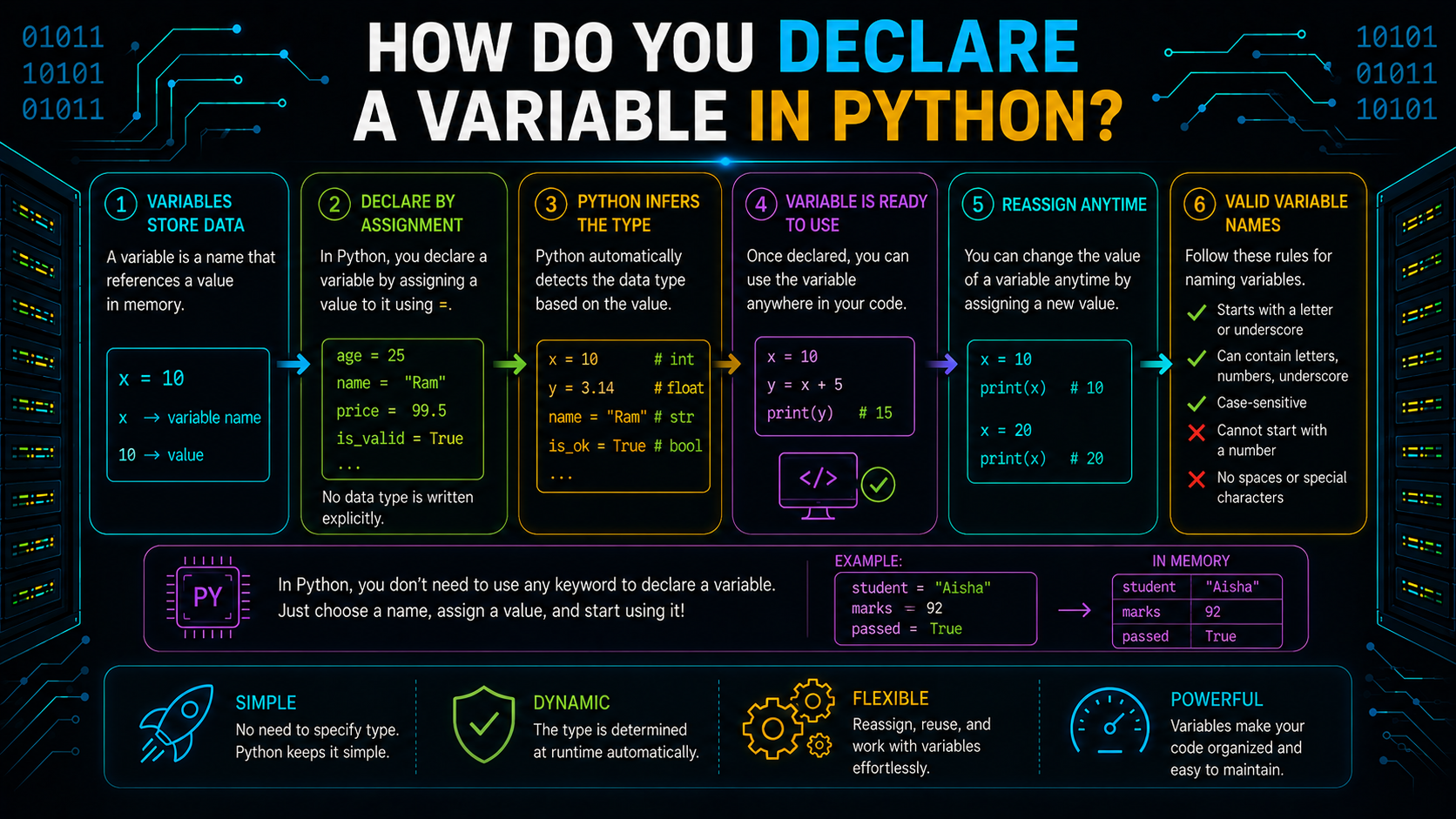
Unlike languages such as C, C++, or Java, Python doesn't require you to declare a variable before using it. A variable is created automatically when you assign a value to it.
name = "Alex"
age = 25
is_student = True
In each statement, Python creates a name and binds it to the corresponding object.
This simple syntax is one of the reasons Python is easy to read and write.
Multiple Assignment
Python allows you to use a single statement to assign the same object to several variables.
a = b = c = 100In this case, the same integer object is referred to by a, b, and c.
When several variables require the same starting value, this syntax is helpful.
Unpacking Assignment
Python also supports unpacking, where multiple values are assigned to multiple variables simultaneously.
first_name, last_name = "John", "Doe"Similarly,
x, y, z = 10, 20, 30There must be an equal number of variables and values. If not, a ValueError is raised by Python.
Rules for Naming Variables in Python
Choosing the right variable names is essential since Python has stringent naming requirements. A name that deviates from these rules is reported as a syntax error by the interpreter.
Variable Naming Rules
An acceptable variable name in Python:
- Must start with an underscore (_) or a letter (A–Z or a–z).
- After the initial character, it may include letters, numbers (0–9), and underscores.
- Cannot begin with a number.
- Cannot be a Python keyword such as class, if, or for.
- Is case-sensitive (count, Count, and COUNT are different names).
Examples:
| Variable Name | Valid | Reason |
|---|---|---|
| student_name | Yes | Uses letters and underscore |
| _marks | Yes | Starts with an underscore |
| marks1 | Yes | Ends with a digit |
| 1marks | No | Starts with a digit |
| class | No | Reserved Python keyword |
| student-name | No | Hyphen is not allowed |
These rules answer common questions like "a variable cannot start with" and "which of the following variable name is invalid".
Which Special Symbol Allowed in a Variable Name?
Python allows only one special symbol in variable names:
_The underscore (_) can appear at the beginning, middle, or end of a variable name.
Examples:
student_name = "Alex"
_total = 100
file_name_1 = "report.pdf"
The following symbols are not allowed:
- @
- #
- $
- %
- &
- -
- !
- *
If any of these characters appear in a variable name, Python reports a syntax error.
Variable Naming Conventions
Variable naming rules define what is valid, while naming conventions describe what is recommended. Python follows the PEP 8 Style Guide for writing readable code.
Use snake_case
Write variable names in lowercase and separate words with underscores.
student_name = "Alex"
total_marks = 450
Choose Meaningful Names
A descriptive name makes code easier to understand.
total_price = 2500Instead of:
tp = 2500Use UPPER_CASE for Constants
Values that are intended to remain unchanged are commonly written in uppercase.
MAX_USERS = 100
PI = 3.14159
Although Python doesn't enforce constants, this convention signals that the value shouldn't be modified.
Avoid Single-Letter Names
Names with just one letter, such as a, b, or x, are less readable and offer less context.
Unless the variable serves a transient function, like a loop counter, use descriptive names.
for i in range(5):
    print(i)
It is common practice to use i for basic iteration.
Key Takeaway: Following variable naming conventions improves code readability and makes collaboration easier, even though these conventions are not enforced by Python.
What Is __name__ in Python?
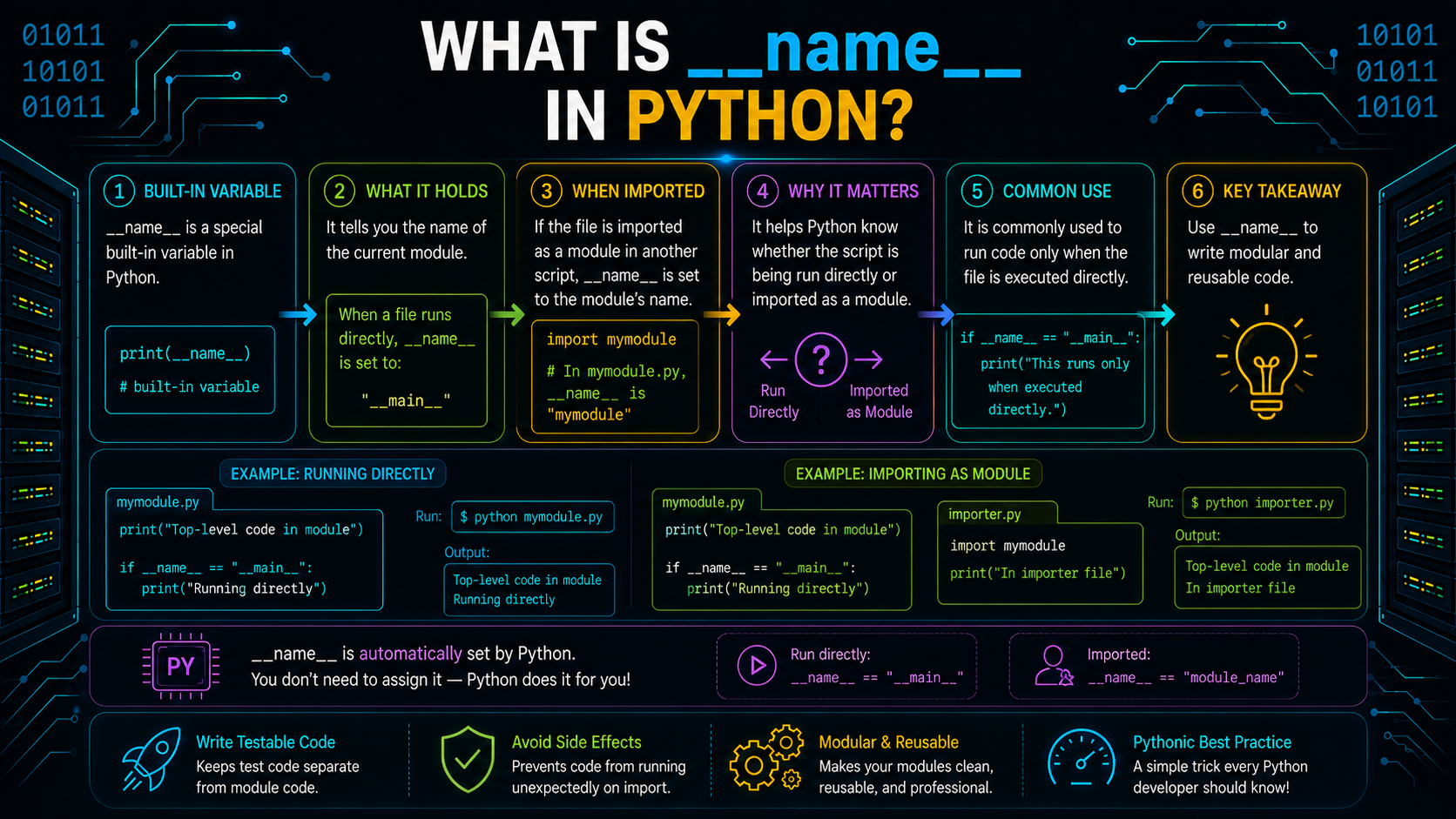
__name__ is a built-in special variable that Python automatically creates for every module. It indicates how the module is being executed.
If a file is run directly, Python assigns:
__name__ = "__main__"Example:
print(__name__)Output when the file is executed directly:
__main__The module name is set to __name__ rather than "__main__" when the same file is imported into another Python application.
The following pattern is frequently employed with this behavior:
if __name__ == "__main__":
    print("Program started")
The code inside this block runs only when the file is executed directly, not when it is imported as a module.
Key Takeaway: __name__ is a predefined Python variable that helps distinguish whether a file is being run as the main program or imported into another module.
Common Misunderstandings About Variables in Python
A lot of beginners use the "box" analogy to learn about variables. Although it makes the idea easier to understand, it also leads to misunderstandings about how Python functions. These are a few of the more typical ones.
Misconception 1: Variables Store Values
Not exactly. In Python, a variable doesn't store a value; it acts as a name that refers to an object.
For example:
language = "Python"Here, language is simply a name associated with the string object "Python".
Remember: Variables are references to objects, not containers that hold data.
Misconception 2: Assignment Copies an Object
A common misconception is that a copy is produced when one variable is assigned to another.
x = [1, 2, 3]
y = x
There is no new list created by this statement. Rather, x and y both point to the same list item.
If you need a separate copy, you must create one explicitly.
Misconception 3: Reassigning a Variable Changes the Object
A variable's name is changed when it is reassigned, but the object itself remains unchanged.
score = 90
score = 95
At first, the integer object 90 is referred to as score. It refers to the integer object 95 following reassignment.
The original object isn't modified; it simply no longer has the name score referring to it.
Misconception 4: Variable Names Affect Objects
Changing a variable name doesn't change the object it refers to.
city = "Hyderabad"
location = city
Both city and location refer to the same string object. The object itself has no knowledge of the names pointing to it.
Conclusion
Variables are often introduced as containers for storing data, but Python follows a different model. A variable is simply a name that refers to an object, and assignment creates or updates that reference. Understanding this distinction makes it easier to reason about how Python handles variables, assignment, and object references. Once you replace the "box" analogy with the idea of names referring to objects, many Python concepts become clearer and easier to understand.
Frequently Asked Questions
What is Python variable?▾
A Python variable is an object's name. It gives you access to the object in your software, but it doesn't hold data itself.
How to define a variable in Python?▾
You define a variable by assigning a value using the assignment operator (=).
message = "Hello"Python automatically creates the name and binds it to the object.
How do you declare a variable in Python?▾
Python doesn't have a separate variable declaration syntax. A variable is created when you assign a value to it.
count = 10In Python, which variable name is invalid?▾
An incorrect variable name is one that:
- Starts with a number
- Includes special characters like @, #, and - that are not supported.
- Matches a Python keyword such as class or for
For example, 2marks, student-name, and class are invalid variable names.
What can a variable name start with in Python?▾
A variable name can start with:
- A letter (A–Z or a–z)
- An underscore (_)
It cannot start with a digit.
In a Python variable name, what special symbol is permitted?▾
The only special symbol permitted in Python variable names is the underscore (_).
Examples:
_student
total_marks
file_name_1
What does Python's __name__ mean?▾
It is a specified special variable that displays a Python file's execution method. The value of the file is "__main__" when it is executed directly and the module name when it is imported.