Python Bytecode and the Virtual Machine, Explained with dis
Key Highlights
- Know how to use the built-in dis module to examine the bytecode produced by CPython.
- Understand what bytecode instructions like LOAD_FAST and RETURN_VALUE actually do.
- See how a single Python statement is translated into multiple executable instructions.
- Discover why the same dis output may differ across Python versions.
- Build a strong foundation for understanding how CPython executes your code.
Ever Wondered What Python Actually Executes?
When you write Python code, it feels as though the interpreter reads each line exactly as you've written it.
Consider this simple function:
def add(a, b):
    return a + b
To us, it's just one return statement.
But CPython doesn't execute return a + b directly.
Instead, it first converts the statement into several low-level instructions such as LOAD_FAST, BINARY_OP, and RETURN_VALUE. These instructions are known as Python bytecode, and they're what Python actually executes.
The interesting part is that Python lets you inspect these instructions yourself using a built-in module called dis.
In this blog, you'll learn how to use the dis module, understand the bytecode it displays, and explore what happens behind the scenes before your Python program runs.
What Is the dis Module?
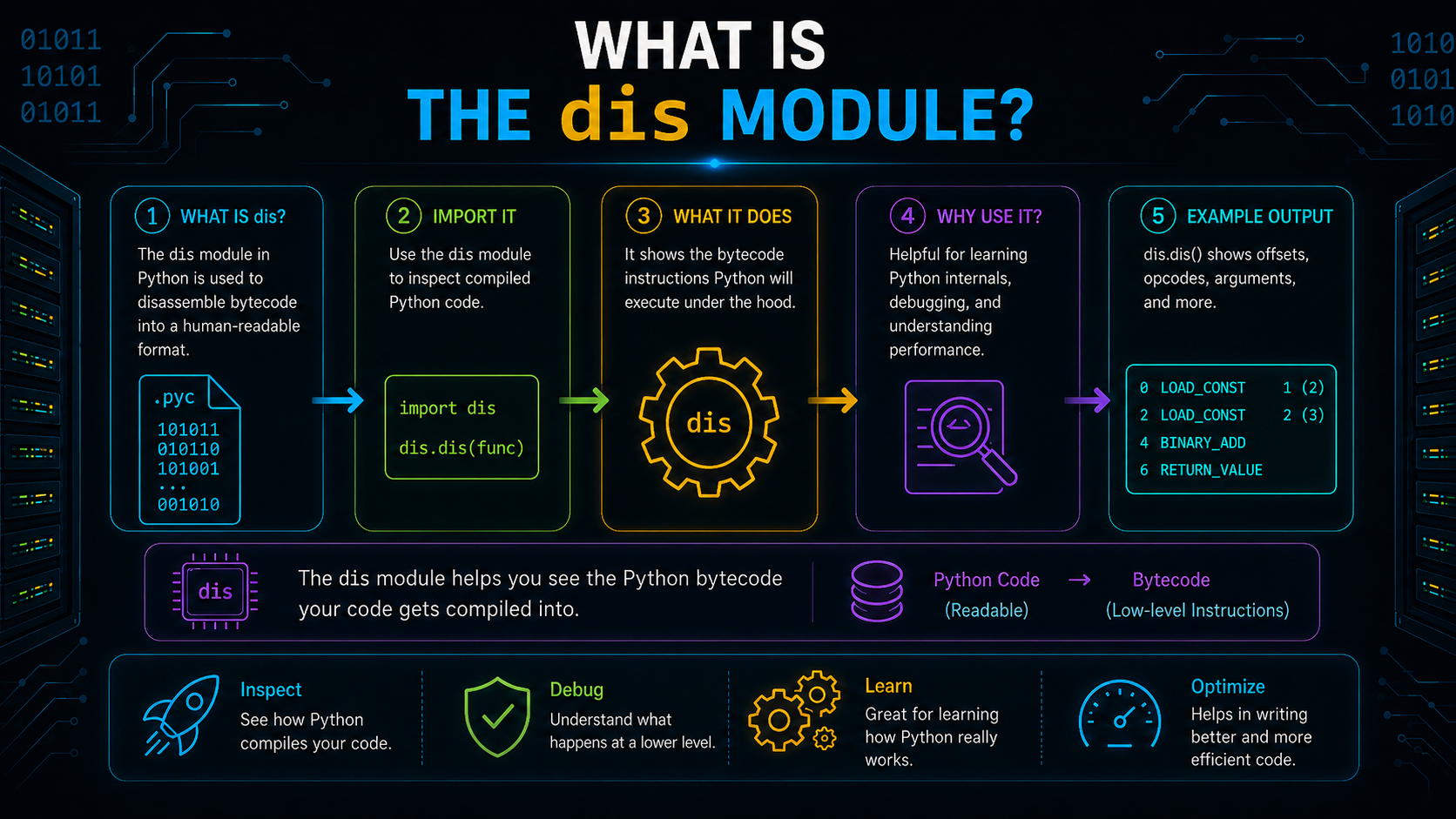
The dis module (short for disassembler) is a built-in Python module that displays the bytecode generated by CPython.
Instead of showing the Python source code you wrote, it reveals the low-level instructions that CPython prepares before execution.
Importing the module is simple:
import disThe dis module is commonly used to:
- Inspect compiled bytecode.
- Understand how Python executes different statements.
- Compare how similar pieces of code are compiled.
- Explore Python internals for learning and debugging.
Think of it as a tool that lets you look behind the scenes of Python's execution process. It doesn't execute or modify your program, it simply displays the bytecode that already exists.
Inspect Your First Bytecode
Let's inspect the bytecode generated for our earlier function.
import dis

def add(a, b):
    return a + b

dis.dis(add)
A simplified output looks like this:
LOAD_FAST       a
LOAD_FAST       b
BINARY_OP       +
RETURN_VALUE
If you're seeing these instructions for the first time, they may look unfamiliar. But each one performs a specific task.
| Bytecode Instruction | What It Does |
|---|---|
LOAD_FAST |
Loads a local variable onto the evaluation stack. |
BINARY_OP |
Performs an operation such as addition or multiplication. |
RETURN_VALUE |
Returns the final result of the function. |
You can read the bytecode almost like a sequence of actions:
Load a
   ↓
Load b
   ↓
Add both values
   ↓
Return the result
Notice that a single Python statement has been converted into multiple executable instructions. This is exactly what the dis module helps you uncover.
Why Does Your dis Output Look Different?
If you compare the output of dis on different systems, you may notice that the instruction names aren't always identical.
For example, an older Python version may display instructions differently from Python 3.13 or later.
This occurs because bytecode is part of the implementation of CPython rather than the Python language standard. In order to enhance performance, CPython may introduce new instructions, rename old ones, or combine many instructions.
Although the bytecode changes internally, your Python source code and its behavior remain the same.
Tip: If your dis output doesn't exactly match examples in tutorials or documentation, first check which Python version you're using.
Reading Bytecode with More Examples
Now that you know how to inspect bytecode, let's see how different Python statements are translated into instructions.
The exact output may vary slightly across Python versions, but the overall execution process remains the same.
Example 1: Variable Assignment
import dis

def demo():
    x = 10

dis.dis(demo)
A simplified output is:
LOAD_CONST      10
STORE_FAST      x
RETURN_VALUE
Python first loads the constant value onto the stack and then stores it in the local variable x.
Example 2: Arithmetic Operation
import dis

def add(a, b):
    result = a + b
    return result

dis.dis(add)
A simplified output is:
LOAD_FAST       a
LOAD_FAST       b
BINARY_OP       +
STORE_FAST      result
LOAD_FAST       result
RETURN_VALUE
Python doesn't perform the addition in a single step. Instead, it loads both values, performs the operation, stores the result, and finally returns it.
Example 3: Function Call
import dis

def greet():
    print("Hello")

dis.dis(greet)
A simplified output is:
LOAD_GLOBAL     print
LOAD_CONST      "Hello"
CALL
RETURN_VALUE
Python loads the function, sets up its parameters, calls it, and then gives back control after it has finished.
Example 4: Conditional Statement
import dis

def check(score):
    if score >= 35:
        print("Pass")

dis.dis(check)
The output includes comparison and jump instructions.
Conceptually, Python performs the following steps:
Evaluate condition
        ↓
Condition false?
        ↓
Jump to next instruction
        ↓
Otherwise execute print()
Instead of using an actual if statement internally, bytecode uses jump instructions to decide which block should execute next.
Example 5: Loop
import dis

def numbers():
    for i in range(3):
        print(i)

dis.dis(numbers)
Instructions to create an iterator, get values, then continuously hop back until the loop is finished are included in the output.
From a conceptual standpoint, the implementation seems as follows:
Create iterator
       ↓
Get next value
       ↓
Execute loop body
       ↓
More values?
    ↙       ↘
 Yes         No
 ↓            ↓
Repeat      Exit loop
This is why dis output contains iteration and jump instructions instead of keywords like for or while.
What Is Python Bytecode?
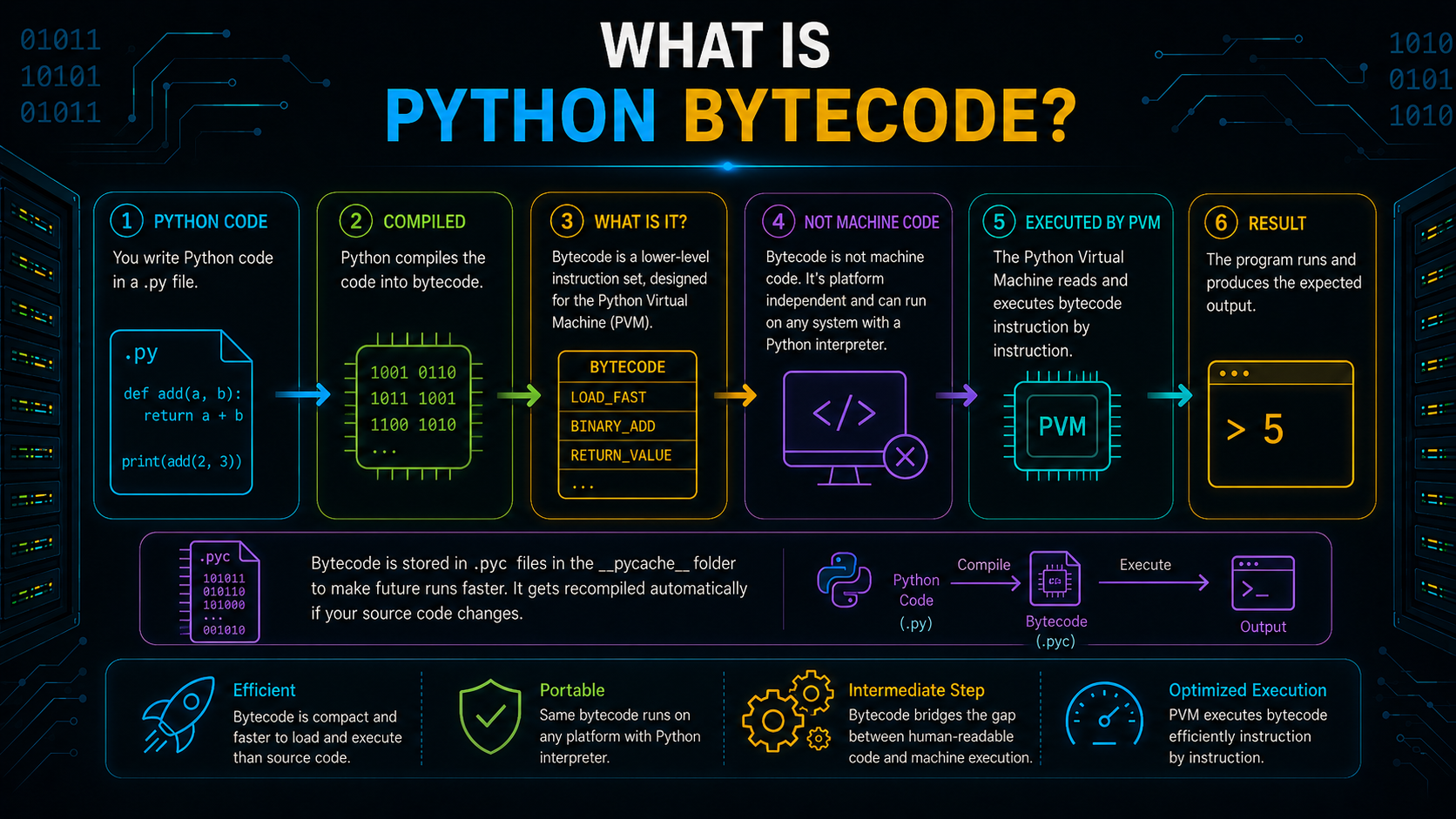
The instructions displayed by the dis module are called Python bytecode.
Bytecode is an intermediate representation (IR) that CPython generates after compiling your source code. It acts as a bridge between the Python code you write and the Python Virtual Machine (PVM), which executes it.
Bytecode is not intended for human reading, in contrast to source code. Rather, it is made up of straightforward instructions that the PVM can effectively handle.
For this reason, it is common practice to compile a single Python statement into many bytecode instructions.
Python Source Code
        │
        ▼
Python Bytecode
        │
        ▼
Python Virtual Machine
Now that we've seen what bytecode is, the next question is:
Who actually executes these instructions?
Meet the Python Virtual Machine (PVM)
The Python Virtual Machine (PVM) is the component responsible for executing Python bytecode.
Its job is simple:
- Read a bytecode instruction.
- Execute it.
- Move to the next instruction.
- Repeat until the program finishes.
For example, the bytecode below is executed one instruction at a time by the PVM.
LOAD_FAST a
LOAD_FAST b
BINARY_OP +
RETURN_VALUE
In simple terms:
Compiler
    │
creates
    ▼
Bytecode
    │
executed by
    ▼
Python Virtual Machine
The compiler creates the instructions, and the PVM executes them.
How Does the PVM Execute Bytecode?
The PVM follows a stack-based execution model.
Instead of storing intermediate results in variables, it temporarily keeps them on an evaluation stack while executing bytecode.
Let's go back to the previous function.
def add(a, b):
    return a + b
The simplified bytecode is:
LOAD_FAST a
LOAD_FAST b
BINARY_OP +
RETURN_VALUE
This is how the stack is altered when it is being executed.
Step 1: Load a
[ ]
 ↓
[a]
Step 2: Load b
[a]
 ↓
[a, b]
Step 3: Perform Addition
BINARY_OP removes both values from the stack, adds them, and pushes the result back.
[a, b]
   ↓
[a+b]
Step 4: Return the Result
RETURN_VALUE removes the top value from the stack and returns it.
[a+b]
  ↓
 [ ]
Only during the function's execution does the evaluation stack exist. The stack is cleaned when execution is complete.
The Evaluation Loop
Bytecode is executed by the PVM via an ongoing evaluation loop.
For every instruction, it:
Read Instruction
      ↓
Execute
      ↓
Update Stack
      ↓
Next Instruction
This process continues until all bytecode instructions have been executed or the program terminates.
Where Does dis Get These Instructions?
When you run:
dis.dis(add)Python doesn't compile the function again.
Rather, the compiled bytecode is stored in the function's code object, which the dis module accesses.
You can access it yourself:
add.__code__A code object stores:
- Bytecode instructions
- Constants
- Variable names
- Function metadata
- Line number information
In simple terms:
Function
   │
contains
   ▼
Code Object
   │
contains
   ▼
Bytecode
The dis module simply displays the bytecode stored inside the code object.
Code Object vs Function Object
A code object stores the compiled bytecode, but it doesn't execute anything by itself.
A function object is what you actually call in your program.
add(10, 20)When a function is called, Python uses the function object to locate its code object and begin execution.
Function Object
       │
references
       ▼
Code Object
       │
contains
       ▼
Bytecode
Think of the code object as the compiled blueprint and the function object as the callable interface that uses that blueprint.
What Happens When You Call a Function?
Calling a function does more than execute its bytecode. Python first creates a frame, which provides the environment needed to run the function.
A frame stores:
- Local variables
- The current bytecode instruction
- The evaluation stack
- References to local, global, and built-in namespaces
Function Called
        │
        ▼
 Create Frame
        │
        ▼
 Execute Bytecode
        │
        ▼
 Return Result
        │
        ▼
 Remove Frame
Each function call gets its own frame, ensuring that variables and execution state remain isolated.
Frames Help Generate Tracebacks
Python logs the active frames in the case of an error. The traceback, which displays the series of function calls that resulted in the problem, is created using these frames.
This makes it easier to locate and debug problems in your code.
Why Does Python Create the __pycache__ Folder?
When you run or import a Python module, you may notice a folder named __pycache__.
It stores compiled bytecode files (.pyc) so Python can reuse them instead of compiling the source code every time.
For example:
project/
│
├── app.py
├── utils.py
└── __pycache__/
      utils.cpython-313.pyc
Using cached bytecode helps Python load imported modules faster.
A few things to remember:
- It stores bytecode, not source code.
- It's mainly created for imported modules.
- The files are specific to the Python version.
- If you delete the folder, Python automatically creates it again when needed.
Why Should You Learn the dis Module?
Most developers don't use dis every day. However, it's a valuable tool when you want to understand how Python works internally.
It helps you:
- See how Python compiles your code.
- Understand what happens behind loops, functions, and conditionals.
- Learn Python internals without reading CPython's source code.
- Explore advanced topics like optimization and debugging.
The goal isn't to memorize bytecode instructions, it's to understand the execution process behind them.
Common Misconceptions About Python Bytecode
Bytecode Is Machine Code
No, machine code operates directly on the CPU, but bytecode is run by the Python Virtual Machine.
Every Python Statement Becomes One Bytecode Instruction
Not always. A single Python statement is often compiled into multiple bytecode instructions.
The dis Module Executes Code
No. The dis module only displays the bytecode that has already been compiled.
Bytecode Never Changes
Bytecode instructions can change between Python versions as CPython continues to evolve. That's why your dis output may not exactly match examples from older tutorials.
__pycache__ Is Required to Run Python Programs
No. It simply stores cached bytecode to speed up future imports. If it's deleted, Python recreates it automatically.
Conclusion
The dis module gives you a clear view of what CPython actually executes. Instead of treating Python code as a single statement, you can see the sequence of bytecode instructions generated behind the scenes.
Along the way, you learned what Python bytecode is, how the Python Virtual Machine executes it, how code objects and frames work together, and why Python creates the __pycache__ folder.
You may not inspect bytecode while writing everyday programs, but understanding it helps you build a stronger foundation in Python and better appreciate what happens every time your code runs.
Frequently Asked Questions
What does the dis module do in Python?▾
The dis module displays the bytecode generated by CPython, helping you inspect how Python compiles your code before execution.
Is Python bytecode the same as machine code?▾
No, machine code is run directly by the processor, but bytecode is run via the Python Virtual Machine.
Why does one Python statement produce multiple bytecode instructions?▾
Each bytecode instruction performs a single operation, such as loading a value, calling a function, or returning a result. Together, these instructions represent the original Python statement.
What is a code object?▾
A code object stores the compiled bytecode, constants, variable names, and other metadata required to execute Python code.
Why is the __pycache__ folder created?▾
Python stores compiled bytecode (.pyc) files inside the __pycache__ folder so imported modules can be loaded faster during future executions.