Python Comprehensions: Patterns, Readability, and When Not To Use Them
Key Takeaways
- Understand what is list comprehension and why comprehensions provide a concise way to create collections.
- Learn how expressions, loops, and conditions work together inside a comprehension.
- Explore list, dictionary, and set comprehensions through a common syntax pattern.
- Understand how comprehension variables are scoped and how evaluation order works.
- Learn when comprehensions improve readability compared to traditional loops.
Introduction
"The best Python code doesn't do less work, it expresses the same work more clearly."
Many programs follow a familiar pattern: iterate over a collection, transform each element, optionally filter some values, and store the results in a new collection. Writing this logic with a traditional loop often requires several lines of code, even when the operation itself is simple.
Python comprehensions provide a concise way to perform these transformations. They combine iteration, value generation, and optional filtering into a single expression without changing the underlying logic. When used appropriately, comprehensions improve readability and reduce repetitive code. Understanding how they work, and when a regular loop is the better choice, helps you write Python code that is both expressive and maintainable.
What Is a Comprehension in Python?
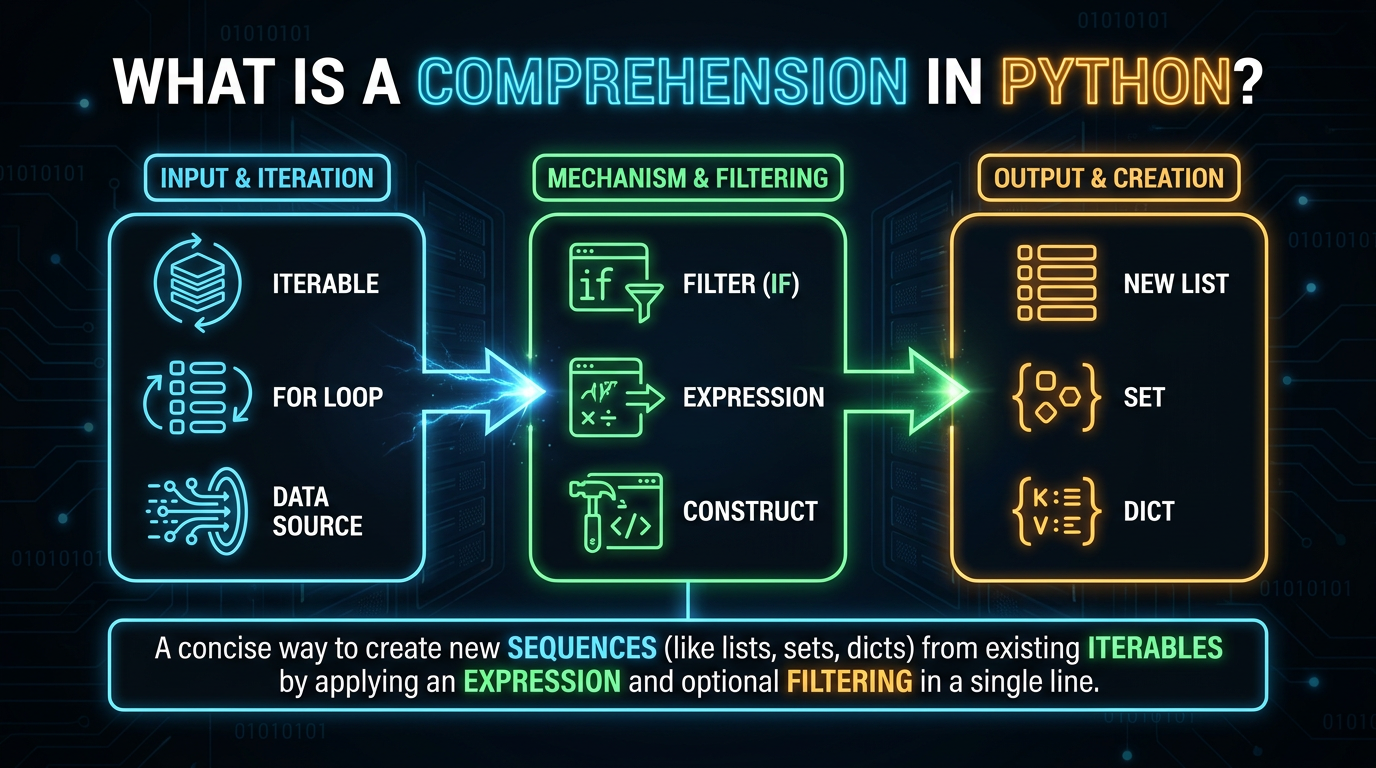
A Python comprehension is a compact syntax for creating a new collection by iterating over an existing iterable. Instead of building a collection step by step with a loop, a comprehension combines the iteration, transformation, and optional filtering into a single expression.
Python supports three types of comprehensions:
- List comprehensions
- Dictionary comprehensions
- Set comprehensions
Each produces a different collection while following the same underlying pattern.
What Is List Comprehension?
A list comprehension creates a new list by evaluating an expression for every element in an iterable.
Example:
numbers = [1, 2, 3, 4]

squares = [n * n for n in numbers]

print(squares)
Output
[1, 4, 9, 16]Instead of creating an empty list and repeatedly calling append(), the entire operation is expressed in a single statement.
Why Comprehensions Exist
Comprehensions exist to simplify a common programming pattern:
- Iterate over a collection.
- Transform or filter its elements.
- Build a new collection.
Without a comprehension:
squares = []

for n in numbers:
    squares.append(n * n)
With a comprehension:
squares = [n * n for n in numbers]Both produce the same result, but the comprehension removes repetitive boilerplate and focuses directly on the transformation being performed.
Comprehensions vs Traditional Loops
Comprehensions and loops can solve the same problems, but they serve different purposes.
Comprehensions
Traditional Loops
Create a new collection.
Perform general-purpose iteration.
Concise for simple transformations and filtering.
Better for complex logic or multiple operations.
Reduce boilerplate code.
Easier to debug and extend.
As a rule, use a comprehension when the goal is to build a collection. If the loop performs multiple independent actions or contains complex branching, a regular for loop is usually more readable.
Anatomy of a Comprehension
Every comprehension follows the same basic structure regardless of whether it creates a list, dictionary, or set.
Basic Syntax
General syntax:
[expression for item in iterable if condition]Each part has a specific role:
- Expression – generates the value to store.
- for clause – iterates over the iterable.
- if clause (optional) – filters elements before they are added.
Only elements that satisfy the condition become part of the resulting collection.
Expression, Loop, and Condition
A comprehension combines three independent components into a single expression.
numbers = [1, 2, 3, 4, 5]

even_squares = [n * n for n in numbers if n % 2 == 0]
Here:
n * n → Expression (transformation)
for n in numbers → Loop (iteration)
if n % 2 == 0 → Condition (filter)
The comprehension first filters even numbers and then transforms them into their squares.
Evaluation Order
Although the expression appears first, Python evaluates a comprehension in this order:
- Iterate over the iterable.
- Apply the optional condition.
- Evaluate the expression for elements that satisfy the condition.
- Add the result to the new collection.
For example:
numbers = [1, 2, 3, 4]

result = [n * 10 for n in numbers if n % 2 == 0]
Python processes each element one at a time:
1 → condition fails → skipped
2 → condition passes → 20
3 → condition fails → skipped
4 → condition passes → 40
Result:
[20, 40]Understanding this evaluation order makes it easier to read and write more complex comprehensions.
Comprehension Variable Scope
The loop variable inside a comprehension is local to the comprehension itself. This behavior follows Python's scoping rules and prevents the variable from leaking into the surrounding scope. To understand how Python resolves variable names across local, enclosing, global, and built-in scopes, see our guide on Python Scope and Namespaces.
numbers = [1, 2, 3]

squares = [n * n for n in numbers]
Here, n exists only while the comprehension is being evaluated. It does not become part of the surrounding scope after the comprehension finishes.
This prevents accidental reuse of the loop variable elsewhere in the program and makes comprehensions safer than the loop-variable behavior found in earlier versions of Python.
List Comprehension
A list comprehension creates a new list by evaluating an expression for each element in an iterable. It combines iteration, transformation, and optional filtering into a single expression, making simple collection-building tasks more concise.
Basic List Comprehension
The general syntax of a list comprehension is:
[expression for item in iterable]Example:
numbers = [1, 2, 3, 4]

squares = [n * n for n in numbers]

print(squares)
Output
[1, 4, 9, 16]The comprehension iterates through each element, evaluates the expression, and stores the result in a new list.
Transforming Data
One of the primary purposes of a comprehension is transformation, creating a new collection where each element is derived from an existing one.
Example:
words = ["python", "java", "go"]

uppercase = [word.upper() for word in words]

print(uppercase)
Comprehensions are commonly used to transform strings, such as converting text to uppercase, trimming whitespace, or calculating string lengths.
Output
['PYTHON', 'JAVA', 'GO']Here, each string is transformed into its uppercase equivalent while preserving the iteration order.
Filtering Data
A comprehension can include an optional condition to select only the elements that satisfy a given criterion.
numbers = [1, 2, 3, 4, 5, 6]

even = [n for n in numbers if n % 2 == 0]

print(even)
Output
[2, 4, 6]The if clause evaluates to a Boolean value (True or False). Only elements for which the condition evaluates to True are included in the new collection.
Nested List Comprehension
A nested list comprehension Python contains multiple for clauses. It is commonly used to flatten nested collections or iterate through multidimensional data.
Example:
matrix = [
    [1, 2],
    [3, 4]
]

flattened = [num for row in matrix for num in row]

print(flattened)
Output
[1, 2, 3, 4]Although nested comprehensions are concise, they should be kept simple. If multiple nested loops or conditions make the expression difficult to read, a regular loop is usually the better choice.
Dictionary Comprehension
A dictionary comprehension creates a new dictionary by generating key-value pairs from an iterable.
Basic Dictionary Comprehension
The general syntax is:
{key_expression: value_expression for item in iterable}Example:
numbers = [1, 2, 3, 4]

squares = {n: n * n for n in numbers}

print(squares)
Output
{1: 1, 2: 4, 3: 9, 4: 16}Each iteration produces one key-value pair that becomes part of the new dictionary.
Transforming Keys and Values
Dictionary comprehensions can transform either the keys, the values, or both.
Example:
students = {
    "alice": 92,
    "bob": 88
}

updated = {
    name.title(): marks + 5
    for name, marks in students.items()
}
print(updated)
Output
{'Alice': 97, 'Bob': 93}This allows existing dictionaries to be reshaped without modifying the original data.
Set Comprehension
A set comprehension in Python creates a new set by evaluating an expression for each element in an iterable.
Creating Sets
General syntax:
{expression for item in iterable}Example:
numbers = [1, 2, 3, 4]

squares = {n * n for n in numbers}

print(squares)
Output
{16, 1, 4, 9}Since sets store only unique values, duplicate results are automatically discarded.
Removing Duplicates
Set comprehensions provide a concise way to generate a collection of unique values.
Example:
words = ["python", "java", "python", "go"]

unique = {word.upper() for word in words}

print(unique)
Output
{'GO', 'PYTHON', 'JAVA'}This combines transformation and deduplication in a single expression.
Is There a Tuple Comprehension?
Despite the name, Python does not support tuple comprehensions.
An expression such as:
(x * x for x in range(5))creates a generator expression, not a tuple.
To create a tuple using a comprehension-like pattern, pass the generator to the tuple() constructor.
numbers = tuple(x * x for x in range(5))
print(numbers)
Output
(0, 1, 4, 9, 16)This design avoids creating an unnecessary intermediate tuple. Instead, values are generated one at a time by the generator expression and then collected into a tuple by tuple().
Key point: Python supports list, dictionary, and set comprehensions, but there is no tuple comprehension. When a tuple is required, use a generator expression with the tuple() constructor. This distinction is an intentional part of Python's design and is emphasized in the reference chapter.
Transformation and Filtering Patterns
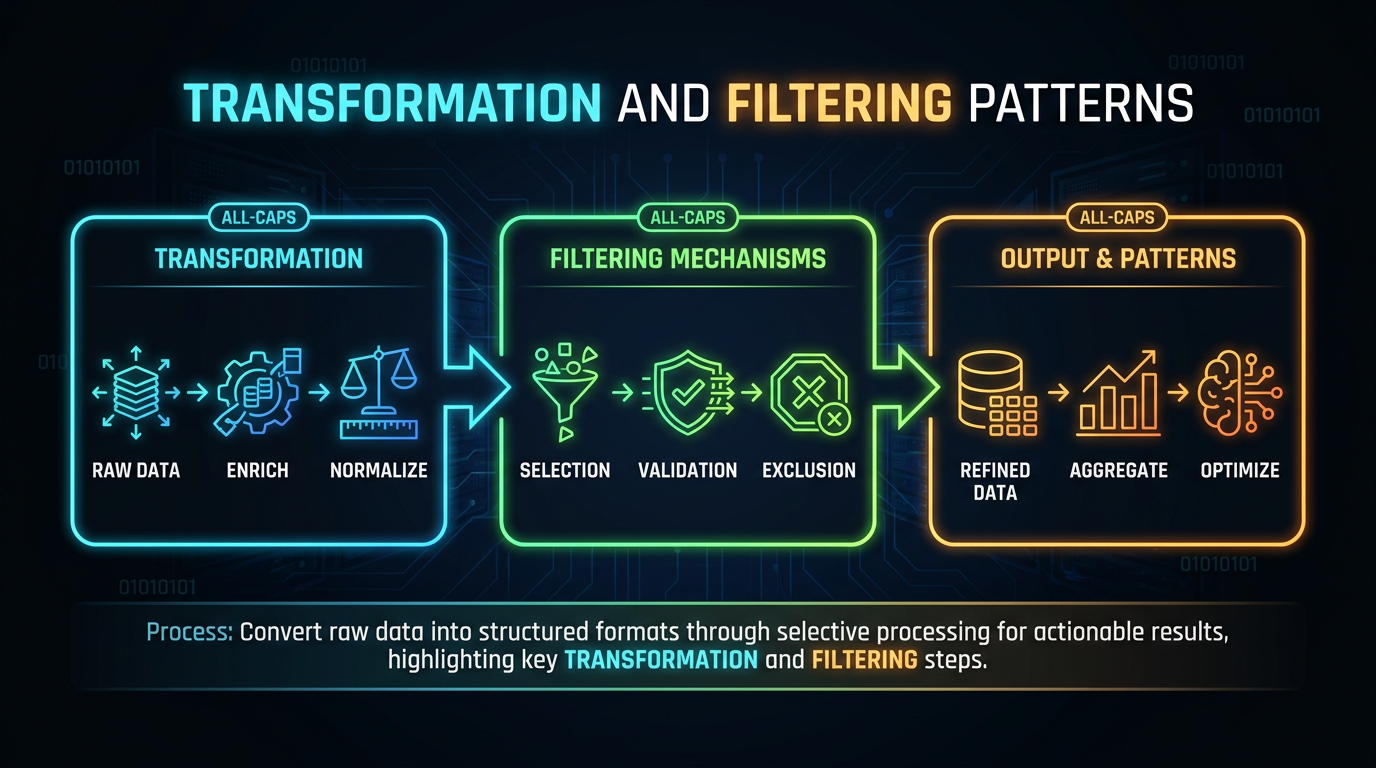
Comprehensions become most useful when they follow a few common patterns. These patterns make code shorter without sacrificing readability.
Mapping
Mapping means transforming every element of an iterable into a new value while preserving the number of elements.
numbers = [1, 2, 3, 4]

squares = [n * n for n in numbers]

print(squares)
Output
[1, 4, 9, 16]Each element is transformed independently, producing a new list of the same length.
Filtering
Filtering selects only the elements that satisfy a condition.
numbers = [1, 2, 3, 4, 5, 6]

even = [n for n in numbers if n % 2 == 0]

print(even)
Output
[2, 4, 6]The condition determines which elements are included, while the original values remain unchanged.
Mapping with Filtering
A comprehension can filter elements first and then transform those that satisfy the condition.
numbers = [1, 2, 3, 4, 5]

result = [n * n for n in numbers if n % 2 == 0]

print(result)
Output
[4, 16]This pattern combines both operations into a single, readable expression.
Flattening Nested Collections
Nested comprehensions can flatten a collection of collections into a single sequence.
matrix = [
    [1, 2],
    [3, 4],
    [5, 6]
]

flattened = [item for row in matrix for item in row]

print(flattened)
Output
[1, 2, 3, 4, 5, 6]Python processes the outer loop first (row), followed by the inner loop (item), preserving the same order as equivalent nested for loops.
Building Lookup Dictionaries
Dictionary comprehensions are useful for creating lookup tables where each key maps to a computed value.
words = ["apple", "banana", "mango"]

lengths = {word: len(word) for word in words}

print(lengths)
Output
{'apple': 5, 'banana': 6, 'mango': 5}Lookup dictionaries make it possible to retrieve computed values directly using a key.
Comprehensions vs map() and filter()
Both comprehensions and the built-in map() and filter() functions transform data. The choice depends on which approach communicates the intent more clearly.
map() vs Comprehensions
map() applies the same function to every element of an iterable.
Using map():
numbers = [1, 2, 3, 4]

squares = list(map(lambda n: n * n, numbers))
Using a comprehension:
squares = [n * n for n in numbers]For simple transformations, a comprehension is generally easier to read because the transformation is visible without introducing a lambda function.
Use map() when an existing function can be applied directly.
names = ["alice", "bob"]

capitalized = list(map(str.title, names))
filter() vs Comprehensions
filter() returns only the elements that satisfy a condition.
Using filter():
numbers = [1, 2, 3, 4, 5]

even = list(filter(lambda n: n % 2 == 0, numbers))
Using a comprehension:
even = [n for n in numbers if n % 2 == 0]For most filtering tasks, comprehensions are more explicit because the condition appears directly inside the expression.
Readability Matters More Than Brevity
A comprehension is not automatically better because it uses fewer lines of code. The primary goal is to make the code easier to understand.
When Comprehensions Improve Readability
Use a comprehension when it performs one clear transformation or one simple filtering operation.
Good example:
names = ["alice", "bob", "charlie"]

capitalized = [name.title() for name in names]
The intent is immediately visible: iterate, transform, and create a new list.
When Not to Use Comprehensions
Avoid comprehensions when the logic becomes difficult to follow.
For example, if the operation requires:
- Multiple conditional branches
- Several independent transformations
- Exception handling
- Side effects such as printing or modifying external variables
a regular for loop is usually clearer.
A comprehension should create a collection, not replace every possible loop.
Nested Comprehensions Can Become Hard to Read
Nested comprehensions are powerful but can quickly become difficult to understand as additional loops and conditions are added.
Readable:
matrix = [[1, 2], [3, 4]]
flattened = [item for row in matrix for item in row]
Difficult to read:
result = [
    value
    for group in groups
    for row in group
    for value in row
    if value > 0
]
If you need to pause and mentally trace multiple loops or conditions, the comprehension has likely become too complex. Breaking the logic into a regular loop often improves readability without changing the result.
Practical List comprehension in Python examples
Square Numbers
A list comprehension provides a concise way to transform every element in a collection.
numbers = [1, 2, 3, 4, 5]

squares = [n * n for n in numbers]

print(squares)
Output
[1, 4, 9, 16, 25]Filter Even Numbers
An optional condition filters elements before they are added to the new collection.
numbers = [1, 2, 3, 4, 5, 6]

even_numbers = [n for n in numbers if n % 2 == 0]

print(even_numbers)
Output
[2, 4, 6]Word Length Dictionary
A dictionary comprehension can build a lookup table by computing values during iteration.
words = ["python", "java", "go"]

word_lengths = {word: len(word) for word in words}

print(word_lengths)
Output
{'python': 6, 'java': 4, 'go': 2}Remove Duplicates Using Set Comprehension
A set comprehension in Python automatically removes duplicate values while creating a new set.
words = ["python", "java", "python", "go", "java"]
unique_words = {word.upper() for word in words}
print(unique_words)
Output
{'GO', 'JAVA', 'PYTHON'}Run your examples here at online Python compiler ->
Best Practices to Follow
- Use comprehensions to create a new collection from an existing iterable.
- Keep the transformation and filtering logic simple.
- Prefer one comprehension over multiple nested loops when the intent remains clear.
- Use descriptive variable names inside comprehensions.
- Choose dictionary or set comprehensions when the output naturally represents key-value pairs or unique values.
- Replace a comprehension with a regular loop if readability starts to suffer.
Common Mistakes
Using Comprehensions for Side Effects
Comprehensions should build collections, not execute actions like printing or modifying external variables.
Avoid:
[print(x) for x in numbers]Use a regular for loop instead.
Writing Overly Complex Comprehensions
Multiple nested loops and conditions can make a comprehension difficult to understand.
If the logic requires careful tracing, a regular loop is usually clearer.
Expecting a Tuple Comprehension
Python supports list, dictionary, and set comprehensions, but not tuple comprehensions.
To create a tuple, use a generator expression with tuple().
result = tuple(x * x for x in range(5))Using the Wrong Comprehension Type
Choose the comprehension that matches the desired output:
- List comprehension → List
- Dictionary comprehension → Dictionary
- Set comprehension → Set
Using the wrong type can produce an unexpected collection.
Final Thoughts
Python comprehensions provide a concise way to build lists, dictionaries, and sets by combining expressions, iteration, and optional filtering into a single construct. Throughout this guide, you learned how list, dictionary, and set comprehensions work, how transformation and filtering patterns simplify collection processing, and how comprehensions compare with traditional loops, map(), and filter(). You also explored variable scope, nested comprehensions, and the importance of prioritizing readability over brevity. Choosing comprehensions for simple collection-building tasks, and switching to regular loops when the logic becomes complex, helps you write clean, expressive, and maintainable Python code.
Frequently Asked Questions
What is a list comprehension in Python?▾
A list comprehension is a concise syntax for creating a new list by combining an expression, iteration, and an optional condition into a single statement.
What is dictionary comprehension?▾
A dictionary comprehension in Python creates a dictionary by generating key-value pairs during iteration.
What is set comprehension?▾
A Python set comprehension creates a set by evaluating an expression for each element in an iterable, automatically removing duplicate values.
Are comprehensions faster than loops?▾
Comprehensions are often more concise and can be slightly faster for simple collection-building tasks. However, readability should be the primary consideration when choosing between a comprehension and a loop.
Does Python support tuple comprehensions?▾
No. Python does not have tuple comprehensions. A generator expression passed to tuple() is used instead.
When should I avoid comprehensions?▾
Avoid comprehensions when the logic involves multiple nested loops, complex conditions, exception handling, or side effects. In these cases, a regular for loop is usually easier to read and maintain.