Key Highlights
- A context manager in Python controls what happens when code enters and leaves a with block.
- The with statement uses __enter__() to set up a context and __exit__() to handle what happens when the block ends.
- The value after as is whatever __enter__() returns. It does not have to be the context manager object itself.
- __exit__() receives exception details and can suppress an exception by returning True. Most context managers should return False or None.
- Python's contextlib module provides convenient tools such as @contextmanager, closing(), suppress(), nullcontext(), ExitStack, and @asynccontextmanager.
Why Does with open() Close Your File Even When an Exception Occurs?
%20Close%20Your%20File%20Even%20When%20an%20Exception%20Occurs__.png)
Consider this:
with open("data.txt", "r") as file:
    data = file.read()
There is no file.close() anywhere. Yet Python closes the file when the with block ends, even if an exception occurs inside the block.
That behavior comes from Python's context management protocol. If you have ever wondered what is context manager in Python, why the with statement exists, what __enter__() and __exit__() actually do, or how to build your own context manager, the answer lies in a small but powerful protocol.
Once you understand that protocol, with open(...), locks, transactions, timers, temporary state, and several contextlib utilities all start to make sense.
This blog breaks down how context management works, how exceptions flow through it, and how to build context managers yourself.
What is a Context Manager in Python?
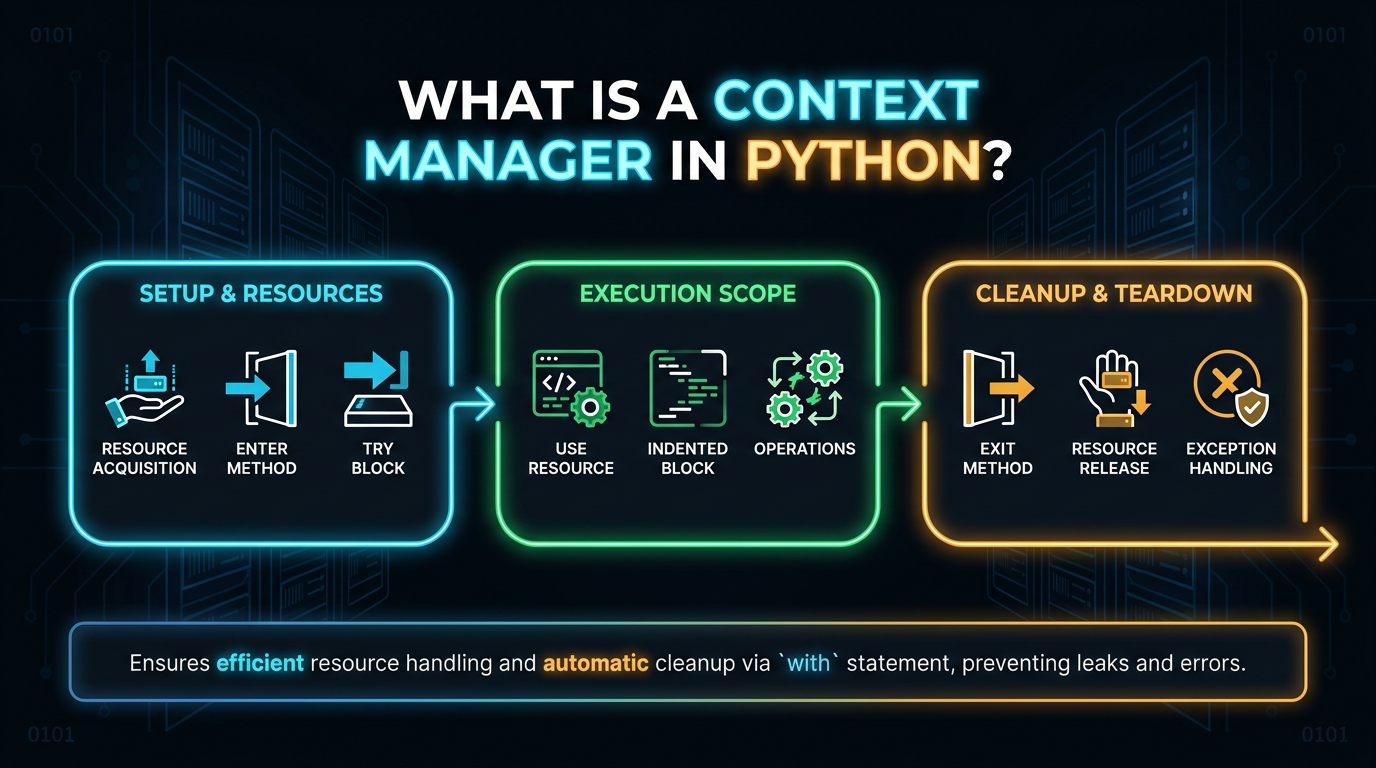
A Python context manager is an object that defines what should happen when execution enters and leaves a controlled block of code.
A traditional class-based context manager implements two special methods:
- __enter__()
- __exit__()
For example:
class SimpleManager:
    def __enter__(self):
        print("Entering the context")
        return self

    def __exit__(self, exc_type, exc_value, traceback):
        print("Leaving the context")
        return False
You can use it with:
with SimpleManager():
    print("Inside the block")
The output is:
Entering the context
Inside the block
Leaving the context
The context manager establishes a boundary around the block.
That boundary can represent:
- Acquiring and releasing a resource
- Starting and finishing a transaction
- Acquiring and releasing a lock
- Temporarily changing state
- Starting and stopping timing
- Opening and closing a file
- Performing setup and guaranteed cleanup
This is the foundation of context management in Python.
Why Does the with Statement Exist?
Before context managers, resource cleanup commonly required try and finally.
For example:
file = open("data.txt", "r")

try:
    data = file.read()
finally:
    file.close()
The finally block is important because it runs when control leaves the try statement, including when an exception is raised.
The same basic resource-lifetime idea can be expressed with:
with open("data.txt", "r") as file:
    data = file.read()
The with statement gives the object an opportunity to perform setup before the block and cleanup afterward.
Conceptually:
Enter context
      ↓
Run the block
      ↓
Leave context
      ↓
Perform exit/cleanup behavior
So, the purpose of the with statement is to provide a structured way to execute a block under the control of a context manager.
It is not merely shorthand for try/finally. Context managers have a defined protocol and can also inspect and potentially suppress exceptions.
How with Relates to try and finally
A useful conceptual comparison is:
resource = acquire()

try:
    use(resource)
finally:
    release(resource)
versus:
with resource_manager() as resource:
    use(resource)
The second form moves the responsibility for entering and leaving the context into the context manager.
This is valuable because the acquisition and cleanup rules can live alongside the object or abstraction that owns them.
For example, Python's file objects support context management, so:
with open("data.txt") as file:
    content = file.read()
handles the file's lifecycle without requiring every caller to manually remember to close it.
The important design idea is:
The code that owns a resource's lifetime should define how that resource is entered and released.
What Does __enter__() Do?
__enter__() runs when Python enters the with block.
Consider:
class Connection:
    def __enter__(self):
        print("Connection opened")
        return self

    def __exit__(self, exc_type, exc_value, traceback):
        print("Connection closed")
        return False
Now:
with Connection() as connection:
    print("Using connection")
The sequence is approximately:
Create Connection
       ↓
Call __enter__()
       ↓
Assign its return value to connection
       ↓
Run the with block
       ↓
Call __exit__()
The important point is that __enter__() can return any value.
What Gets Assigned After as?
Consider:
class DataManager:
    def __enter__(self):
        return {"status": "ready"}

    def __exit__(self, exc_type, exc_value, traceback):
        return False
Now:
with DataManager() as data:
    print(data)
Output:
{'status': 'ready'}The name data refers to the value returned by:
__enter__()It does not automatically refer to the DataManager object.
So:
with Manager() as value:means, conceptually:
Create Manager
     ↓
Call Manager.__enter__()
     ↓
Assign returned value to value
This distinction is especially important when using third-party context managers.
What Does __exit__() Do?
__exit__() is called when execution leaves a successfully entered with context.
Its method signature is:
def __exit__(self, exc_type, exc_value, traceback):
    ...
The arguments describe what happened inside the block.
If the block finishes normally:
exc_type = None
exc_value = None
traceback = None
If an exception occurs, these contain information about that exception.
For example:
class DebugManager:
    def __enter__(self):
        print("Start")

    def __exit__(self, exc_type, exc_value, traceback):
        print("Exception:", exc_type)
        print("Value:", exc_value)
        print("End")
        return False
Then:
with DebugManager():
    raise ValueError("Something went wrong")
The context manager gets an opportunity to inspect the exception before normal exception propagation continues.
How Context Managers Handle Exceptions
A context manager does not automatically make exceptions disappear.
Suppose:
class Manager:
    def __enter__(self):
        return self

    def __exit__(self, exc_type, exc_value, traceback):
        print("Cleanup")
        return False
Then:
with Manager():
    raise ValueError("Failure")
__exit__() runs, but because it returns False, the ValueError continues propagating.
This is usually what you want. The context manager performs its cleanup while allowing the actual error to reach the caller.
Why Does Returning True Suppress an Exception?
The return value of __exit__() has special meaning. If it returns a truthy value, Python treats the exception as handled.
For example:
class IgnoreValueError:
    def __enter__(self):
        return self

    def __exit__(self, exc_type, exc_value, traceback):
        return exc_type is ValueError
Now:
with IgnoreValueError():
    raise ValueError("Handled")

print("Program continues")
The ValueError is suppressed.
But this:
with IgnoreValueError():
    raise TypeError("Not handled")
still raises the TypeError.
The reason is:
return exc_type is ValueErrorreturns True only for ValueError.
Why Should Most __exit__() Methods Return False or None?
Suppressing exceptions can hide failures.
Consider:
def __exit__(self, exc_type, exc_value, traceback):
    return True
This tells Python:
"I handled the exception."
If the context manager returns True accidentally, errors inside the block can disappear. For most context managers, cleanup and error handling should be separate concerns:
def __exit__(self, exc_type, exc_value, traceback):
    cleanup()
    return False
Or simply:
def __exit__(self, exc_type, exc_value, traceback):
    cleanup()
Returning None is also falsey, so the exception is allowed to propagate. Only suppress an exception when that behavior is an intentional part of the abstraction.
Files and Context Management
Files are one of the most familiar examples.
Instead of:
file = open("data.txt", "r")

try:
    content = file.read()
finally:
    file.close()
use:
with open("data.txt", "r") as file:
    content = file.read()
The file object supports the context manager protocol. When the context is entered, the file becomes available. When the context is exited, the file is closed.
This makes the resource's lifetime visible in the code:
with block starts
       ↓
file is used
       ↓
with block ends
       ↓
file is closed
If reading the file raises an exception, the context still gets its exit behavior.
Context Managers for Locks
Locks are another practical example.
Python's threading locks support the context management protocol:
import threading

lock = threading.Lock()
counter = 0

with lock:
    counter += 1
The lock is acquired when entering the context and released when leaving it. This is safer than manually managing the lifecycle:
lock.acquire()

try:
    counter += 1
finally:
    lock.release()
The with form makes the intended critical section immediately visible. The same pattern applies to other synchronization primitives that support context management.
Context Managers for Transactions
Transactions naturally have a beginning and an ending state.
A simplified custom transaction manager might look like:
class Transaction:
    def __enter__(self):
        print("Transaction started")
        return self

    def __exit__(self, exc_type, exc_value, traceback):
        if exc_type is None:
            print("Transaction committed")
        else:
            print("Transaction rolled back")

        return False
Use it:
with Transaction():
    print("Updating records")
If an exception occurs:
with Transaction():
    print("Updating records")
    raise RuntimeError("Database failure")
the context manager can perform rollback logic while allowing the original exception to propagate.
Real database libraries may implement more sophisticated transaction semantics, but the context-management pattern is the same: establish a transaction context, perform work, then commit or roll back according to the outcome.
Context Managers for Timers
A timer is another useful example.
from contextlib import contextmanager
from time import perf_counter

@contextmanager
def timer():
    start = perf_counter()

    try:
        yield
    finally:
        elapsed = perf_counter() - start
        print(f"Elapsed: {elapsed:.4f} seconds")
Use it:
with timer():
    total = sum(range(1_000_000))
The setup happens before yield, while the finally block guarantees that the elapsed time is calculated when the context ends. This is a good example of a context manager that manages behavior, rather than an external resource.
Context Managers for Temporary State
Context management can also temporarily change application state.
class TemporaryMode:
    def __init__(self, settings):
        self.settings = settings

    def __enter__(self):
        self.previous = self.settings["mode"]
        self.settings["mode"] = "debug"
        return self.settings

    def __exit__(self, exc_type, exc_value, traceback):
        self.settings["mode"] = self.previous
        return False
Use it:
settings = {"mode": "normal"}

with TemporaryMode(settings):
    print(settings["mode"])

print(settings["mode"])
Output:
debug
normal
The context manager establishes a temporary state and restores the previous state afterwards. This is one reason context managers are useful beyond resource cleanup.
How to Write a Class-Based Context Manager
A class-based context manager normally implements:
- __enter__()
- __exit__()
For example:
class ManagedResource:
    def __enter__(self):
        print("Acquire resource")
        self.resource = "ready"
        return self.resource

    def __exit__(self, exc_type, exc_value, traceback):
        print("Release resource")
        self.resource = None
        return False
Use it:
with ManagedResource() as resource:
    print(resource)
Output:
Acquire resource
ready
Release resource
A class-based implementation is particularly useful when the context manager needs persistent state or several related methods.
__enter__() and __exit__() Are Dunder Methods
Methods such as:
__enter__
__exit__
are special methods, commonly called Dunder Methods because their names use double underscores.
They allow Python to give objects protocol-specific behavior.
For context managers:
__enter__ → entering the context
__exit__  → leaving the context
You normally should not manually call these methods.
Instead of:
manager.__enter__()use:
with manager:
    ...
The with statement invokes the appropriate protocol automatically.
How with Roughly Relates to try...finally
A useful conceptual model is:
manager = SomeManager()
value = manager.__enter__()

try:
    # with block
    ...
except BaseException as exc:
    suppress = manager.__exit__(
        type(exc),
        exc,
        exc.__traceback__,
    )

    if not suppress:
        raise
else:
    manager.__exit__(None, None, None)
This is not literal replacement code for the language construct. It is a simplified model for understanding the protocol.
The key ideas are:
- Python evaluates the context expression.
- It obtains the context manager.
- It calls __enter__().
- The returned value is assigned to the as target, if present.
- The block executes.
- Python calls __exit__() when the context is exited.
- Exception information is passed to __exit__() when appropriate.
- A truthy __exit__() result can suppress the exception.
This explains why context managers provide a cleaner abstraction than repeatedly writing resource-specific try...finally code.
Generator-Based Context Managers with contextlib
Writing a class is not always necessary.
Python's contextlib module provides @contextmanager for creating context managers using generator functions.
from contextlib import contextmanager

@contextmanager
def managed_resource():
    print("Acquire")

    try:
        yield "resource"
    finally:
        print("Release")
Use it:
with managed_resource() as resource:
    print(resource)
Output:
Acquire
resource
Release
The structure is:
setup
  ↓
yield
  ↓
with block
  ↓
cleanup
The yield separates the setup phase from the managed block.
Why try...finally Is Important with @contextmanager
Consider:
from contextlib import contextmanager

@contextmanager
def managed_resource():
    resource = acquire_resource()

    try:
        yield resource
    finally:
        release_resource(resource)
The finally block is essential when cleanup must happen regardless of how the block exits.
For example:
with managed_resource() as resource:
    process(resource)
If process(resource) raises an exception, the cleanup code in finally still gets an opportunity to run.
Avoid relying on code placed only after yield:
@contextmanager
def bad_manager():
    resource = acquire_resource()
    yield resource
    release_resource(resource)
If an exception interrupts the managed block, that cleanup statement may not execute as intended. For cleanup-sensitive code, put the cleanup in finally.
Handling Exceptions with @contextmanager
A generator-based context manager can also explicitly handle exceptions.
from contextlib import contextmanager

@contextmanager
def manager():
    print("Start")

    try:
        yield
    except ValueError:
        print("ValueError received")
        raise
    finally:
        print("Cleanup")
The raise matters. It re-raises the exception after the context manager has performed its handling or logging. If the exception is intentionally handled and not re-raised, the context manager can suppress it.
Therefore, just like __exit__(), a generator-based context manager needs deliberate exception-handling logic.
contextlib.closing()
Some objects provide:
close()but do not implement the context manager protocol. contextlib.closing() can adapt such an object:
from contextlib import closing

with closing(resource) as item:
    item.use()
When the context ends, closing() calls:
item.close()This can be useful with third-party objects that expose a close() method but do not themselves support with.
If an object already supports context management correctly, you normally do not need closing().
contextlib.suppress()
Sometimes an exception is expected and should intentionally be ignored.
Instead of:
try:
    remove_temp_file()
except FileNotFoundError:
    pass
you can write:
from contextlib import suppress

with suppress(FileNotFoundError):
    remove_temp_file()
This clearly communicates that FileNotFoundError is intentionally ignored.
Avoid broad suppression such as:
with suppress(Exception):
    critical_operation()
because it can hide unexpected application failures. Use suppress() for narrow, deliberate exception handling.
contextlib.nullcontext()
Sometimes a function may or may not need to create a context. nullcontext() provides a context manager that does nothing when entered or exited.
For example:
from contextlib import nullcontext

def process(file=None):
    context = open("data.txt") if file is None else nullcontext(file)

    with context as current_file:
        return current_file.read()
Here:
- If no file is supplied, the function opens one.
- If a file is supplied, nullcontext() allows the same with structure to be used without taking ownership of that supplied file.
This can make resource ownership clearer in APIs.
Python Multiple Context Managers
Python supports multiple context managers in one with statement.
For example:
with open("input.txt") as source, open("output.txt", "w") as target:
    target.write(source.read())
This is equivalent in structure to nested contexts:
with open("input.txt") as source:
    with open("output.txt", "w") as target:
        target.write(source.read())
The contexts are entered from left to right.
They are exited in reverse order.
Conceptually:
Enter source
    ↓
Enter target
    ↓
Run block
    ↓
Exit target
    ↓
Exit source
The reverse order matters when one resource depends on another.
ExitStack for Dynamic Context Managers
Multiple with expressions work well when the number of resources is known in advance. But sometimes the resources are determined dynamically.
For example:
from contextlib import ExitStack

files = ["a.txt", "b.txt", "c.txt"]

with ExitStack() as stack:
    opened_files = [
        stack.enter_context(open(filename))
        for filename in files
    ]

    for file in opened_files:
        print(file.read())
ExitStack lets you enter context managers dynamically and ensures they are exited when the stack closes.
This is particularly useful when:
- The number of resources is dynamic.
- Resources are optional.
- Different conditions determine which contexts are entered.
- Cleanup needs to be registered progressively.
ExitStack essentially gives you a programmable way to build a collection of context managers.
Python Async Context Manager
Asynchronous code has its own context-management protocol.
Synchronous context managers use:
__enter__()
__exit__()
Asynchronous context managers use:
__aenter__()
__aexit__()
They are used with:
async withFor example:
class AsyncResource:
    async def __aenter__(self):
        print("Acquire resource")
        return self

    async def __aexit__(self, exc_type, exc_value, traceback):
        print("Release resource")
        return False
Use it inside an asynchronous function:
async def main():
    async with AsyncResource() as resource:
        print("Using resource")
This allows the entering and exiting operations themselves to perform asynchronous work.
contextlib.asynccontextmanager
contextlib also provides:
@asynccontextmanagerfor generator-based asynchronous context managers.
Example:
from contextlib import asynccontextmanager

@asynccontextmanager
async def managed_connection():
    connection = await acquire_connection()

    try:
        yield connection
    finally:
        await connection.close()
Then:
async def fetch_data():
    async with managed_connection() as connection:
        return await connection.fetch()
This follows the same general lifecycle as the synchronous version:
async setup
     ↓
yield
     ↓
async with block
     ↓
async cleanup
The difference is that the protocol is asynchronous.
Context Managers and Resource Lifetime Design
One of the biggest advantages of context management is that it makes resource lifetime explicit.
Compare:
resource = acquire_resource()

try:
    use(resource)
finally:
    release_resource(resource)
with:
with acquire_context() as resource:
    use(resource)
The second form makes the ownership boundary easier to see.
The general design becomes:
Acquire
   ↓
Use
   ↓
Release
This matters because resources can otherwise remain open, locked, or in an unexpected state. Context managers are therefore useful for designing code around ownership and lifetime.
The code that enters a context establishes when a resource becomes available, while the exit protocol defines what happens when that resource's lifetime ends.
This applies to:
- Files
- Locks
- Database transactions
- Network resources
- Temporary state
- Timers
- Temporary resources
A good context manager makes that lifecycle difficult to forget.
Common Context Manager Mistakes
1. Forgetting cleanup
Risky:
@contextmanager
def manager():
    resource = acquire()
    yield resource
    release(resource)
Safer:
@contextmanager
def manager():
    resource = acquire()

    try:
        yield resource
    finally:
        release(resource)
2. Accidentally suppressing exceptions
Be careful with:
def __exit__(self, exc_type, exc_value, traceback):
    return True
This suppresses exceptions.
Unless that behavior is intentional, return False or None.
3. Assuming as receives the manager
This:
with Manager() as value:
    ...
does not mean value must be the Manager instance.
It receives:
Manager().__enter__()So the return value of __enter__() determines what value contains.
4. Doing cleanup only after yield
Risky:
@contextmanager
def manager():
    resource = acquire()
    yield resource
    release(resource)
Prefer:
@contextmanager
def manager():
    resource = acquire()

    try:
        yield resource
    finally:
        release(resource)
5. Suppressing errors too broadly
This is dangerous:
def __exit__(self, exc_type, exc_value, traceback):
    return True
unless the context manager is specifically designed to handle every relevant exception.
A context manager should not silently hide failures just to make cleanup easier.
6. Creating a custom context manager unnecessarily
If an existing context manager already solves the problem, use it.
For example:
with open("data.txt") as file:
    ...
is preferable to creating a custom wrapper simply to close the file. Use a custom context manager when the application has a meaningful setup/teardown lifecycle that deserves its own abstraction.
Class-Based vs Generator-Based Context Managers
There are two common approaches.
Class-based
class Timer:
    def __enter__(self):
        ...
        return self

    def __exit__(self, exc_type, exc_value, traceback):
        ...
This is useful when:
- The manager has state.
- Multiple methods are needed.
- The lifecycle is part of a larger object abstraction.
Generator-based
from contextlib import contextmanager

@contextmanager
def timer():
    ...
    try:
        yield
    finally:
        ...
This is useful when the lifecycle naturally looks like:
setup
  ↓
yield
  ↓
cleanup
Both approaches implement the context-management concept. The choice should depend on which representation makes the lifecycle clearer.
A Practical Decision Guide
When you need context management, ask:
Does something need to happen before the block?
Put it in __enter__() or before yield.
Does something need to happen afterward?
Put it in __exit__() or a finally block around yield.
Can the block raise an exception?
Assume that it can and make cleanup exception-safe.
Should exceptions propagate?
Usually, yes.
Return False or None unless suppression is deliberate.
Does the manager need substantial state?
Consider a class-based context manager.
Is the lifecycle simply setup → use → cleanup?
Consider @contextmanager.
Are the contexts dynamic?
Consider ExitStack.
Is the code asynchronous?
Use async with and the asynchronous context manager protocol.
Final Takeaway
A context manager provides a controlled boundary around a block of code.
The with statement uses that boundary through the context manager protocol:
with manager() as value:
    use(value)
The basic lifecycle is:
__enter__()
    ↓
managed block
    ↓
__exit__()
__enter__() establishes the context and returns the value assigned after as.
__exit__() handles the transition out of the context and receives exception information when the block exits because of an exception.
Returning a truthy value from __exit__() suppresses that exception. Because accidental suppression can hide bugs, most context managers should return False or None.
For class-based implementations:
class Manager:
    def __enter__(self):
        ...

    def __exit__(self, exc_type, exc_value, traceback):
        ...
For simpler setup-and-cleanup lifecycles, contextlib.contextmanager provides a concise generator-based approach:
@contextmanager
def manager():
    setup()

    try:
        yield resource
    finally:
        cleanup()
The contextlib module extends this idea with closing(), suppress(), nullcontext(), ExitStack, and asynccontextmanager.
The deeper design principle is resource lifetime:
Acquire → Use → Release
A well-designed context manager keeps those boundaries together, makes ownership visible, and ensures cleanup is handled even when the code inside the block fails.
That is why context management is useful far beyond files. The same pattern can make locks, transactions, timers, temporary state, and other resources safer and easier to reason about.
Frequently Asked Questions
1. What is a context manager in Python?▾
A context manager is an object that defines what happens when execution enters and leaves a controlled block. Class-based context managers typically implement __enter__() and __exit__() and are used with the with statement.
2. What does the with statement do in Python?▾
The Python with statement enters a context, runs its block, and then exits the context. The context manager controls the setup and exit behavior, including cleanup and exception handling.
3. What does __enter__() return?▾
__enter__() can return any value. If the with statement uses as, that value is assigned to the name after as.
For example:
with Manager() as value:
    ...
value receives the return value of Manager().__enter__().
4. Why does __exit__() receive three arguments?▾
__exit__() receives the exception type, exception value, and traceback when the with block exits because of an exception. If the block completes normally, all three are None.
5. Why does returning True from __exit__() suppress an exception?▾
A truthy return value tells Python that the context manager has handled the exception. Python therefore does not re-raise that exception after __exit__() returns.
6. Should __exit__() normally return True?▾
Usually, no. Most context managers should allow exceptions to propagate after performing their cleanup. Returning False or None is the normal choice unless exception suppression is an intentional part of the context manager.
7. What is contextlib.contextmanager used for?▾
It lets you create a context manager with a generator function instead of writing a class with __enter__() and __exit__(). Setup is normally placed before yield, while cleanup is placed in a finally block around it.
8. What is the difference between with and async with?▾
with uses the synchronous context manager protocol, based on __enter__() and __exit__(). async with uses __aenter__() and __aexit__() and is designed for asynchronous setup and cleanup.