
Python Data Structures: The Complete Guide
Key Takeaways
- Understand what data structures are and why they are fundamental to Python programming.
- Learn the different types of data structures and how Python organizes data efficiently.
- Get an overview of Python's built-in data structures: lists, tuples, sets, and dictionaries.
- Discover the strengths of each data structure and when to use them.
- Build a solid foundation for choosing the right data structure for different programming tasks.
Introduction
"The performance of a program often depends not on how much code you write, but on how well you organize your data."
Every Python program works with data, whether it's a list of students, a dictionary of employee records, or a set of unique values. As programs grow, storing data efficiently becomes just as important as processing it. That's where data structures come in.
Python provides several built-in data structures that simplify storing, accessing, searching, and modifying data. Understanding what is a list in Python, how a Python tuple differs from a list, or when a dictionary is a better choice can significantly improve both code readability and performance. In this guide, you'll explore Python's core data structures, their characteristics, and how to choose the right one for different programming scenarios.
What Are Data Structures?
A data structure is a way of organizing and storing data so it can be accessed, modified, and processed efficiently. Instead of keeping data in an unstructured form, data structures define how elements are arranged and how operations such as searching, inserting, updating, and deleting are performed.
For example, if you're storing the names of students in a class, a Python list allows you to maintain them in order. If you need to associate each student with a roll number, a dictionary is a more suitable choice.
Choosing the right data structure can improve:
- Data organization.
- Search and retrieval efficiency.
- Code readability.
- Overall program performance.
Data structures form the foundation of efficient algorithms and are used in almost every Python application.
Types of Data Structures in Python
Python Data structures can be broadly classified into several categories based on how they store and organize data.
Primitive Data Structures in Python
Primitive data structures store individual values and are built directly into the language.
Examples include:
- int
- float
- bool
- str
These represent single pieces of data rather than collections.
Non-Primitive Data Structures in Python
Non-primitive data structures store collections of values and define relationships between multiple elements.
Examples include:
- Lists
- Tuples
- Sets
- Dictionaries
These structures make it easier to manage groups of related data.
Built-in Data Structures in Python
Python provides several ready-to-use data structures as part of its standard language features. They cover most common programming needs and are optimized for everyday operations.
The primary built-in data structures are:
- List
- Tuple
- Set
- Dictionary
Most Python programs rely heavily on these built-in structures.
User-Defined Data Structures in Python
When built-in structures don't fully address a problem, developers can create their own data structures by combining Python classes with existing collections.
Common examples include:
- Stack
- Queue
- Linked List
- Tree
- Graph
Python's flexibility makes it possible to implement custom data structures while reusing its built-in capabilities.
Built-in Data Structures in Python
Python offers four primary built-in data structures, each designed for a specific purpose. They differ in terms of ordering, mutability, uniqueness, and data access.
| Data Structure | Ordered | Mutable | Allows Duplicates | Best Used For |
|---|---|---|---|---|
| List | yes | yes | yes | Storing ordered collections that may change. |
| Tuple | yes | No | yes | Storing fixed, read-only collections. |
| Set | No* | yes | No | Maintaining unique values and fast membership testing. |
| Dictionary | yes | yes | Keys must be unique | Storing data as key-value pairs. |
Note: As of Python 3.7, dictionaries preserve insertion order. Sets do not provide indexing and should generally be treated as unordered collections.
Each data structure has distinct strengths:
- A Python list is ideal when you need an ordered, mutable collection and frequently perform Python list operations such as adding, updating, or removing elements.
- A Python tuple is useful when the data should remain unchanged after creation, such as coordinates or configuration values.
- A set automatically removes duplicate values and supports efficient membership testing.
- A dictionary provides fast access to values through unique keys, making it ideal for mappings and lookups.
Understanding these characteristics helps you select the most appropriate data structure instead of using the same one for every problem. The following sections explore each of these built-in data structures in detail, including their operations, use cases, and best practices.
Python Lists
A Python list is an ordered, mutable collection that can store elements of different data types. Lists preserve the order of insertion, allow duplicate values, and support efficient indexing, making them one of the most commonly used data structures in Python.
If you're wondering what is list in Python, think of it as a flexible container that can grow, shrink, and be modified during program execution.
numbers = [10, 20, 30, 40]Lists are ideal for storing collections that change over time, such as shopping carts, task lists, or student records.
Creating a Python List
Lists are created by placing comma-separated values inside square brackets ([]).
Examples:
fruits = ["apple", "banana", "orange"]
mixed = [10, "Python", 3.14, True]
empty = []
A Python list can store multiple data types because everything in Python is an object.
Python List Operations
Python provides several built-in operations for working with lists.
| Operation | Example | Description |
|---|---|---|
| Indexing | numbers[0] | Access an element by position. |
| Slicing | numbers[1:4] | Retrieve a portion of the list. |
| Concatenation | list1 + list2 | Combine two lists. |
| Repetition | numbers * 2 | Repeat list elements. |
| Membership | 20 in numbers | Check whether an element exists. |
Example:
numbers = [10, 20, 30, 40]
print(numbers[1])
print(numbers[1:3])
print(20 in numbers)
Output
20
[20, 30]
True
These Python list operations make lists suitable for storing and manipulating dynamic collections.
Common List Methods
Lists provide methods for modifying their contents.
| Method | Purpose |
|---|---|
| append() | Adds an element to the end. |
| insert() | Inserts an element at a specific position. |
| extend() | Adds elements from another iterable. |
| remove() | Removes the first matching element. |
| pop() | Removes and returns an element. |
| sort() | Sorts the list in place. |
| reverse() | Reverses the order of elements. |
Example:
numbers = [3, 1, 4]

numbers.append(2)
numbers.sort()

print(numbers)
Output
[1, 2, 3, 4]List Comprehensions
A list comprehension creates a new list by applying an expression to each element of an iterable. It often replaces simple for loops with a more concise and readable syntax.
Syntax
[expression for item in iterable]Example:
numbers = [1, 2, 3, 4]

squares = [n * n for n in numbers]

print(squares)
Output
[1, 4, 9, 16]List comprehensions can also include conditions.
even = [n for n in numbers if n % 2 == 0]They are commonly preferred for straightforward transformations because they clearly express the intent of creating a new list.
When Should You Use a Python List?
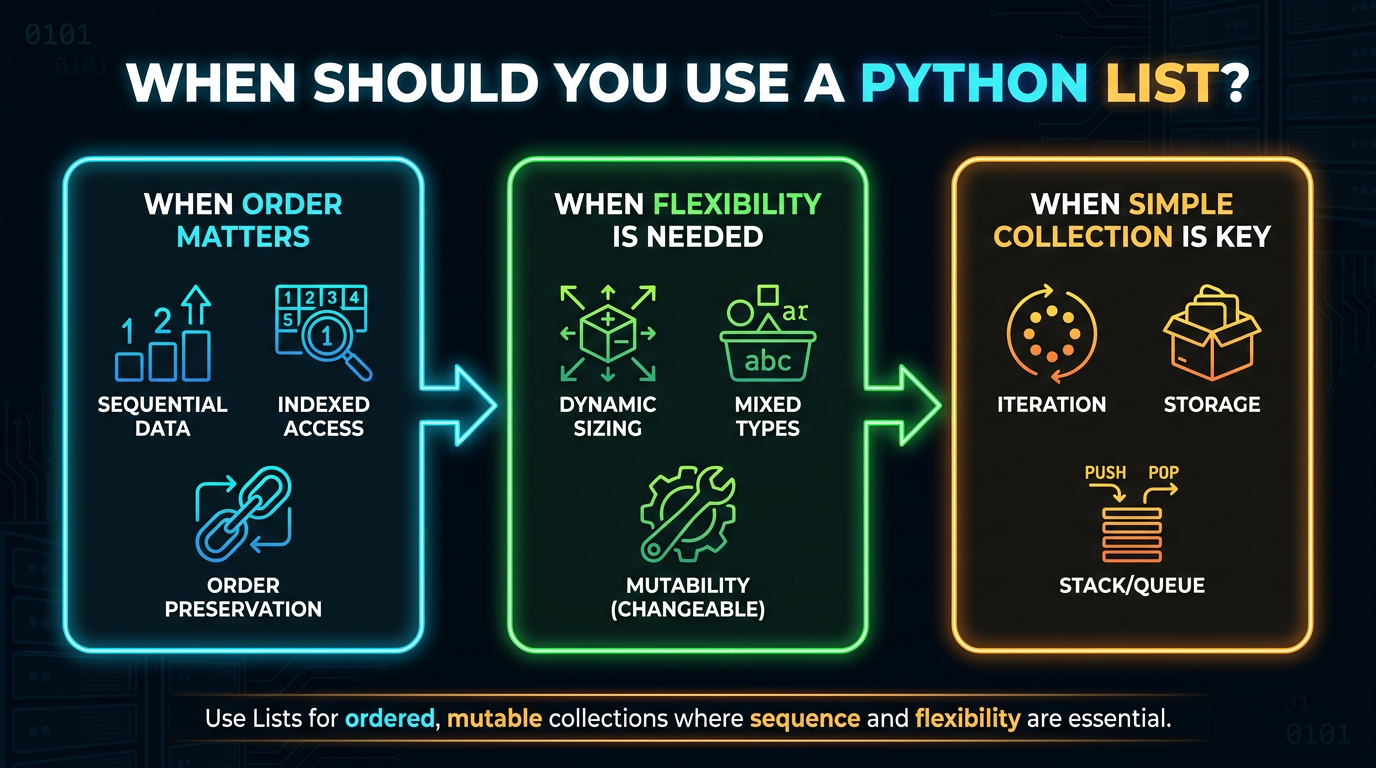
Use a Python list when:
- The collection needs to change over time.
- Element order matters.
- Duplicate values are allowed.
- Frequent indexing and iteration are required.
Lists are versatile, but they are not always the best choice. For fixed collections that should not change, a Python tuple is often more appropriate.
Python Tuples
A Python tuple is an ordered, immutable sequence used to store related values. Like lists, tuples preserve insertion order and allow duplicate elements, but once created, they cannot be modified.
coordinates = (10, 20)Because tuples are immutable, they provide a reliable way to represent data that should remain constant throughout program execution.
Creating a Python Tuple
Tuples are created using parentheses (()), although the commas define the tuple.
Examples:
colors = ("red", "green", "blue")
numbers = (1, 2, 3)
single = (10,)
Notice that a single-element tuple requires a trailing comma.
Tuple Packing and Unpacking
Python automatically groups multiple values into a tuple, a feature known as tuple packing.
person = ("Alice", 25, "Engineer")The stored values can later be assigned to individual variables using tuple unpacking.
name, age, profession = person

print(name)
print(age)
Output
Alice
25
Packing and unpacking simplify assignments and make returning multiple values from functions more convenient.
Python Tuple Operations
Tuples support many of the same read-only operations as lists.
| Operation | Example | Description |
|---|---|---|
| Indexing | t[0] | Access an element. |
| Slicing | t[1:3] | Retrieve a portion of the tuple. |
| Concatenation | t1 + t2 | Combine tuples. |
| Repetition | t * 2 | Repeat tuple elements. |
| Membership | 5 in t | Check if a value exists. |
Example:
numbers = (10, 20, 30, 40)

print(numbers[2])
print(numbers[:2])
Output
30
(10, 20)
Since tuples are immutable, these operations never modify the original tuple.
Python Tuple Functions and Methods
A Python tuple provides only two built-in methods:
- count() – Counts how many times a value appears.
- index() – Returns the position of the first matching value.
Example:
numbers = (10, 20, 20, 30)

print(numbers.count(20))
print(numbers.index(30))
Output
2
3
In addition to these methods, built-in Python tuple functions such as len(), max(), min(), and sum() work with tuples because they are iterable.
List of Tuples
A list of tuples combines the flexibility of lists with the immutability of tuples. Each tuple usually represents a single record, while the list stores multiple records.
Example:
students = [
    ("Alice", 85),
    ("Bob", 90),
    ("Charlie", 88)
]

print(students[1])
Output
('Bob', 90)A list of tuples is commonly used for tabular data, coordinates, database query results, and records that should not be modified individually.
Python List vs Python Tuple
| Feature | Python List | Python Tuple |
|---|---|---|
| Mutability | Mutable | Immutable |
| Order | Preserves insertion order | Preserves insertion order |
| Duplicates | Allowed | Allowed |
| Syntax | [] | () |
| Methods | Many modification methods | Only count() and index() |
| Best Use | Dynamic collections | Fixed collections |
Choose a Python list when the data needs to change, and a Python tuple when the data should remain constant. Selecting the appropriate data structure improves both code clarity and maintainability.
Python Sets
A set is an unordered, mutable collection of unique elements. Unlike lists and tuples, sets automatically remove duplicate values and are optimized for fast membership testing.
languages = {"Python", "Java", "C++"}Sets are commonly used when uniqueness matters more than the order of elements.
Creating a Set
Sets are created using curly braces ({}) or the set() constructor.
Examples:
fruits = {"apple", "banana", "orange"}

numbers = set([1, 2, 2, 3])

empty_set = set()
Note: {} creates an empty dictionary, not an empty set.
Set Operations
Python sets support mathematical set operations, making them useful for comparing collections.
| Operation | Operator | Description |
|---|---|---|
| Union | | | Combines elements from both sets. |
| Intersection | & | Returns common elements. |
| Difference | - | Returns elements in the first set but not the second. |
| Symmetric Difference | ^ | Returns elements present in only one set. |
Example:
a = {1, 2, 3}
b = {3, 4, 5}

print(a | b)
print(a & b)
print(a - b)
Output
{1, 2, 3, 4, 5}
{3}
{1, 2}
These operations make sets ideal for comparing datasets.
Common Set Methods
Python provides methods for adding, removing, and updating elements.
| Method | Purpose |
|---|---|
| add() | Adds an element. |
| update() | Adds multiple elements. |
| remove() | Removes a specific element. |
| discard() | Removes an element without raising an error if it doesn't exist. |
| pop() | Removes and returns an arbitrary element. |
| clear() | Removes all elements. |
Example:
numbers = {1, 2, 3}
numbers.add(4)
numbers.remove(2)
print(numbers)
When Should You Use a Set?
Choose a set when:
- Duplicate values should be eliminated.
- Fast membership testing is required.
- Mathematical set operations are needed.
- Element order is not important.
Sets are generally a better choice than lists when checking whether an item exists in a large collection.
Python Dictionaries
A dictionary stores data as key-value pairs, allowing values to be retrieved using unique keys instead of numeric indexes. Dictionaries preserve insertion order (Python 3.7+) and provide fast lookups, updates, and insertions.
student = {
    "name": "Alice",
    "age": 20
}
Dictionaries are ideal for representing structured data such as user profiles, configuration settings, and product information.
Creating a Dictionary
Dictionaries are created using curly braces with keys mapped to values using a colon (:).
Example:
employee = {
    "id": 101,
    "name": "John",
    "department": "Engineering"
}
An empty dictionary can be created using:
employee = {}Dictionary Operations
Python dictionaries support several common operations.
| Operation | Example | Description |
|---|---|---|
| Access | student["name"] | Retrieves a value. |
| Add | student["grade"] = "A" | Inserts a new key-value pair. |
| Update | student["age"] = 21 | Changes an existing value. |
| Delete | del student["age"] | Removes a key-value pair. |
| Membership | "name" in student | Checks whether a key exists. |
Example:
student = {
    "name": "Alice",
    "age": 20
}

print(student["name"])
student["age"] = 21
Common Dictionary Methods
| Method | Purpose |
|---|---|
| keys() | Returns all keys. |
| values() | Returns all values. |
| items() | Returns key-value pairs. |
| get() | Retrieves a value safely. |
| pop() | Removes a key and returns its value. |
| update() | Merges another dictionary. |
Example:
student = {"name": "Alice", "age": 20}

print(student.keys())
print(student.values())
Unlike direct indexing, get() returns None (or a default value) when a key is missing instead of raising a KeyError.
When Should You Use a Dictionary?

Use a dictionary when:
- Data naturally forms key-value pairs.
- Fast lookups by key are required.
- Each key must uniquely identify a value.
- Records need to be updated frequently.
Dictionary keys must be immutable, such as strings, numbers, or tuples. Mutable objects like lists cannot be used as keys.
Comprehension Patterns
Comprehensions provide a concise way to create new collections by combining iteration and optional filtering into a single expression. Rather than replacing loops, they simplify common collection-building tasks.
Python supports comprehensions for lists, dictionaries, and sets.
List Comprehensions
A list comprehension creates a new list by applying an expression to every element of an iterable.
Example:
numbers = [1, 2, 3, 4]
squares = [n * n for n in numbers]
Result:
[1, 4, 9, 16]Dictionary Comprehensions
Dictionary comprehensions generate dictionaries dynamically.
Example:
numbers = [1, 2, 3]
square_map = {n: n * n for n in numbers}
Result:
{1: 1, 2: 4, 3: 9}They are useful when keys and values can be derived programmatically.
Set Comprehensions
Set comprehensions create sets while automatically removing duplicate values.
Example:
numbers = [1, 2, 2, 3, 4]
unique_squares = {n * n for n in numbers}
Result:
{1, 4, 9, 16}Nested Comprehensions
Comprehensions can also contain nested loops.
Example:
matrix = [
    [1, 2],
    [3, 4]
]

flattened = [item for row in matrix for item in row]
Result:
[1, 2, 3, 4]Although nested comprehensions are powerful, avoid excessive nesting as it can reduce readability.
Choosing the Right Data Structure
Selecting the right data structure depends on how the data will be stored, accessed, and modified. There is no universally "best" data structure, each is designed for different use cases.
| Requirement | Recommended Data Structure |
|---|---|
| Ordered, modifiable collection | List |
| Fixed, read-only collection | Tuple |
| Unique elements | Set |
| Key-value mapping | Dictionary |
Common Use Cases
| Scenario | Best Choice | Reason |
|---|---|---|
| Shopping cart | List | Items can be added or removed. |
| Geographic coordinates | Tuple | Values remain fixed. |
| Unique email addresses | Set | Automatically removes duplicates. |
| Student records | Dictionary | Fast lookup using student IDs or names. |
When choosing a data structure, ask yourself:
- Does the data need to change? → Use a list.
- Should the data remain constant? → Use a tuple.
- Do I need unique values? → Use a set.
- Do I need to retrieve values using keys? → Use a dictionary.
Choosing the appropriate data structure not only improves code readability but also leads to more efficient and maintainable Python programs.
Specialized Collections
Python's built-in data structures handle most programming tasks, but some problems require specialized behavior. The collections, heapq, and bisect modules provide optimized data structures and algorithms for these scenarios, helping you write cleaner and more efficient code without implementing complex logic from scratch.
deque
A deque (double-ended queue) is a sequence optimized for adding and removing elements from both ends in constant time. Unlike lists, which are inefficient for removing elements from the beginning, a deque is designed for queue-like operations.
from collections import deque
queue = deque([1, 2, 3])
queue.append(4)
queue.appendleft(0)
print(queue)
Output
deque([0, 1, 2, 3, 4])When to Use deque
- Implementing queues.
- Breadth-First Search (BFS).
- Sliding window problems.
- Managing recently accessed items.
Counter
A Counter counts the frequency of hashable objects and stores the result as key-value pairs.
from collections import Counter
text = "banana"
count = Counter(text)
print(count)
Output
Counter({'a': 3, 'n': 2, 'b': 1})When to Use Counter
- Counting words or characters.
- Finding the most frequent elements.
- Building histograms.
- Frequency analysis.
defaultdict
A defaultdict automatically creates a default value for missing keys, eliminating the need to check whether a key already exists.
from collections import defaultdict
students = defaultdict(list)
students["Python"].append("Alice")
students["Python"].append("Bob")
print(students)
Output
defaultdict(<class 'list'>, {'Python': ['Alice', 'Bob']})When to Use defaultdict
- Grouping related data.
- Counting occurrences.
- Building adjacency lists for graphs.
- Avoiding repetitive key existence checks.
heapq
The heapq module implements a min-heap, where the smallest element is always available at the root.
import heapq
numbers = [5, 2, 8, 1]
heapq.heapify(numbers)
print(heapq.heappop(numbers))
Output
1When to Use heapq
- Priority queues.
- Scheduling tasks.
- Finding the smallest or largest elements.
- Graph algorithms such as Dijkstra's algorithm.
bisect
The bisect module uses binary search to efficiently locate insertion points in sorted sequences while preserving their order.
import bisect
numbers = [10, 20, 40]
bisect.insort(numbers, 30)
print(numbers)
Output
[10, 20, 30, 40]When to Use bisect
- Maintaining sorted lists.
- Fast insertion into sorted collections.
- Binary search operations.
Custom Data Structures
Python's built-in and specialized data structures solve most programming problems. However, some applications require custom behavior that isn't directly supported.
A custom data structure combines existing Python data structures and classes to model a specific problem.
Common examples include:
- Stack
- Queue
- Linked List
- Tree
- Graph
For example, a simple stack can be implemented using a list.
class Stack:

    def __init__(self):
        self.items = []

    def push(self, value):
        self.items.append(value)
    def pop(self):
        return self.items.pop()
In practice, you should build a custom data structure only when existing data structures do not naturally fit your problem.
Time Complexity at a Glance
Choosing the right data structure also affects performance. The following table summarises the average time complexity of common operations.
| Operation | List | Tuple | Set | Dictionary | deque |
|---|---|---|---|---|---|
| Access by index | O(1) | O(1) | , | , | O(1) |
| Search | O(n) | O(n) | O(1)* | O(1)* | O(n) |
| Insert at end | O(1) amortized | , | O(1)* | O(1)* | O(1) |
| Remove | O(n) | , | O(1)* | O(1)* | O(1) at both ends |
*Average-case complexity. Performance may vary depending on factors such as hash collisions.
Time complexity provides a useful guideline for comparing data structures, but the best choice always depends on the problem, the size of the data, and the operations performed most frequently.
Best Practices
- Choose the data structure based on how the data will be accessed and modified.
- Use lists for dynamic, ordered collections.
- Prefer tuples for fixed data that should not change.
- Use sets for fast membership testing and storing unique values.
- Choose dictionaries for key-value relationships and fast lookups.
- Use comprehensions to create collections concisely when they improve readability.
- Consider specialized collections such as deque or Counter instead of reinventing common data structures.
- Prioritize readability over clever implementations.
Common Mistakes
Using a List for Membership Testing
Searching a large list requires checking elements one by one. If uniqueness is sufficient, a set usually provides much faster membership tests.
Trying to Modify a Tuple
Tuples are immutable. If the data needs to change after creation, use a list instead.
Using Mutable Objects as Dictionary Keys
Dictionary keys must be immutable. Lists, dictionaries, and sets cannot be used as keys because their values can change.
Assuming Sets Preserve Order
Sets are designed for uniqueness and efficient membership testing, not positional access. If order is important, consider using a list or another ordered data structure.
Choosing a Data Structure Before Understanding the Problem
Selecting a familiar data structure isn't always the best choice. First consider whether your application requires ordering, uniqueness, mutability, or fast lookups, then choose the structure that best matches those requirements.
Summary
Python provides a rich collection of built-in and specialized data structures for organizing data efficiently. Lists, tuples, sets, and dictionaries form the foundation of everyday programming, while tools such as deque, Counter, defaultdict, heapq, and bisect address more specialized use cases. By understanding the strengths, limitations, and performance characteristics of each data structure, you can choose the right one for the problem at hand and write Python programs that are more efficient, readable, and maintainable.
Frequently Asked Questions
What are Python data structures?▾
Python data structures are containers used to organize, store, and manage data efficiently. The primary built-in data structures are lists, tuples, sets, and dictionaries.
Which Python data structure is the fastest?▾
There is no universally fastest data structure. Performance depends on the operation being performed. For example, dictionaries and sets provide very fast average-case lookups, while lists are efficient for ordered iteration and indexed access.
What is the difference between a list and a tuple?▾
A list is mutable and can be modified after creation, whereas a tuple is immutable and cannot be changed. Lists are suitable for dynamic collections, while tuples are better for fixed data.
When should I use a set instead of a list?▾
Use a set when duplicate values should be removed or when fast membership testing is more important than preserving element order.
Why can't lists be used as dictionary keys?▾
Dictionary keys must be immutable because Python uses their hash values to store and retrieve data. Since lists are mutable, they cannot be hashed and therefore cannot be used as keys.
What are specialized collections in Python?▾
Specialized collections are data structures provided by modules such as collections, heapq, and bisect to solve common problems more efficiently than general-purpose built-in data structures.