
Python Lists: How They Work Under the Hood and When to Use Them
Key Takeaways
- Understand what is list in Python and why lists are the most widely used built-in data structure.
- Learn how Python lists store references to objects and why they are mutable.
- Explore list creation, indexing, slicing, nested lists, and common Python list operations.
- Understand how list methods, copying, and assignment affect list behavior.
- Learn when a Python list is the right choice and how it differs from a tuple.
Introduction
"A Python list doesn't store values the way many beginners imagine; it stores references to objects, and that design choice explains everything from mutability to copying."
Lists are one of the first data structures every Python developer learns, but understanding how they work is just as important as knowing how to use them. A clear understanding of list behavior helps you avoid common bugs, write more efficient code, and choose the right data structure for different problems.
You will learn how to create and use Python lists effectively, understand how they behave during common operations, and uncover the internal concepts that explain mutability, copying, and iteration in this blog.
What Is a List in Python?
A Python list is an ordered, mutable collection that stores references to objects. It preserves the order in which elements are added, allows duplicate values, and can contain objects of different data types.
Unlike arrays in many programming languages, a Python list is designed to grow or shrink dynamically as elements are added or removed.
numbers = [10, 20, 30]
print(numbers)
Output
[10, 20, 30]Because of its flexibility, the Python list is commonly used to store sequences of related data that may change during program execution.
Define List in Python
To define a list in Python, you create an ordered collection of elements enclosed in square brackets ([]) and separated by commas.
For example:
fruits = ["apple", "banana", "orange"]A list can contain:
- Numbers
- Strings
- Boolean values
- Objects
- Even other lists
This ability to store heterogeneous data makes lists suitable for a wide range of programming tasks.
Why Lists Exist
Programs often need to manage multiple related values together. Without lists, each value would require a separate variable, making code difficult to organize and scale.
For example, instead of writing:
student1 = "Alice"
student2 = "Bob"
student3 = "Charlie"
you can store the same data in a single list:
students = ["Alice", "Bob", "Charlie"]Lists simplify iteration, searching, sorting, updating, and other collection-based operations. They provide a flexible structure for handling data whose size or contents may change over time.
List Notation
Python uses square brackets ([]) to represent a list. Elements are separated by commas and enclosed within the brackets.
Examples:
numbers = [1, 2, 3]
mixed = [10, "Python", True, 3.14]
empty = []
This bracket-based syntax, known as list notation, makes lists easy to identify and distinguish from tuples () and dictionaries {}.
How to Create a List in Python
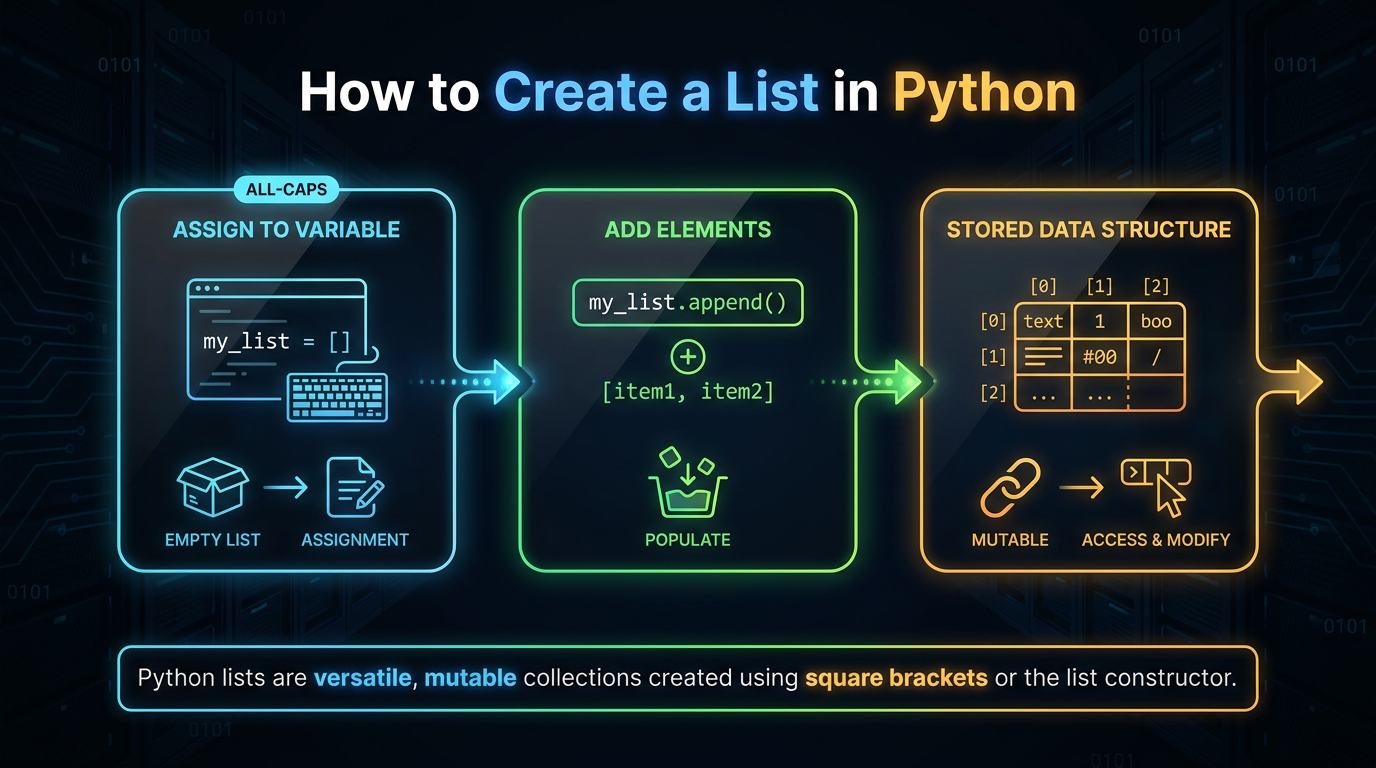
There are multiple ways to create a Python list, depending on the source of the data. The most common approach is using list literals, but Python also provides built-in functions and comprehensions for generating lists dynamically.
Creating Lists
The simplest way to create a list in Python is by using square brackets.
Example:
languages = ["Python", "Java", "C++"]Lists can contain duplicate values and objects of different types.
data = [100, "Python", False, 5.6]The order of elements is preserved exactly as they are added.
Different Ways to Create Lists
Python supports several approaches for creating lists.
Using a List Literal
numbers = [1, 2, 3]Using the list() Constructor
The list() function creates a list from any iterable.
letters = list("Python")Output
['P', 'y', 't', 'h', 'o', 'n']Using a List Comprehension
List comprehensions generate lists by evaluating an expression for each item in an iterable.
squares = [n * n for n in range(5)]Output
[0, 1, 4, 9, 16]They are often preferred for creating transformed or filtered lists in a concise and readable way.
How to Input a List in Python
User input is typically read as a string. To create a list from input, the string is split into individual values and converted to the required data type.
Example:
numbers = list(map(int, input().split()))If the user enters:
10 20 30 40the resulting list becomes:
[10, 20, 30, 40]This approach is commonly used in coding interviews, competitive programming, and practice problems where multiple values are entered on a single line.
Working with Python Lists
Once a Python list is created, you can access, modify, and organize its elements in different ways. Understanding indexing, slicing, and list operations is essential because almost every Python program interacts with lists.
Indexing
Indexing retrieves an element from a list using its position. Python uses zero-based indexing, meaning the first element is at index 0, the second at 1, and so on.
fruits = ["apple", "banana", "orange"]
print(fruits[0])
Output
appleIndexing provides direct access to individual elements, making it an O(1) operation.
Negative Indexing
Python also supports negative indexing, which counts positions from the end of the list. The last element has an index of -1, the second last -2, and so forth.
fruits = ["apple", "banana", "orange"]
print(fruits[-1])
Output
orangeNegative indexing is useful when you need to access the last few elements without calculating the list's length.
Slicing
Slicing extracts a portion of a list by specifying a start index and an end index. The start index is included, while the end index is excluded.
Syntax
list[start:end:step]Example:
numbers = [10, 20, 30, 40, 50]
print(numbers[1:4])
Output
[20, 30, 40]Slicing creates a new list, leaving the original list unchanged.
Nested Lists
A nested list is a list that contains one or more lists as its elements. It is commonly used to represent tables, matrices, or grouped data.
matrix = [
    [1, 2],
    [3, 4]
]

print(matrix[1][0])
Output
3In a nested list Python example, the first index selects the inner list, and the second index selects an element within that list.
Python List Operations
Python supports several operations for creating, combining, and querying lists.
Operation
Example
Description
Indexing
numbers[0]
Access an element.
Slicing
numbers[1:4]
Extract a portion of the list.
Concatenation
list1 + list2
Combine two lists.
Repetition
numbers * 2
Repeat list elements.
Membership
20 in numbers
Check whether an element exists.
Length
len(numbers)
Returns the number of elements.
Example:
numbers = [10, 20, 30]

print(numbers + [40, 50])
print(20 in numbers)
print(len(numbers))
These list operations in Python with examples are frequently used to manipulate and inspect list data.
Python List Functions
Python provides several built-in functions that operate on lists without modifying them directly.
Function
Purpose
len()
Returns the number of elements.
max()
Returns the largest element.
min()
Returns the smallest element.
sum()
Returns the sum of numeric elements.
sorted()
Returns a new sorted list.
any()
Returns True if any element is truthy.
all()
Returns True if all elements are truthy.
Example:
numbers = [8, 3, 10]
print(len(numbers))
print(max(numbers))
print(sorted(numbers))
Unlike list methods, these list functions in Python return new values and do not change the original list.
List Methods
List methods are functions that belong specifically to list objects and are used to modify or manage list contents.
Method
Purpose
append()
Adds an element to the end of the list.
extend()
Adds elements from another iterable.
insert()
Inserts an element at a specified position.
remove()
Removes the first matching element.
pop()
Removes and returns an element.
clear()
Removes all elements.
sort()
Sorts the list in place.
reverse()
Reverses the list in place.
copy()
Creates a shallow copy of the list.
Example:
numbers = [3, 1, 2]
numbers.append(4)
numbers.sort()
print(numbers)
Output
[1, 2, 3, 4]These list methods modify the existing list rather than creating a new one.
Why Some List Methods Return None
One common source of confusion is that methods such as append(), sort(), extend(), reverse(), and clear() return None instead of the modified list.
Example:
numbers = [3, 1, 2]
result = numbers.sort()
print(result)
print(numbers)
Output
None
[1, 2, 3]
These methods modify the original list in place, so returning the list again would be unnecessary. Returning None also helps prevent mistakes such as unintentionally assigning the result of a list-modifying method to another variable.
In contrast, functions like sorted() return a new sorted list, leaving the original list unchanged.
numbers = [3, 1, 2]

new_list = sorted(numbers)

print(numbers)
print(new_list)
Output
[3, 1, 2]
[1, 2, 3]
Understanding the difference between functions that return new objects and methods that modify existing lists is essential for writing correct and predictable Python code.
How Python Lists Work Under the Hood
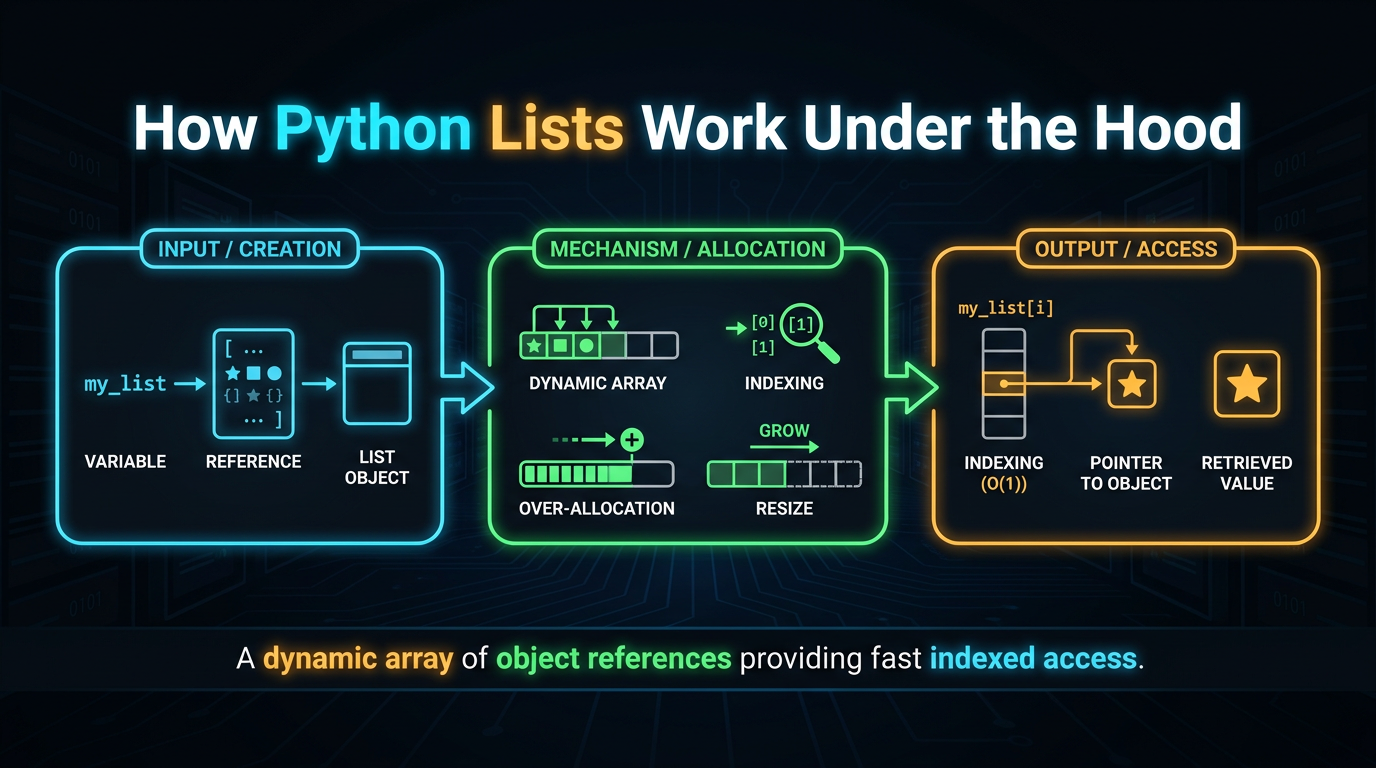
Although a Python list looks like a collection of values, it actually stores references to objects, not the objects themselves. This design makes lists flexible enough to hold objects of different types while allowing efficient access and modification.
Understanding how lists manage references, copying, and memory helps explain many common behaviors that often confuse beginners.
Lists Store References
Each element in a list is a reference to a Python object. The list itself does not contain the actual objects, it stores references that point to them.
For example:
numbers = [10, 20, 30]Conceptually, the list looks like this:
List
 ├──► 10
 ├──► 20
 └──► 30
Because lists store references, they can contain objects of different types.
data = [10, "Python", True, [1, 2]]This flexibility is one of the reasons lists are widely used in Python.
Why Lists Are Mutable
A mutable object can be modified after it is created. A Python list is mutable, meaning elements can be added, removed, updated, or reordered without creating a new list.
Example:
numbers = [10, 20, 30]
numbers[1] = 50
print(numbers)
Output
[10, 50, 30]The list object remains the same; only one of its stored references changes. This mutability makes lists suitable for collections that change over time, such as task lists, shopping carts, or user input.
Assignment vs Mutation
Assignment and mutation are often confused, but they perform different operations.
Assignment binds a name to an object.
numbers = [1, 2, 3]Here, numbers now refers to the list object.
Mutation changes the existing list without creating another one.
numbers[0] = 100The variable still refers to the same list object, but its contents have changed.
Understanding this distinction is important because assignment changes what a name refers to, whereas mutation changes the object itself.
Aliasing
Aliasing occurs when multiple variables refer to the same list object.
Example:
a = [1, 2, 3]
b = a
b.append(4)
print(a)
Output
[1, 2, 3, 4]Both a and b point to the same list. Modifying the list through one variable is immediately visible through the other.
Aliasing is useful when multiple references should share the same data, but it can also introduce unexpected side effects if you're not aware that two variables reference the same object.
Python Copy List
If you need an independent list, create a copy instead of assigning another reference.
One common approach is the copy() method.
original = [1, 2, 3]
copied = original.copy()
copied.append(4)
print(original)
print(copied)
Output
[1, 2, 3]
[1, 2, 3, 4]
You can also create a shallow copy using slicing.
copied = original[:]Both copy() and slicing create a shallow copy, meaning a new outer list is created while nested objects are still shared.
Iterating Over Lists
Iteration processes list elements one at a time. The most common approach is using a for loop.
fruits = ["apple", "banana", "orange"]

for fruit in fruits:
    print(fruit)
Output
apple
banana
orange
During iteration, Python retrieves each stored reference in sequence until all elements have been processed.
When you need both the index and the value, use enumerate().
for index, value in enumerate(fruits):
    print(index, value)
This approach is generally clearer than manually maintaining an index variable.
How List Growth Works
Python lists are implemented as dynamic arrays. Unlike fixed-size arrays, a list automatically grows when additional elements are appended.
numbers = []
numbers.append(10)
numbers.append(20)
numbers.append(30)
When the available space is exhausted, Python allocates a larger block of memory and copies the existing references into it. Because this resizing happens only occasionally, repeated append() operations remain efficient in practice.
This is why appending to the end of a list is typically fast, even for large lists.
Time Complexity of Common List Operations
The efficiency of an operation depends on how Python manages the underlying dynamic array.
Operation
Average Complexity
Reason
Indexing (list[i])
O(1)
Direct access by position.
Update (list[i] = value)
O(1)
Replaces an existing reference.
append()
O(1) amortized
Usually adds to the end without resizing.
pop() (last element)
O(1)
Removes the final element directly.
Insert at beginning
O(n)
Existing elements must be shifted.
Remove from beginning
O(n)
Remaining elements shift left.
Membership (x in list)
O(n)
Searches elements sequentially.
Slicing
O(k)
Creates a new list containing the selected elements.
Rather than memorizing these complexities, remember the underlying principle:
Accessing by index is fast because lists support direct positional access.
Operations that shift many elements become slower as the list grows.
Creating slices or copies requires allocating a new list.
Understanding these trade-offs helps you choose the right operations and write more efficient Python programs.
List Comprehensions
A list comprehension creates a new list by combining iteration, optional filtering, and an expression into a single construct. It provides a concise alternative to building a list with a for loop.
Syntax
[expression for item in iterable if condition]Example:
numbers = [1, 2, 3, 4, 5]
squares = [n * n for n in numbers]
print(squares)
Output
[1, 4, 9, 16, 25]A condition can also be added.
even = [n for n in numbers if n % 2 == 0]Use list comprehensions for simple transformations and filtering. If the logic becomes complex or deeply nested, a regular for loop is often easier to understand.
Python List Examples
The following examples demonstrate common ways to work with a Python list.
Creating a List
languages = ["Python", "Java", "C++"]Updating an Element
languages[1] = "JavaScript"Appending an Element
languages.append("Go")Removing an Element
languages.remove("C++")Iterating Over a List
for language in languages:
    print(language)
These examples cover the most common Python list operations used in everyday programming.
Python List Programs
Here are a few beginner-friendly Python list programs that demonstrate practical list operations.
Find the Largest Number
numbers = [10, 45, 22, 67, 31]
print(max(numbers))
Calculate the Sum of Elements
numbers = [5, 10, 15, 20]
print(sum(numbers))
Remove Duplicate Values
numbers = [1, 2, 2, 3, 4, 4]
unique = list(set(numbers))
print(unique)
Reverse a List
numbers = [1, 2, 3, 4]
numbers.reverse()
print(numbers)
These simple list programs in Python help build familiarity with common list operations and built-in functions.
Difference Between List and Tuple in Python
Lists and tuples difference is they both ordered collections, but they are designed for different purposes.
Feature
List
Tuple
Mutability
Mutable
Immutable
Syntax
[]
()
Modification
Supported
Not supported
Methods
Many modification methods
Only count() and index()
Typical Use
Dynamic data
Fixed data
When to Choose Each
Use a list when:
- Elements need to be added, removed, or updated.
- The collection changes during program execution.
Use a tuple when:
- The data should remain constant.
- You want to prevent accidental modification.
Understanding the difference between list and tuple in Python helps you choose the right data structure for a given problem.
When to Use Lists
Lists are the preferred choice when working with collections whose contents may change over time.
Use a list when you need to:
- Store an ordered sequence of values.
- Add or remove elements frequently.
- Modify existing values.
- Iterate through a collection.
- Store objects of different data types.
Typical use cases include:
- Shopping carts
- Task management applications
- Student records
- Sensor readings
- Search results
If the collection should remain unchanged after creation, a tuple is usually a better alternative.
Best Practices
- Choose lists for dynamic collections that change over time.
- Use descriptive variable names that reflect the list's contents.
- Prefer list comprehensions for simple transformations.
- Create copies before modifying a shared list when necessary.
- Use append() to add a single element and extend() to add multiple elements.
- Iterate directly over list elements instead of manually managing indexes whenever possible.
- Use sorted() when you need a sorted copy and sort() when modifying the existing list is acceptable.
Common Mistakes with Lists in Python
Confusing Assignment with Copying
a = [1, 2, 3]
b = a
Both variables reference the same list. Use copy() or slicing to create a separate list.
Expecting List Methods to Return the Modified List
Methods such as append(), sort(), and reverse() modify the list in place and return None.
Modifying a List While Iterating
Changing a list during iteration can skip elements or produce unexpected results. If modifications are required, iterate over a copy instead.
Using Nested List Multiplication Incorrectly
matrix = [[0] * 3] * 3This creates multiple references to the same inner list rather than independent rows.
Using a List for Fast Membership Testing
Lists perform a sequential search. If frequent membership checks are required, a set is often a better choice.
Summary
A Python list is a dynamic, ordered, and mutable data structure that stores references to objects rather than the objects themselves. In this guide, you learned how to create and manipulate lists, perform common Python list operations, work with indexing, slicing, nested lists, and comprehensions, and understand concepts such as mutability, aliasing, copying, and dynamic resizing. You also explored how lists behave internally, compared lists with tuples, and learned when lists are the right choice. Understanding these concepts helps you use lists more effectively and avoid many common programming mistakes.
Frequently Asked Questions
1. What is a list in Python?▾
A Python list is an ordered, mutable collection that stores references to objects. Lists support indexing, slicing, iteration, and dynamic resizing.
2. Is a list mutable in Python?▾
Yes. Lists are mutable, meaning their elements can be added, removed, or modified after creation.
3. How do I create a list in Python?▾
You can create a list using square brackets or the list() constructor.
numbers = [1, 2, 3]4. How do I copy a Python list?▾
Use the copy() method or slicing.
copy_list = original.copy()
or
copy_list = original[:]
5. What is a nested list?▾
A nested list is a list that contains one or more lists as elements. It is commonly used to represent tables, matrices, or grouped data.
6. What is the difference between a list and a tuple?▾
Lists are mutable and intended for dynamic collections, whereas tuples are immutable and better suited for fixed collections.