Python Loops Explained: for, while, and Loop Patterns That Read Well
Key Takeaways
- Understand how Python loops automate repetitive tasks by executing a block of code multiple times.
- Learn when to use for and while loops based on the problem you're solving.
- Explore how Python iterates over strings, lists, tuples, dictionaries, sets, and other iterables.
- Discover loop control statements such as break, continue, pass, and the loop else clause.
- Write cleaner and more readable loops by avoiding common mistakes and using practical iteration patterns.
Introduction
Imagine processing a file with thousands of records, analysing customer transactions, or validating user input until it's correct. Writing the same code repeatedly for each task would be inefficient and difficult to maintain. This is where Python loops become essential. A loop allows a program to execute the same block of code multiple times, making it easier to process data, automate repetitive operations, and build scalable applications.
Whether you are iterating through a list, reading a file, or repeating an action until a condition changes, loops simplify repetitive logic. In this blog, you will learn how for and while loops work in Python, when to use each one, and the best practices for writing clean, readable Python loops.
What are Loops in Python?
A loop is a control flow statement that repeatedly executes a block of code. Instead of writing the same statements multiple times, you define the task once and let the loop repeat it until all items have been processed or a specified condition is no longer true.
Python provides two looping constructs:
- for loop – Iterates over each item in an iterable, such as a list, tuple, string, dictionary, set, or the sequence generated by range().
- while loop – Continues executing a block of code as long as a given condition evaluates to True.
Unlike conditional statements, which choose one execution path, loops repeatedly execute the same block while controlling how many times it runs. This makes them a fundamental part of writing efficient and maintainable programs.
Why are Loops Important?
Many programming tasks involve performing the same operation multiple times. Without loops, the same code would have to be written repeatedly, making programs longer, harder to maintain, and more prone to errors.
Loops simplify repetitive tasks such as:
- Processing every element in a list or tuple.
- Reading each line from a file.
- Searching for a specific value in a collection.
- Validating user input until a valid response is received.
- Calculating totals, averages, or other aggregated values from datasets.
For example, instead of printing every student's name individually, a for loop can iterate through the entire list and perform the same operation for each student.
Because loops in Python automate repetition, they improve code readability, reduce duplication, and make programs easier to modify as data or requirements change.
Types of Loops in Python
Python supports two primary types of loops, each designed for a different iteration scenario.
| Loop Type | Best Used When | Example Scenario |
|---|---|---|
| for loop | Iterating over every item in an iterable or a fixed sequence. | Printing each name in a list or processing every row in a CSV file. |
| while loop | Repeating an operation until a condition changes. | Asking for user input until a valid password is entered. |
Although both types of loops in Python repeat code, choosing the right one depends on how the repetition is controlled. Use a for loop when you're iterating over an iterable or know what needs to be traversed. Use a Python while loop when the number of iterations depends on a condition that is evaluated during execution.
Understanding the for Loop
The for loop is Python's primary construct for iteration. Instead of repeating code a fixed number of times, it processes each item in an iterable one at a time until no items remain.
Unlike some programming languages where a for loop is commonly associated with counting, Python's for loop is designed to work directly with collections and other iterable objects. This makes it simpler to read and eliminates the need to manually manage loop counters in many situations.
for loop Syntax
for variable in iterable:
    # Block of code
During each iteration:
Python retrieves the next item from the iterable.
The item is assigned to the loop variable.
The loop body executes.
The process repeats until every item has been processed.
Python for loop example:
fruits = ["Apple", "Banana", "Orange"]

for fruit in fruits:
    print(fruit)
Output
Apple
Banana
Orange
Here in the Python for loop example, the program automatically retrieves each element from the list and assigns it to fruit without requiring an index variable.
Types of for Loops in Python
Although Python has only one for loop syntax, it can be used in different ways depending on the iterable or iteration pattern. These are often referred to as the types of for loops in Python because they represent the most common ways a for loop is applied in real programs.
Some common iteration patterns include:
- Iterating over strings
- Iterating over lists
- Iterating over tuples
- Iterating over dictionaries
- Iterating over sets
- Iterating over a sequence of numbers using range()
- Iterating with both an index and value using enumerate()
- Iterating over multiple iterables simultaneously using zip()
The following sections explain each of these patterns with practical examples.
What Is an Iterable?
An iterable is any object that can return its elements one at a time. When a for loop starts, Python creates an iterator from the iterable. The iterator keeps track of the current position and supplies the next item until the collection is exhausted.
You don't usually interact with iterators directly when writing everyday Python code. The for loop handles the iteration process automatically, allowing you to focus on the operation performed for each item.
Common iterable objects include:
- Strings
- Lists
- Tuples
- Dictionaries
- Sets
- Objects returned by range()
- Files
Because these objects are iterable, they can all be used directly in a for loop.
Iterating Over Different Data Types
One advantage of Python's for loop is that it works consistently across different iterable types.
Iterating Over a String
A string is a sequence of characters. The for loop processes one character at a time.
language = "Python"

for character in language:
    print(character)
Output
P
y
t
h
o
n
Iterating Over a List
Lists store ordered collections of items. The loop visits each element in order.
languages = ["Python", "Java", "C++"]

for language in languages:
    print(language)
Iterating Over a Tuple
Tuples are ordered and immutable collections. They are traversed in the same way as lists.
coordinates = (10, 20, 30)

for value in coordinates:
    print(value)
Iterating Over a Dictionary
When a dictionary is used directly in a for loop, Python iterates over its keys.
student = {
    "name": "Rahul",
    "age": 20
}

for key in student:
    print(key)
To iterate over both keys and values together, use the items() method.
for key, value in student.items():
    print(key, value)
Iterating Over a Set
A set stores unique elements. Since sets are unordered collections, the iteration order is not guaranteed.
numbers = {10, 20, 30}

for number in numbers:
    print(number)
Using range()
The range() function generates a sequence of integers. It is commonly used when you need to repeat an operation a specific number of times or iterate over a range of numeric values.
range(stop)
Generates numbers starting from 0 up to, but not including, stop.
for number in range(5):
    print(number)
Output
0
1
2
3
4
range(start, stop)
Starts from the specified value and continues until, but not including, stop.
for number in range(2, 6):
    print(number)
Output
2
3
4
5
range(start, stop, step)
The third argument specifies the increment (or decrement) between consecutive values.
for number in range(2, 11, 2):
    print(number)
Output
2
4
6
8
10
A negative step can be used to count backwards.
for number in range(5, 0, -1):
    print(number)
Using enumerate()
When iterating over a collection, you may need both the index and the value. The enumerate() function returns each item along with its corresponding index, eliminating the need to maintain a separate counter.
students = ["Asha", "Rahul", "Meera"]

for index, student in enumerate(students):
    print(index, student)
Output
0 Asha
1 Rahul
2 Meera
If you want indexing to begin from a different value, use the optional start parameter.
for index, student in enumerate(students, start=1):
    print(index, student)
This produces numbering starting from 1 instead of 0.
Using zip()
The zip() function combines two or more iterables by pairing their corresponding elements. During each iteration, the for loop receives one element from each iterable as a tuple.
students = ["Asha", "Rahul", "Meera"]
scores = [92, 88, 95]

for student, score in zip(students, scores):
    print(student, score)
Output
Asha 92
Rahul 88
Meera 95
By default, zip() stops when the shortest iterable is exhausted. This behavior prevents attempts to access elements beyond the available data.
zip() is particularly useful when processing related collections together, such as names and scores, products and prices, or months and sales figures.
Understanding the while Loop
Unlike a for loop, which iterates over an iterable, a while loop repeatedly executes a block of code as long as a specified condition evaluates to True. Before each iteration, Python evaluates the condition. If it is True, the loop body runs; if it becomes False, the loop terminates, and execution continues with the next statement.
A Python while loop is useful when the number of iterations is not known in advance and depends on a condition that changes during program execution.
While loop Syntax in Python
while condition:
    # Block of code
For example:
count = 1

while count <= 5:
    print(count)
    count += 1
Output
1
2
3
4
5
In this while loop program in Python, the loop continues until the value of count becomes greater than 5.
When to Use a while Loop
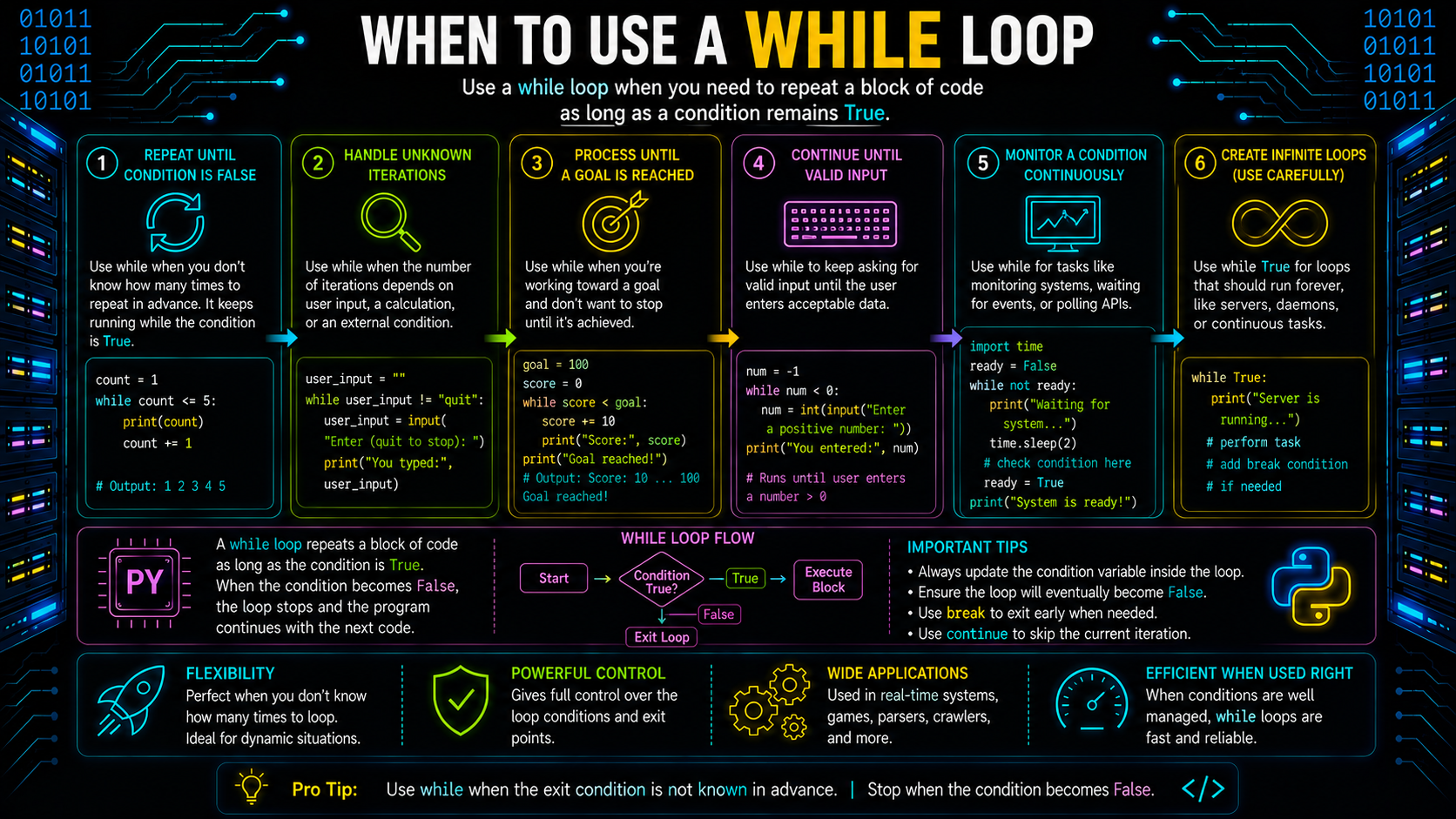
Use a Python while loop when repetition depends on a changing condition rather than iterating over a collection. It is commonly used when the program cannot determine beforehand how many times the loop should execute.
Waiting for Valid User Input
A program may repeatedly ask for input until the user enters valid data.
password = ""
while password != "python123":
    password = input("Enter password: ")
print("Access granted")
The loop continues until the correct password is entered.
Menu-Driven Programs
Many console applications display a menu repeatedly until the user chooses to exit.
choice = ""

while choice != "4":
    print("1. View")
    print("2. Add")
    print("3. Delete")
    print("4. Exit")

    choice = input("Choose an option: ")
The menu keeps appearing until the user selects the exit option.
Retrying Until an Operation Succeeds
Programs often retry an operation until it succeeds or another condition is met.
connected = False

while not connected:
    print("Trying to connect...")
    connected = True

print("Connected")
This pattern is commonly used when checking whether an operation has completed successfully.
Avoiding Infinite Loops
An infinite loop occurs when the loop condition never becomes False. As a result, the loop continues executing indefinitely unless it is interrupted or terminated externally.
One common cause is forgetting to update the variable that controls the loop condition.
Incorrect
count = 1

while count <= 5:
    print(count)
Since count never changes, the condition count <= 5 always remains True.
Correct
count = 1

while count <= 5:
    print(count)
    count += 1
When writing a while loop, always ensure that:
- The loop condition can eventually evaluate to False.
- Variables involved in the condition are updated correctly.
- The termination condition is clearly defined before the loop begins.
Common while Loop Mistakes
Although Python while loops are straightforward, a few mistakes occur frequently.
Forgetting to Update the Condition
If the controlling variable is never modified, the loop may never terminate.
Using the Wrong Comparison Operator
A small mistake in the condition can cause the loop to stop too early or execute longer than intended.
For example:
while count < 5:behaves differently from
while count <= 5:Choosing the correct comparison operator is important for producing the expected number of iterations.
Changing the Loop Variable Incorrectly
Updating the loop variable by the wrong amount may skip values or prevent the termination condition from being reached.
Using a while Loop When a for Loop Is More Suitable
If you're simply processing every element in a list, tuple, string, or other iterable, a for loop is usually simpler and more readable because Python manages the iteration automatically.
Nested Loops
A nested loop is a loop placed inside another loop. During each iteration of the outer loop, the inner loop executes completely before the outer loop moves to its next iteration.
Nested loops are useful when working with two-dimensional data or when every element in one collection must be processed together with elements from another collection.
Nested for Loop in Python
Python starts by executing the first iteration of the outer loop. It then runs the inner loop from beginning to end. After the inner loop finishes, the outer loop proceeds to its next iteration and the inner loop starts again.
For example:
for row in range(2):
    for column in range(3):
        print(f"Row {row}, Column {column}")
Output
Row 0, Column 0
Row 0, Column 1
Row 0, Column 2
Row 1, Column 0
Row 1, Column 1
Row 1, Column 2
Notice that the inner loop completes all three iterations before the outer loop advances from row = 0 to row = 1.
Understanding Nested Loop Execution Order
The execution order of nested loops follows a predictable pattern. For every iteration of the outer loop, the inner loop runs from start to finish.
Outer Loop (Iteration 1)
    Inner Loop (Iteration 1)
    Inner Loop (Iteration 2)
    Inner Loop (Iteration 3)

Outer Loop (Iteration 2)
    Inner Loop (Iteration 1)
    Inner Loop (Iteration 2)
    Inner Loop (Iteration 3)
This means that if the outer loop executes m times and the inner loop executes n times for each outer iteration, the inner loop body executes a total of m × n times.
Understanding this execution order helps you estimate how many times a block of code runs and identify opportunities to simplify or optimize nested loops when processing large datasets.
Practical Uses of Nested Loops
Nested loops are commonly used when solving problems that involve rows, columns, or combinations of data.
Traversing a Matrix
A matrix can be processed by iterating through each row and then each element within that row.
matrix = [
    [1, 2],
    [3, 4]
]

for row in matrix:
    for value in row:
        print(value)
Generating a Multiplication Table
Nested loops are useful when generating multiplication tables or other tabular data.
for i in range(1, 4):
    for j in range(1, 4):
        print(i * j, end=" ")
    print()
Comparing Data Between Collections
When every element in one collection needs to be compared with every element in another collection, nested loops provide a straightforward solution.
list1 = [1, 2]
list2 = [2, 3]

for first in list1:
    for second in list2:
        if first == second:
            print(first)
Processing Grid-Based Data
Many grid-based problems represent data as rows and columns. Nested loops make it possible to visit each cell in the grid one at a time.
Examples include:
- Processing game boards.
- Traversing spreadsheet data.
- Reading image pixels stored in rows and columns.
- Exploring two-dimensional arrays.
Nested loops provide a structured way to solve these problems while keeping the iteration logic clear and predictable.
Controlling Loop Execution
Python provides three loop control statements—break, continue, and pass—that modify how a loop executes. These statements help you stop a loop early, skip specific iterations, or reserve a placeholder for future code. Python also supports an optional else clause that executes only when a loop completes normally.
The break Statement
The break statement immediately terminates the nearest enclosing for or while loop. Once break executes, control moves to the first statement after the loop.
Use break when continuing the remaining iterations is unnecessary, such as when you've found the required item or met a termination condition.
Example
numbers = [12, 25, 37, 48, 59]

for number in numbers:
    if number > 30:
        print("First value greater than 30:", number)
        break
Output
First value greater than 30: 37Here, the loop stops as soon as it finds the first value greater than 30. The remaining elements are not processed.
Common Use Cases
- Searching for an item in a collection.
- Exiting a menu-driven program.
- Stopping a loop when an error or success condition occurs.
The continue Statement
The continue statement skips the rest of the current iteration and immediately proceeds to the next iteration of the loop.
Unlike break, it does not terminate the loop.
Example
for number in range(1, 6):
    if number == 3:
        continue
    print(number)
Output
1
2
4
5
When number becomes 3, Python skips the print() statement and continues with the next iteration.
Common Use Cases
- Ignoring invalid input.
- Skipping missing or incomplete records.
- Filtering items during iteration.
The pass Statement
The pass statement is a null statement. It performs no action when executed.
It is commonly used as a placeholder where Python expects a statement syntactically, but no implementation is required yet.
Example
for number in range(5):
    if number == 2:
        pass
    print(number)
Output
0
1
2
3
4
Although pass does nothing, the program remains syntactically valid.
Common Use Cases
- Creating placeholder loops during development.
- Defining empty functions or classes temporarily.
- Reserving logic for future implementation.
Understanding the Loop else Clause
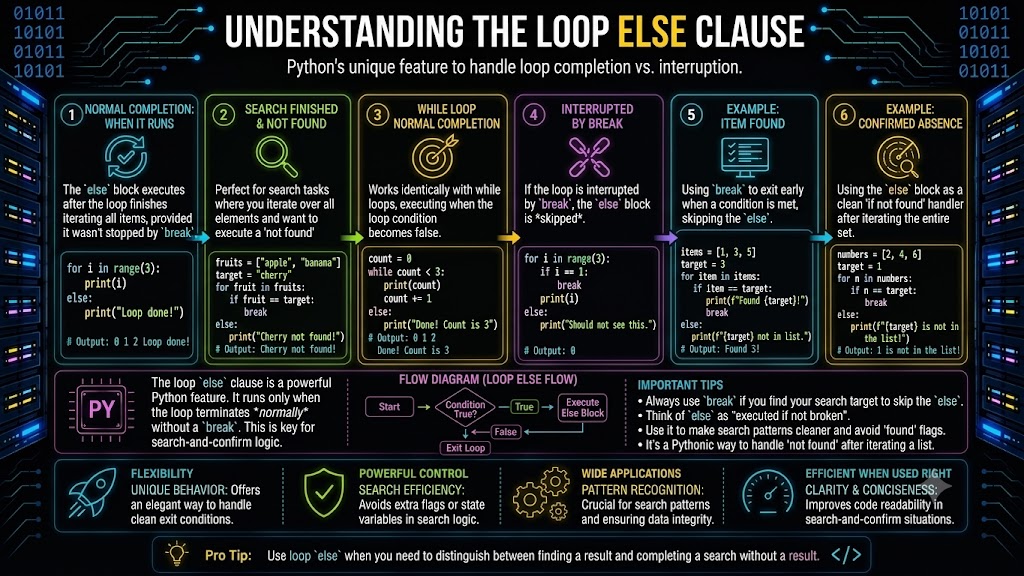
In Python, both for and while loops can include an optional else clause.
The else block executes only if the loop completes normally without encountering a break statement. If the loop terminates because of break, the else block is skipped.
Example Without break
numbers = [2, 4, 6, 8]

for number in numbers:
    print(number)
else:
    print("Loop completed successfully.")
Output
2
4
6
8
Loop completed successfully.
Since the loop finishes all iterations, the else block executes.
Example With break
numbers = [2, 4, 7, 8]

for number in numbers:
    if number % 2 != 0:
        print("Odd number found.")
        break
else:
    print("All numbers are even.")
Output
Odd number found.Because the loop exits using break, the else block does not execute.
The loop else clause is commonly used in search operations where you want to perform one action if an item is found and another if the search completes without finding a match.
Writing Cleaner Loop Patterns
Writing a working loop is only part of the solution. Choosing the appropriate loop, using meaningful variable names, and avoiding common pitfalls can make your code easier to understand and maintain.
Choosing Between for and while
Although both loops repeat a block of code, they are designed for different situations.
| Feature | for Loop | while Loop |
|---|---|---|
| Best suited for | Iterating over an iterable | Repeating until a condition changes |
| Number of iterations | Usually known or determined by the iterable | Often unknown before execution |
| Loop control | Managed automatically | Requires manual condition updates |
| Common use cases | Lists, strings, dictionaries, files | User input, retry logic, waiting for events |
As a general guideline:
- Use a for loop when processing every item in an iterable.
- Use a Python while loop when repetition depends on a condition evaluated during execution.
Writing Readable Loop Variables
Meaningful variable names improve readability and make the purpose of a loop immediately clear.
Less descriptive
for x in students:
    print(x)
More descriptive
for student in students:
    print(student)
Similarly, use names such as row, column, product, or employee instead of generic variables whenever possible.
Avoiding Mutation Bugs While Iterating
Modifying a collection while iterating over it can produce unexpected behavior because the collection changes as the loop is traversing it.
Incorrect
numbers = [1, 2, 3, 4]

for number in numbers:
    if number % 2 == 0:
        numbers.remove(number)

print(numbers)
Removing elements during iteration changes the list's contents, which may cause some elements to be skipped.
Correct Approach
Instead of modifying the original list, create a new one using a list comprehension.
numbers = [1, 2, 3, 4]

filtered_numbers = [number for number in numbers if number % 2 != 0]

print(filtered_numbers)
Alternatively, iterate over a copy of the list if modifying the original collection is necessary.
for number in numbers[:]:
    if number % 2 == 0:
        numbers.remove(number)
Common Looping Patterns in Real Programs
Loops appear in almost every Python application. Some patterns occur frequently because they solve common programming tasks.
Reading a File Line by Line
with open("data.txt") as file:
    for line in file:
        print(line.strip())
Each iteration processes one line until the end of the file is reached.
Searching for an Item
target = 15
numbers = [8, 10, 15, 20]

for number in numbers:
    if number == target:
        print("Found")
        break
The loop stops immediately after finding the target value.
Validating User Input
choice = ""

while choice not in {"yes", "no"}:
    choice = input("Enter yes or no: ")
The loop continues until valid input is provided.
Counting Occurrences
text = "programming"
count = 0
for character in text:
    if character == "g":
        count += 1
print(count)
The loop counts how many times a character appears.
Processing API Responses
for user in users:
    print(user["name"])
Applications commonly iterate through API responses to process each returned record.
Pairing Related Data with zip()
students = ["Asha", "Rahul"]
scores = [91, 88]

for student, score in zip(students, scores):
    print(student, score)
zip() keeps related values together during iteration, making the code simpler and easier to read.
Common Loop Mistakes
Understanding common mistakes can help you write loops that are both correct and maintainable.
- Modifying a collection during iteration, which may skip or duplicate elements.
- Using unnecessary indexing when iterating directly over elements is simpler.
- Creating deeply nested loops, which can make code difficult to read and may increase execution time.
- Using a Python while loop instead of a for loop when iterating over an iterable.
- Forgetting to update the loop condition in a while loop, leading to an infinite loop.
- Using unclear variable names, making the purpose of the loop difficult to understand.
Choosing the appropriate loop structure and following these practices results in code that is easier to read, debug, and maintain.
Summary
Loops are fundamental to Python because they automate repetitive tasks without duplicating code. In this guide, you learned how for loops iterate over iterables, how while loops repeat code until a condition changes, and how nested loops execute. You also explored loop control statements such as break, continue, pass, and the loop else clause, along with practical iteration techniques using range(), enumerate(), and zip(). By selecting the appropriate loop, avoiding common pitfalls, and following readable loop patterns, you can write Python code that is clear, efficient, and easier to maintain.
Frequently Asked Questions
What are loops in Python?▾
Loops are control flow or looping statements that repeatedly execute a block of code. Python provides for loops for iterating over iterables and while loops for repeating code while a condition remains True. These iterative statements in Python reduce code duplication by automating repetitive tasks and improving code readability.
What is the difference between a for loop and a while loop in Python?▾
A for loop iterates over each element in an iterable, while a while loop continues executing as long as a specified condition evaluates to True. Use a for loop when processing a collection and a while loop when the number of iterations depends on a changing condition.
How many types of loops are there in Python?▾
Python provides two primary types of loops: the for loop and the while loop. A for loop iterates over each element in an iterable, while a while loop repeatedly executes a block of code as long as a specified condition evaluates to True.
How do you write a for loop in Python?▾
To write a for loop in Python, specify a loop variable, an iterable, and the block of code to execute during each iteration.
for item in iterable:
    # Code to execute
During each iteration, Python assigns the next element from the iterable to the loop variable until all elements have been processed.
How do you use a for loop in Python?▾
A for loop is used to iterate over iterable objects such as strings, lists, tuples, dictionaries, sets, or the sequence generated by range(). It automatically retrieves each element one at a time, making it the preferred choice when processing every item in a collection.
How do you use a while loop in Python?▾
A while loop repeatedly executes a block of code as long as its condition evaluates to True. It is commonly used when the number of iterations is not known beforehand, such as validating user input or retrying an operation until it succeeds.
Does Python have a do...while loop?▾
No. Python does not have a built-in do...while loop. Similar behavior can be implemented using a while True loop combined with a break statement or by executing the required code once before entering a while loop.