Python Modules Explained: Files, Namespaces, and Reuse
A Python program often starts as one file. You write a few functions, run the script, and everything feels simple. But as the program grows, keeping every function, constant, class, and piece of logic in one file quickly becomes difficult.
Python solves part of this problem with modules.
A module gives related code a separate home. It creates a namespace for its names, lets other files reuse those names through imports, and provides a boundary between different parts of a program.
But there is an important distinction to understand:
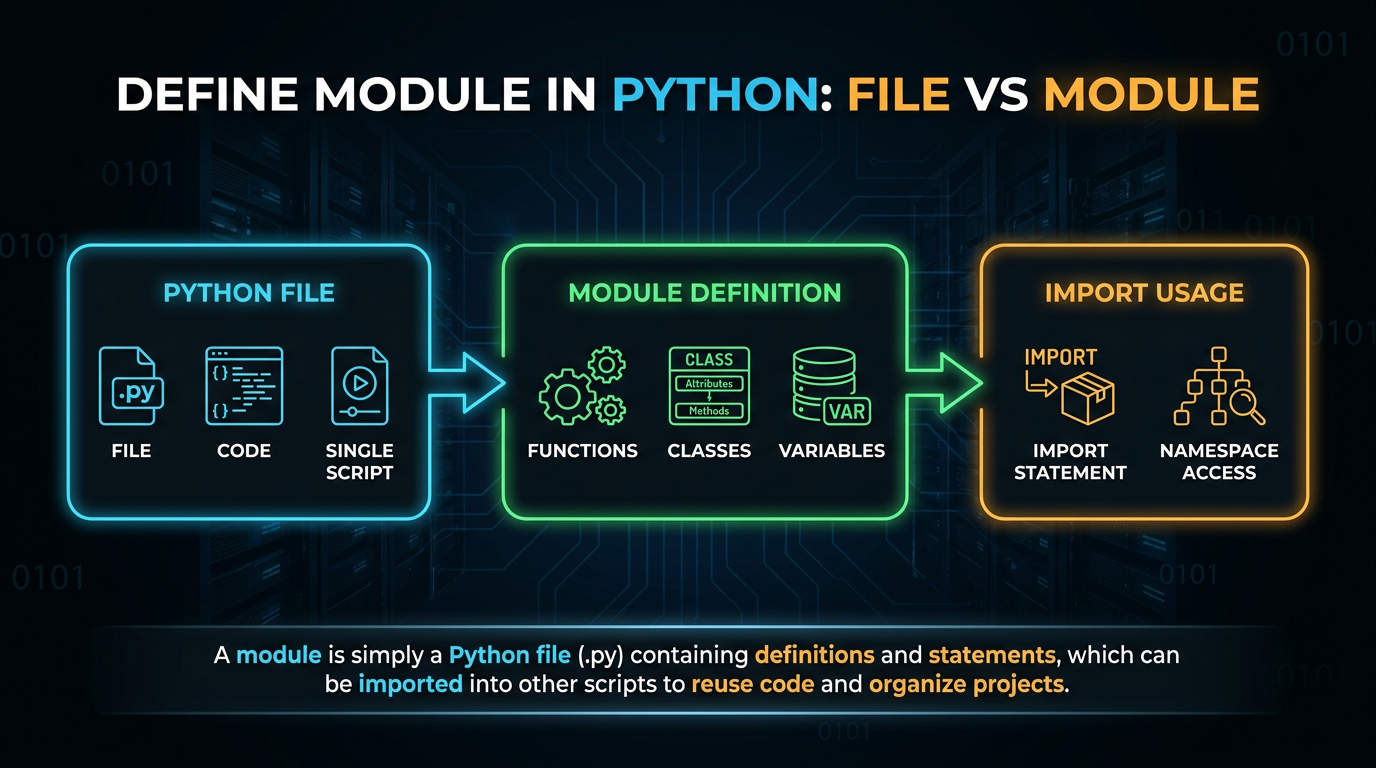
A Python file is the source representation; a module is the Python object created from that code when it is loaded.
This distinction helps explain why imports work the way they do, why import executes module-level code, why __name__ changes depending on how a file is used, and why modules are more than just a way to split a large file.
What is a Module in Python?
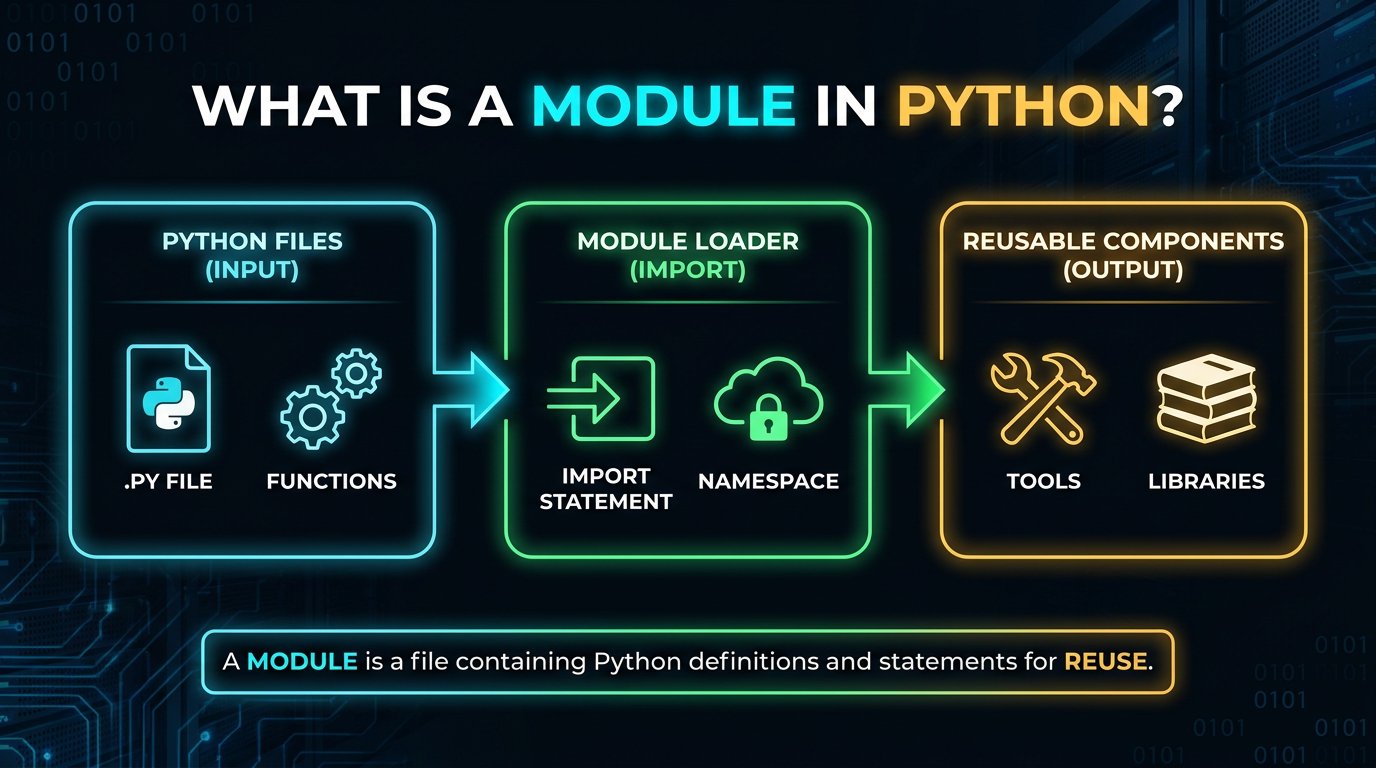
A module is a Python object that contains code and names. Most commonly, a module originates from a .py file.
For example, suppose you create:
calculator.py
with:
def add(a, b):
    return a + b
def subtract(a, b):
    return a - b
This file can be imported as the calculator module:
import calculator

print(calculator.add(10, 5))
print(calculator.subtract(10, 5))
Output:
15
5
At a conceptual level:
calculator.py
     ↓
calculator module
     ↓
module namespace
     ↓
add, subtract
     ↓
function objects
Therefore, the meaningful response to the question "what is module?" is not just "a Python file." Although a module's source is often provided via a.py file, the module itself is an object that occurs at runtime.
Define Module in Python: File vs Module
This distinction is worth learning early.
Consider:
math_tools.py
The file name is:
math_tools.py
The corresponding simple module name is:
math_tools
Therefore, you write:
import math_toolsnot:
import math_tools.pyThe .py extension identifies the source file. The import statement uses the module name.
A useful mental model is:
File → provides source code
Module → runtime object containing names
Namespace → mapping of names to objects
This is one of the foundations of understanding Python's module system.
Why Does Python Have Modules?
A small script can easily fit into one file:
def add(a, b):
    return a + b

def subtract(a, b):
    return a - b

print(add(10, 5))
print(subtract(10, 5))
There is nothing wrong with this.
The problem appears when the program grows.
Imagine one file containing:
user input
validation
database operations
file processing
business logic
reporting
logging
command-line behavior
The file becomes difficult to navigate and test. Modules let you separate these responsibilities:
project/
├── input.py
├── validation.py
├── database.py
├── reports.py
└── main.py
Each module can contain related code.
This makes a larger program easier to:
- read
- test
- reuse
- debug
- extend
- maintain
Modules are therefore one of Python's fundamental tools for moving from a collection of scripts toward a structured program.
How to Create a Python Module
Learning python create module is simple.
Create a file:
temperature.py
Add:
def celsius_to_fahrenheit(celsius):
    return celsius * 9 / 5 + 32
def fahrenheit_to_celsius(fahrenheit):
    return (fahrenheit - 32) * 5 / 9
Now create another file:
main.py
and import the module:
import temperature
print(temperature.celsius_to_fahrenheit(25))
Output:
77.0This is a basic module in Python example.
The crucial thing is that temperature.It is not necessary to copy py into main.py. Python imports it as a module and uses the module object to make its names accessible.
Module Namespaces: Where Do Module-Level Names Live?
One of the most important ideas behind modules is the namespace.
A namespace is a mapping between names and objects.
Consider:
# settings.py

APP_NAME = "Task Tracker"
DEBUG = True
def show_settings():
    print(APP_NAME, DEBUG)
The module's namespace contains names such as:
APP_NAME      → "Task Tracker"
DEBUG         → True
show_settings → function object
Another file can access them through the module:
import settings
print(settings.APP_NAME)
settings.show_settings()
Notice the prefix:
settings.APP_NAMEinstead of:
APP_NAMEThat prefix matters.
It indicates that APP_NAME is a part of the settings module namespace.
This helps avoid unrelated names from being put into one enormous common namespace.
A Module Is an Object
Python's object model becomes particularly useful here.
After importing:
import settingsthe name settings refers to a module object.
You can see this directly:
print(settings)
print(type(settings))
You will see output similar to:
<module 'settings' from '.../settings.py'>
<class 'module'>
The exact path depends on your system.
Conceptually:
settings
   │
   ▼
module object
   │
   ├── APP_NAME
   ├── DEBUG
   └── show_settings
This means modules fit naturally into Python's general model of names and objects:
name → objectThe name settings refers to a module object, and that module object contains names that refer to other objects.
That is why modules are more than folders for code. They participate directly in Python's runtime object model.
Module-Level Names
Names defined at the top level of a module are called module-level names.
For example:
# limits.py

MAX_USERNAME_LENGTH = 30
MIN_PASSWORD_LENGTH = 12
These names belong to the limits module.
Another file can use them:
import limits

if len(username) > limits.MAX_USERNAME_LENGTH:
    print("Username is too long")
Module-level names commonly include:
- constants
- functions
- classes
- imported names
- shared configuration
- internal helper values
Python does not enforce constants, so this is technically possible:
limits.MAX_USERNAME_LENGTH = 100Uppercase names are a convention indicating that a value should normally be treated as constant.
Reusing Code Through Modules
One of the biggest benefits of modules is reuse.
Suppose you have:
# tasks.py

def normalize_task(text):
    return text.strip()
def is_empty_task(text):
    return normalize_task(text) == ""
Your main program can use those functions:
# main.py
import tasks
task = tasks.normalize_task("  Learn Python modules  ")
if not tasks.is_empty_task(task):
    print(task)
The tasks module owns task-related functionality, whereas main.py utilizes it. This division facilitates the identification of duties.
Connecting modules with the previous concepts of Functions, Parameters, and Return Values is helpful if you are studying Python functions concurrently. A module provides a distinct place and a namespace for those reusable functions within your project.
How to Import a Module in Python
A common question is how to import a module in Python.
The basic syntax is:
import module_nameFor example:
import math
print(math.sqrt(25))
Here, math is a module and sqrt is a name inside that module.
You access it using:
math.sqrt(25)The dot means attribute access: look at the module object referenced by math and access its sqrt attribute.
What Is import in Python?
The import statement does more than copy the contents of one file into another.
At a high level, when Python imports a module, it:
Finds the module.
Creates or reuses a module object.
Executes the module's code when needed.
Stores names in the module's namespace.
Binds a name in the importing code.
For example:
# greetings.py

print("Loading greetings")
def hello(name):
    return f"Hello, {name}"
Then:
import greetingsproduces:
Loading greetingsWhy?
because the top-level code in greetings was run by Python.Py. The import mechanism is therefore not merely executing textual inclusion. The module has its own namespace and becomes a runtime object.
Why Does Importing a Module Execute Code?
This is one of the most important behaviors to understand.
Consider:
# report.py

print("Creating report tools")

TITLE = "Monthly Report"

def build_report():
    return TITLE
When you write:
import reportPython executes the module's top-level code.
That includes statements such as:
- assignments
- function definitions
- class definitions
- loops
- conditional statements
- function calls
- print statements
This is why module design matters.
You generally want importing a module to make its tools available rather than unexpectedly perform an application's main actions.
Module-Level Side Effects
A side effect is an action that happens because code runs, rather than simply defining something for later use.
For example, this is potentially problematic at module level:
send_email()or:
delete_old_files()or:
start_server()If another file only wants to import a function from the module, those actions would happen during import.
A better design is often:
def start():
    start_server()

if __name__ == "__main__":
    start()
Now the application action is separated from the module's reusable definitions.
Import-friendly modules generally keep import-time behavior predictable.
import module vs from module import name
Python supports multiple import styles.
Import the module
import math_tools

result = math_tools.square(4)
Import a specific name
from math_tools import square

result = square(4)
Both are valid.
The first keeps the module boundary visible:
math_tools.square()The second is shorter:
square()For beginners and larger codebases, keeping the module prefix can often make the source of a name clearer.
The important thing is understanding what happens in each case.
With:
import math_toolsthe importing module gets a name referring to the math_tools module object.
With:
from math_tools import squarethe importing module gets a name square that refers to the function object exposed by math_tools.
Why from module import * Is Usually a Bad Idea
Python allows:
from math_tools import *But this is generally not a good choice in ordinary application code.
Suppose:
from module_a import *
from module_b import *
and both modules define:
load()It becomes difficult to determine which load your code is using.
Compare that with:
import module_a
import module_b

module_a.load()
module_b.load()
The module prefixes make the source explicit.
A clear namespace is one of the major advantages of using modules, so wildcard imports can undermine that benefit.
Standard Modules in Python
Python comes with a large standard library containing modules that provide commonly needed functionality.
For example:
import math
import random
import pathlib
import datetime
These are standard modules in Python.
You do not need to create these modules yourself.
For example:
import math
print(math.sqrt(81))
The same basic module concept applies whether a module comes from:
- code you wrote
- Python's standard library
- a third-party library
- a package
The key idea is that importing gives your code access to names defined elsewhere.
Module APIs: What Should Other Code Use?
A module can be thought of as exposing a small API.
Consider:
# temperature.py

def celsius_to_fahrenheit(celsius):
    return celsius * 9 / 5 + 32

def fahrenheit_to_celsius(fahrenheit):
    return (fahrenheit - 32) * 5 / 9
Another module can use:
import temperature

temperature.celsius_to_fahrenheit(0)
temperature.fahrenheit_to_celsius(32)
These functions form part of the module's usable interface.
A good module API is generally:
- clear
- focused
- consistently named
- small enough to understand
This is why a module should not simply become a dumping ground for unrelated code.
Organizing a Module by Responsibility
Suppose you create a file called:
helpers.py
and put everything inside it:
create_task()
send_email()
parse_date()
connect_database()
draw_chart()
The code may work, but the module's responsibility is unclear.
Instead, consider:
tasks.py
users.py
reports.py
storage.py
validation.py
formatting.py
A reader may now reasonably guess where a certain piece of functionality fits. The amount of mental work needed to comprehend a project is decreased by well-defined module boundaries.
Private-Looking Names in a Module
Python commonly uses a leading underscore to indicate that a name is intended for internal use.
For example:
def _round_temperature(value):
    return round(value, 1)

def celsius_to_fahrenheit(celsius):
    return _round_temperature(celsius * 9 / 5 + 32)
The leading underscore communicates:
This is an internal helper rather than part of the intended public API.
However, this is a convention, not a strict access restriction.
Another module can technically access:
temperature._round_temperature(12.345)Python does not prevent it. The underscore mainly communicates intent to other developers.
Module State and Shared Values
Modules can also contain mutable state.
For example:
# counter.py

count = 0

def increment():
    global count
    count += 1
    return count
Then:
import counter

print(counter.increment())
print(counter.increment())
Output:
1
2
The value of count is retained by the module.
Because code importing the module shares the same module object and, consequently, the same module-level state, this can be helpful but potentially lead to hidden coupling.
Before implementing module-level mutable state, examine if the value truly has to be shared across the program or whether giving an object or value directly will make the design simpler.
What Happens When a Module Is Imported More Than Once?
Consider:
# once.py
print("Module executed")
Then:
import once
import once
You will normally see:
Module executedonly once during that process.
At a high level, Python caches imported modules. Later imports reuse the existing module object rather than executing the module from scratch again.
This also explains why module-level state is shared:
import counter
import counter
Both references point to the same loaded module object in that Python process.
What Does __name__ Mean in a Python Module?
Every module has a special attribute called:
__name__Its value depends on how the module is being used.
Suppose you have:
# app.py

print(__name__)
If you run:
python app.pythen:
__name__ == "__main__"If another file imports it:
import appthen inside app.py:
__name__ == "app"This gives Python a way to distinguish between:
- a file being run directly
- a file being imported as a module
That distinction leads to one of the most common patterns in Python.
Why Is if __name__ == "__main__": Useful?
You will frequently see:
if __name__ == "__main__":
    main()
This is called the main guard.
For example:
# app.py

def greet(name):
    return f"Hello, {name}"

def main():
    print(greet("Ada"))


if __name__ == "__main__":
    main()
When you run:
python app.py__name__ is "__main__", so main() runs.
But if another file does:
import appthe condition is false, so main() does not run automatically.
However, the reusable function is still available:
print(app.greet("Grace"))This allows one file to serve as both reusable module code and a directly executable program.
Why the Main Guard Prevents Import Side Effects
Without the main guard:
# app.py

def greet(name):
    return f"Hello, {name}"

print(greet("Ada"))
Now:
import appprints:
Hello, Adaeven though the importing program only wanted to access greet().
With:
if __name__ == "__main__":
    print(greet("Ada"))
the output happens only when the file is run directly.
This is especially useful for testing. A test module can import your functions without unintentionally starting the program or producing output.
Splitting One Python File Into Multiple Modules
Suppose your original program looks like this:
def normalize(text):
    return text.strip().lower()

def is_valid(text):
    return normalize(text) != ""

def main():
    task = input("Task: ")

    if is_valid(task):
        print(normalize(task))

main()
As the program grows, separate responsibilities.
Create:
project/
├── tasks.py
└── main.py
Put task-related logic in tasks.py:
def normalize(text):
    return text.strip().lower()

def is_valid(text):
    return normalize(text) != ""
Then main.py becomes:
import tasks
def main():
    task = input("Task: ")

    if tasks.is_valid(task):
        print(tasks.normalize(task))

if __name__ == "__main__":
    main()
Now:
tasks.py
→ task-related functionality

main.py
→ command-line execution
This is a small example, but the same principle scales to much larger applications.
Modules Make Testing Easier
A well-designed module can be imported without running the entire application.
For example:
# tasks.py

def normalize(text):
    return text.strip().lower()
A test can simply do:
import tasks

def test_normalize():
    assert tasks.normalize("  Python  ") == "python"
The test does not need to launch the command-line program.
This separation between definitions and program execution is one of the practical benefits of modules and the main guard.
Choosing Good Module Names
For a simple Python module:
math_tools.py
the module is imported as:
import math_toolsGood module names are generally:
math_tools.py
user_reports.py
config.py
Avoid names such as:
math-tools.py
user reports.py
2026-report.py
because they do not make clean Python module names. Using lowercase names with underscores keeps imports readable.
Avoid Shadowing Standard Library Modules
Be careful when naming your own files.
Suppose you create:
random.py
and then write:
import randomPython may find your local random.py instead of the standard-library random module.
Similar problems can occur with names such as:
- math.py
- json.py
- datetime.py
- email.py
- typing.py
This is known as shadowing.
It can produce confusing errors because Python may be importing your file when you intended to import a standard-library module.
A simple rule is:
Avoid naming your project files after standard-library modules or installed packages.
Modules and Packages in Python
Modules are also the foundation for understanding modules and packages in Python.
A module can be a single file:
users.py
As projects become larger, related modules can be organized into packages:
users/
├── profiles.py
├── authentication.py
└── permissions.py
This leads naturally to the difference between module and package in Python:
A module is an importable unit, commonly originating from a .py file.
A package provides a way to organize related modules and subpackages into a namespace.
So when learning what is a package in Python or what is a Python package, it helps to first understand the module concept.
Packages and the full import system build on the ideas introduced here.
What About Virtual Environments?
A Python virtual environment solves a different problem from modules and packages.
Modules organize code.
Packages organize related modules.
A virtual environment isolates a project's Python environment and installed dependencies.
For example:
project/
├── .venv/
├── main.py
└── tasks.py
You would create the environment with:
python -m venv .venvThis is the standard python command to create virtual environment using Python's built-in venv module. Then you can activate it depending on your operating system.
Linux
source .venv/bin/activateThis is the usual command when you need to know how to activate venv in Linux.
Windows PowerShell
.venv\Scripts\Activate.ps1This is one common way to activate venv in Windows using PowerShell.
VS Code
After creating the environment, VS Code can use its interpreter through the Python interpreter selection interface. You can select the Python executable located inside .venv.
The virtual environment belongs to project dependency management; it is not part of what makes a .py file a module.
Module vs Package vs Virtual Environment
These concepts are easier to remember when separated by purpose:
Module
→ Organizes reusable Python code

Package
→ Organizes related modules and subpackages

Virtual environment
→ Isolates a project's Python environment and dependencies
For example:
my_project/
│
├── .venv/                                 ← virtual environment
│
├── tasks.py                              ← module
├── reports.py                         ← module
│
└── users/                                ← package
          ├── profiles.py                ← module
          └── authentication.py     ← module
Each solves a different organizational problem.
Key Takeaways
A Python module is not merely a file sitting somewhere in your project. A .py file commonly serves as the source from which a module is created and loaded as a runtime object.
The core relationship is:
file
  ↓
module
  ↓
namespace
  ↓
names
  ↓
objects
Understanding that relationship explains why:
- Python files can become modules.
- Modules have their own namespaces.
- Module-level names belong to those namespaces.
- module.name uses attribute access.
- import does not simply copy source text.
- Importing a module executes its top-level code.
- Later imports generally reuse the already loaded module.
- Module-level mutable state can be shared.
- __name__ identifies how a module is being used.
- if __name__ == "__main__": separates direct execution from importing.
- Splitting code into modules makes larger programs easier to test and maintain.
- Modules provide the conceptual foundation for packages and the broader import system.
The most useful mental model is simple:
A module gives related Python code a namespace and a reusable boundary.
Once that idea is clear, packages, imports, and larger Python project structures become much easier to understand.
Frequently Asked Questions
1. What is a module in Python?▾
Usually created from a.py files, a module is an importable Python code unit. It is possible to incorporate functions, classes, variables, and other definitions that may be used in other program parts.
2. How do you create and import a module in Python?▾
Create a .py file with reusable code and import it using the import statement.
# calculator.py
def add(a, b):
return a + b
Then:
import calculator
print(calculator.add(2, 3))
3. What happens when you import a module in Python?▾
When the module is initially loaded, Python locates it, generates or reuses its module object, and runs its top-level code. The namespace of the module then provides access to its names.
4. What is the purpose of if __name__ == "__main__": in Python?▾
It enables a Python file to behave differently when imported as a module and when executed directly. This block's code executes when the file is run directly, but not when it is imported by another module.
5. What is the difference between a module and a package in Python?▾
A module, which is often denoted by a.py file, is an importable unit of Python code. Related modules and subpackages are arranged into an organized namespace using a package. Understanding Python packages and the import mechanism is based on modules.