Python's Object Model: Names, Objects, and Values
Key Highlights
- In Python, everything is an object, including strings, integers, functions, classes, and modules. Each piece of data you work with has an object representation.
- Values are not directly stored in variables. Rather, they serve as names (or references) to memory-based things. Gaining knowledge of this is essential to comprehending how Python manages data.
- Every Python object has three defining properties: an identity (a unique identifier), a type (what kind of object it is), and a value (the data it represents).
- Assignment in Python doesn't copy objects by default. It creates a new name that refers to an existing object, which is why multiple variables can reference the same object.
- Python's object model explains many seemingly confusing behaviors, including mutability, copying, function arguments, and object lifetime.
Understanding Python's Object Model: Names, Objects, and Values
If you have programmed in languages like C, C++, or Java, you've probably learned that a variable stores a value. While that mental model works for many languages, it doesn't accurately describe how Python works.
Data is neither owned nor contained by variables in Python. Rather, they speak of things. Python does not put the value into a variable when you write code such as x = 10 or message = "Hello". It involves constructing (or finding) an item and assigning a name to it.
This design is known as Python's object model, the internal system Python uses to represent, organize, and manage every piece of data during program execution.
Once you understand this model, many Python behaviors become much easier to explain.
Questions like
- Why does changing one list affect another?
- What's the difference between == and is?, or
- Why are strings immutable?
all have the same underlying answer: how Python handles names, objects, and values.
In this blog, you'll learn what an object is, how names are bound to objects, and why these concepts form the foundation of Python programming.
Why Understanding Python's Object Model Matters
Many Python concepts that appear unrelated are actually connected through the object model. For example:
- Why is it possible for two variables to refer to the same list?
- Why does assigning one variable to another not create a copy?
- Why does list.append() modify the original list, while x = x + 1 creates a new integer object?
- Why do == and provide different outcomes?
These actions can appear inconsistent when names and things are not understood. They all follow the same concepts, so if you grasp Python's object model, they become predictable.
This paradigm helps you comprehend why Python operates the way it does, not simply what it does, whether you're debugging code, giving arguments to functions, dealing with collections, or learning object-oriented programming.
The Traditional View vs Python's View
The concept that variables are only places to store data is one of the most common fallacies that new Python users have. Although certain programming languages can benefit from this concept, Python's underlying architecture is not reflected in it.
Traditional View
In many languages, you can imagine a variable as a box that directly contains a value.
x
┌──────┐
│  10          │
└──────┘
Here, the variable itself holds the value.
Python's View
Python treats variables differently. A variable is simply a name that refers to an object.
 x
 │
▼
┌──────────────┐
│          Integer               │
│        Value: 10             │
└──────────────┘
The object stores the actual data, while the name acts as a reference to that object.
This distinction is fundamental because names can be rebound to different objects, and multiple names can refer to the same object. As you'll see later in this article, this behavior explains assignment, copying, mutability, and function arguments.
What Is an Object in Python?
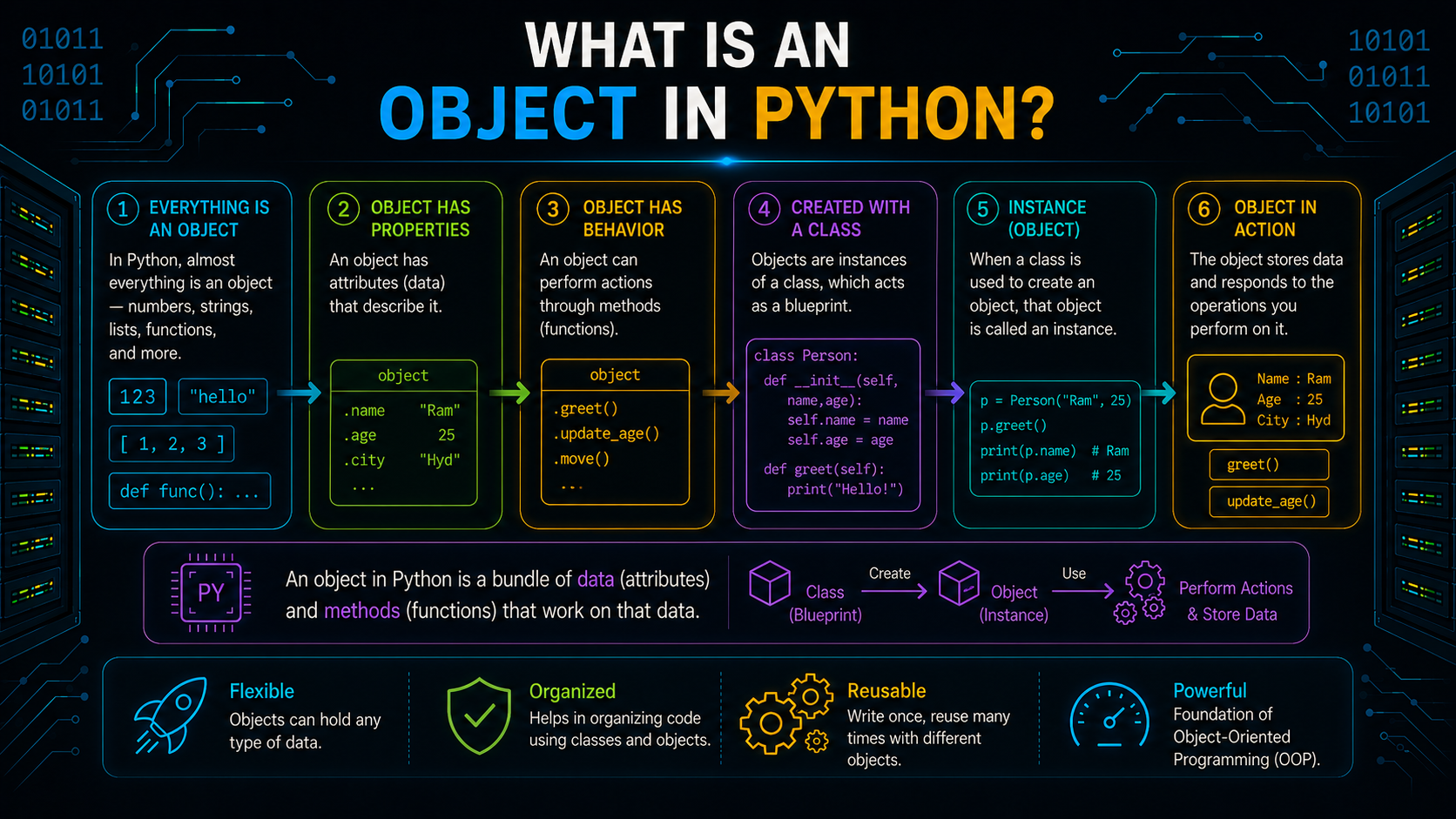
At the heart of Python's design is a simple principle:
Everything in Python is an object.
Whether you're working with simple data or advanced programming constructs, Python represents them as objects.
For example:
| Python Code | Object Type |
|---|---|
| 42 | Integer object |
| "Python" | String object |
| [1, 2, 3] | List object |
| {"name": "Alex"} | Dictionary object |
| print() | Function object |
| MyClass | Class object |
| math | Module object |
Python has a consistent object-based architecture, in contrast to several programming languages that differentiate between raw data types and objects. In other words, functions, classes, strings, integers, and even modules all behave like objects with distinct properties.
Regardless of what an object represents, Python manages every object using the same underlying model.
The Three Core Components of Python's Object Model
Every Python object is defined by three essential properties:
- Identity
- Type
- Value
Together, these properties determine what an object is, what kind of data it represents, and how it behaves during program execution.
               Python Object
             ┌─────────────────┐
             │                Identity                    │
             │                   Type                     │
             │                 Value                    │
             └─────────────────┘
Let's also introduce the fourth concept that works with every object: names.
Name
  │
 ▼
Python Object
├── Identity
├── Type
└── Value
A name is simply an identifier that refers to an object. It is not part of the object itself, but it provides a way to access and work with that object in your code.
For example:
language = "Python"Here's what happens:
Python creates (or reuses) a string object with the value "Python".
The name language is bound to that object.
Whenever language is used later in the program, Python follows the reference to access the same object.
Notice that the object exists independently of the name. The same object can have multiple names referring to it, or a name can later be rebound to a completely different object.
This separation between names and objects is one of the defining characteristics of Python's object model and forms the basis for everything you'll learn in the remaining sections of this guide.
How Assignment Works in Python
An essential component of Python programming is assignment. Nevertheless, Python does not keep values within variables, in contrast to many programming languages. Rather, it is a fundamental idea in Python's object model, binding a name to an object.
What Happens When You Assign a Value?
Consider the following statement:
x = 10When Python executes this line, it performs three steps:
Creates (or reuses) an integer object with the value 10.
Creates the name x in the current namespace.
Binds the name x to that integer object.
The object stores the data, while the name x simply provides a way to access it.
Assignment Creates a Name Binding, Not a Copy
Assignment does not create a duplicate object by default. Instead, it creates a new binding between a name and an existing object.
language = "Python"
course = language
Both language and course now refer to the same string object.
language ───┐
                        ▼
                  "Python"
                        ▲
course ─────┘
Since strings are immutable, this shared reference is usually invisible. However, for mutable objects like lists, changes made through one name are visible through the other because both names reference the same object.
Key Takeaway: Assignment in Python binds a name to an object, it doesn't create a new copy unless you explicitly do so.
Names Are Not Boxes
A common misconception is that variables act like containers that store values. In Python, variables are simply names that refer to objects. They don't own or contain the data.
Why Variables Don't Store Values
Consider this example:
city = "Hyderabad"Many beginners imagine this as:
However, Python's internal model looks like this:
The string exists independently as an object, and city is simply a name that refers to it.
This reference-based model allows Python to efficiently manage memory and lets multiple names point to the same object when needed.
Rebinding a Name to a Different Object
Names in Python can be rebound to different objects at any time.
city = "Hyderabad"
city = "Chennai"
Python doesn't modify the original string object. Instead, it rebinds the name city to a different string object.
Before
city
  │
 ▼
"Hyderabad"
After
city
  │
 ▼
"Chennai"
If no other name refers to "Hyderabad", Python eventually removes it from memory through its memory management process.
Key Takeaway: Think of variables as labels attached to objects, not containers that hold values. A label can be moved from one object to another, while the objects themselves remain independent.
Multiple Names Can Refer to the Same Object
Since names are only references, multiple names can point to a single object. This behavior is known as aliasing and is especially important when working with mutable objects like lists and dictionaries.
Understanding Object References
Consider the following code:
languages = ["Python", "Java"]
favorites = languages
Python creates one list object, and both names refer to it.
languages ───┐
                         ▼
     ["Python", "Java"]
                        ▲
favorites ────┘
No second list is created during assignment.
How Multiple Variables Share One Object
Because both names refer to the same object, a change made through one name is visible through the other.
favorites.append("C++")
print(languages)
Output
['Python', 'Java', 'C++']The list changed because languages and favorites point to the same object.
Key Takeaway: A name can have more than one representation pointing to the same object. For the case when the object is mutable, any change done via one of the names will automatically be visible through all other names that refer to the same object.
Understanding Object Identity in Python
Every object created in Python has a unique identity that distinguishes it from every other object during its lifetime.
What Is Object Identity?
Object identity tells Python which specific object a name refers to. Even if two objects contain identical values, they can still have different identities.
For example:
a = [1, 2]
b = [1, 2]
Although both lists contain the same values, Python creates two separate objects.
Using the id() Function
Python provides the built-in id() function to retrieve an object's identity.
a = [1, 2]
b = a
print(id(a))
print(id(b))
Output
140543281676800
140543281676800
Both names return the same identity because they refer to the same object.
If you create separate objects instead:
a = [1, 2]
b = [1, 2]
the identities will be different, even though the values are identical.
Key Takeaway: id() identifies the object itself, not the value stored inside it.
== vs is in Python
Although == and is may seem similar, they compare different aspects of objects.
== Compares Object Values
The == operator checks whether two objects contain the same value.
a = [10, 20]
b = [10, 20]
print(a == b)
Output
TrueThe values match, so the comparison returns True.
is Compares Object Identity
The is operator checks whether two names refer to the same object.
a = [10, 20]
b = [10, 20]
print(a is b)
Output
FalseAlthough the lists contain identical values, they are different objects.
If both names point to the same object:
a = [10, 20]
b = a
print(a is b)
Output
TrueWhen Should You Use == and is?
Use == when comparing values or data stored inside objects.
user1 == user2Use is when checking whether two names refer to the same object, or when comparing with singleton objects such as None.
if result is None:
    print("No result found")
Using is None is the recommended Python practice because None is a singleton object.
Key Takeaway: == asks "Do these objects have the same value?", while is asks "Do these names refer to the exact same object?"
Below is Part 3 in the same style as Part 2, concise, technically accurate, beginner-friendly, and without unnecessary fluff.
Object Type in Python
Every object in Python belongs to a specific type, which defines what kind of data the object represents and what operations can be performed on it. Whether it's an integer, string, list, or dictionary, its type determines its behavior.
Python stores an object's type when the object is created, and it remains unchanged throughout the object's lifetime.
What Is an Object Type?
An object's type acts as its blueprint. It specifies the object's characteristics, supported operations, and available methods.
For example:
number = 25
language = "Python"
scores = [85, 90, 95]
Here:
25 is an integer object
"Python" is a string object
[85, 90, 95] is a list object
Although all of them are objects, each behaves differently because they belong to different types.
Using the type() Function
To determine the type of an object, Python has the built-in type() method.
print(type(25))
print(type("Python"))
print(type([1, 2, 3]))
Output
<class 'int'>
<class 'str'>
<class 'list'>
Knowing an object's type helps you understand which operations are valid. For example, lists support append(), while strings do not.
Key Takeaway: Every Python object has a fixed type that determines how it behaves and what operations it supports.
Mutable vs Immutable Objects
One of the most important concepts in Python's object model is whether an object is mutable or immutable. This determines whether an object's value can be changed after it is created.
What Are Immutable Objects?
An immutable object cannot be modified after creation. Python generates a new object rather than altering the current one if you seem to change its value.
Common immutable types include:
- Integer (int)
- Float (float)
- Boolean (bool)
- String (str)
- Tuple (tuple)
- Frozen Set (frozenset)
- Bytes (bytes)
Example:
x = 10
x = x + 5
In this case, the original integer object 10 is not altered by Python. Rather, it attaches x to a new integer object called 15.
Before
 x
 │
▼
10
After
 x
 │
▼
15
The original object remains unchanged.
What Are Mutable Objects?
A mutable object's value can be altered after it is created without the need to construct a new object.
Common mutable types include:
- List (list)
- Dictionary (dict)
- Set (set)
- Most user-defined objects
Example:
languages = ["Python", "Java"]
languages.append("C++")
Output
['Python', 'Java', 'C++']The list object itself is updated in this case. A new list is not created by Python.
Key Takeaway: Immutable objects create new objects when modified, while mutable objects change their existing contents.
Understanding Aliasing in Python
Since names refer to objects, multiple names can point to the same object. This is called aliasing.
Aliasing is common when assigning mutable objects like lists or dictionaries.
How Aliasing Works
Consider the following example:
a = [10, 20]
b = a
Python creates only one list object.
a ──────┐
                  ▼
            [10,20]
                  ▲
b ──────┘
The same thing is referred to by both names.
If you modify the list:
b.append(30)The change is visible through both names.
print(a)Output
[10, 20, 30]You have aliased a and b to the same list object so the output appears.
Key Takeaway: When names are aliases to the same object, any changes to immutable objects are visible through all aliases.
Copy vs Reference
Beginner programmers think the first step of assignment is to make a copy. But, in Python, assignment results in one variable referencing another variable, not duplicating the original object. Reference simply means that variable is pointing to the same object in memory.
Assignment Creates a Reference
list1 = [1, 2, 3]
list2 = list1
Both variables refer to the same object.
list1 ──┐
            ▼
          [1,2,3]
              ▲
list2 ───┘
Any modification made through one name affects the other.
Creating an Independent Copy
To create a separate object, you must explicitly copy it.
list1 = [1, 2, 3]
list2 = list1.copy()
Now Python creates a new list object.
list1 ──> [1,2,3]
list2 ──> [1,2,3]
Although both lists contain the same values, they have different identities.
Key Takeaway: Assignment shares an object, while copying creates a new object with the same contents.
How Function Arguments Work in Python
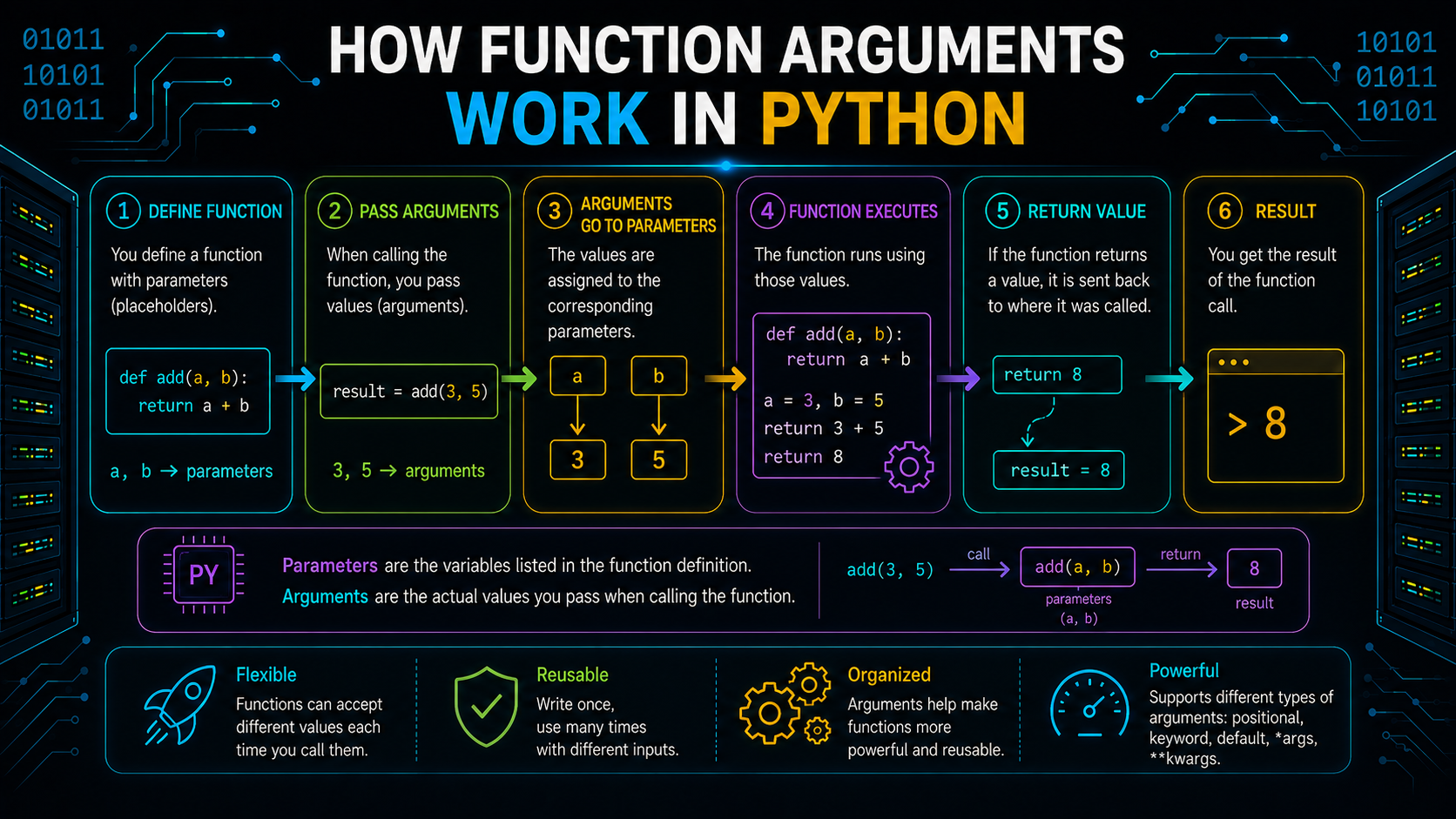
Some may think that calling a function causes Python to copy the argument. But in fact what happens is object passing through references. The function introduces a new name which points to the same object that was passed by the caller.
Passing Object References
Consider the following function:
def greet(message):
    print(message)
text = "Hello"
greet(text)
During the function call:
text
 │
▼
"Hello"
▲
 │
message
The parameter message becomes another name referring to the same string object.
Since strings are immutable, the function cannot modify the original object.
What Happens with Mutable Objects?
Now consider a list.
def add_item(items):
    items.append("Python")
courses = ["Java"]
add_item(courses)
print(courses)
Output
['Java', 'Python']Because both items and courses relate to the same object, the method changes the original list.
If the object is immutable, reassignment inside the function creates a new object instead of changing the original.
Key Takeaway: Python doesn't copy function arguments by default. Function parameters become new names that reference the same object passed by the caller.
Object Lifetime in Python
Every object created in Python occupies memory. However, objects don't stay in memory forever. Once they are no longer needed, Python automatically reclaims the memory so it can be reused. This process is known as an object's lifetime.
An object's lifetime begins when it is created and ends when no part of the program references it anymore.
When Does an Object Become Unused?
An object remains alive as long as at least one name or reference points to it.
Consider this example:
message = "Hello"Initially, the name message refers to the string object.
message
  │
 ▼
"Hello"
If the name is reassigned:
message = "Welcome"Python binds message to the new string object. If no other references exist to "Hello", that object becomes unreachable and is eligible for memory cleanup.
Key Takeaway: An object's lifetime depends on whether it is still referenced, not on how long the program has been running.
Reference Counting in Python
The primary mechanism CPython uses to manage object lifetime is reference counting. Every object maintains a reference count, which represents how many references point to it.
How Reference Counting Works
An object's reference count rises each time a new name refers to it. The count drops when a reference is eliminated.
For example:
a = [1, 2]
b = a
The list object is now referenced by both a and b.
Reference Count = 2
If one reference is removed:
del bThe reference count becomes 1 because only a refers to the list.
CPython instantly releases the memory when the reference count drops to 0, indicating that the object is no longer available.
Note: Reference counting is the primary memory management technique used by CPython, the standard Python implementation.
Key Takeaway: Every reference affects an object's lifetime. When the reference count turns zero, the object can be safely removed from memory.
Garbage Collection in Python
Reference counting can manage the majority of objects, but it is unable to remove circular references, which occur when two or more objects refer to one another.
Python has a garbage collector that finds and eliminates things that are inaccessible on a regular basis.
Why Garbage Collection Is Needed
Consider two objects that reference each other.
Object A ───> Object B
    ▲                               │
     └────────────┘
Even if no variable in the program points to these objects, they still reference each other. Their reference counts never reach zero, so reference counting alone cannot remove them.
Python's Garbage Collector (GC) detects such unreachable reference cycles and frees their memory automatically.
Most of the time, this process runs in the background, and developers don't need to manage memory manually.
Key Takeaway: Reference counting handles most memory management, while the garbage collector removes unreachable objects involved in circular references.
Conclusion
In Python, a value is represented as an object and the names that refer to those objects are defined by their identity, type, and value of the object. In Python, Python doesn't store a value in a variable, but Python is binding a variable name (identifier) and an object. It is the object that the variable is bound to. Python allows multiple variables (names) for one object, and each variable points to that specific object. One object that Python creates will be used in multiple variables. You must know name binding, object mutability concepts and memory management to write clean, bug-free, and efficient code, besides making you a Python rock star by having deep knowledge of Python advanced features, which are really a bit tricky to master as well.
Frequently Asked Questions
What is Python's object model?▾
The core framework used by Python to represent and handle data is called the object model. It tells us how objects are created or constructed, how names (like variables) are connected to them, and how Python manages their characteristics, including their identity, type value, and lifespans.
Do variables store values in Python?▾
No. Variables in Python are names that reference objects. The actual data is stored inside objects, not inside variables.
What is the difference between mutable and immutable objects?▾
Mutable objects (like lists, dictionaries, and sets) could be changed after creation. It is not possible to edit immutable objects (like integers, strings, tuples, and booleans); instead, a new object is created.
What is the difference between == and is?▾
== operator is used for checking if two objects have the same value, whereas is is used for checking if two names are pointing at the same location in memory i. e., they refer to the same object in memory.
How does Python manage memory automatically?▾
Primarily, managing memory is mostly accomplished in CPython via reference counting. An object is discarded from memory when no references to it exist (i. e., the reference count is zero). Python also offers a garbage collector for detecting and removing circular references that can't be cleaned up with reference counting.