
Python Operators: Precedence, Chaining, and Common Traps
Key Highlights
- Operators in Python are symbols and keywords that perform operations on values to create a Python expression.
- Python supports different types of operators in Python, including arithmetic, assignment, relational, logical, bitwise, membership, identity, and conditional operators.
- The same operator can behave differently depending on the data types involved. For example, + adds numbers but concatenates strings.
- Python does not have an increment (++) or decrement (--) operator. Instead, it uses assignment operators like +=.
- Understanding operators is the first step toward learning operator precedence, comparison chaining, and writing predictable Python code.
Every Python Expression Starts with an Operator
Imagine asking Python to calculate your shopping bill, check whether a user is eligible to log in, or determine if a file exists. These tasks may look completely different, but underneath, Python is doing the same thing: evaluating expressions using operators.
Consider these two expressions:
2 + 3 * 4

"Python" + "3"
The first performs a mathematical calculation, while the second joins two strings. Although both use the + symbol, Python treats them differently based on the operands involved. This illustrates an important idea: operators don't work in isolation; they work according to Python's syntax, data types, and evaluation rules.
As programs grow larger, expressions become more complex. A small misunderstanding about how an operator behaves can lead to unexpected results or bugs that are difficult to trace. That's why learning operators isn't just about memorizing symbols; it's about understanding how Python evaluates expressions.
In this guide, you'll explore the different types of operators in Python, learn how each one works with practical examples, and build the foundation needed to understand operator precedence, comparison chaining, and the common mistakes developers encounter while writing Python code.
What are Operators in Python?
Operators in Python are special symbols or keywords that tell Python to perform an operation on one or more values, known as operands. Together, operators and operands form a Python expression, which Python evaluates to produce a result.
For example:
price = 500
tax = 50
total = price + tax
print(total)
Output
550In this example:
- price and tax are operands.
- + is the operator.
- price + tax is a Python expression.
Python evaluates the expression and stores the result in total.
Operators aren't limited to numbers. They can compare values, combine conditions, check whether an item exists in a collection, manipulate binary data, and even make decisions within a single line of code.
For example:
username = "Alex"
print("A" in username)
Output
TrueHere, the in keyword acts as a membership operator in Python, checking whether "A" exists in the string.
Simply put, operators are the building blocks of Python expressions. Every calculation, comparison, logical decision, or condition you write relies on one or more operators.
Different Types of Operators in Python
Python provides several categories of operators, each designed for a specific purpose. Instead of learning them individually, it's helpful to group them based on the kind of operation they perform.
| Operator Type | Common Operators | Purpose |
|---|---|---|
| Arithmetic operators in Python | +, -, *, /, //, %, ** | Perform mathematical calculations |
| Assignment operators | =, +=, -=, *=, /=, //=, %= | Assign or update variable values |
| Relational operators in Python | ==, !=, >, <, >=, <= | Compare two values |
| Logical operators in Python | and, or, not | Combine or negate Boolean expressions |
| Python bitwise operators | &, |, ^, ~, <<, >> | Manipulate binary bits directly |
| Membership operators | in, not in | Check whether a value exists in a sequence or collection |
| Identity operators | is, is not | Check whether two variables refer to the same object |
| Python conditional operator | x if condition else y | Return a value based on a condition |
Although these categories serve different purposes, they all participate in evaluating Python expressions. Later in this guide, you'll also learn how Python decides which operator to evaluate first when multiple operators appear in the same expression.
Did you know? Python does not include a traditional increment operator (++) or decrement operator (--) found in languages like C++ or Java. Writing x++ results in a syntax error. Instead, Python updates values using assignment operators such as x += 1.
Arithmetic Operators in Python
Among all the types of operators in Python, arithmetic operators are the most commonly used. They perform mathematical calculations on numeric values and return the computed result.
The table below summarises the Python arithmetic operators.
| Operator | Name | Example | Result |
|---|---|---|---|
| + | Addition | 8 + 2 | 10 |
| - | Subtraction | 8 - 2 | 6 |
| * | Multiplication | 8 * 2 | 16 |
| / | Division | 8 / 2 | 4.0 |
| // | Floor Division | 9 // 2 | 4 |
| % | Modulus | 9 % 2 | 1 |
| ** | Exponentiation | 2 ** 5 | 32 |
Let's understand the most important ones.
Addition (+)
The + operator adds numeric values.
marks = 85
bonus = 5

print(marks + bonus)
Output
90When used with strings, the same operator concatenates text instead of performing addition.
print("Hello " + "Python")Output
Hello PythonDivision (/) vs Floor Division (//)
Many beginners confuse the Python division operator with floor division.
The / operator always performs true division and returns a floating-point value.
print(15 / 4)Output
3.75The // operator performs floor division, returning the quotient after discarding the fractional part.
print(15 // 4)Output
3Floor division is commonly used when only whole-number results are required, such as calculating pages, batches, or groups.
Modulus (%)
The modulus operator returns the remainder after division.
print(17 % 5)Output
2A common use case is checking whether a number is even or odd.
number = 18

print(number % 2 == 0)
Output
TrueExponentiation (**)
The ** operator raises one number to the power of another.
print(3 ** 4)Output
81If you've ever encountered the interview question:
Which of the following is an exponential operator in Python?
The correct answer is:
**The ** symbol is the exponent operator in Python, and it's used to calculate powers.
Arithmetic Operators in Python with Examples
The following example combines multiple arithmetic operators in Python with examples to demonstrate how they work together.
a = 20
b = 6

print(a + b)
print(a - b)
print(a * b)
print(a / b)
print(a // b)
print(a % b)
print(a ** 2)
Output
26
14
120
3.3333333333333335
3
2
400
Notice that each operator produces a different result even when working with the same operands. Understanding these differences becomes essential before learning how Python evaluates multiple operators within a single expression.
Assignment Operators in Python
An assignment operator in Python stores a value in a variable. The simplest assignment operator is =, but Python also provides shorthand assignment operators that update existing values.
Instead of writing:
score = score + 10you can write:
score += 10This shorter form is easier to read and is widely used in loops, counters, and accumulators.
The table below lists the most common assignment operators.
| Operator | Example | Equivalent To |
|---|---|---|
| = | x = 10 | Assign value |
| += | x += 5 | x = x + 5 |
| -= | x -= 5 | x = x - 5 |
| *= | x *= 2 | x = x * 2 |
| /= | x /= 2 | x = x / 2 |
| //= | x //= 2 | x = x // 2 |
| %= | x %= 3 | x = x % 3 |
| **= | x **= 2 | x = x ** 2 |
For example:
balance = 1000
balance += 250
balance *= 2
print(balance)
Output
2500Assignment operators improve code readability by expressing updates directly instead of repeating the variable name.
Important: Python does not support the ++ operator. Unlike languages such as C++ or Java, writing count++ raises a SyntaxError. To increase a value, use count += 1.
Relational Operators in Python
Relational operators compare two values and return a Boolean result, either True or False. They're commonly used in conditions, loops, and filtering logic to make decisions based on comparisons.
For example:
age = 20
print(age >= 18)
Output
TrueHere, the expression age >= 18 evaluates to True, allowing the program to determine that the user is an adult.
| Operator | Meaning | Example | Result |
|---|---|---|---|
| == | Equal to | 5 == 5 | TRUE |
| != | Not equal to | 5 != 3 | TRUE |
| > | Greater than | 8 > 5 | TRUE |
| < | Less than | 8 < 5 | FALSE |
| >= | Greater than or equal to | 8 >= 8 | TRUE |
| <= | Less than or equal to | 8 <= 5 | FALSE |
Example: Comparing Student Scores
math_marks = 82
passing_marks = 35
print(math_marks >= passing_marks)
print(math_marks == 100)
Output
True
False
Notice the difference between = and ==:
- = assigns a value to a variable.
- == compares two values for equality.
Mixing these two operators is one of the most common beginner mistakes.
Quick Tip: Relational operators compare values, not objects. Later, you'll learn why is behaves differently from ==.
Logical Operators in Python
While relational operators produce Boolean values, logical operators in Python combine or modify those Boolean expressions. They are essential when multiple conditions must be evaluated together.
Python provides three logical operators:
| Operator | Purpose |
|---|---|
| and | Returns True only if both conditions are True |
| or | Returns True if at least one condition is True |
| not | Reverses a Boolean value |
Python and Operator
The Python and operator evaluates to True only when every condition is true.
age = 22
has_id = True
print(age >= 18 and has_id)
Output
TrueIf either condition becomes false, the entire expression evaluates to False.
or Operator
The or operator returns True when at least one condition is true.
is_admin = False
is_editor = True
print(is_admin or is_editor)
Output
Truenot Operator
The not operator simply reverses a Boolean value.
logged_in = False
print(not logged_in)
Output
TrueUnderstanding Short-Circuit Evaluation
One feature that makes Python logical operators efficient is short-circuit evaluation. Python stops evaluating an expression as soon as the final result is known.
Consider this example:
def expensive_operation():
    print("Function executed")
    return True

print(False and expensive_operation())
Output
FalseNotice that "Function executed" is never printed.
Since the first operand of the and operator is already False, Python knows the overall result cannot become True, so it skips evaluating the second expression.
Similarly, with the or operator:
print(True or expensive_operation())The function isn't executed because the first operand already makes the expression True.
Short-circuit evaluation improves both performance and safety by avoiding unnecessary computations or function calls.
Important: Unlike many programming languages, Python's and and or operators don't always return True or False. They return one of their operands.
For example:
print(10 or 20)
print(0 or 20)
print(10 and 20)
print(0 and 20)
Output
10
20
20
0
This behavior is widely used for assigning default values and writing concise expressions.
Bitwise Operators in Python
While logical operators work with Boolean values, Python bitwise operators operate directly on the binary representation of integers. They're commonly used in low-level programming, networking, cryptography, graphics, and performance-sensitive applications.
For example, the decimal number 5 is represented in binary as:
0101and 3 as:
0011Bitwise operators compare these bits individually.
| Operator | Name | Purpose |
|---|---|---|
| & | Bitwise AND | Sets a bit if both bits are 1 |
| | | Bitwise OR | Sets a bit if either bit is 1 |
| ^ | Bitwise XOR | Sets a bit if bits differ |
| ~ | Bitwise NOT | Inverts all bits |
| << | Left Shift | Shifts bits left |
| >> | Right Shift | Shifts bits right |
Bitwise AND (&)
print(5 & 3)Binary representation:
0101
0011
----
0001
Output
1Bitwise OR (|)
print(5 | 3)Output
7XOR Operation in Python (^)
The XOR operation in Python returns 1 only when the corresponding bits are different.
print(5 ^ 3)Binary:
0101
0011
----
0110
Output
6Left Shift (<<)
print(5 << 1)Output
10Shifting left by one position effectively multiplies the number by 2.
Right Shift (>>)
print(20 >> 2)Output
5Each right shift divides the number by powers of two while discarding fractional bits.
Unless you're working with binary protocols, hardware interfaces, or optimization techniques, you'll use bitwise operators in Python less frequently than arithmetic or logical operators. However, understanding them helps explain how Python manipulates integers at the binary level.
Membership and Identity Operators
Although they often appear together, membership and identity operators answer two completely different questions.
Membership operators check whether a value exists in a collection.
Identity operators check whether two variables refer to the exact same object in memory.
Understanding this distinction helps avoid subtle bugs.
Membership Operators in Python
The membership operator in Python checks whether a value exists inside a sequence such as a string, list, tuple, set, or dictionary.
Python provides two membership operators:
| Operator | Meaning |
|---|---|
| in | Value exists in the collection |
| not in | Value does not exist in the collection |
Example:
languages = ["Python", "Java", "Go"]

print("Python" in languages)
print("C++" not in languages)
Output
True
True
Membership operators are commonly used while searching collections or validating user input.
Identity Operators (is and is not)
Identity operators compare object identity, not value.
Python provides:
| Operator | Meaning |
|---|---|
| is | Both variables reference the same object |
| is not | Variables reference different objects |
Consider this example:
list1 = [1, 2, 3]
list2 = [1, 2, 3]

print(list1 == list2)
print(list1 is list2)
Output
True
False
Why?
- == compares the contents of the lists.
- is checks whether both variables point to the exact same object in memory.
This is one of the most common beginner mistakes in Python.
Best Practice: Use == when comparing values and reserve is primarily for checking singleton objects such as None.
For example:
if result is None:
    print("No value returned")
This is the recommended and idiomatic way to compare with None.
Python Conditional (Ternary) Operator
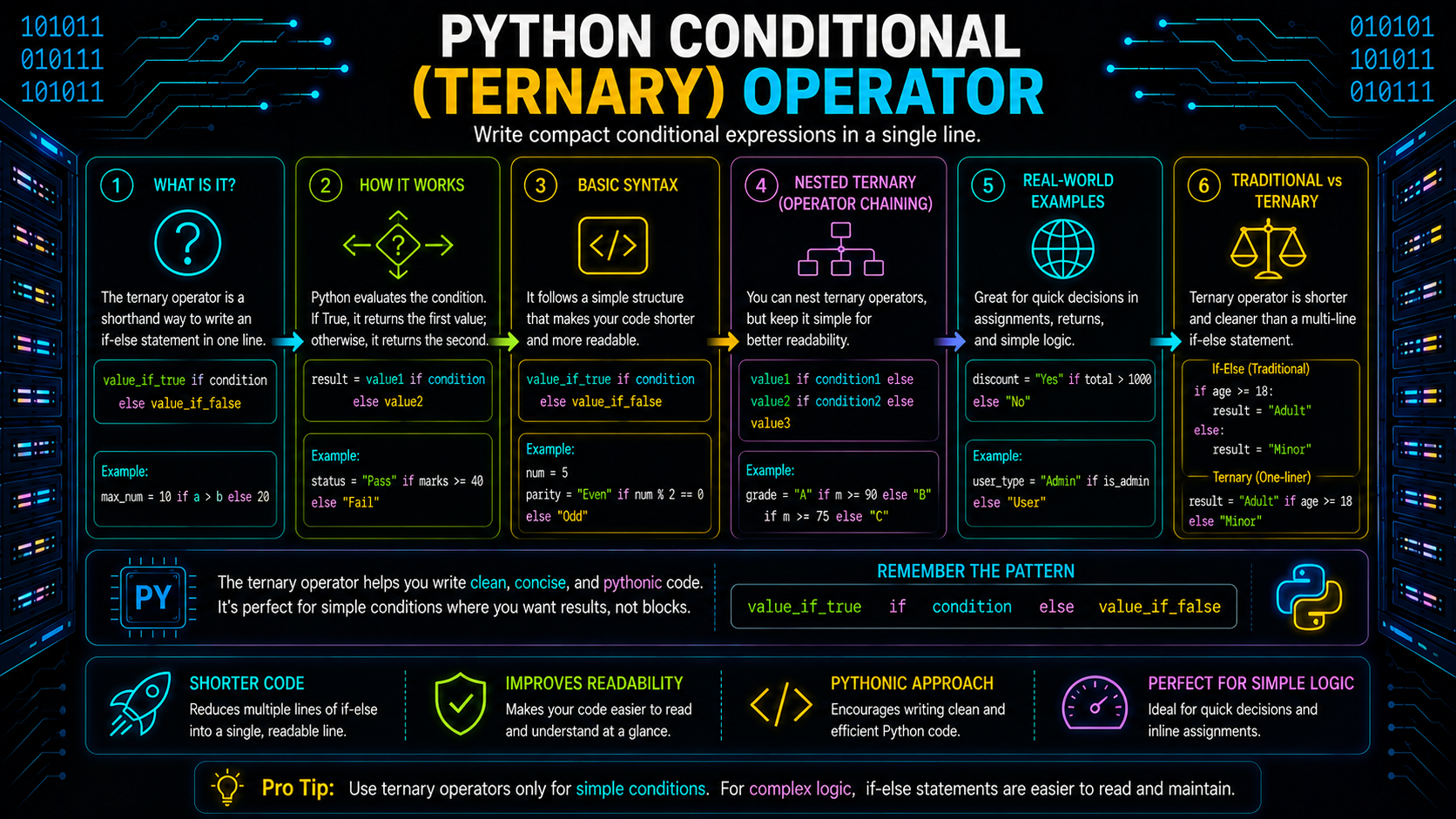
Sometimes you need to return one value if a condition is true and another if it's false. Instead of writing a full if...else block, Python provides a compact conditional expression, commonly called the ternary operator in Python.
Syntax
value_if_true if condition else value_if_falseExample:
marks = 78
status = "Pass" if marks >= 35 else "Fail"
print(status)
Output
PassWithout the conditional expression, the same logic would be written as:
if marks >= 35:
    status = "Pass"
else:
    status = "Fail"
The conditional expression produces the same result while keeping simple decisions concise.
When Should You Use It?
The Python conditional operator is best suited for straightforward decisions that fit comfortably on a single line.
Good example:
discount = 20 if is_member else 0Less readable example:
result = "A" if condition1 else "B" if condition2 else "C"As conditional expressions become nested, readability decreases. In such cases, a standard if...elif...else statement is usually the better choice.
Excellent, we're now at the most important part of the blog. This section should differentiate your article from the hundreds of generic "Python operators" blogs that simply list operators. Below is content that's technically accurate, aligned with Python's official evaluation rules, concise, and focused on understanding how Python evaluates expressions, not just what operators exist.
Understanding Operator Precedence in Python
Imagine evaluating this expression:
print(5 + 3 * 2)What will Python print?
11Not 16.
That's because Python follows operator precedence, a predefined order that determines which operation is evaluated first when multiple operators appear in the same Python expression.
In the example above, multiplication (*) has a higher precedence than addition (+), so Python first calculates:
3 * 2and then adds 5.
It's similar to the BODMAS/BIDMAS rule used in mathematics. Without these rules, the same expression could produce different results, making programs unpredictable.
Operator Precedence Order in Python
The table below lists the most commonly used operators from highest to lowest precedence.
| Precedence | Operators | Description |
|---|---|---|
| Highest | () | Parentheses |
| ** | Exponentiation | |
| +x, -x, ~x | Unary operators | |
| *, /, //, % | Multiplication and division | |
| +, - | Addition and subtraction | |
| <<, >> | Bitwise shifts | |
| & | Bitwise AND | |
| ^ | Bitwise XOR | |
| | | Bitwise OR | |
| <, <=, >, >=, !=, ==, in, not in, is, is not | Comparisons | |
| not | Logical NOT | |
| and | Logical AND | |
| or | Logical OR | |
| Lowest | x if condition else y | Conditional expression |
Example 1
print(10 - 4 * 2)Python evaluates:
10 - (4 * 2)Output
2Example 2
print((10 - 4) * 2)Output
12Parentheses override the default precedence and make the intended order explicit.
Tip: Even when you know the precedence rules, adding parentheses often makes expressions easier for others to read.
Associativity: What Happens When Operators Have the Same Precedence?
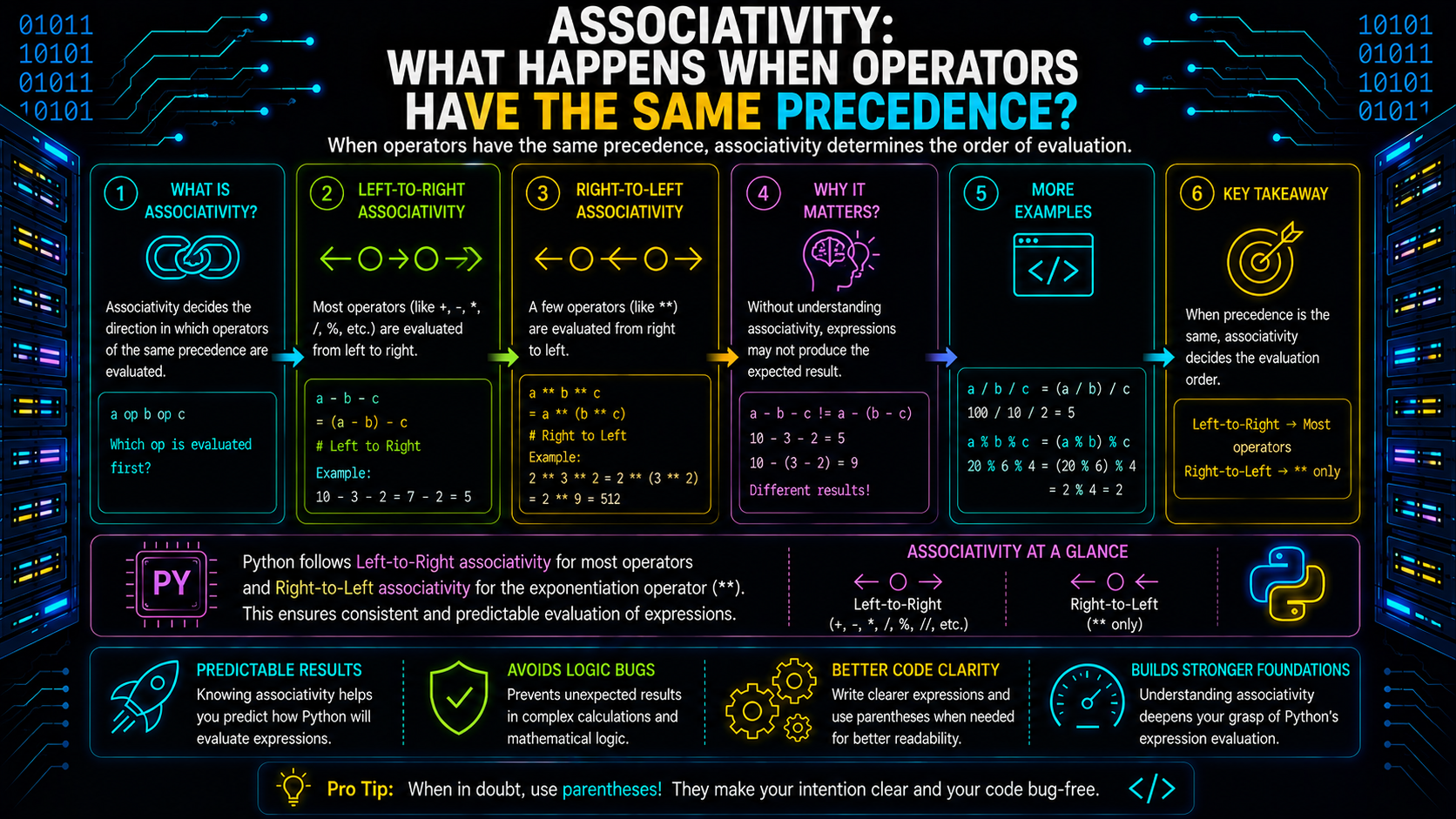
Operator precedence tells Python which operator comes first.
But what if two operators have the same precedence?
That's where associativity comes in. Associativity determines the direction in which Python evaluates operators of equal precedence.
Left-to-Right Associativity
Most binary operators in Python are evaluated from left to right.
For example:
print(20 - 5 - 3)Python evaluates it as:
(20 - 5) - 3Output
12It does not evaluate it as:
20 - (5 - 3)which would produce 18.
Right-to-Left Associativity
One important exception is the exponent operator (**).
Consider this expression:
print(2 ** 3 ** 2)Many beginners expect:
(2 ** 3) ** 2which equals:
64However, Python evaluates exponentiation from right to left:
2 ** (3 ** 2)Output
512Understanding associativity helps you predict how complex expressions are evaluated without relying on trial and error.
Comparison Chaining: A Feature Unique to Python
One feature that makes Python stand out is comparison chaining.
Instead of writing:
age >= 18 and age <= 60Python allows you to write:
18 <= age <= 60This is easier to read and expresses the intent more naturally.
Example
score = 82
print(60 <= score < 90)
Output
TruePython internally evaluates it similarly to:
60 <= score and score < 90However, the middle expression (score) is evaluated only once, making chained comparisons both readable and efficient.
Comparison chaining also works with multiple comparisons.
print(5 < 10 < 20)Output
TrueLikewise,
print(5 < 10 > 7)also returns:
Truebecause Python evaluates:
5 < 10
10 > 7
Both conditions are true.
Note: Chaining only works with comparison operators. Arithmetic operators such as +, -, and * cannot be chained in this way.
Common Operator Traps in Python
Many bugs occur because Python behaves correctly, but differently from what programmers expect. Understanding these common pitfalls will help you avoid subtle errors.
1. Exponentiation Is Right-Associative
print(2 ** 3 ** 2)Output
512Not
64Python evaluates the rightmost exponent first.
2. == Is Different from is
a = [1, 2]
b = [1, 2]
print(a == b)
print(a is b)
Output
True
False
== compares values.
is compares object identity.
Use is only when checking object identity, such as comparing with None.
3. and and or Don't Always Return Booleans
Many beginners assume these operators always return True or False.
Consider:
print(10 or 20)
print("" or "Python")
Output
10
Python
Python returns one of the operands, not necessarily a Boolean value.
Similarly,
print(0 and 100)Output
0This behavior is commonly used to provide default values.
4. Integer Division vs Floor Division
print(9 / 2)
print(9 // 2)
Output
4.5
4
Although both perform division, the results are different because // removes the fractional part by performing floor division.
5. Python Has No Increment (++) Operator
Unlike C, C++, or Java, Python doesn't support:
count++This produces a SyntaxError.
Instead, use:
count += 1Best Practices for Using Operators in Python
Writing expressions that are easy to understand is just as important as writing expressions that work correctly.
Here are a few best practices to follow:
- Use parentheses to improve readability, even when they're not strictly required.
- Avoid writing overly complex expressions that combine many different operators.
- Prefer explicit code over clever one-liners. Readability is a core principle of Python.
- Use == to compare values and reserve is for checking object identity, especially None.
- Be careful when mixing logical and bitwise operators, as they serve different purposes.
- Remember that and and or return operands, not always Boolean values.
- Use chained comparisons when checking numeric ranges because they're cleaner and easier to read.
Clear expressions reduce debugging time and make code easier for others to maintain.
Conclusion
Every Python program, from a simple calculator to a machine learning application, relies on expressions built with operators. Learning what each operator does is only the beginning. The real skill lies in understanding how Python evaluates expressions, how operator precedence and associativity influence results, and why features like comparison chaining make Python both expressive and readable.
Instead of memorizing precedence tables, focus on writing clear, maintainable expressions. Use parentheses when they improve readability, choose the right operator for the task, and avoid relying on assumptions about evaluation order. As your programs grow more complex, these habits will help you write code that's easier to understand, debug, and maintain.
Frequently Asked Questions
What are operators in Python?▾
Operators are special symbols or keywords that perform operations on one or more operands. They are used to create expressions that Python evaluates to produce a result.
What are the different types of operators in Python?▾
Python provides several operator categories:
Arithmetic operators
Assignment operators
Relational (comparison) operators
Logical operators
Bitwise operators
Membership operators
Identity operators
Conditional (ternary) operator
Which of the following is the exponential operator in Python?▾
The exponent operator in Python is:
**
It raises a number to the power of another number.
Example:
print(2 ** 4)
Output
16
Does Python have an increment operator?▾
No. Python does not support ++ or --.
Use:
count += 1
instead.
What is the difference between == and is?▾
== checks whether two values are equal.
is checks whether two variables refer to the same object in memory.
What is operator precedence in Python?▾
Operator precedence defines the order in which Python evaluates operators within an expression. Operators with higher precedence are evaluated before those with lower precedence unless parentheses change the order.
What is the ternary operator in Python?▾
The ternary operator, also called the conditional expression, returns one value when a condition is true and another when it is false.
Example:
status = "Pass" if marks >= 35 else "Fail"