
Key Takeaways
- Understand what is a set in Python and why sets are designed to store only unique values.
- Learn how a Python set differs from lists, tuples, and dictionaries.
- Explore different ways to create sets and understand why {} does not create an empty set.
- Discover why set elements must be hashable and how hashing enables fast membership testing.
- Build a strong foundation for learning Python set operations such as union, intersection, and difference.
Introduction
"Sometimes the fastest way to find something is to stop caring where it is."
Imagine processing millions of user IDs, email addresses, or product codes. If your only question is "Does this value already exist?", searching through a list repeatedly becomes increasingly expensive. You don't need duplicates, and you don't care about positions, you only care about uniqueness and fast lookup.
That's exactly why Python provides sets.
A Python set is built for problems where uniqueness matters more than order. By storing only distinct, hashable elements, sets can quickly answer membership questions, remove duplicates, and compare collections using mathematical set operations. Understanding why sets work differently from lists, tuples, and dictionaries will help you choose the right data structure and write more efficient Python programs.
What is Set in Python?
A Python set is a built-in data structure that stores unique, unordered, and hashable elements. Unlike lists and tuples, a set does not allow duplicate values, and its elements are not accessed by index.
languages = {"Python", "Java", "C++"}If the same value appears multiple times, Python stores it only once.
numbers = {1, 2, 2, 3, 3}
print(numbers)
Output
{1, 2, 3}This automatic removal of duplicates makes sets ideal for membership testing, deduplication, and comparing collections.
Why Sets Exist
Lists preserve order and allow duplicates, making them suitable for ordered collections. However, many real-world problems require checking whether a value already exists, rather than tracking its position.
Sets were introduced to solve problems such as:
- Removing duplicate values
- Fast membership testing
- Finding common elements between collections
- Identifying unique values
- Comparing relationships between datasets
For example, instead of searching through an entire list to check whether "Python" exists, a set can perform the lookup much more efficiently using hashing.
Sets vs Lists, Tuples, and Dictionaries
Although all four are built-in collections, they are designed for different purposes.
Feature
Set
List
Tuple
Dictionary
Stores
Unique values
Ordered values
Ordered values
Key-value pairs
Duplicates
Not allowed
Allowed
Allowed
Keys must be unique
Order
Unordered*
Ordered
Ordered
Insertion ordered
Mutable
Yes
Yes
No
Yes
Indexing
Not supported
Supported
Supported
Access by key
*A set does not guarantee a stable iteration order.
Choose a set when uniqueness and fast membership checks matter more than preserving order.
Creating Sets in Python
Python provides multiple ways to create a set depending on the source of the data.
Python Create Set
The most common way to create a set is by using curly braces with comma-separated values.
languages = {"Python", "Java", "C++"}You can also create a set from any iterable using the built-in set() function.
numbers = set([1, 2, 2, 3])
print(numbers)
Output
{1, 2, 3}The set() function automatically removes duplicate values while creating the collection.
Empty Set in Python
One of the most common beginner mistakes is assuming that {} creates an empty set.
data = {}This actually creates an empty dictionary.
To create an empty set in Python, use the set() constructor.
data = set()You can verify its type.
print(type(data))Output
<class 'set'>Remember:
{} → Empty dictionary
set() → Empty set
Why Set Elements Must Be Hashable
A set uses hash values to determine whether an element already exists. For this reason, every set element must be hashable, meaning its hash value remains unchanged throughout its lifetime.
Examples of valid set elements include:
- Strings
- Integers
- Floats
- Tuples (only if all their elements are hashable)
data = {"Python", 10, (1, 2)}Mutable objects such as lists, dictionaries, and other sets cannot be added because they are not hashable.
data = {[1, 2], 10}Output
TypeError: unhashable type: 'list'Requiring hashable elements allows Python to perform fast membership checks and efficiently prevent duplicate values from being stored.
Adding and Removing Elements
Unlike lists, sets do not support indexing. Elements are added or removed based on their value, not their position.
Adding Elements
Use the add() method to insert a single element into a set. If the element already exists, the set remains unchanged.
languages = {"Python", "Java"}
languages.add("C++")
print(languages)
Output
{'Python', 'Java', 'C++'}To add multiple elements at once, use update().
languages.update(["Go", "Rust"])
print(languages)
Output
{'Python', 'Java', 'C++', 'Go', 'Rust'}Since sets store only unique values, duplicate elements are ignored automatically.
Removing Elements
Python provides multiple methods for removing elements, each with slightly different behavior.
remove()
Removes the specified element. If the element does not exist, Python raises a KeyError.
languages = {"Python", "Java", "C++"}
languages.remove("Java")
print(languages)
discard()
Removes the element only if it exists. No error is raised if the element is missing.
languages.discard("Go")pop()
Removes and returns an arbitrary element from the set.
language = languages.pop()
print(language)
Since sets are unordered, you should not rely on which element is removed.
clear()
Removes all elements from the set.
languages.clear()
print(languages)
Output
set()Python Set Operations
One of the biggest strengths of a Python set is its support for mathematical set operations. These operations make it easy to compare collections, identify common values, and find unique elements.
Union
The union of two sets contains every unique element from both sets.
backend = {"Python", "Java"}
frontend = {"JavaScript", "React"}
print(backend | frontend)
Output
{'Python', 'Java', 'JavaScript', 'React'}You can also use the union() method.
backend.union(frontend)Intersection
The intersection returns only the elements present in both sets.
backend = {"Python", "Java", "SQL"}

data = {"Python", "SQL", "Pandas"}

print(backend & data)
Output
{'Python', 'SQL'}The equivalent method is intersection().
This operation is useful for finding common items between collections.
Difference
The difference returns elements that exist in the first set but not in the second.
backend = {"Python", "Java", "SQL"}

data = {"Python", "Pandas"}

print(backend - data)
Output
{'Java', 'SQL'}The same result can be obtained using the difference() method.
Symmetric Difference
The symmetric difference returns elements that belong to either set but not both.
backend = {"Python", "Java"}

data = {"Python", "SQL"}

print(backend ^ data)
Output
{'Java', 'SQL'}The equivalent method is symmetric_difference().
This operation is useful for identifying differences between two collections.
Membership Testing
Membership testing determines whether a value exists in a set using the in operator.
languages = {"Python", "Java", "C++"}

print("Python" in languages)
Output
TrueUnlike lists, Python does not search a set sequentially. It computes the element's hash value and uses it to locate the element efficiently. This is why membership testing in a set is typically much faster than searching through a list, especially for large collections.
Set Methods in Python
Python provides several built-in set methods for adding, removing, copying, and comparing set elements.
Method
Purpose
add()
Adds a single element to the set.
update()
Adds multiple elements from one or more iterables.
remove()
Removes an element; raises KeyError if it doesn't exist.
discard()
Removes an element if present; otherwise does nothing.
pop()
Removes and returns an arbitrary element.
clear()
Removes all elements from the set.
copy()
Returns a shallow copy of the set.
union()
Returns a new set containing all unique elements.
intersection()
Returns common elements between sets.
difference()
Returns elements present only in the first set.
symmetric_difference()
Returns elements present in either set but not both.
issubset()
Checks whether one set is a subset of another.
issuperset()
Checks whether one set is a superset of another.
isdisjoint()
Checks whether two sets have no common elements.
These Python set methods allow you to efficiently manage collections, remove duplicates, compare datasets, and perform set algebra without writing additional logic.
Is Set Mutable in Python?

A common question is whether a set is mutable or immutable in Python.
A Python set is mutable, meaning you can add or remove elements after it is created. However, the individual elements stored inside the set must be immutable (hashable).
Example:
languages = {"Python", "Java"}
languages.add("C++")
languages.remove("Java")
print(languages)
Output
{'Python', 'C++'}The set changes over time, but each element must satisfy Python's hashability requirements.
Mutable Set, Immutable Elements
Although a set is mutable, its elements cannot be mutable objects.
Valid elements include:
- Strings
- Integers
- Floats
- Tuples (if all their elements are hashable)
data = {"Python", 10, (1, 2)}Invalid elements include:
- Lists
- Dictionaries
- Sets
data = {[1, 2], "Python"}Output
TypeError: unhashable type: 'list'This design allows Python to efficiently locate elements and prevent duplicates.
Why Set Elements Must Be Hashable
A set determines whether an element already exists by computing its hash value.
When an element is added:
Python computes its hash.
The hash determines where the element is stored.
Future lookups use the same hash to locate the element quickly.
If an element could change after being inserted, its hash value could also change, making it impossible for Python to locate it reliably.
This is why only hashable objects can be stored in a set.
Set Relationships
One of the biggest advantages of sets is the ability to compare relationships between collections using mathematical operations.
Subset
A set is a subset if every element in it also exists in another set.
a = {1, 2}
b = {1, 2, 3, 4}
print(a.issubset(b))
Output
TrueThe equivalent operator is:
print(a <= b)Subset checks are useful for validating permissions, required skills, or prerequisite conditions.
Superset
A set is a superset if it contains every element of another set.
a = {1, 2, 3, 4}
b = {1, 2}
print(a.issuperset(b))
Output
TrueThe equivalent operator is:
print(a >= b)Superset checks determine whether one collection completely includes another.
Disjoint Sets
Two sets are disjoint if they have no common elements.
backend = {"Python", "Java"}
design = {"Figma", "Photoshop"}
print(backend.isdisjoint(design))
Output
TrueDisjoint checks are useful when verifying that two groups or datasets do not overlap.
Set Iteration Order
Unlike lists and tuples, sets do not guarantee element order.
languages = {"Python", "Java", "C++"}
for language in languages:
    print(language)
The order of elements should be treated as arbitrary and should not be relied upon in your program.
Although the iteration order may appear consistent within a particular run, it is an implementation detail and can change as elements are added, removed, or across different executions.
If a predictable order is required, convert the set to a sorted list.
print(sorted(languages))Time Complexity of Set Operations
Sets achieve fast performance by storing elements in a hash table, allowing most operations to avoid scanning every element.
Operation
Average Complexity
Reason
Membership (x in set)
O(1)
Uses the element's hash for direct lookup.
Add (add())
O(1)
Inserts the element using its hash value.
Remove (remove())
O(1)
Locates the element through hashing before removal.
Union
O(len(s1) + len(s2))
Visits each element from both sets once.
Intersection
O(min(len(s1), len(s2)))
Checks elements from the smaller set against the larger one.
Difference
O(len(s1))
Processes each element of the first set once.
Iteration
O(n)
Visits every element exactly once.
Rather than memorizing the complexity table, remember these key ideas:
- Membership testing is the primary strength of a Python set.
- Hashing enables fast insertion, deletion, and lookup.
- Operations such as union, intersection, and difference become more expensive because they process multiple elements rather than a single lookup.
Deduplication Using Sets
One of the most common uses of a Python set is deduplication. Since sets store only unique values, duplicate elements are automatically discarded.
Example:
numbers = [10, 20, 20, 30, 40, 40]
unique_numbers = set(numbers)
print(unique_numbers)
Output
{40, 10, 20, 30}If you need the result as a list:
unique_numbers = list(set(numbers))Deduplication is useful for:
- Removing duplicate user IDs
- Eliminating repeated email addresses
- Cleaning datasets before analysis
- Finding unique words in text
Relationship Logic with Sets
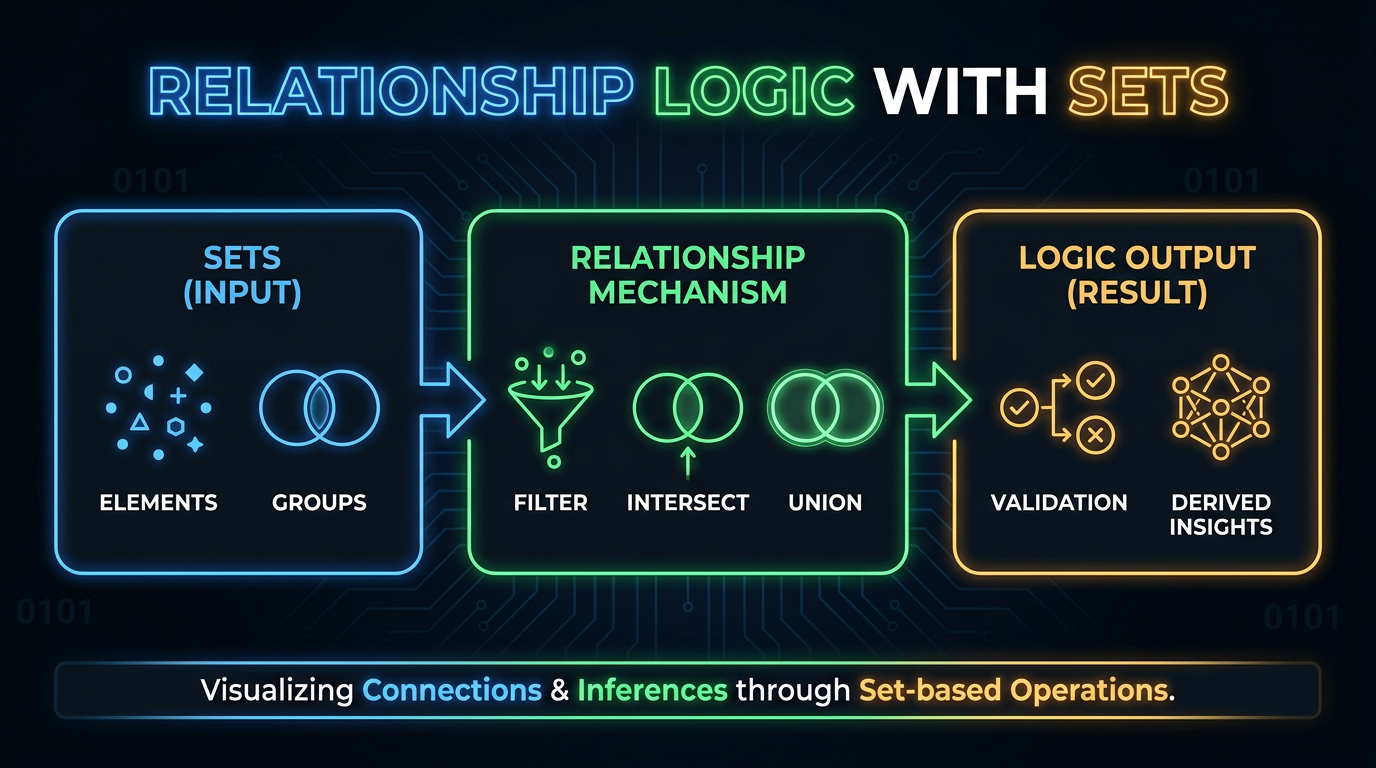
Sets make it easy to compare relationships between collections using mathematical set operations.
Finding Common Elements
Use intersection to identify elements shared by multiple sets.
python = {"Alice", "Bob", "Charlie"}
sql = {"Bob", "David", "Charlie"}
print(python & sql)
Output
{'Bob', 'Charlie'}Finding Unique Elements
Use difference to identify elements present in one set but not another.
print(python - sql)Output
{'Alice'}Comparing Collections
Use subset, superset, or disjoint operations to determine how two collections relate to each other.
These operations are commonly used for:
- Permission validation
- Role-based access control
- Course prerequisite checks
- Comparing datasets
Practical Examples
Remove Duplicate Values
cities = ["Delhi", "Mumbai", "Delhi", "Chennai"]
unique_cities = set(cities)
print(unique_cities)
Find Common Students
math = {"Alice", "Bob", "David"}
science = {"Bob", "David", "Eva"}
print(math.intersection(science))
Output
{'Bob', 'David'}Check Membership
technologies = {"Python", "SQL", "Git"}
print("Python" in technologies)
Output
TrueThese examples demonstrate why sets are widely used for uniqueness checks, comparisons, and efficient membership testing.
Run your code online now and practice
Best Practices
- Use sets when duplicate values should not be stored.
- Choose sets for fast membership testing instead of repeatedly searching a list.
- Use set operations (|, &, -, ^) to compare collections instead of writing manual loops.
- Store only hashable objects as set elements.
- Convert a set to a sorted list when a predictable order is required.
- Use discard() instead of remove() when the element may not exist.
Common Mistakes
Creating an Empty Set with {}
data = {}This creates an empty dictionary, not a set.
Correct approach:
data = set()Expecting Sets to Preserve Order
Sets do not guarantee iteration order. Never write code that depends on the order in which elements are returned.
Trying to Access Elements by Index
numbers = {1, 2, 3}
print(numbers[0])
Sets do not support indexing because they are unordered collections.
Using Mutable Objects as Elements
Lists, dictionaries, and sets cannot be stored inside a set because they are not hashable.
Assuming pop() Removes the First Element
pop() removes an arbitrary element, not the first or last one.
Summary
A Python set is a powerful data structure for storing unique, hashable elements and performing efficient membership tests. In this guide, you learned how to create sets, add and remove elements, perform Python set operations such as union, intersection, difference, and symmetric difference, and understand concepts like hashability, mutability, and set relationships. You also explored practical applications such as deduplication and comparing collections. Choosing a set whenever uniqueness and fast lookups are more important than ordering leads to simpler, more efficient Python programs.
Frequently Asked Questions
1. Define Set in Python▾
If you need to define set in Python, it can be described as:
A set is a mutable collection of unique, hashable objects that supports fast membership testing and mathematical set operations.
Unlike sequences, a set focuses on whether an element exists, not where it exists.
Example:
fruits = {"Apple", "Orange", "Mango"}Here, each value appears only once, regardless of how many times it is added.
2. Is a set mutable in Python?▾
Yes. A set is mutable, meaning elements can be added or removed after creation. However, its elements must be hashable.
3. Why doesn't a set allow duplicate values?▾
When a value is added, Python checks whether it already exists using its hash value. If it does, the duplicate is ignored.
4. How do I create an empty set?▾
Use the set() constructor.
empty = set()Using {} creates an empty dictionary.
5. Is a set ordered in Python?▾
No. A set does not guarantee element order, so its iteration order should not be relied upon.
6. When should I use a set instead of a list?▾
Use a set when you need unique values, fast membership testing, or set operations such as union, intersection, and difference. Use a list when order or indexing is important.