Key Takeaways
- Python strings are Unicode text objects of type str and are used to represent text in applications.
- Strings are immutable, meaning their contents cannot be modified after creation.
- Python treats strings as sequences of characters, allowing indexing, slicing, and iteration.
- Slicing always creates a new string object instead of modifying the original one.
- Understanding how strings work as objects makes it easier to use methods, formatting, and text processing correctly.
Introduction
Every Python program processes text in some form. Usernames, passwords, file paths, URLs, JSON keys, log messages, and user input are all represented as strings.
Although strings look simple, they follow the same object model as every other Python object. That's why this code often surprises beginners:
text = "Python"
text.upper()
print(text)
Output
PythonWhy didn't the value change?
The answer is that strings are immutable. Methods like upper(), replace(), and strip() don't modify an existing string—they create and return a new one.
In this blog, you'll learn how Python represents strings, why they are immutable, how indexing and slicing work, and how these concepts prepare you for working with string methods, Unicode, encoding, and f-strings.
What Are Strings in Python?
A string is a sequence of Unicode characters used to represent text in Python.
Examples of strings include:
"hello"
"Python"
"नमस्ते"
"こんにちは"
"🙂"
In Python, every string has the type str.
message = "hello"
print(type(message))
Output
<class 'str'>Unlike simple text in a document, a Python string is an object. Every string object has:
- Identity – the object's unique identity during its lifetime
- Type – str
- Value – a sequence of Unicode characters
Conceptually:
str object
├── identity
├── type: str
└── value: Unicode text
Because strings are objects, they support built-in operations and methods for working with text.
Why Strings Are Objects
Strings aren't just collections of characters—they are Python objects with their own behavior.
For example:
text = "python"
print(text.upper())
print(text.capitalize())
print(text.replace("p", "P"))
Output
PYTHON
Python
Python
These methods exist because text refers to a str object.
Like every Python object, a string has:
- an identity
- a type
- a value
- methods that define its behavior
This follows the same object model used throughout Python:
expression
      │
      ▼
 str object
      │
      ▼
string operations
Understanding that strings are objects helps explain why methods return values, why strings are immutable, and why operations create new string objects instead of changing existing ones.
Creating Strings in Python
Python provides several ways to create string literals depending on the content you want to represent.
Single Quotes vs Double Quotes
You can use either single quotes or double quotes to create a string.
"hello"
'hello'
Both create string objects with the same value.
print("hello" == 'hello')Output
TrueChoosing one over the other is mainly a matter of readability.
For example, double quotes avoid escaping an apostrophe:
message = "It's fine"Similarly, single quotes make strings containing double quotes easier to read:
quote = 'She said "hello"'Triple-Quoted Strings
Triple quotes allow a string to span multiple lines.
text = """Line one
Line two
Line three"""
print(text)
Output
Line one
Line two
Line three
Triple-quoted strings are commonly used for:
- Multi-line text
- Docstrings
- SQL queries
- Templates
- Long messages
Keep in mind that line breaks and indentation become part of the string unless handled deliberately.
Escape Sequences
Some characters are difficult to write directly in source code. Python represents them using escape sequences.
Common examples include:
| Escape Sequence | Meaning |
|---|---|
| \n | New line |
| \t | Horizontal tab |
| \\ | Backslash |
| \" | Double quote |
| \' | Single quote |
Example:
text = "Hello\nWorld"
print(text)
Output
Hello
World
Although the source code contains the characters \ and n, the resulting string contains a single newline character.
Raw Strings
Normally, Python interprets escape sequences inside string literals.
A raw string reduces this escape processing, making it useful for text that contains many backslashes.
path = r"C:\Users\Ada\Documents"
print(path)
Output
C:\Users\Ada\DocumentsRaw strings are commonly used for:
- Windows file paths
- Regular expressions
- Text containing multiple backslashes
One important limitation is that a raw string cannot end with a single trailing backslash, because the final backslash would escape the closing quote in the source code.
Understanding Strings as Sequences
A Python string is a sequence of characters.
Consider the string:
text = "Python"Its characters are arranged by position.
Index:      0   1   2   3   4   5
Character:  P   y   t   h   o   n
This sequence allows Python to access individual characters, extract parts of a string, and iterate through text.
Finding the Length of a String
Use len() to determine the number of characters in a string.
text = "Python"
print(len(text))
Output
6For most beginner examples, len() returns the number of characters in the string. However, with some Unicode text, the number of user-perceived visual characters can be more complex than the value returned by len().
Positive Indexing
Indexing retrieves a character by its position.
text = "Python"

print(text[0])
print(text[1])
print(text[5])
Output
P
y
n
Python uses zero-based indexing, so the first character is always at index 0.
Negative Indexing
Negative indexes count from the end of the string.
text = "Python"

print(text[-1])
print(text[-2])
Output
n
o
Visualizing both index systems together:
Index:     -6  -5  -4  -3  -2  -1
Character:  P   y   t   h   o   n
Index:      0   1   2   3   4   5
Negative indexing is useful when you want to access characters relative to the end of a string.
What Causes an IndexError?
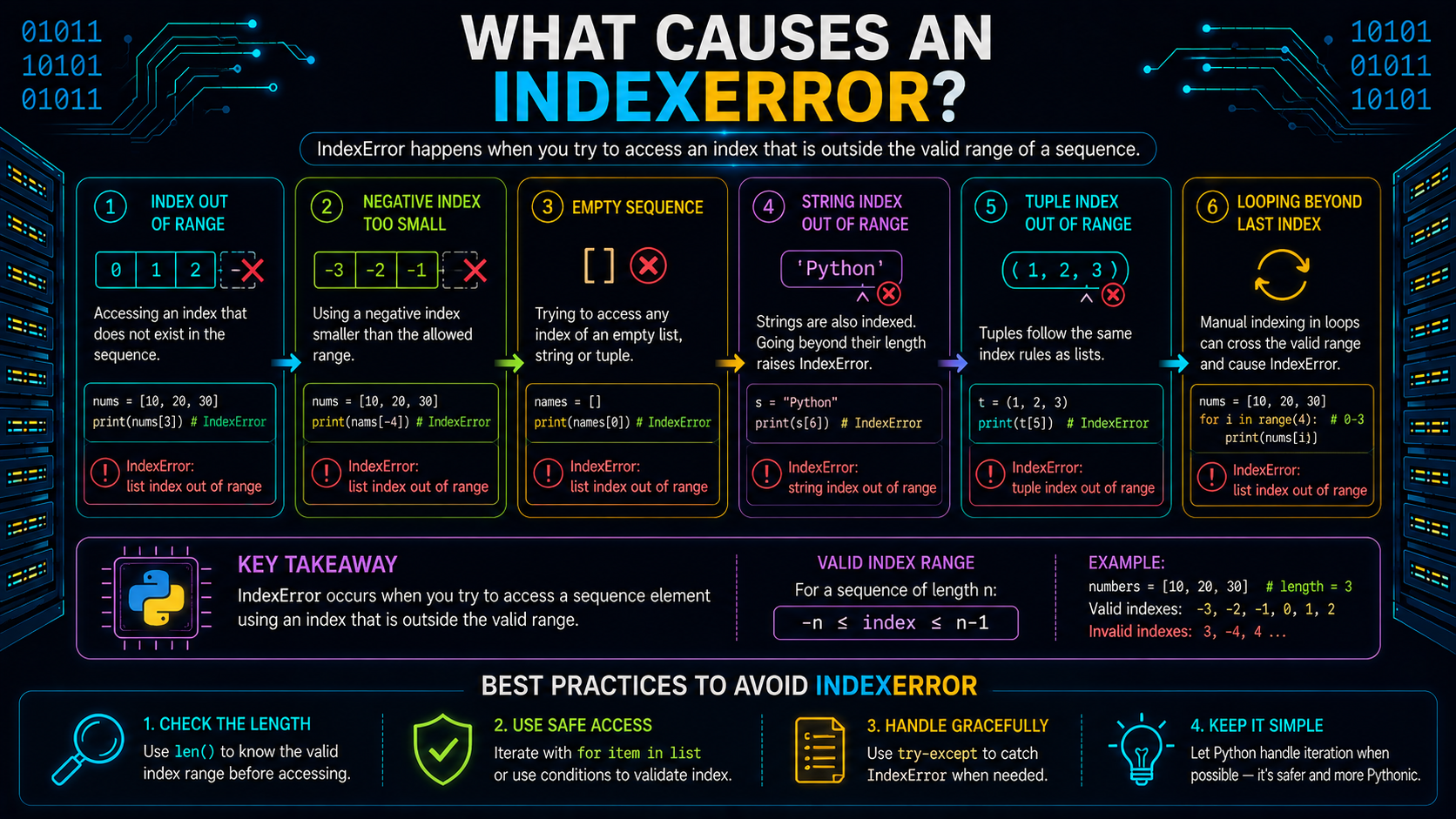
An index must refer to an existing position in the string.
For example:
text = "abc"
print(text[3])
The valid indexes are:
0 1 2
Since index 3 doesn't exist, Python raises an IndexError.
This isn't a syntax error, the code is valid. The error occurs at runtime because the requested position is outside the string's bounds.
String Slicing Explained
Indexing returns a single character, while slicing extracts a portion of a string.
The basic syntax is:
text[start:stop]The slice starts at start and ends before stop.
text = "Python"
print(text[0:2])
print(text[2:6])
Output
Py
thon
Why the Stop Index Is Excluded
Python includes the start index but excludes the stop index.
For example:
text[0:2]returns the characters at indexes 0 and 1.
This design makes slice lengths easy to calculate.
For example:
text[2:6]
Length = 6 − 2 = 4
It also allows adjacent slices to fit together without overlapping.
Omitting Slice Bounds
You don't have to specify both the start and stop positions.
text = "Python"
print(text[:2])
print(text[2:])
print(text[:])
Output
Py
thon
Python
Meaning:
- text[:2] → beginning to index 2
- text[2:] → index 2 to the end
- text[:] → the entire string
Using the Step Parameter
Slices can also include a step value.
text = "abcdef"
print(text[::2])
print(text[1::2])
Output
ace
bdf
A negative step traverses the string in reverse order.
print(text[::-1])Output
fedcbaUsing [::-1] is a common Python idiom for creating a reversed copy of a string.
Slicing Creates a New String
Since strings are immutable, slicing never modifies the original string.
text = "Python"
part = text[:2]
print(text)
print(part)
Output
Python
Py
Conceptually:
text ─────▶ "Python"

part ─────▶ "Py"
The original string remains unchanged, while the slice produces a new string object.
Why Python Strings Are Immutable
A Python string cannot be modified after it has been created.
For example:
text = "Python"
text[0] = "J"
Python raises a TypeError because individual characters in a string cannot be changed.
If you want different text, you must create a new string.
text = "Python"
text = "J" + text[1:]
print(text)
Output
JythonNotice what happened:
- The original string wasn't modified.
- A new string was created.
- The variable text was rebound to the new string.
Conceptually:
Before

text ─────▶ "Python"

After

text ─────▶ "Jython"
This immutability explains why string methods, slicing, and concatenation always produce new string objects instead of modifying existing ones. It is one of the fundamental characteristics of Python's str type.
Why String Methods Return New Strings
In Part 1, you learned that Python strings are immutable, meaning their contents cannot be modified after they're created.
That's why string methods don't change the original string. Instead, they return a new string object with the requested changes.
For example:
text = " python "
cleaned = text.strip()
print(text)
print(cleaned)
Output
python
python
The original string still contains the spaces because strip() created a new string instead of modifying the existing one.
A common mistake is assuming the method changes the original value.
text = " python "
text.strip()
print(text)
Output
pythonSince the returned string wasn't stored, the result was discarded.
To keep the modified text, assign the returned string back to a variable.
text = text.strip()This behavior is common to many string methods because strings are immutable.
Common String Methods
Python's str type provides built-in methods for transforming, searching, and processing text. Since strings are immutable, each method returns a new string unless stated otherwise.
Changing Letter Case
Python provides several methods to convert the case of characters.
text = "Python"

print(text.lower())
print(text.upper())
print(text.swapcase())
print(text.capitalize())
Output
python
PYTHON
pYTHON
Python
Each method returns a new string.
For case-insensitive comparisons, casefold() is generally more suitable than lower() because it performs a more comprehensive Unicode-aware case conversion.
For example:
print("Straße".casefold())Output
strasseUse casefold() when you want reliable case-insensitive matching across different languages.
Removing Whitespace
The strip() method removes whitespace from the beginning and end of a string.
text = "  hello\n"
print(text.strip())
Output
helloPython also provides:
- lstrip() – removes leading whitespace
- rstrip() – removes trailing whitespace
These methods do not remove spaces inside the string.
text = "hello   world"
print(text.strip())
Output
hello worldOnly the leading and trailing whitespace is removed.
Replacing Text
Use replace() to create a new string with one substring replaced by another.
text = "red blue red"
new_text = text.replace("red", "green")
print(new_text)
Output
green blue greenYou can also limit how many replacements are made.
print(text.replace("red", "green", 1))Output
green blue redThe original string remains unchanged because replace() returns a new string.
Splitting Strings
The split() method divides a string into a list of smaller strings.
line = "red,green,blue"

parts = line.split(",")

print(parts)
Output
['red', 'green', 'blue']When no separator is provided, split() separates text using runs of whitespace.
text = "a   b\nc"
print(text.split())
Output
['a', 'b', 'c']Unlike methods such as upper() or replace(), split() returns a list, not another string.
Joining Strings
The join() method combines multiple strings into a single string.
parts = ["red", "green", "blue"]
text = ",".join(parts)
print(text)
Output
red, green, blueNotice that join() is called on the separator string.
",".join(parts)This can be read as:
Use "," as the separator to join the strings in parts.
Every item being joined must already be a string.
For example:
"-".join([1, 2, 3])raises a TypeError.
Convert non-string values before joining.
"-".join(str(number) for number in [1, 2, 3])This produces a single string with each number separated by a hyphen.
Searching Within Strings
Python provides multiple ways to search for text.
To check whether a substring exists, use the in operator.
text = "python programming"

print("python" in text)
print("java" in text)
Output
True
False
To locate the position of a substring, use find().
print(text.find("program"))
print(text.find("java"))
Output
7
-1
If the substring isn't found, find() returns -1.
When the absence of a substring should be treated as an error, use index() instead.
text.index("java")This raises a ValueError because "java" doesn't exist in the string.
Checking Prefixes and Suffixes
The startswith() and endswith() methods make it easy to test whether a string begins or ends with specific text.
filename = "report.pdf"
print(filename.startswith("report"))
print(filename.endswith(".pdf"))
Output
True
True
These methods also accept a tuple of values.
filename.endswith((".pdf", ".txt", ".md"))This checks whether the filename ends with any of the specified extensions.
String Concatenation vs String Repetition
Python provides operators for combining and repeating strings.
Using the + Operator
The + operator joins two or more strings.
first = "Py"
second = "thon"
print(first + second)
Output
PythonThe operation creates a new string. Neither original string is modified.
Using the * Operator
The * operator repeats a string a specified number of times.
print("ha" * 3)Output
hahahaThe repetition count must be an integer.
"ha" * 2.5raises a TypeError.
Why join() Is Better for Combining Many Strings
While the + operator works well for a few strings, the reference recommends using join() when combining many pieces of text.
parts = ["a", "b", "c"]
text = "".join(parts)
Repeated string concatenation can be inefficient because each concatenation creates a new string object.
Using join() combines all the strings into a single result in one operation.
Comparing Strings in Python
String comparisons are based on values, not object identity.
Comparing String Values with ==
Use == to check whether two strings contain the same text.
print("abc" == "abc")
print("abc" == "ABC")
Output
True
False
String comparison is case-sensitive.
Case-Insensitive Comparisons
When case differences shouldn't matter, convert both strings before comparing them.
a = "Python"
b = "python"
print(a.casefold() == b.casefold())
Output
TrueThe reference recommends casefold() over lower() for more robust Unicode-aware case-insensitive comparisons.
Lexicographic Ordering
Strings also support ordering comparisons.
print("apple" < "banana")Output
TrueThese comparisons are based on Unicode code points.
For simple English text, the ordering often matches alphabetical order. However, it isn't the same as locale-aware dictionary sorting for every language.
Formatting Strings with f-Strings
f-strings provide a concise way to build strings by embedding variables and expressions directly inside a string literal.
Creating Your First f-String
name = "Ada"
age = 36
message = f"{name} is {age} years old"
print(message)
Output
Ada is 36 years oldThe expressions inside {} are evaluated at runtime, and the final result is a new string object.
Using Expressions Inside f-Strings
You aren't limited to variables.
Expressions can also be evaluated.
x = 10
y = 20
print(f"Total: {x + y}")
Output
Total: 30This makes f-strings useful for constructing dynamic messages without manually concatenating values.
Formatting Numbers
f-strings support format specifiers.
price = 19.99

print(f"Price: ${price:.2f}")
Output
Price: $19.99Here, .2f formats the number as fixed-point notation with two digits after the decimal point.
Aligning Text
You can control text alignment within a specified width.
name = "Ada"
print(f"|{name:<10}|")
print(f"|{name:>10}|")
print(f"|{name:^10}|")
These alignment options represent:
- < Left alignment
- > Right alignment
- ^ Center alignment
Formatting changes only the displayed representation. It doesn't modify the original value.
Understanding str() and repr()
Python provides two common text representations.
str() produces a human-readable representation.
repr() produces a developer-oriented representation.
text = "hello\nworld"
print(str(text))
print(repr(text))
Output
hello
world
'hello\nworld'
Within an f-string, the !r conversion flag uses repr().
print(f"{text!r}")This is particularly useful when debugging strings that contain invisible characters, such as newline (\n) or tab (\t).
Strings Are Iterable
Because strings are sequences, they can be processed one character at a time.
Iterating Over Characters
for char in "abc":
    print(char)
Output
a
b
c
Each iteration returns a one-character string.
Membership Tests
Use the in operator to check whether a substring exists.
email = "ada@example.com"
print("@" in email)
print(email.endswith(".com"))
Output
True
True
Membership checks are commonly used when parsing or validating text. However, a simple check such as "@" in email only verifies the presence of the @ character—it doesn't fully validate an email address.
Understanding Unicode in Python
So far, you've learned how to create, manipulate, and format strings. But what exactly does a Python string store?
A Python string stores Unicode text. Unicode is a standard that assigns a unique code point to characters from writing systems around the world, allowing Python to represent text in many languages using the same str type.
For example, all of these are valid Python strings:
print("hello")
print("नमस्ते")
print("こんにちは")
print("🙂")
Unlike older systems that primarily supported ASCII, Python's str type is designed to work with Unicode text by default. This makes it possible to write programs that handle multilingual text without changing the data type.
Unicode Code Points
Every Unicode character is assigned a unique numeric value called a code point.
Python provides two built-in functions to work with code points:
- ord() returns the code point of a character.
- chr() converts a code point back into a character.
print(ord("A"))
print(chr(65))
Output
65
A
You can also retrieve the code point of Unicode characters such as emojis.
print(ord("🙂"))You don't need to memorize code points. The important idea is that Python strings represent Unicode text, while code points provide the underlying numeric representation of individual characters.
Why Character Length Can Be Tricky
For many strings, the number of characters is straightforward.
len("hello")returns:
5However, Unicode text can be more complex. Some characters that appear as a single visual symbol may actually be composed of multiple Unicode code points. This means the value returned by len() may not always match the number of characters a user visually perceives.
For most beginner programs, len() behaves exactly as expected. As you work with international text, it's useful to remember that human language is often more complex than it appears.
Strings vs Bytes
Although both represent data, strings and bytes serve different purposes in Python.
A string (str) represents human-readable text.
A bytes (bytes) object represents raw binary data.
For example:
text = "hello"
data = b"hello"
print(type(text))
print(type(data))
Output
<class 'str'>
<class 'bytes'>
Even though they may look similar, they are different data types. Python doesn't automatically combine text and bytes.
For example:
"hello" + b"world"raises a TypeError because Python requires you to convert between text and bytes explicitly.
Encoding and Decoding
Strings are convenient for people to read, but computers store and transmit information as bytes.
Encoding and decoding bridge this gap.
Text (str)
     │
 Encode
     ▼
Bytes
      │
 Decode
     ▼
Text (str)
Encoding Text into Bytes
Encoding converts a string into a sequence of bytes.
text = "hello"
data = text.encode("utf-8")
print(data)
print(type(data))
Output
b'hello'
<class 'bytes'>
UTF-8 is one of the most widely used text encodings for modern software systems.
When encoding non-ASCII text, the resulting bytes are intended for storage or transmission and may not be human-readable.
text = "नमस्ते"
data = text.encode("utf-8")
print(data)
This output represents the encoded bytes rather than the original text.
Decoding Bytes into Text
Decoding performs the opposite conversion.
It transforms bytes back into a string.
data = b"hello"
text = data.decode("utf-8")
print(text)
print(type(text))
Output
hello
<class 'str'>
Encoding and decoding should use the same character encoding.
For example, if text is encoded using UTF-8, it should also be decoded using UTF-8. Using mismatched encodings can produce errors or incorrect text.
This becomes especially important when working with files, APIs, databases, and network communication.
Why UTF-8 Is Commonly Used
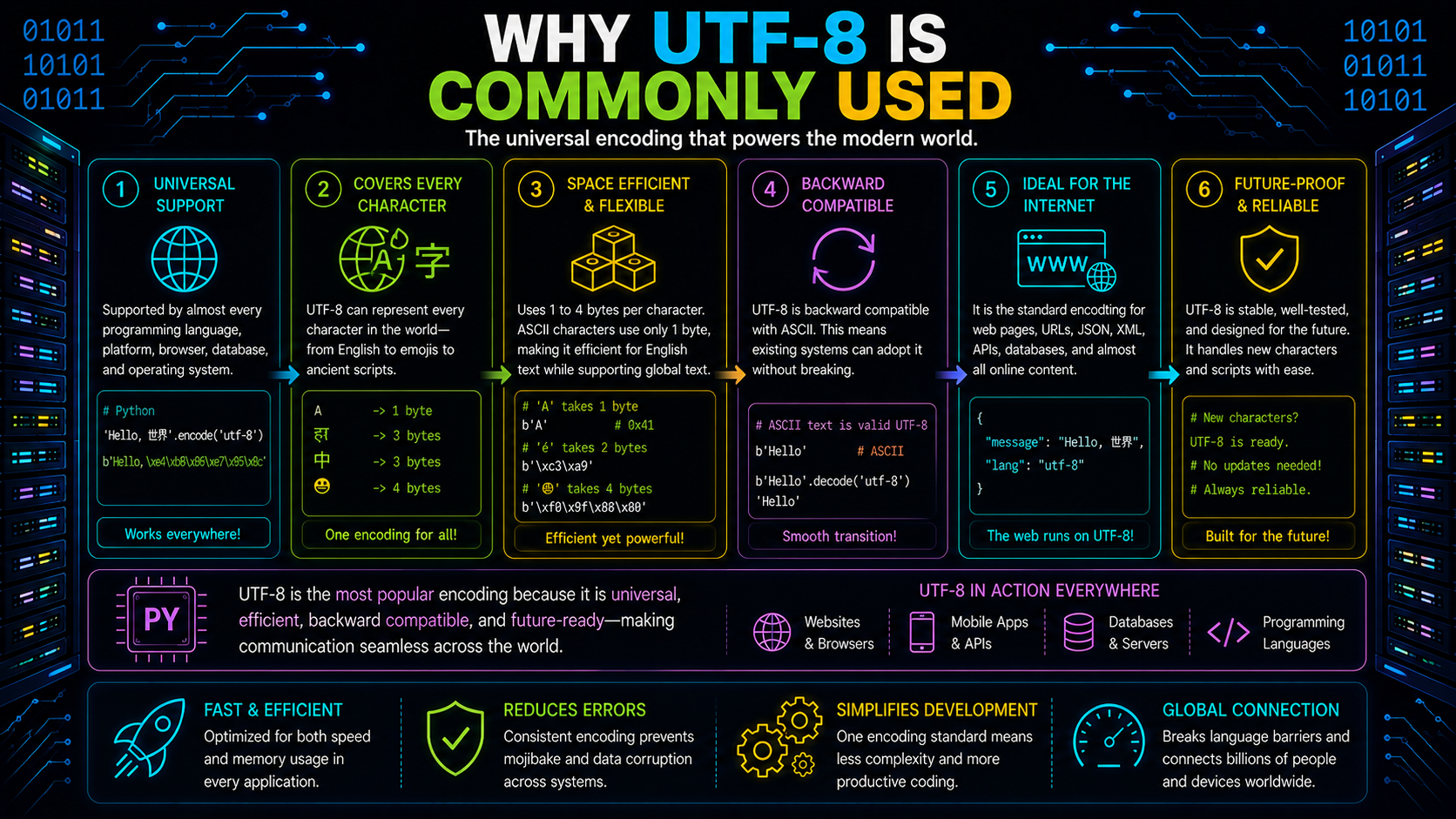
UTF-8 can represent Unicode text while remaining compatible with ASCII.
Because of this, it has become the most common encoding used for text files, web pages, APIs, and many modern software systems.
When you see examples using:
text.encode("utf-8")or
data.decode("utf-8")they are converting between Unicode text and its UTF-8 byte representation.
Common Encoding Mistakes
Many encoding problems happen when text and bytes are treated as the same thing.
For example:
- Trying to concatenate a string with bytes
- Decoding bytes using the wrong encoding
- Assuming encoded bytes are human-readable text
A good rule to remember is:
str → Text
bytes → Raw binary data
Convert between them explicitly using encode() and decode().
Reading and Writing Text Files
When working with text files, it's a good practice to specify the encoding explicitly.
Writing a file:
with open("notes.txt", "w", encoding="utf-8") as file:
    file.write("hello")
Reading a file:
with open("notes.txt", "r", encoding="utf-8") as file:
    text = file.read()
Specifying the encoding helps ensure that text is interpreted consistently across different platforms and environments.
Whenever text crosses the boundary between your program and a file, encoding becomes part of the process.
String Truthiness
Strings also participate in Boolean expressions.
An empty string evaluates to False, while a non-empty string evaluates to True.
print(bool(""))
print(bool("hello"))
Output
False
True
This allows strings to be used directly in conditions.
name = "Ada"
if name:
    print("Name was provided.")
Here, the condition evaluates to True because name is not an empty string.
When the variable contains an empty string, the condition evaluates to False.
Common Mistakes When Working with Strings
Many beginner mistakes come from misunderstanding how string objects behave.
| Mistake | Why It Happens | Correct Approach |
|---|---|---|
| Assuming strings are mutable | String objects cannot be modified after creation | Create a new string instead |
| Calling text.strip() without storing the result | strip() returns a new string | Assign the returned value |
| Comparing strings with is | is checks object identity, not string values | Use == for comparisons |
| Treating text and bytes as the same type | str and bytes are different objects | Use encode() and decode() |
| Assuming len() always matches visible characters | Unicode text may consist of multiple code points | Remember that visual characters can be more complex |
| Calling join() on a list | The separator string owns the join() method | Use "separator".join(list) |
These mistakes become much easier to avoid once you understand that strings are immutable Unicode objects and that text and bytes represent different kinds of data.
Real-World Uses of Python Strings
Strings appear throughout Python applications because most information exchanged between people and software is represented as text.
Processing User Input
The value returned by input() is always a string. It's common to normalize the input before using it.
name = input("Name: ").strip()Logging Messages
Log messages are typically constructed as strings.
count = 25
print(f"Processed {count} records")
In production applications, dedicated logging libraries are generally used instead of print(), but the formatted output is still text.
Working with File Paths
File paths are often represented as strings, although Python also provides pathlib for working with paths as objects.
from pathlib import Path
path = Path("data") / "input.txt"
Using path objects is generally safer than manually concatenating path strings.
APIs and Data Exchange
Many protocol values are represented as strings.
For example:
method = "GET"
content_type = "application/json"
HTTP methods, JSON keys, and many API values rely on precise string values.
SQL Queries and Security
Avoid building SQL queries by concatenating strings with user input.
For example:
query = "SELECT * FROM users WHERE name = '" + name + "'"Instead, use parameterized queries provided by database libraries.
Correct string handling isn't just about formatting—it also helps write safer applications.
Wrapping Up
Python strings are immutable str objects that represent Unicode text. Throughout this guide, you learned how strings are created, accessed, sliced, formatted, compared, and processed. You also explored the relationship between text and bytes, how encoding and decoding convert data between the two, and why UTF-8 is commonly used for text representation. Understanding these concepts helps you write Python programs that process text correctly and avoid common mistakes.
The core mental model is:
String Expression
        │
        ▼
    str Object
        │
        ├── Unicode Text
        ├── Immutable
        ├── Sequence of Characters
        │
        ▼
String Operations
        │
        ├── Methods
        ├── Slicing
        ├── Formatting
        ├── Encoding / Decoding
        │
        ▼
New String or Boolean Result
This mental model ties together the key ideas from all three parts: strings are objects, they are immutable, they represent Unicode text, and most string operations either create new string objects or return Boolean results.
Frequently Asked Questions
What is a Python string?▾
A Python string is a str object that represents Unicode text. It stores a sequence of Unicode characters and supports operations such as indexing, slicing, formatting, and searching.
Why are Python strings immutable?▾
Immutability means a string's contents cannot be modified after the string is created. Operations that appear to change a string actually create and return a new string object.
What's the difference between strings and bytes?▾
Strings (str) represent Unicode text, while bytes (bytes) represent raw binary data. You convert between them using encode() and decode().
What is UTF-8 encoding?▾
UTF-8 is a widely used character encoding that converts Unicode text into bytes for storage or transmission and can convert those bytes back into text during decoding.
Should I use == or is to compare strings?▾
Use == to compare string values. The is operator checks object identity and should not be used for string value comparison.
Why do string methods return new strings?▾
Because strings are immutable, methods such as upper(), replace(), and strip() return new string objects instead of modifying the original string.