
Truthiness in Python: Booleans and What Counts as False
Key Takeaways
- Python conditions assess an object's truth value rather than just requiring True or False.
- Non-empty and non-zero values are typically truthy, whereas empty and zero-like values are typically false.
- The built-in bool() function reveals how an object behaves in a Boolean context.
- The and, or, and not operators have distinct behaviors, and and and or support short-circuit evaluation.
- Understanding truthiness helps you write cleaner, more readable, and idiomatic Python conditions.
Introduction
Consider these two if statements:
if "0":
    print("Runs")

if 0:
    print("Runs")
"Runs" is only printed in the first statement.
This is confusing at first. Why does Python handle both values differently when they seem to represent zero?
One of Python's most useful ideas, truthiness, holds the key to the solution. Python determines an object's truth value rather than requiring each condition to be the Boolean values True or False. The integer 0 is falsy, whereas a non-empty string like "0" is truthy.
From basic if statements to while loops and Boolean expressions, this behavior affects practically every conditional statement you make. Writing clear, legible, and idiomatic code will be simpler after you comprehend how Python detects if an object is truthy or falsy.
This blog will explain what Booleans are, how truthiness functions, which values evaluate to False, how bool() transforms objects, and how Boolean operators like and, or, and not impact program flow.
What Are Booleans in Python?
Think about developing software that checks if a shopping cart is empty, if a user has authorization to view a site, or if a password is accurate. Finally, each of these choices boils down to a simple question: yes or no.
Python answers these questions using the Boolean data type.
A Boolean represents one of two possible truth values:
- True
- False
Its type is bool.
For example:
print(type(True))
print(type(False))
Output
<class 'bool'>
<class 'bool'>
Booleans do not store text or quantities, in contrast to strings or numbers. They serve as the basis for decision-making in Python programs since they show the results of conditions and comparisons.
Understanding the bool Type
Python's built-in Boolean data type is called bool. A Boolean value is ultimately produced by each comparison, membership test, and logical action.
For example:
print(10 > 3)
print("py" in "python")
print([1, 2] == [1, 2])
Output
True
True
True
Each expression evaluates to either True or False, allowing Python to decide whether a condition has been satisfied.
Why Booleans Are Objects
Like integers, strings, and lists, Booleans are also Python objects.
Each Boolean object has:
- an identity
- a type
- a value
Conceptually, a Boolean object looks like this:
bool object
├── identity
├── type: bool
└── value: True or False
Python maintains a single True object and a single False object during program execution. Since Boolean logic depends on their truth values rather than their identities, you typically work with the values instead of the objects themselves.
Why Booleans Exist in Programming
Programs don't just perform calculations, they also make decisions.
For example, an application may need to determine:
- Should a user be allowed to log in?
- Is the entered password valid?
- Should the loop continue running?
These questions are answered using Boolean values.
if password_is_valid:
    login()
Similarly:
if temperature > 100:
    warn()
or
while queue_has_items:
    process_next()
In each case, a Boolean result controls what happens next.
Programs could compute outcomes without Booleans, but they wouldn't know whether to branch, repeat, check input, or halt execution. They serve as the link between assessing a condition and choosing a program.
Boolean Literals
Python has exactly two Boolean literals:
- True
- False
These keywords are reserved and represent the only Boolean values available in the language.
For example:
is_active = True
is_deleted = False
These variables now hold Boolean objects that can be used directly in conditions or expressions.
True and False
True represents a satisfied condition, while False represents an unsatisfied one.
Many Python expressions naturally evaluate to one of these values.
print(8 > 5)
print(8 < 5)
Output
True
False
Rather than writing Boolean values manually, you'll most often obtain them as the result of comparisons or logical operations.
Why Capitalization Matters
Boolean literals are case-sensitive.
The following are valid:
- True
- False
However, these are not Boolean literals:
- true
- false
- TRUE
- FALSE
Python interprets them as ordinary variable names. If they haven't been defined previously, a NameError is raised.
Always write Boolean literals with an uppercase first letter.
Why bool Is Related to int
One interesting feature of Python is that bool is a subclass of int.
You can verify this using isinstance():
print(isinstance(True, int))
print(isinstance(False, int))
Output
True
True
Because of this relationship:
- True behaves like 1
- False behaves like 0
For example:
print(True + True)
print(False + 10)
Output
2
10
This design exists mainly for historical compatibility and practical convenience. It allows Boolean values to participate in arithmetic operations when needed, for example, counting how many conditions evaluate to True.
However, in everyday programming, Booleans should represent truth values, not ordinary numbers. Using arithmetic with Booleans where the intent isn't obvious can make code harder to understand.
How Comparisons Produce Boolean Values
Comparison operators evaluate relationships between values and always produce a Boolean result.
These Boolean results can then be stored, passed to functions, or used directly in conditions.
Equality Operators (==, !=)
Equality operators determine whether two values are equal or different.
print("python" == "python")
print("python" != "java")
print([1, 2] == [1, 2])
Output
True
True
True
Remember that == compares values, not object identity.
Ordering Operators (<, <=, >, >=)
Ordering operators compare the relative order of values.
print(3 < 5)
print(10 >= 10)
Output
True
True
Numbers are compared numerically, while strings are compared lexicographically. Comparing unrelated types, such as an integer and a string, raises a TypeError.
Chained Comparisons
Python allows multiple comparisons to be written as a single expression.
age = 25
print(18 <= age < 65)
Output
TrueThis is equivalent to:
18 <= age and age < 65but evaluates age only once, making the expression both concise and readable.
Identity Comparisons with is
The is operator checks whether two references point to the same object.
A common use case is checking for None.
value = None
print(value is None)
Output
TrueUnlike ==, which compares values, is compares object identity. For this reason, is None is the recommended way to check for missing values.
Membership Tests with in
The in operator checks whether a value exists within another object.
print("py" in "python")
print(3 in [1, 2, 3])
Output
True
True
Membership tests also return Boolean values, making them useful for searching and simple validation tasks.
What Is Truthiness in Python?
Python doesn't require conditions to contain only the Boolean values True or False. Instead, every object has an associated truth value that determines how it behaves in a Boolean context. This behavior is called truthiness.
For example:
if "hello":
    print("Runs")
Although "hello" isn't the Boolean object True, the condition executes because the string is truthy.
On the other hand:
if "":
    print("Runs")
doesn't execute because an empty string is falsy.
This implicit conversion makes conditions shorter and easier to read.
Instead of writing:
if len(items) > 0:Python programmers typically write:
if items:Python automatically evaluates the object's truth value before deciding whether the condition should run.
Understanding bool()
The built-in bool() function converts an object to its Boolean truth value.
It answers one simple question:
How does this object behave in a Boolean context?
For example:
print(bool(""))
print(bool("hello"))
print(bool(0))
print(bool(42))
print(bool([]))
print(bool([1, 2]))
print(bool(None))
Output
False
True
False
True
False
True
False
Notice the pattern:
- Empty objects evaluate to False.
- Non-empty objects evaluate to True.
- Zero values evaluate to False.
- Non-zero numbers evaluate to True.
- None evaluates to False.
The bool() function doesn't change the object itself. Instead, it reveals the truth value Python would use whenever that object appears inside an if statement, a while loop, or another Boolean expression. Understanding this behavior is the foundation for writing concise and idiomatic Python code.
What Values Are Considered False in Python?
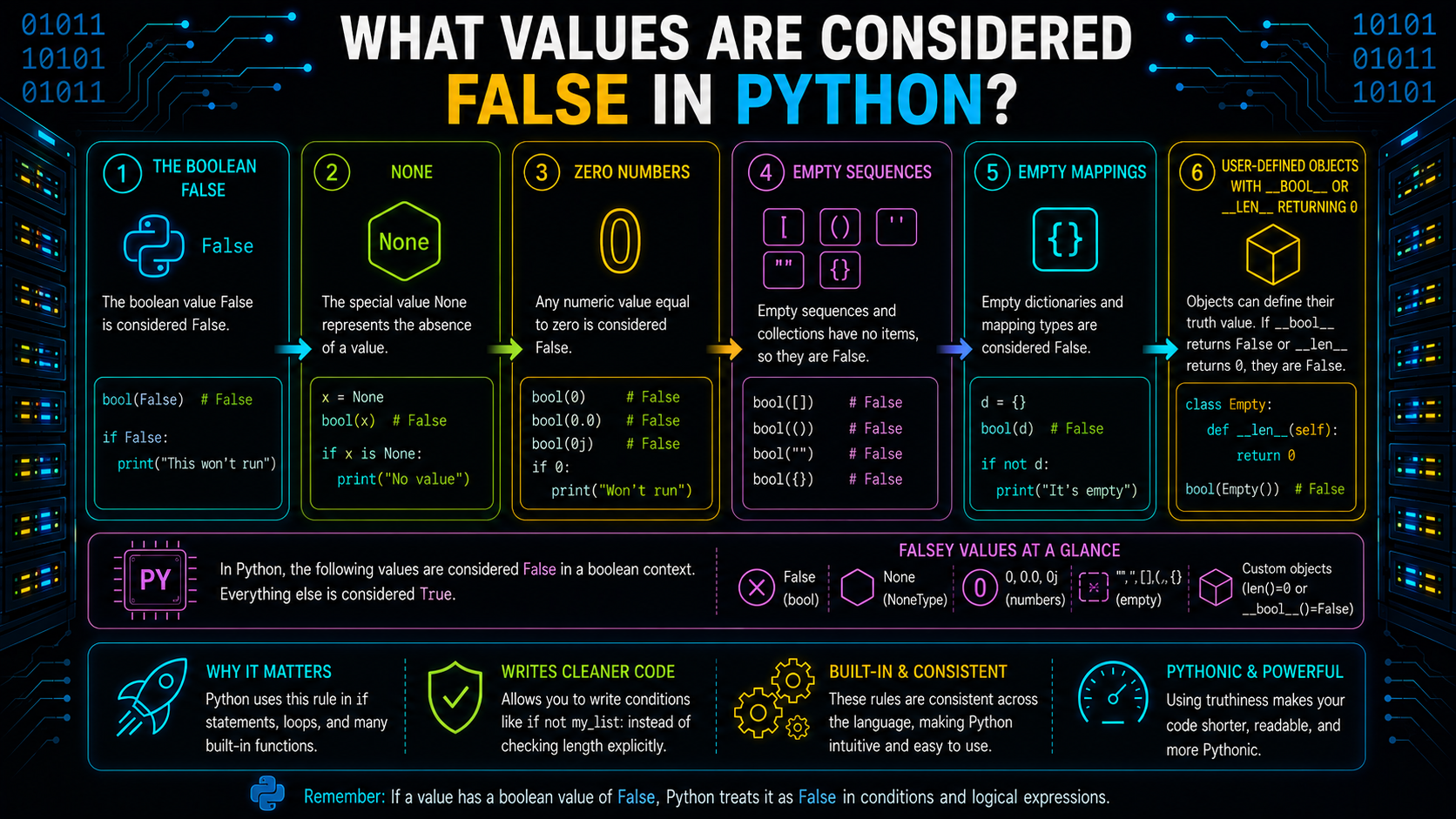
A condition in Python doesn't have to evaluate to the Boolean object False to skip an if or while block. Many objects have a false truth value, meaning Python treats them as False when evaluating a condition.
Some of the most common falsy values are shown below.
| Value | Type | bool() |
|---|---|---|
| False | bool | False |
| None | NoneType | False |
| 0 | int | False |
| 0.0 | float | False |
| 0j | complex | False |
| "" | str | False |
| [] | list | False |
| {} | dict | False |
| set() | set | False |
| () | tuple | False |
| range(0) | range | False |
You can verify these values using the bool() function.
print(bool(False))
print(bool(None))
print(bool(0))
print(bool(""))
print(bool([]))
Output
False
False
False
False
False
A useful rule of thumb is:
Empty containers and zero-like values are usually falsy, while non-empty and non-zero values are usually truthy.
What Values Are Considered True in Python?
Any object that doesn't evaluate to a false truth value is considered truthy.
Common examples include:
- Non-zero numbers
- Non-empty strings
- Non-empty lists
- Non-empty tuples
- Non-empty dictionaries
- Non-empty sets
For example:
print(bool(10))
print(bool("Python"))
print(bool([1, 2]))
print(bool({"name": "Ada"}))
Output
True
True
True
True
The following table compares commonly used truthy and falsy values.
| Truthy Values | Falsy Values |
|---|---|
| "Python" | "" |
| [1, 2] | [] |
| {"a": 1} | {} |
| (1,) | () |
| {1, 2} | set() |
| 5 | 0 |
| 3.14 | 0.0 |
Remember that Python checks an object's truth value, not whether it is literally the Boolean object True.
Truthiness of Containers
Container objects such as lists, dictionaries, tuples, and sets follow a simple rule:
An empty container is falsy. A non-empty container is truthy.
This behavior allows Python code to be both concise and readable.
Lists
An empty list evaluates to False, while a list containing one or more elements evaluates to True.
print(bool([]))
print(bool([1]))
Output
False
True
Because of this behavior, checking whether a list contains elements is straightforward.
items = ["Python", "Java"]
if items:
    print("Items are available.")
Instead of writing:
if len(items) > 0:
    print("Items are available.")
Using the list directly is the idiomatic Python approach.
Dictionaries
Dictionaries follow the same truthiness rule.
print(bool({}))
print(bool({"name": "Ada"}))
Output
False
True
A dictionary with at least one key-value pair is truthy, while an empty dictionary is falsy.
Sets
Sets also depend on whether they contain elements.
print(bool(set()))
print(bool({1, 2, 3}))
Output
False
True
An empty set evaluates to False, whereas a populated set evaluates to True.
Tuples
Tuples behave consistently with other container types.
print(bool(()))
print(bool((1, 2)))
Output
False
True
Regardless of the container type, Python evaluates its truth value based on whether it is empty or contains data.
Truthiness of Numbers
Numbers are evaluated based on whether their value is zero.
Zero vs Non-Zero
The rule is simple:
Zero is falsy.
Any non-zero number is truthy.
This applies to integers, floating-point numbers, and complex numbers.
print(bool(0))
print(bool(1))
print(bool(-5))
print(bool(0.0))
print(bool(0.1))
Output
False
True
True
False
True
Python doesn't distinguish between positive and negative values when determining truthiness. It only checks whether the numeric value is zero.
Why 0 Isn't Always Missing
Although 0 is falsy, it isn't necessarily the same as missing data.
For example:
age = 0If age represents a newborn's age, 0 is a valid value.
Writing:
if age:
    print("Age available")
won't execute because 0 is falsy.
If None is used to represent missing data, check explicitly for it.
if age is not None:
    print("Age available")
This distinction prevents valid values from being treated as absent.
Truthiness of Strings
Strings follow the same principle as other containers: empty strings are falsy, while non-empty strings are truthy.
Empty Strings
An empty string contains no characters, so its truth value is False.
print(bool(""))Output
FalseThis behavior is commonly used to determine whether the user entered any text.
Whitespace Strings
A string containing only spaces is not empty.
print(bool(" "))Output
TrueAlthough it may appear blank, the string still contains a character, making it truthy.
This is an important distinction when validating user input.
Using strip() Before Checking
User input often includes leading or trailing spaces.
Before determining a string's truth value, the strip() method eliminates whitespace from both ends of the string.
name = "   "

if name.strip():
    print("Name entered")
else:
    print("Empty input")
Output
Empty inputUsing strip() helps distinguish meaningful input from strings that contain only whitespace.
Using Truthiness in if and while
Truthiness is most commonly used in conditional statements and loops. Instead of comparing values explicitly with True or False, Python evaluates the truth value of the object directly.
if Statements
The if statement runs its block only when the condition evaluates to a truthy value.
items = ["Python", "Java"]

if items:
    print("Items available")
Output
Items availableIf items becomes an empty list, the condition evaluates to False, and the block is skipped.
while Loops
while loops also depend on truthiness.
items = [1, 2, 3]

while items:
    print(items.pop())
Output
3
2
1
Each iteration removes one element from the list. Once the list becomes empty, it evaluates to False, causing the loop to terminate automatically.
Idiomatic Python Conditions
One of Python's design principles is writing code that's simple and readable.
Instead of comparing a container's length:
if len(items) > 0:
    print("Items available")
prefer:
if items:
    print("Items available")
Similarly, instead of writing:
if is_active == True:
    print("Active")
write:
if is_active:
    print("Active")
These forms rely on truthiness and are considered the idiomatic way to write conditional expressions in Python.
Boolean Operators in Python
Python provides three Boolean operators, not, and, and or, to combine or modify conditions. Although they all work with truth values, each behaves differently.
| Operator | Purpose | Return Behavior |
|---|---|---|
| not | Reverses the truth value | Always returns a Boolean (True or False) |
| and | Returns the first falsy operand or the last operand if all are truthy | Returns an operand |
| or | Returns the first truthy operand or the last operand if all are falsy | Returns an operand |
Using not
The not operator negates the truth value of an expression.
is_active = False

print(not is_active)
print(not [])
Output
True
True
Unlike and and or, not always returns a Boolean object.
Using and
Expressions are evaluated from left to right using the and operator. If all operands are truthy, it yields the final operand; otherwise, it returns the first falsy operand.
print("Python" and 100)
print("" and 100)
Output
100
This behavior makes and useful in conditional expressions, but remember that it doesn't always return True or False.
Using or
The or operator returns the first truthy operand, or the last operand if every operand is falsy.
print("Python" or "Java")
print("" or "Java")
Output
Python
Java
This makes or useful for selecting fallback values, provided falsy values aren't valid data.
Understanding Short-Circuit Evaluation
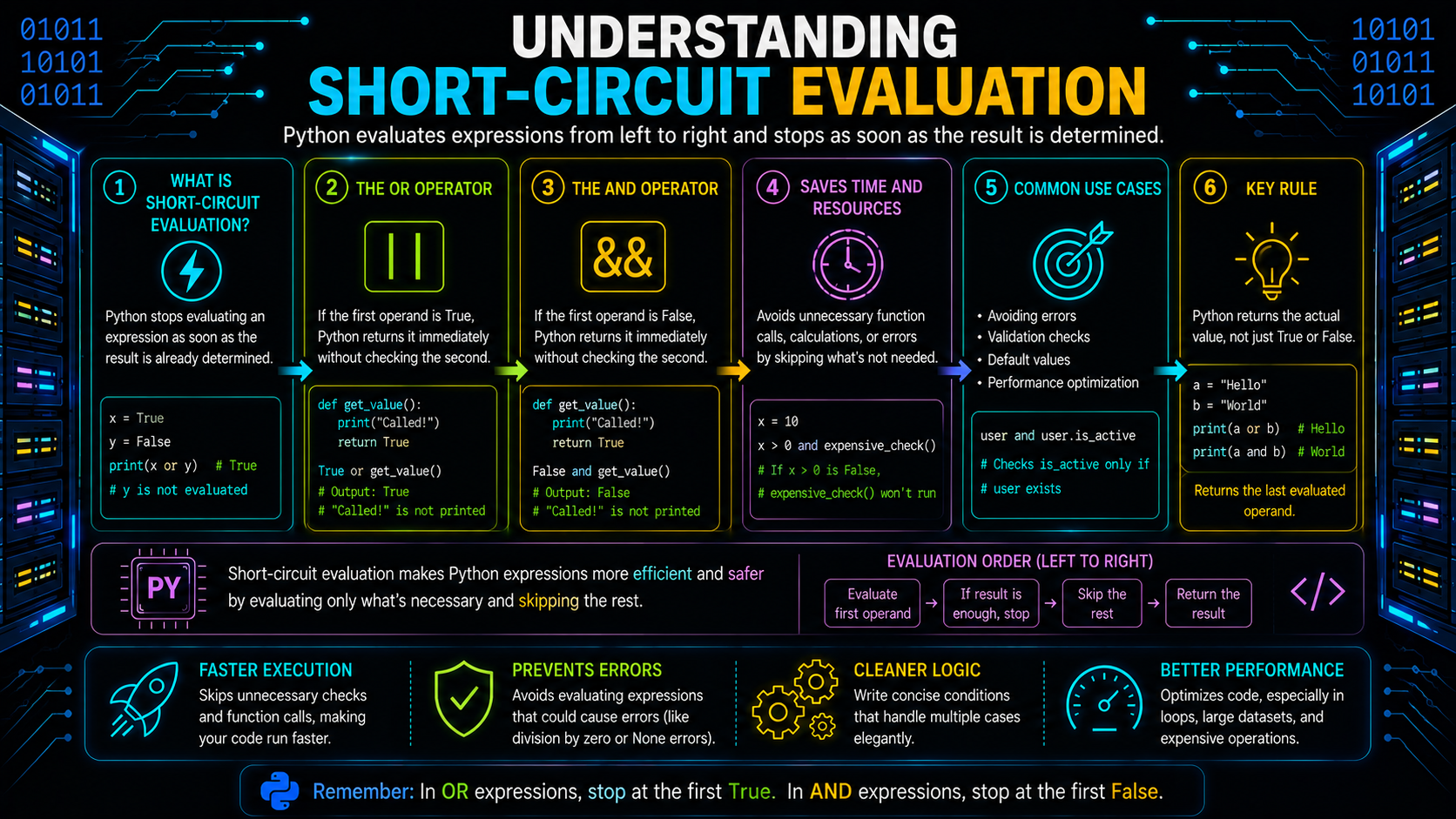
Boolean expressions are only evaluated by Python until the outcome is known. We refer to this behavior as short-circuit evaluation.
Short-Circuiting with and
If the left operand is falsy, Python skips evaluating the right operand.
False and expensive_call()Since the result is already known to be falsy, expensive_call() is never executed.
Short-Circuiting with or
Python does not evaluate the remaining expression if the left operand is true.
True or expensive_call()The function call is omitted since the outcome is already true.
Why Evaluation Order Matters
Whether or not later expressions are evaluated depends on the order of criteria.
if user is not None and user.is_active:
    print("Active")
Here, user.is_active is evaluated only if user isn't None, making the condition both safe and efficient.
Preventing Errors with Short-Circuiting
An error may occur if the prior condition is reversed.
if user.is_active and user is not None:
    ...
Python raises an exception if user is None because it tries to access user.is_active before checking for None. The safer situation should always come first.
Boolean Contexts
Python automatically evaluates an object's truth value in several language constructs.
- if – Executes a block when the condition is truthy.
- while – Continues looping while the condition remains truthy.
- Conditional expressions – Selects one value based on a condition.
status = "Adult" if age >= 18 else "Minor" - assert – Verifies that a condition is true during debugging.
All of these rely on truthiness, not just explicit Boolean values.
Writing Clear Boolean Expressions
Readable Boolean expressions make code easier to understand and maintain.
Good Boolean Variable Names
Boolean variables should read like questions or conditions.
Good examples:
is_active = True
has_permission = False
can_retry = True
should_send_email = False
These names make conditions easy to read.
if is_active:
    ...
Avoid == True
Instead of comparing a Boolean variable with True, use it directly.
Instead of:
if is_active == True:Write:
if is_active:This is the recommended and more idiomatic approach.
Avoid is True
The is operator checks object identity, not truthiness.
value = 1
print(value is True)
Although 1 is truthy, it isn't the Boolean object True.
When checking truthiness, simply write:
if value:Why is None Different
Unlike True and False, None represents a unique singleton object.
if value is None:
    ...
Use is None when checking whether a value is missing, not whether it's falsy. For example, 0 is falsy but it isn't None.
Default Values with or
A common pattern is using or to provide a fallback value.
name = provided_name or "Anonymous"If provided_name is truthy, it's used. Otherwise, "Anonymous" becomes the default.
This works well in many cases but can introduce bugs when falsy values are valid.
For example:
timeout = provided_timeout or 30If provided_timeout is 0, the expression returns 30, even though 0 may be a valid timeout.
In such cases, check explicitly for None.
timeout = 30 if provided_timeout is None else provided_timeoutChoose the approach that matches your application's requirements.
Boolean Arithmetic
Since bool is a subclass of int, True behaves like 1 and False behaves like 0.
print(True + True)
print(False + 5)
Output
2
5
This behavior is useful when counting conditions.
values = [True, False, True]
print(sum(values))
Output
2Use Boolean arithmetic only when it improves readability and clearly communicates your intent.
Using any() and all()
Python provides two built-in functions for evaluating multiple truth values.
How any() Works
any() returns True if at least one item is truthy.
values = [0, "", "Python"]
print(any(values))
Output
TrueHow all() Works
all() returns True only when every item is truthy.
values = [1, "Python", True]
print(all(values))
Output
TrueIf any item is falsy, all() returns False.
Short-Circuit Behavior
Both any() and all() short-circuit.
any() stops after finding the first truthy value.
all() stops after finding the first falsy value.
This avoids unnecessary evaluations and improves efficiency.
De Morgan's Laws
De Morgan's Laws help simplify Boolean expressions.
not (A and B) == (not A) or (not B)

not (A or B) == (not A) and (not B)
For example:
if not (is_admin or is_owner):
    print("Access denied")
is equivalent to:
if not is_admin and not is_owner:
    print("Access denied")
Choose the form that's easier to understand.
Common Boolean Mistakes
| Mistake | Why It's Wrong | Better Approach |
|---|---|---|
| if value == True | Unnecessary Boolean comparison | if value: |
| if value is True | Checks object identity, not truthiness | Use truthiness directly |
| Treating 0 as missing | 0 can be a valid value | Check is None when None represents missing data |
| Assuming and always returns True or False | It returns operands | Understand and return rules |
| Using x or default for every default value | Valid falsy values may be replaced | Use explicit None checks when appropriate |
These practices make Boolean expressions clearer, safer, and more Pythonic.
Real-World Uses of Boolean Logic
Nearly all Python applications use boolean logic.
Validation
Conditions help verify user input before processing it.
if has_email and has_name:
    print("Valid input")
Permissions
Multiple conditions are frequently combined by applications to determine access.
can_edit = is_admin or is_ownerFeature Flags
Boolean variables are commonly used to enable or disable application features.
if enable_new_checkout:
    use_new_checkout()
Input Defaults
When valid falsy values, such 0 or an empty string, are possible, use fallback values cautiously to simplify optional inputs.
name = provided_name or "Anonymous"Filtering Data
Boolean expressions are frequently used to filter collections.
active_users = [user for user in users if user.is_active]Clear Boolean logic makes validation, permissions, feature management, and data filtering easier to read and maintain.
Summary
Python decision-making is based on Booleans. Conditions use the truthiness of an object to decide if a block of code should run, whereas each comparison yields a Boolean object. You may develop more understandable and predictable programs by knowing which values are truthy or falsy, how bool() evaluates objects, and how the and, or, and not operators act.
Additionally, you discovered that comparisons like == True or is True are typically superfluous, is None is the proper method to check for missing values, and short-circuit evaluation enhances both performance and safety. When combined, these ideas make your conditional logic more clear, succinct, and compliant with Python best practices.
Frequently Asked Questions
What is truthiness in Python?▾
Truthiness is the way Python determines whether an object behaves as True or False in a Boolean context. Objects don't have to be the Boolean objects True or False to be used in conditions.
What are values that are true and false?▾
In Boolean contexts, falsy values evaluate to False, whereas truthy values evaluate to True. While the majority of non-empty and non-zero objects are truthy, empty containers, None, and zero-like values are frequently falsy things.
What does the bool() function do?▾
The bool() function converts an object to its Boolean truth value. It returns True for truthy objects and False for falsy objects.
print(bool(""))
print(bool([1]))
Output
False
True
Why do and and/or not always yield True or False?▾
In contrast to not, which always returns a Boolean value, the and and or operators yield one of their operands. They can support patterns like short-circuit evaluation and fallback value selection because to this behavior.
Should I use == True or is True in conditions?▾
In most cases, neither is recommended. If you're checking whether a value is truthy, write the condition directly.
if is_active:
    ...
Use is True only when you specifically need to check whether a value is the Boolean object True, which is uncommon.