Computer Architecture Explained: How a Computer Really Works Behind the Screen
Key Highlights
- Computer architecture explains how a computer's hardware components work together to execute programs.
- The CPU, memory, storage, input devices, and output devices each have a specific role in processing information.
- Understanding computer architecture and organization helps beginners learn programming more effectively.
- Knowing the difference between RAM and ROM, the memory hierarchy in computer architecture, and storage devices makes it easier to understand how computers manage data.
- Every program you write eventually becomes machine-level instructions executed by the processor.
Introduction
You press the power button on your laptop.
Within a few seconds, the screen lights up, the operating system loads, applications become available, and you're ready to start working.
It all happens so quickly that it's easy to think of a computer as a single machine doing everything at once. In reality, dozens of components are working together behind the scenes. Some are busy processing instructions, some temporarily hold data, while others permanently store files or display information on your screen.
This coordinated system is known as computer architecture.
Before learning programming languages like Python, it's worth understanding how a computer actually runs a program. Every application, from a calculator and web browser to an AI-powered chatbot, relies on the same fundamental architecture. Once you understand these building blocks, concepts such as programming, operating systems, databases, and memory management become much easier to grasp.
What Is Computer Architecture?
Suppose you are building a house.
You need bricks, cement, steel, electrical wiring, and plumbing. Having these materials alone isn't enough. They must be arranged in the right way so that every part works together.
A computer works in a similar way.
It contains several hardware components, but they become useful only when they are organized to perform specific tasks efficiently. This overall design is called computer architecture.
In simple terms, computer architecture refers to the structure of a computer system and the way its components communicate to execute instructions, process data, and produce results.
Although every computer may look different from the outside, they all depend on the same core components working together.
Why is Computer Architecture Important?
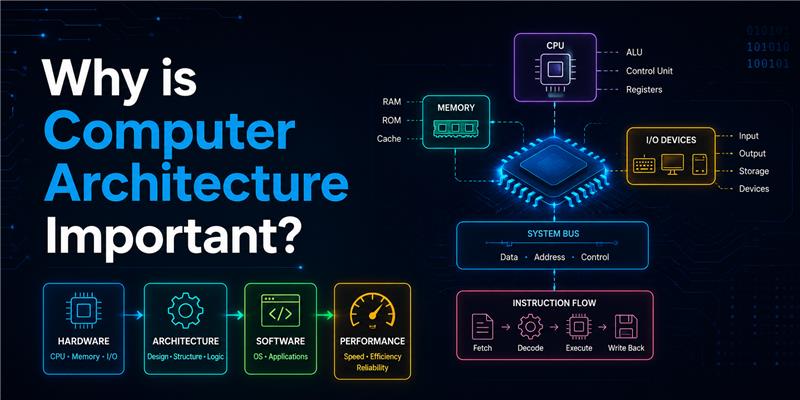
Whether you're opening a web browser, editing a document, or training an AI model, the computer follows the same basic process.
It receives data, processes it, stores information when required, and produces an output.
Understanding this process helps you:
- understand how programs actually run
- write more efficient code
- identify performance issues
- understand why hardware specifications matter
- build a stronger programming foundation
As a programmer, you're not just writing code; you are giving instructions to hardware. Knowing how those instructions are executed makes you a better developer.
Computer Organization vs. Computer Architecture
Many beginners use these terms interchangeably, but they describe different aspects of a computer system.
Computer architecture focuses on the overall design of the computer, including how instructions are executed and how hardware components interact.
Computer organization, on the other hand, explains how those architectural ideas are implemented using physical hardware.
A simple way to think about it is:
Computer architecture answers "What should the computer do?"
Computer organization answers, "How is it built to do that?"
Because both concepts are closely connected, you'll often see them discussed together as computer organization and architecture or computer architecture and organization.
The Main Components of Computer Architecture
Every computer relies on five essential components. Each one performs a different task, but none of them works effectively on their own.
Image source: ChatGPT
Central Processing Unit (CPU)
The Central Processing Unit (CPU) is often called the brain of the computer because it executes instructions and performs calculations.
Whenever you open a browser, play a video, or run a Python program, the CPU processes millions, even billions, of instructions every second.
Its primary responsibilities include:
- Executing program instructions
- Performing arithmetic and logical operations
- Managing communication between hardware components
- Coordinating the overall operation of the computer
Simply put, the CPU decides what happens next whenever a program runs.
Memory
Imagine trying to solve a puzzle while constantly putting every piece back into the box after each move.
That would be incredibly slow.
Computers face a similar problem. The processor needs a place to temporarily store information while programs are running. That's where memory comes in.
Memory allows the CPU to quickly access the data and instructions it needs without repeatedly reading them from long-term storage. However, not all memory serves the same purpose.
Types of Memory in Computer
Computers use different kinds of memory based on speed, capacity, and purpose. The two most familiar types are RAM and ROM.
RAM (Random Access Memory)
Many beginners search for the RAM full form before learning how computers work. RAM stands for Random Access Memory.
RAM temporarily stores the data and instructions that the CPU is actively using. Since it provides very fast access, applications can run smoothly without repeatedly accessing the storage drive.
When you close a program or turn off the computer, the data stored in RAM is cleared.
Examples:
- Running a web browser
- Editing a document
- Playing a game
- Running Python code
ROM (Read-Only Memory)
ROM stores permanent instructions that help a computer start when it is powered on. Unlike RAM, the information stored in ROM is not erased when the computer is switched off.
These instructions are essential because they initialize the hardware before the operating system begins loading.
Difference Between RAM and ROM
Although both are memory devices, they serve completely different purposes.
| RAM | ROM |
|---|---|
| Temporary memory | Permanent memory |
| Stores running programs | Stores startup instructions |
| Data is erased when the power is off | Data remains even after the power is off |
| Fast read and write operations | Mostly read-only during normal use |
Understanding the difference between RAM and ROM is one of the first steps toward understanding how computers manage information.
Memory Hierarchy in Computer Architecture
Not all memory is equally fast.
Some memory is extremely fast but small, while other memory can store much more information but is slower.
To balance speed, cost, and storage capacity, computers use a memory hierarchy.
The hierarchy typically looks like this:
- CPU Registers
- Cache Memory
- RAM
- SSD or Hard Disk
- External Storage
As you move down the hierarchy:
- Storage capacity increases.
- Access speed decreases.
- Cost per unit of storage becomes lower.
This arrangement allows frequently used data to remain close to the processor while larger amounts of information are stored on slower devices.
Storage Devices of Computer
Memory and storage are often confused, but they serve different purposes.
Memory is temporary. Storage is permanent.
Storage devices keep files even after the computer is turned off.
Common storage devices of a computer include:
- Solid-State Drives (SSD)
- Hard Disk Drives (HDD)
- USB Flash Drives
- CDs and DVDs
- External Hard Drives
These devices store operating systems, applications, documents, photos, videos, and other digital information for long-term use.
What Is a Memory Card?
A memory card is a portable storage device used to expand the storage capacity of electronic devices such as smartphones, cameras, drones, and gaming consoles.
Unlike RAM, a memory card stores information permanently until it is deleted or formatted.
It is commonly used for storing:
- Photos
- Videos
- Music
- Documents
- Application files
Although memory cards are considered storage devices, they are not part of a computer's main memory hierarchy.
Input and Output Devices
A computer doesn't work in isolation. It constantly receives information, processes it, and presents the results back to the user. This interaction is possible through input and output devices.
Input Devices
Input devices allow users to send data or instructions to a computer.
Some common examples include:
- Keyboard
- Mouse
- Scanner
- Microphone
- Webcam
- Touchscreen
For example, when you type your name on a keyboard, each key press is converted into digital signals that the computer can understand. These signals are then processed by the CPU.
Output Devices
Once the computer finishes processing data, it sends the results through output devices.
Some commonly used output devices are:
- Monitor
- Printer
- Speakers
- Projector
- Headphones
Whether you are watching a movie, listening to music, or printing a document, output devices present the final result in a form that people can understand.
How Do Computer Components Work Together?
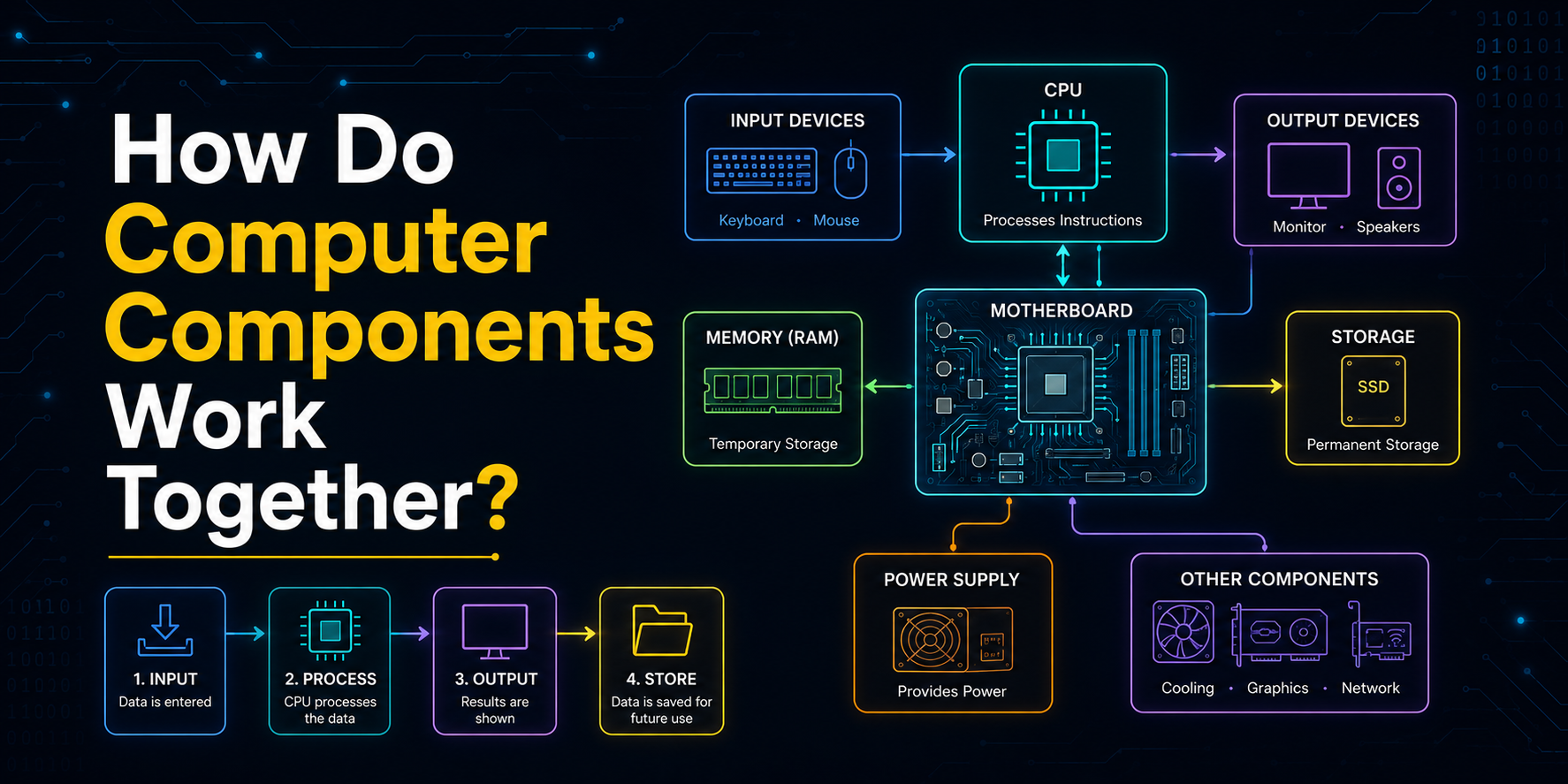
Understanding individual components is useful, but the real magic happens when they work together.
Imagine you type the following expression into a calculator application:
25 + 15It looks like a simple task, but several components work together behind the scenes.
Step 1: Input
The keyboard sends your keystrokes to the computer.
Step 2: Memory
The entered data is temporarily stored in RAM, so the processor can access it quickly.
Step 3: Processing
The CPU fetches the instructions needed to perform the addition and executes the calculation.
Step 4: Output
The calculated result is displayed on the monitor.
Although this entire process happens in less than a second, every program follows a similar sequence of receiving input, processing information, and producing output.
How the CPU Executes Instructions
Every application on your computer, from a text editor to a video game, runs because the processor repeatedly performs a simple sequence of operations.
This process is commonly known as the Fetch–Decode–Execute Cycle.
Step 1: Fetch
The CPU retrieves the next instruction from memory.
For example, the instruction might tell the computer to add two numbers, display text, or open a file.
Step 2: Decode
The processor interprets the instruction to determine the operation that needs to be performed.
At this stage, the CPU identifies whether it should perform a calculation, move data, compare values, or access memory.
Step 3: Execute
The processor carries out the instruction. The result may be stored in memory, displayed on the screen, or passed to another instruction.
This cycle repeats continuously while your computer is running, allowing applications to perform millions or even billions of operations every second.
Instruction Format in Computer Architecture
The CPU cannot execute instructions written in English or programming languages like Python. Every instruction must follow a specific structure known as an instruction format.
An instruction typically contains information such as:
- The operation to perform
- The location of the required data
- Where the result should be stored
For example, an instruction might tell the processor to:
- Add two values
- Move data from one memory location to another
- Compare two numbers
- Store the result
The exact instruction format varies depending on the processor architecture, but the purpose remains the same: providing the CPU with clear instructions that it can execute efficiently.
Virtual Memory in Computer Architecture
Sometimes, the programs running on a computer require more memory than the available RAM. Instead of stopping those programs, the operating system uses virtual memory.
Virtual memory temporarily uses a portion of the storage drive as an extension of RAM. This allows larger applications to continue running even when physical memory becomes limited.
Although virtual memory improves multitasking, it is much slower than RAM because storage devices cannot match the speed of main memory.
Why Understanding Computer Architecture Matters
Many beginners think computer architecture is only useful for hardware engineers.
In reality, every programmer benefits from understanding it.
Knowing how a computer processes instructions helps you:
- Write more efficient programs.
- Understand why some applications run faster than others.
- Learn memory management more easily.
- Debug performance-related issues.
- Build software that makes better use of system resources.
Whether you're learning Python, Java, web development, artificial intelligence, or cybersecurity, these concepts help you understand what happens behind the scenes when your code runs.
Conclusion
Computer architecture is the foundation that enables every computer to process information, execute instructions, and perform useful tasks. While users interact with applications through a simple interface, a carefully coordinated system of processors, memory, storage, and input/output devices works continuously behind the scenes.
Understanding these fundamentals gives you a deeper appreciation of how software runs and prepares you for advanced topics such as operating systems, programming, databases, and computer networks. The stronger your foundation in computer architecture, the easier it becomes to understand how computers execute the programs you write.
Key Takeaways
Before moving on to programming languages, remember these important ideas:
- A computer is made up of several components that work together rather than independently.
- The CPU executes instructions and coordinates most operations.
- RAM temporarily stores active data, while ROM stores startup instructions.
- Storage devices permanently save files and applications.
- Input devices send data to the computer, and output devices present the results.
- Every program follows the Fetch–Decode–Execute cycle.
- Virtual memory helps computers handle workloads that exceed available RAM.
Once you understand these fundamentals, learning programming becomes much easier because you'll know what actually happens after your code is executed.
Frequently Asked Questions
1. What is computer architecture in simple words?▾
Computer architecture is the design of a computer's hardware components and the way they work together to execute instructions. It explains how the CPU, memory, storage, and input/output devices communicate to process data.
2. What is the difference between computer architecture and computer organization?▾
Computer architecture focuses on the overall design and functionality of a computer system, while computer organization explains how those hardware components are implemented and connected to perform operations.
3. Why is RAM important in a computer?▾
RAM temporarily stores the programs and data that the CPU is currently using. Since RAM is much faster than permanent storage, it helps applications run quickly and improves overall system performance.
4. What is the Fetch–Decode–Execute cycle?▾
The Fetch–Decode–Execute cycle is the process the CPU follows to run a program. It retrieves an instruction from memory, interprets its meaning, executes it, and then repeats the same process for the next instruction.
5. Why should programmers learn computer architecture?▾
Understanding computer architecture helps programmers write efficient code, manage memory better, improve application performance, and understand how software interacts with hardware, making it an essential foundation for software development.