Key Highlights
- Software is a collection of instructions that inform a computer what to do, allowing hardware to function.
- With software, the web becomes alive, smartphones light up, games play, and the entire computer is made to boot up!
- System software, application software, and programming software are the three general categories of software.
- Programming languages like Python, Java, and C++ help developers create software that computers can execute.
- Learning software fundamentals makes programming concepts much easier to understand.
Introduction
We use computers and cellphones on a daily basis to order food, exchange messages, view movies, conduct web searches, and make online payments. Although these activities seem simple, a computer is unable to complete any of them by itself.
Unlike humans, computers cannot think, make decisions, or understand intentions. They simply follow instructions.
This is where software becomes essential. It provides the instructions that tell a computer what to do, how to process information, and how to respond to different situations. Whether you're opening a web browser or running an artificial intelligence application, every digital experience begins with software.
Before learning programming languages like Python or understanding how applications are built, it's important to know what software is and why it forms the foundation of modern computing.
What Is Software?
Behind every click, every launch of an application, and each internet search you do, your computer is working to finish a bunch of jobs in a matter of a few seconds. A computer may not look simple on the surface, yet these actions are only made when your personal computer follows an exact sequence of commands.
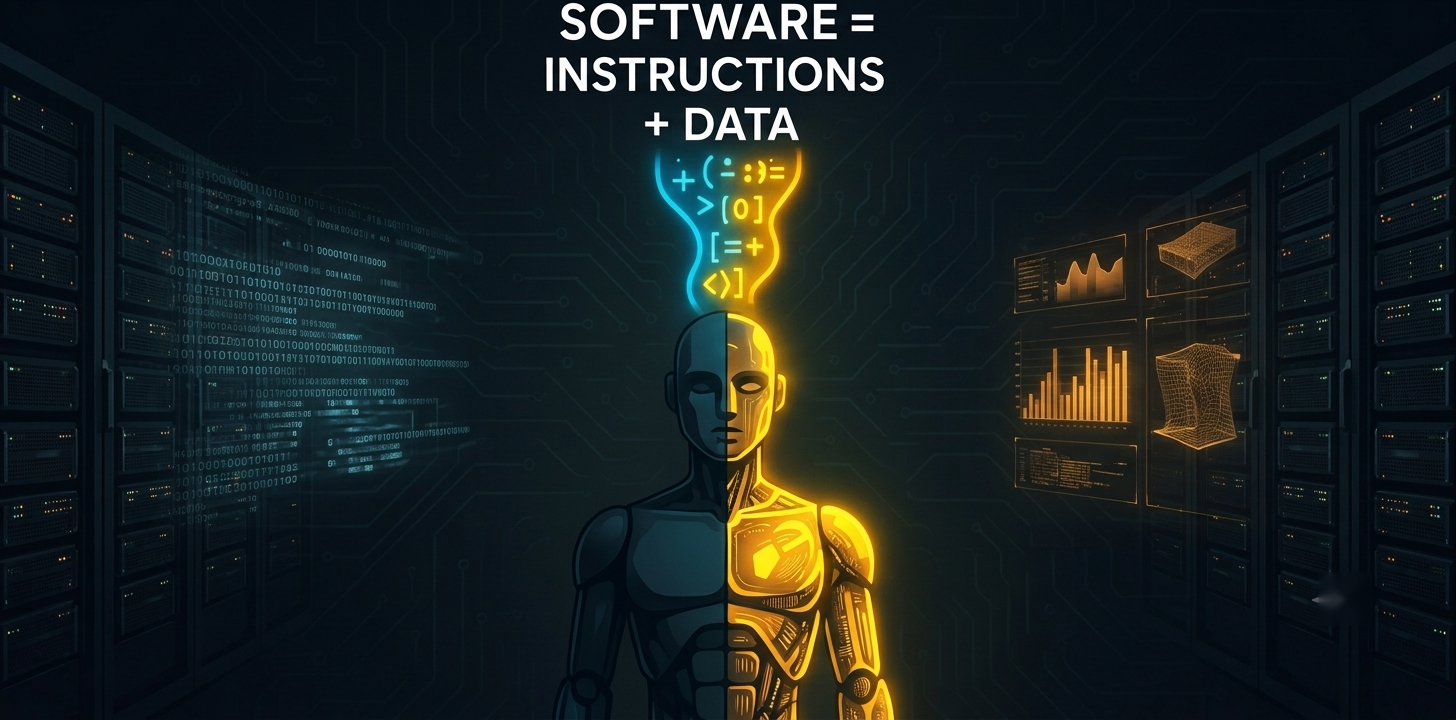
Those instructions are known as software.
Software consists of programs, data, and digital instructions that guide a computer in carrying out specific operations. It serves as the brain of digital gadgets, giving them the ability to analyse data, carry out tasks, and communicate with people.
In contrast to hardware, software does not have a defined form. Instead, it exists as digital instructions stored in a computer's memory or storage. From basic calculations to complex operations like online banking, video editing, and artificial intelligence, these instructions inform the hardware what to do.
Without software, a computer would have powerful hardware but no way to perform meaningful tasks.
Hardware vs Software
Many beginners confuse hardware and software because both work together. The easiest way to understand the difference is by thinking about a car.
A car has an engine, wheels, a steering wheel, brakes, and seats. These physical parts are similar to computer hardware. However, modern cars also contain software that controls navigation, fuel injection, safety systems, parking assistance, and entertainment.
Without software, many of these intelligent features would stop working even though the hardware still exists.
The same idea applies to computers.
| Hardware | Software |
| Physical components | Digital instructions |
| Can be touched | Cannot be touched |
| Manufactured | Developed by programmers |
| CPU, keyboard, monitor, SSD | Windows, Chrome, Photoshop, Python |
Hardware performs the work. Software tells the hardware what work needs to be done. Neither is very useful without the other.
How Does Software Work?
A simple input-process-output loop is how software operates. When a user clicks a button, enters data, or conducts an information search, it starts. After receiving this input, the program follows pre-established instructions to process it and produce the desired result.
For example, if you do a search for "Python programming" on Google, your browser will transmit the request to Google's servers. The software will process your request, pick out the most matching websites, and show the search results to you in the shortest time possible. Although such a process appears to be instantaneous, millions of instructions behind the scenes are involved in making it happen.
Components of Software
When people hear the word software, they often think it's just code. In reality, software is made up of several components that work together to create a complete and usable application. Writing code is only one part of the process. Data, documentation, and supporting files are equally important for building, maintaining, and improving software.
Sofware consists of four major elements, which are Programs, Data, Documentation, and Procedures.
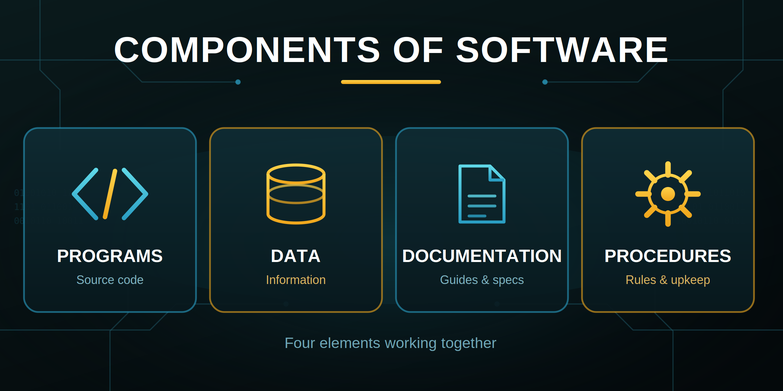
1. Programs (Source Code)
Programs are the foundation of any piece of software. They have all the instructions that tell the computer what to do and how to react to various events. Codewriters use programming languages, like Python, Java, C++ or JavaScript, to make up these instructions.
For example, when you log in to an online shopping website, the program verifies your username and password, retrieves your account details, and displays your order history. Every feature you use in an application is powered by programs running behind the scenes.
Without programs, software cannot perform any task.
2. Data
Data is necessary for software to provide useful outcomes. The information that an application saves, processes, or retrieves while carrying out its operations is referred to as data.
Depending on the application, data may include customer profiles, product details, medical records, images, videos, financial transactions, or messages.
For example, a music streaming app stores playlists, song details, listening history, and user preferences as data. The software processes this information to recommend songs and personalize the user experience.
Without data, software would have nothing to work with.
3. Documentation
Documentation is the process of detailing software development, installation, maintenance, and usage. It acts as a handbook to the developers and the end users alike.
From the side of the developers, documentation comprises of technical specifications, API references, architecture diagrams, and coding standards. On the side of the user though, it may contain installation guides, technical user manuals, troubleshooting directions, and often FAQs.
Well-written documentation helps teams understand software more easily, reduces maintenance effort, and makes future updates more efficient.
4. Procedures
Procedures are the instructions and guidelines that describe how software should be operated, maintained, updated, and secured. They define the correct steps for using software effectively and consistently.
If we take a company for example, there may be procedures about installing software updates, backing up data, recovering systems in case of breakdowns or just managing user accounts. They are the ones that keep software smooth-running and secure.
Without proper procedures, even well-designed software can become difficult to manage over time.
How These Components Work Together
A successful software application depends on all four components working together.
- Programs specify the functions of the software.
- Data provides the information it processes.
- Documentation explains how it should be developed and used.
- Procedures ensure it is operated and maintained correctly.
Whether it's a simple calculator or a large banking system, every software application combines these components to deliver reliable and efficient functionality.
Types of Software
Not all software performs the same job.
Depending on its purpose, software is generally divided into three major categories.
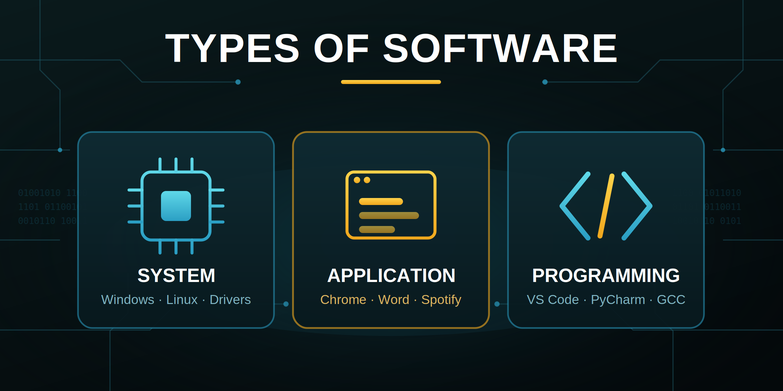
1. System Software
System software manages the computer itself.
It acts as the bridge between hardware and applications.
Examples include:
- Windows
- Linux
- macOS
- Android
- Device drivers
Without system software, programs cannot interface with the computer's hardware.
2. Application Software
Application software helps users perform specific tasks.
These are the programs people use every day.
Examples include:
- Microsoft Word
- Google Chrome
- Spotify
- Adobe Photoshop
- Zoom
Every application is designed to solve a particular problem for users.
3. Programming Software
Developers can produce additional software with the use of programming software. These tools make it easier to write, test, debug, and maintain code.
Examples include:
- Visual Studio Code
- PyCharm
- Eclipse
- IntelliJ IDEA
- GCC Compiler
Without programming software, building modern applications would be much more difficult.
How Do Computers Understand Software?
Computers cannot directly understand programming languages like Python, Java, or C++. They only understand machine code, which consists of binary digits (0s and 1s). Since writing software in binary is difficult, developers use programming languages to write instructions in a readable format.
What are Programming Languages?
Programming languages are a means for human coders to produce software through readable instructions, as an alternative to the very complicated binary code. Languages like Python, Java, C++, and JavaScript have made development and implementation of software faster, easier and with a much lower chance of an error.
But computers themselves have no idea about running this kind of code without some kind of processing first.
How Is Code Converted into Machine Code?
Before a program can run, it must be translated into machine code using special software.
- Compiler: Entire program will be converted into machine code by the compiler before even starting to run the program.
- Interpreter: Translates and executes the program one statement at a time.
In simple terms, the process looks like this:
Programming Language → Compiler or Interpreter → Machine Code → Computer Executes the Program
This translation enables software developers who want to work in human-readable programming languages to communicate with computers that understand machine code through the efficient interpretation of the instructions.
How Is Software Developed?
The creation of modern software takes time. Every piece of software is developed using a methodical procedure.
Step 1: Understand the Problem
Developers first identify what users need.
For example, a food delivery app solves the problem of ordering meals online.
Step 2: Plan the Solution
Teams design the application's features, interface, database, and overall architecture.
Step 3: Write the Code
Developers convert ideas into working software using programming languages.
Step 4: Test the Software
Testers identify bugs, performance issues, and security vulnerabilities before users access the application.
Step 5: Deploy the Software
The application is released for customers to use.
Step 6: Maintain and Improve
Software continues to receive updates, bug fixes, security patches, and new features throughout its life.
That's why apps on your phone frequently ask you to update them.
Real-Life Examples of Software
Software powers almost every digital experience today.
Some common examples include:
- Mobile banking applications
- Google Maps navigation
- Netflix recommendations
- Online shopping websites
- Hospital management systems
- Flight booking platforms
- Video conferencing applications
- Digital payment systems
- Smart TVs
- Smartwatches
Behind each of these systems are millions of lines of software working together.
Conclusion
Computers can carry out useful activities thanks to software, which transforms hardware into systems capable of processing data, resolving issues, and facilitating common digital experiences. You can study programming languages, operating systems, databases, and software development with a solid basis if you understand software foundations. Every software program starts with a collection of instructions designed to address an issue, whether you're developing a basic application or an AI-powered solution. The first step to being a proficient developer is to grasp these fundamentals.
FAQ's
1. What is the difference between software and an application?
An application is a kind of software created to assist users in carrying out particular activities, such as editing documents or accessing the internet. Applications, operating systems, drivers, and programming tools are all included under the more general word "software." To put it simply, all software is an application, but not all software is an application.
2. What is the first software that runs when a computer starts?
The first software that runs is the operating system, but before it loads, firmware such as the BIOS or UEFI initializes the hardware and starts the boot process. Once the operating system loads, it manages the computer's resources and lets users run applications.
3. Can software be updated after it is created?
Definitely. Most software applications receive updates regularly to add new features, bolster security, enhance performance, and resolve issues. These patches ensure that the software remains dependable and stays compatible with the evolving hardware and user needs.
4. What skills should I learn after understanding software fundamentals?
Once you acquire basic concepts of software, you may dive into learning either Python or any other language (like Java). From there, you shall proceed to studying data structures, algorithms, databases, operating systems, version control (e.g., Git), and software development life cycle concepts.
5. What is the software development life cycle (SDLC)?
SDLC or Software Development Life Cycle is an organised way for software development that usually covers planning, design, implementation/coding, testing, deployment, and last but not least, maintenance stages. It is this very process that makes software teams deliver software that is not only reliable but also of top quality.